Modular Video Ads
Smart Combo Mode
Build only clip combinations that form one complete script.
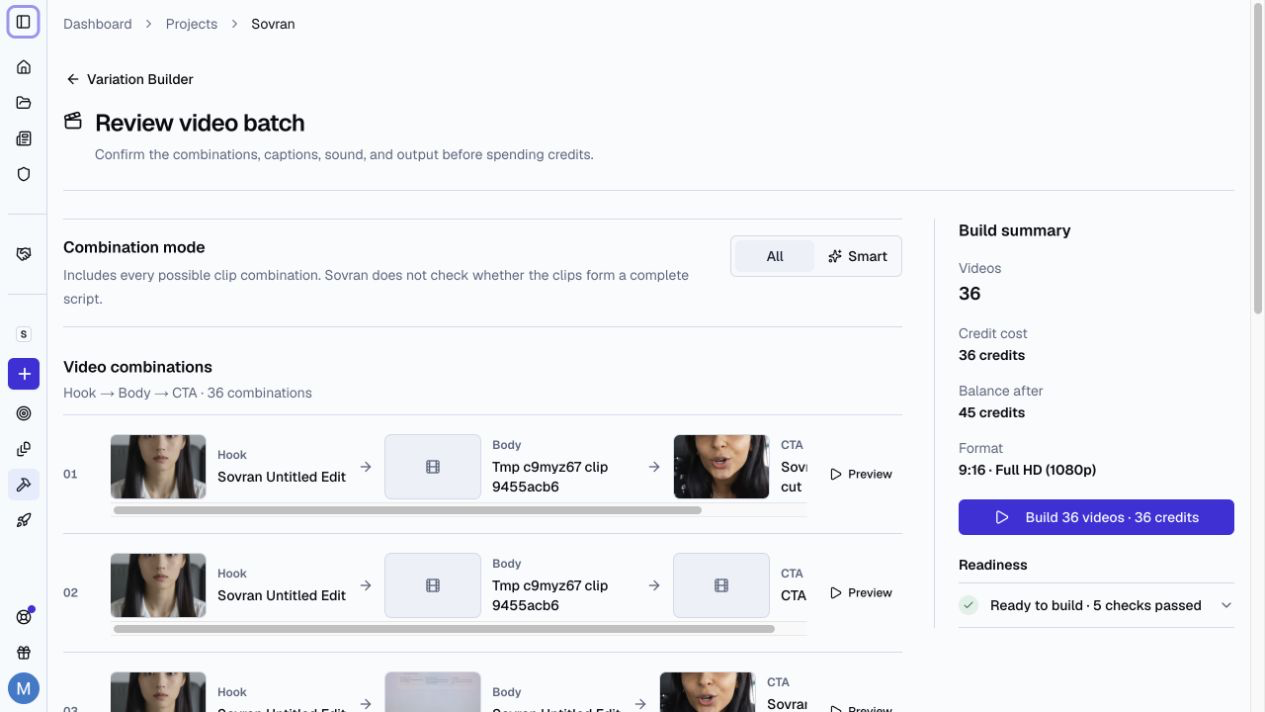
All Mode and Smart Mode
In Arrange clips, Modular Builder has two combination modes:
- All includes every possible clip combination. It does not check the script.
- Smart includes only combinations that form one complete script.
Smart Combo Mode excludes combinations with repeated lines, broken sentences, or clips that do not continue the script.
Use Smart Combo Mode
- Open Modular Builder in a project and choose Arrange clips.
- Build your sequence and add clips to each block.
- Select Review settings.
- Select Smart under Combination mode.
- Wait for Sovran to check the combinations.
- Review the included and excluded combinations.
- Restore any excluded combination that you want to keep.
- Build the video batch.
Create drafts without a sequence
Smart Combo Mode is not the same as Auto-arrange. Choose Auto-arrange in Modular Builder to build drafts directly from project source footage. Filter the sources, choose how many drafts to create, and review the results before rendering.
Requirements
Smart Combo Mode uses speech transcripts to check script flow. Sovran prepares missing transcripts before the review when possible.
Use All mode when the clips do not contain speech or when you want every possible combination.
Related articles
Was this article helpful?