Rendering Ad Variations
Build and track video batches from Modular Builder.
How Rendering Works
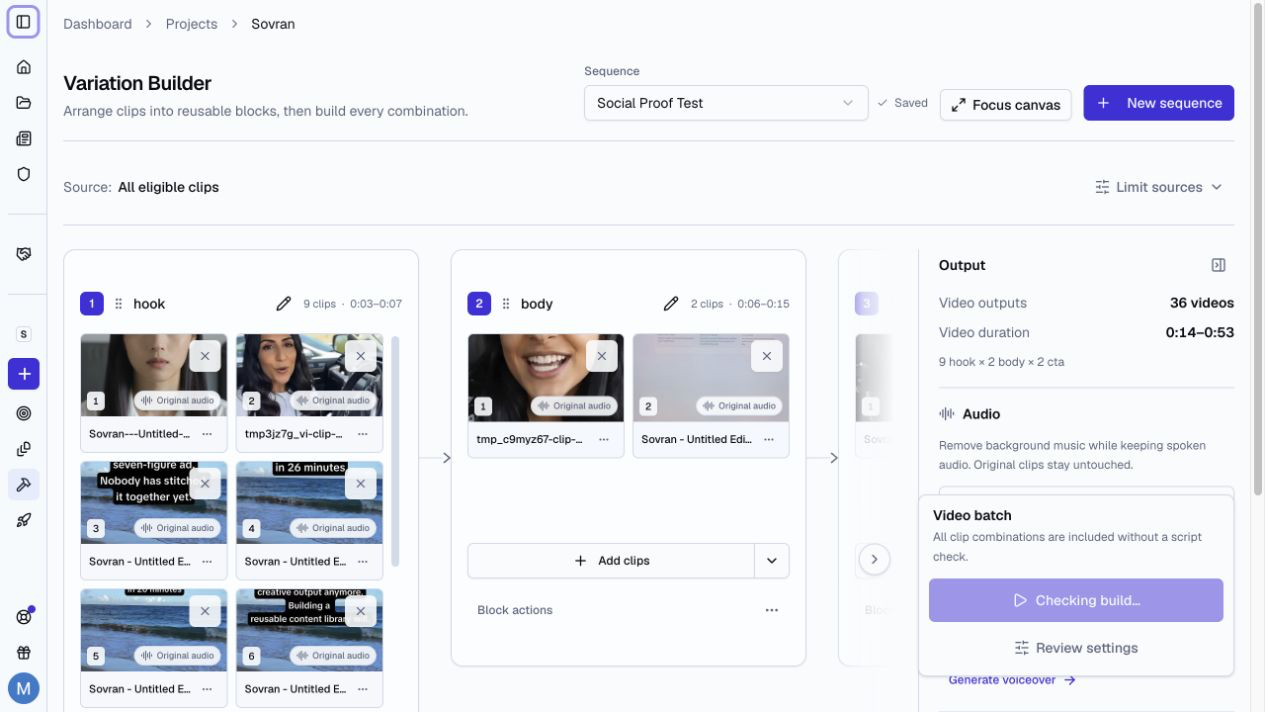
When you build a video batch, Sovran:
- Calculates the possible clip combinations.
- Applies All or Smart combination mode.
- Applies your saved combination shortlist.
- Shows the video combinations for review.
- Queues one render job for each included video.
- Saves completed videos under Finished Videos.
Review and Select Combinations
All combinations are selected when you first open the review page.
Use a row checkbox to remove or include one combination. Use Select all or Clear all to change the full list.
Select Preview to make a free preview. You can preview a combination when it is not included. You can also include or remove it in the preview dialog.
Your shortlist saves automatically for the project workspace. All and Smart modes use separate shortlists. A change to the sequence clips starts a new shortlist.
The video count and credit cost update at once. A selected combination includes all planned music and voiceover outputs. You must select at least one combination before you build the full batch.
Edit one variation
Select Open in video editor for a combination to trim clips and correct caption text before rendering. Source order stays fixed. Batch settings control the final caption style.
Apply pending changes, then select Save and return to batch. The changes apply to this variation.
Resolve Missing Captions
When selected clips have no captions, review the list before you build.
- Select Prepare captions when saved speech timing is available.
- Select Keep all videos to use captions where available. The button shows the current video count.
- Select Exclude combinations to remove affected combinations when other videos remain. The clips stay in Assets.
If every selected video uses these clips, you cannot exclude all of them and build an empty batch.
Check Render Credits
Review the credit cost before you submit the batch. If more credits are needed, a workspace owner can buy extra render credits in Account. Return to Modular Builder after payment and check the balance before building.
Tracking Progress
The project shows the current status of each render:
- Queued
- Rendering
- Complete
- Failed
You can close the browser tab. Rendering continues in the background.
File Naming
Open Review settings and check Export filename. The preview shows the first selected combination with its first music and voiceover choices. It uses the selected source filenames.
Select Edit naming rule to change the project rule. The preview updates as you type. Save the rule to use it for the build. Cancel restores the saved rule.
If the rule uses custom fields, enter a value for each field. These values apply to the current batch. Missing values block the build.
Each name ends with the build ID and the variation, such as h1-b2-m1-vo1: hook 1, body 2, music 1, voiceover 1. The numbers are each clip's place in its block in Modular Builder. Source file extensions such as .MOV are left out. The aspect ratio is added to the end only when the rule does not already include it. The Build version field uses the build start time in UTC. A retry keeps the original name.
Names keep valid spaces, case, and international characters. Long names are shortened to keep the build ID, the variation, and one .mp4 extension.
After Rendering
Once all variations are rendered, you can:
- Preview and download a video.
- Select Duplicate & edit to create a separate editor draft when the export supports it.
- Publish to TikTok.
Editable copies need available source details, media, and fonts. Some older exports or settings cannot be copied. The video details panel shows the cause. A copy does not start a render. See Copy a finished video.