Organizing Your Assets
Search, filter, tag, and organize project media for fast reuse.
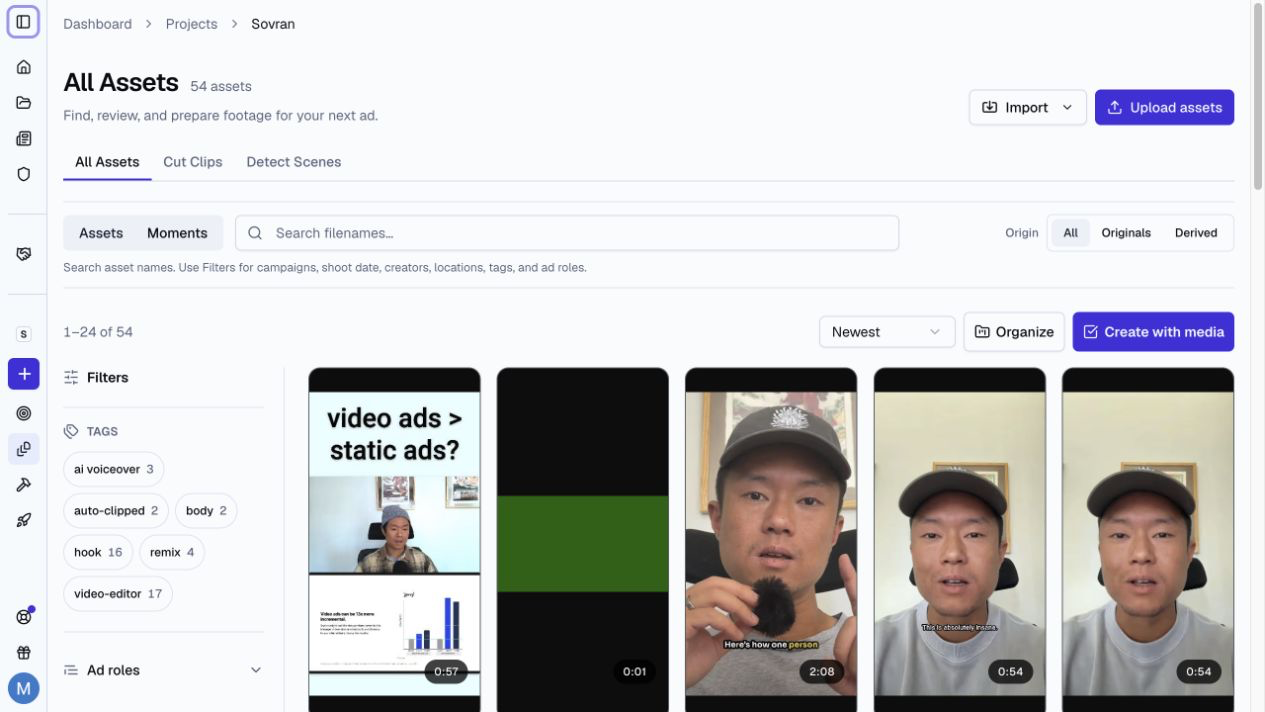
The Assets Workspace
The Assets workspace is the searchable catalog for your project media. It contains uploaded footage, generated media, clips, remixes, editor exports, voiceovers, and other derived assets.
Search by file name, or switch to Moments to search the content inside analyzed footage.
Analysis Status
Video cards show AI analysis status separately from file preparation. Not analyzed means no analysis result is available. It does not mean the file is still being prepared. Check the separate file status before you use the video.
Understood means saved analysis or ad-role results are available. Indexing video and Reading speech show analysis work in progress. Video ready · Analysis unavailable means the analysis could not complete. Open the asset to check its saved speech and visual results.
Filters and Organization
Use the available filters to narrow the asset list by:
- Original or derived source
- Campaign
- Shoot date
- Creator
- Location
- Tag
- Ad role
Use Organize to apply tags and other project details to selected assets.
Organize Uploads and Cloud Imports
For video and audio uploads, open Organize this upload to set campaigns, shoot date, creators, and location. These details apply to the files in the upload. An asset can belong to more than one campaign.
For Google Drive and Dropbox imports, review the selected files before you start. Remove files you do not need. Open Organize this import to apply the same details to the import.
For local uploads, use Minimize to continue on other dashboard pages. Keep the browser open until the upload is complete. Use View details on the background card to return to the upload. Use Cancel upload to stop it. See transfer progress.
Correct a Source Transcript
Open an asset's Transcript section and select Edit transcript. Correct the words, then select Save changes. Passage timing stays the same.
After you save, Sovran can suggest dictionary rules from your corrections. Select Add to dictionary to reuse a correction. You can edit a suggested replacement before you add it.
If another team member changes the transcript while you edit, reload the latest transcript before you save again.
Module Types
Ad roles describe how a clip can work in a video ad. Common roles include:
- Hook — The opening 3-5 seconds that grabs attention.
- Body — The main content that communicates your message.
- CTA — The closing call-to-action that drives conversions.
- Problem — Content that identifies the viewer's pain point.
- Solution — Content that shows how your product solves the problem.
- Social Proof — Testimonials, reviews, or user-generated content.
- Results — Data, before/after, or outcome demonstrations.
Tagging Clips
You can tag clips manually or let Sovran suggest ad roles:
- Manual tagging: Select one or more assets and use Organize.
- AI auto-tagging: Sovran analyzes speech and visuals to suggest useful roles. See AI Clip Search & Auto-Tagging.
Original vs. Derived Assets
The workspace contains two kinds of assets:
- Original assets are videos that you upload or generate with AI. You can analyze, transcribe, clip, and trim them.
- Derived assets are clips, remixes, Creative Copilot drafts, editor exports, and other outputs made from an original asset.
Derived assets show their source type so you can find the workflow that created them.
Using the Library in Sequences
When you build a sequence, use ad roles and other filters to find clips for each block. More useful clips in each block create more possible variations.