Creative Copilot
Turn your footage into complete, editable video ad variations.
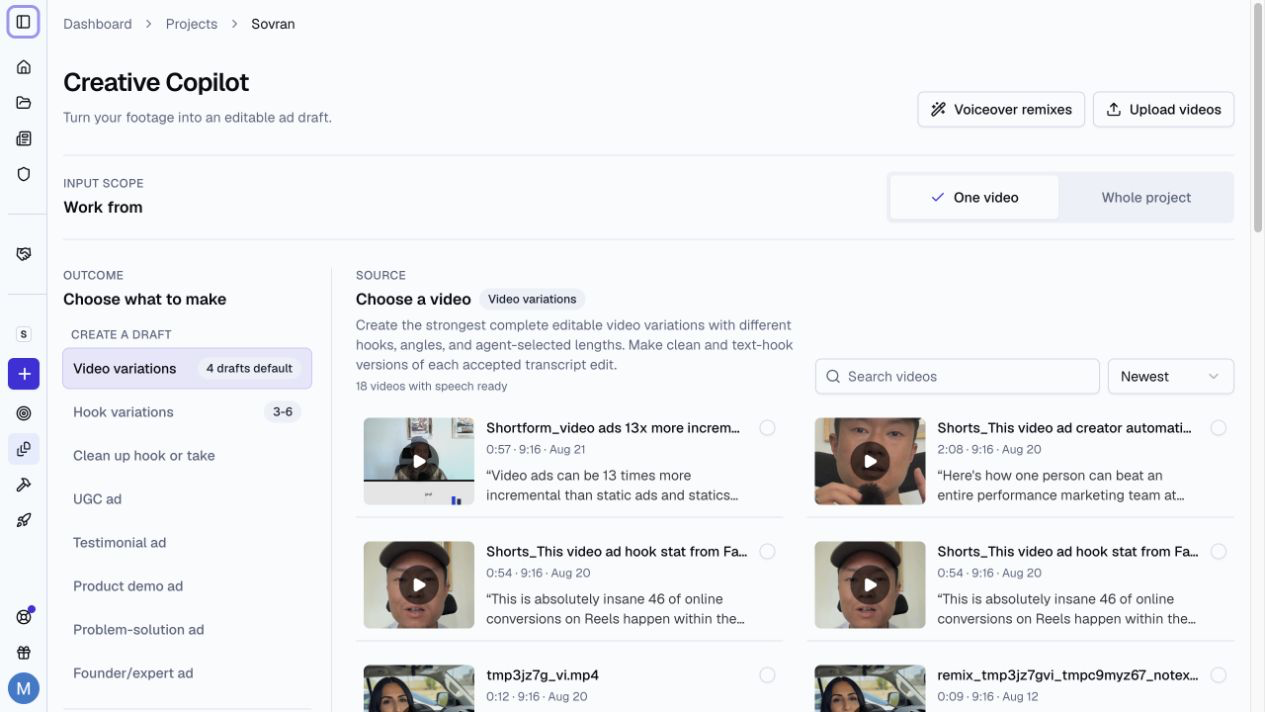
What Creative Copilot Does
Creative Copilot turns your footage into editable video ad drafts. Most templates cut from what is said. Audience variations also works with footage without speech. It can create complete video variations, hook variations, clean takes, and common ad structures such as UGC, testimonials, product demos, and problem-solution ads.
Use Video variations to automatically generate new variations from an edited video ad. Each draft can use a different hook, angle, or length. Creative Copilot can also make a clean version and a text-hook version of each accepted transcript edit.
Create Video Ad Variations
- Open a project.
- Select Creative Copilot under Build ads in the sidebar or in Create.
- Under What to make, select Video variations.
- Choose a video with clear speech. Select Set up 4 drafts. The count can differ for a saved template.
- Choose 4, 6, or 8 videos. Set one or more Minimum length values.
- Choose a Text style for the opening text hook. Use a starter style or a saved workspace style. Select New style… to save a style for the workspace and editor.
- Optional: turn on Animated emphasis. It supplies the text style while it is on. Choose a starter style, a saved style, or Customize.
- Select Create up to 4 drafts, Create up to 6 drafts, or Create up to 8 drafts.
Sovran analyzes the transcript and footage before it creates the drafts. This can take a few minutes for a long source video.
Make one draft per audience
Use Audience variations when one video could sell to more than one type of buyer.
- Under What to make, select Audience variations. Choose one video from 5 seconds to 10 minutes long.
- Select Set up audiences.
- Choose a campaign goal: purchases, subscriptions, email sign-ups, or video views. Add notes if you want. Notes can hold a full plan, up to 3,000 characters.
- Check Each draft: about 30 seconds, portrait 9:16, with captions. Turn on Keep the whole video for a finished edit: every draft plays the full video with its own sound, music included, and only the text changes. Select Change to set the length, shape, captions, Text style, or Animated emphasis. Text style sets the look of the hook, the on-screen lines, and the call to action: choose a starter style such as Golden Serif or Handwritten Note, one of your saved styles, or New style… to make one. Each style keeps its own motion, and new styles are saved for your workspace and the editor's Text panel. With animated emphasis on, the callout animates in that style instead, and the other text uses the same style.
- Select Create audience drafts.
Sovran watches and listens to the video and checks each visual moment a second time. It finds 1 to 3 audiences and makes one editable draft for each. You do not approve the audiences first. Each draft opens with that audience's callout, shows up to 3 short lines over the moments they describe, and ends with a call to action for your goal. If your project's Meta button type fits the goal, the call to action matches it. Audiences are suggestions to test, not facts about who will buy. Delete the drafts you do not want in Recent drafts.
If your notes name the audiences or angles, Sovran makes one draft for each, in your order, up to 3. Hooks, on-screen lines, and calls to action that you write in the notes are used word for word. Captions use detected speech. Music-only videos do not create captions.
A run takes a few minutes. Audience analyses and draft sets share a limit of 10 requests per person in 24 hours. A new analysis and its automatic draft set each use one request. Each analysis can make up to three draft sets. Drafts use no credits until you render.
The dialog shows each step and the moments Sovran finds. You can close it, or follow the run in Recent drafts. Sovran tells you when it finds the audiences and when the drafts are ready. If a run cannot finish, Recent drafts shows the cause and offers Try again or Choose another video.
To see why each draft exists, select See audiences on the finished job. Open a finished draft from the dialog to edit it. Each audience also shows its source moments and opening moment. Select a moment to play it. If an audience does not get a draft, the dialog lists it under Didn’t draft with the cause. Select Try again, or Try a 15-second draft for a shorter cut.
Older runs, and runs whose drafts did not start, show Draft audiences in Recent drafts. Choose the audiences to draft, select Edit copy to change a callout, message, or call to action, and select Create N drafts.
Audience suggestions use your Brand Brief, website import, personas, and angles. A card marked Your persona matches a saved persona. Cards without that label are new suggestions.
Footage without speech works too. Recut drafts use muted clips and have no captions. Add music in the editor if you want sound. Keep the whole video retains the source sound, including music. In onboarding, a video without usable speech offers Make audience drafts.
To use a different goal, select Change goal. If none of the audiences fit, select Find different audiences. Both find new audiences and draft each one. The drafts you already have stay.
Find spoken hooks
Select Hook variations and choose one video with speech. Select Find spoken hooks. Sovran scans the transcript and creates an editable draft for each usable hook it detects. You do not need to choose a hook count. Repeated takes of the same line are grouped. Different spoken lines can use the same angle.
Each hook lasts 3–15 seconds. A scan can create up to 24 drafts. The results show when that limit is reached. More hooks may remain in the source. If no usable hooks are found, choose another video. If some drafts cannot be saved, completed drafts remain available. Existing jobs keep their previous count settings. New runs use automatic detection.
Choose minimum lengths
Available minimums are 5, 10, 15, 20, 25, 30, 35, 40, 45, and 60 seconds. The source length limits the choices. Choose up to two minimums for 4 videos, three for 6 videos, or four for 8 videos.
Each story produces two videos: a clean version and a text-hook version. Check the allocation below Minimum length. Videos can be longer to keep the story complete. Different minimums do not guarantee different final lengths. Check the batch notes if some lengths are similar.
Review the Drafts
Recent drafts groups jobs under Running, Needs attention, and Finished. Open a completed draft in the video editor. You can change the clips, captions, music, and layout before export. Use the editor's variation selector to review other drafts from the same footage.
Delete unwanted drafts
Use a draft's actions menu to select Delete draft. Select several drafts and use Delete selected to remove them together. Use Delete batch in a batch's actions menu to remove the batch.
Check the draft and review counts before you confirm. Deletion is permanent and removes the selected drafts and their review history. Source files, saved voiceovers, and finished videos stay. Wait for draft creation or video rendering to finish before you delete.
Creative Copilot works best with one speaker, clear audio, and a complete sales message.