Understanding Sequences
Learn what sequences are and how they power modular creative testing.
What Is a Sequence?
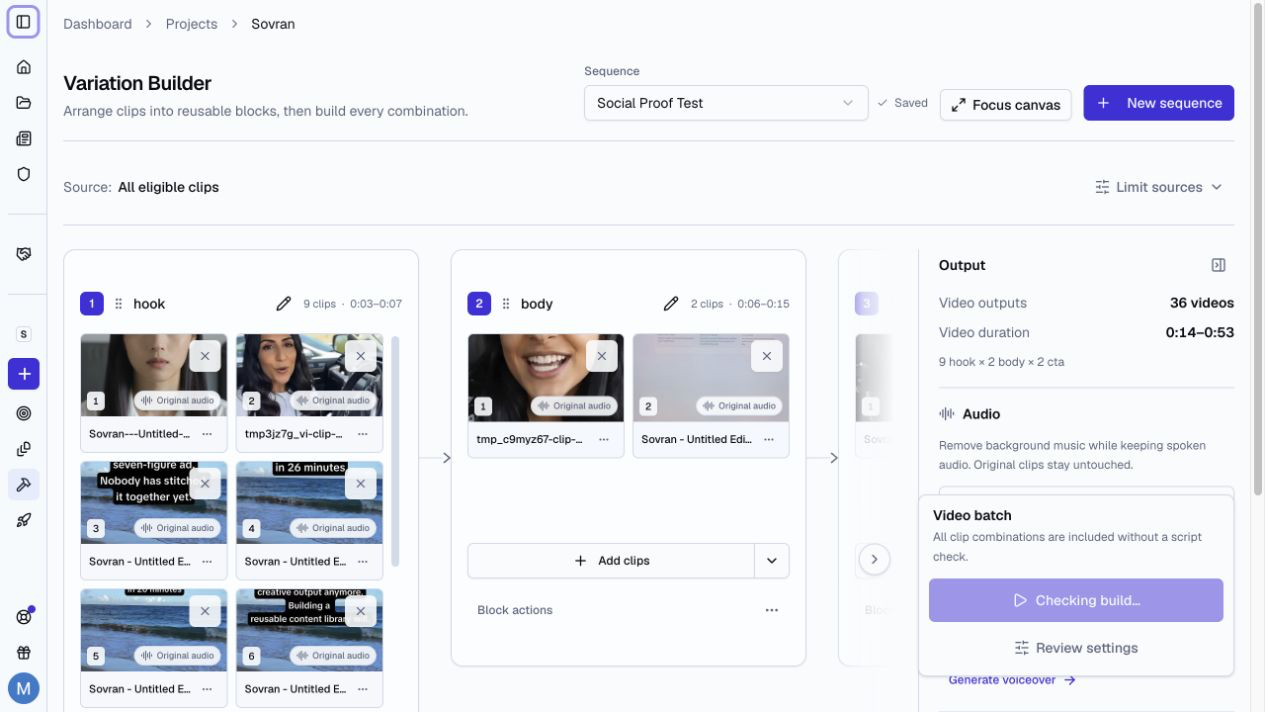
Open Modular Builder and choose Arrange clips to work with sequences. Choose Auto-arrange to create drafts from source footage without placing each clip. Modular Builder remembers the last mode used in the project.
A sequence is a reusable template for video ads. It defines the order of the blocks, such as Hook, Body, and CTA, and the clips assigned to each block.
How Sequences Work
The math is simple. If you have 10 hooks, 10 bodies, and 3 CTAs, the sequence has 10 × 10 × 3 = 300 possible video ads.
Use All mode to build every combination. Use Smart Combo Mode to keep only combinations that form one complete script.
Block Types
Blocks are fully customizable. You're not limited to Hook-Body-CTA. You can create any structure:
- Hook, Problem, Solution, CTA
- Hook, Testimonial, Offer, CTA
- Intro, Demo, Results, Social Proof, CTA
- Any custom structure that fits your creative strategy
Add as many blocks as you need and name them anything you want.
Why Modular?
Modular creative testing helps you find the parts that improve performance. You can compare a useful hook, body, or CTA across many complete ads.