Voiceover Remixes
Build editable video ads that match the length of your voiceover.
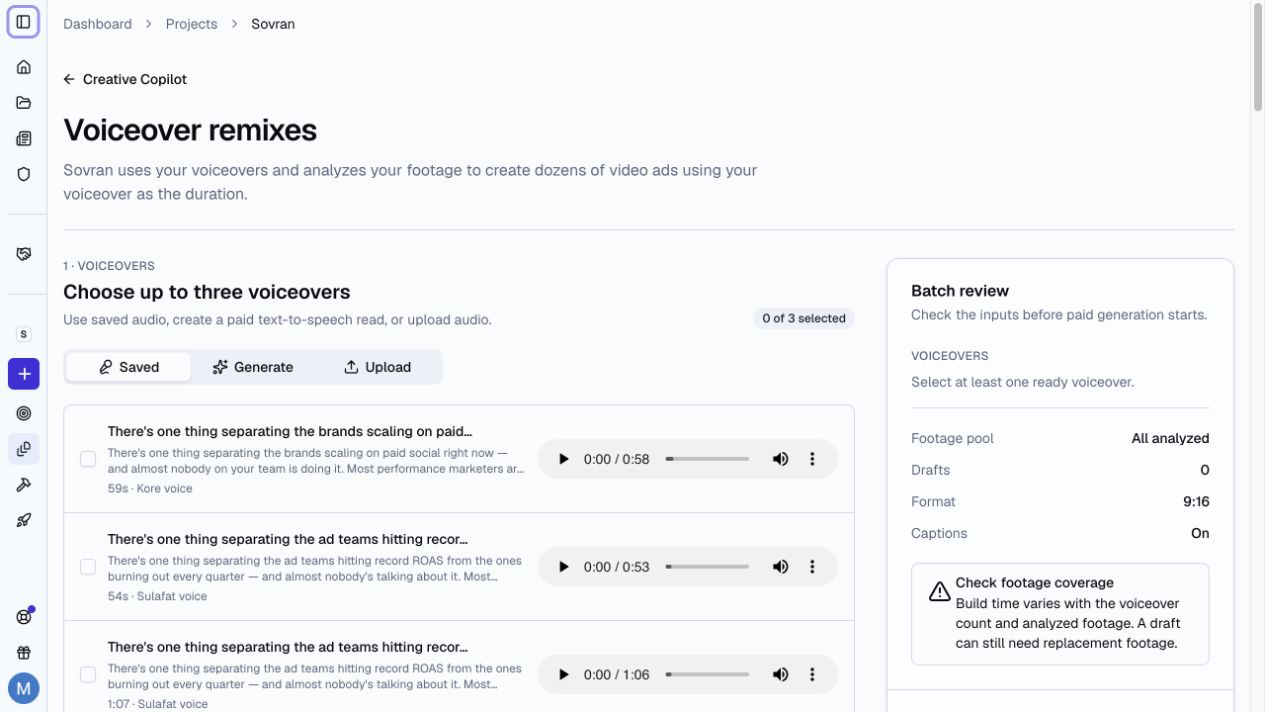
What Voiceover Remixes Does
Voiceover Remixes automatically remixes your B-roll, product demos, and reaction clips into video ads that match the length of your voiceover.
Sovran studies the voiceover and your analyzed footage. It then builds editable 9:16 drafts with clips that support the spoken message.
Create a Voiceover Remix
- Open a project.
- Select Remixes under Build ads in the sidebar. You can also use Create, then Remixes. Keep With voiceover selected at the top of the page. To build ads from a brief instead, see B-roll Remixes.
- Choose up to three saved voiceovers, or select Generate or Upload to open Add a voiceover. A new voiceover is saved and selected for the batch.
- Select Adjust speed to preview and save a different voiceover speed if needed.
- Use all eligible footage, or choose Selected footage and select footage posters. Hover a poster to scrub through it.
- Choose how many drafts to make for each voiceover.
- Add captions and select a caption style if needed.
- Turn on Animated emphasis if you want animated text for key spoken phrases.
- Add an optional Batch name, then select Create drafts in the summary bar at the bottom of the page. Creating drafts uses no credits. Rendering finished videos does.
Draft a Script with a Template
In Generate, select Draft with AI. Choose an audience, a message angle, and a Script Template. Keep Sovran default or select saved instructions from your workspace. Add optional Creative direction for this request.
Use Create template or Manage templates to save, edit, copy, and delete instructions. Save and use selects the template without starting generation. Script templates are shared with Messaging and AI Avatar across projects in the workspace. Length, language, audience, and angle stay in the form.
Select Use my script to supply the final words yourself. See Messaging for template limits and conflict handling.
Choose a voice and delivery
The selected voice and language stay visible. Select the voice name to open the list of Google and ready custom voices. Search by name. Open Filters to narrow Google voices by gender, pitch, voice role, or use case. Preview a voice, then select it to close the list. Your search and filters stay when you open the list again.
Google preset voices use Gemini 3.8 Flash-Lite TTS. Voice role describes the voice, such as Tutor or Commercial Voiceover. Style controls how it reads your script.
Use a 5 to 120 second read for remixes. Shorter audio is saved to Assets but cannot be used in a remix.
Open Style to choose Natural, Whisper, Friendly, Narration, Promote, or Calm. You can also describe the tone, mood, or pace. The style applies to the whole read.
For a written script, use Add expression to insert a sound or pause at the cursor. For example: <gasp> That is a great idea! <short pause> Try it today. Expression tags stay out of captions.
Select a ready custom voice from the same list. Custom voice clones use natural delivery. Gemini styles and expression tags are not available for these voices.
Find and Reuse Saved Voiceovers
Open Saved to search voiceover names and scripts. Filter by creator or language. Select Mine to show your voiceovers.
Use Script to read the saved text. Use the play button to listen. You can rename a voiceover and expand its versions to choose a saved speed. Save a new speed version before you use it in a remix.
Your selection stays visible when you change filters. Select up to three voiceovers at a time.
Review the Drafts
Remixes remembers the last mode used in this project. Switch between With voiceover and No voiceover at the top. Each mode keeps its setup.
Open Recent batches to find earlier remixes. Batches are grouped as Running, Needs attention, and Finished. Search by batch name, batch ID, or voiceover. Filter by status, creator, or review status. Use Created by me or Assigned to me to find your work.
Select a batch to open its drafts in a side panel. Full coverage means that footage covers the draft. Needs footage identifies missing sections. Select Replace footage to fix these sections in the editor.
Choose a Reviewer for each draft, or select Assign to me. Set Draft review to Unreviewed, In review, or Reviewed to track the review.
Select Review draft to open the editor. You can replace clips, adjust captions, add music, and export the finished ad. Use Next draft to continue through the batch. Use Back to batch to return to the batch and its filters.
To test a new hook in a Sovran AI voiceover, open Transcript, select its words, and choose Replace spoken words. The replacement uses the original voice. Choose Keep timing or Move later content. Select Generate. Voiceover generation uses no credits. Use Play preview to check the new speech and surrounding audio before Apply replacement. The rest of the narration keeps its original audio.
Prepare saved speech, Retry preparation, and timing changes use the saved speech. Retry generation continues the same saved request. Generate again creates new speech. See Replace spoken words.
If a voiceover fails, use the retry button when available. The retry keeps completed drafts.
Rename a batch or delete drafts
Open a batch's actions menu and select Rename batch. Enter up to 120 characters. Leave the name empty to use the batch label.
Use Delete draft or Delete batch in the actions menu to remove unwanted work. You can also select drafts and use Delete selected. Check the draft and review counts before you confirm.
Deletion is permanent and removes the selected drafts and their review history. Source files, saved voiceovers, and finished videos stay. Wait for draft creation or video rendering to finish before you delete.
To remove a saved voiceover, select Delete in Saved. Confirm to remove it and all its speed versions from saved voiceovers across the workspace. Existing remixes keep their audio.
Add Animated Emphasis
Animated emphasis adds text graphics for key phrases in the voiceover. Choose a starter style or a saved style. Use Customize to change the font, colors, background, and outline. Preview the Hook and Offer samples before you create drafts.
Use Save style for this project to reuse the appearance in Voiceover Remixes and Auto-arrange. Each new run starts with emphasis off. Existing drafts keep their style.
See Adding Text Overlays to edit the generated graphics.
Analyze your footage before you start. Sovran cannot match a voiceover to footage that it has not analyzed.