Production Schedule Optimization for Scalable Ad Testing
Jump to a section
- Why Most Creative Testing Pipelines Break at Scale
- Diagnosing Bottlenecks in Your Ad Production Workflow
- Designing Batching and Multivariate Workflows for Maximum Output
- Allocating Resources and Integrating AI Asset Management
- Automating Handoffs and Tracking Performance KPIs
- Templates and Timelines for Your Production Schedule
Your team has more ad requests than it can comfortably process. Media buyers want fresh angles for Meta and TikTok, strategists are adding ideas faster than production can absorb them, and designers are spending their days hunting for the latest footage, rebuilding similar edits, and waiting for approvals. The campaign keeps spending, but the creative pipeline feels permanently behind.
That problem usually gets mislabeled as a hiring issue. More designers might increase output for a while, but they won't fix unclear briefs, overloaded reviewers, broken handoffs, or a schedule built around hope instead of demonstrated capacity. Production schedule optimization gives creative testing the operational discipline that media buying already demands. It turns a collection of urgent requests into a system that can prioritize work, load capacity realistically, and move modular assets from concept to launch without exhausting the team.
Why Most Creative Testing Pipelines Break at Scale
A performance team can survive an improvised workflow while it tests a handful of variations. The strategist writes a hook, a designer makes an edit, a buyer launches it, and everyone remembers which file is current. As the request volume rises, that informal memory system collapses.
One campaign needs new UGC angles. Another needs shorter cuts. A third needs a new opening because its strongest ad has started to fatigue. Slack fills with messages such as “can this go live today?” while the production board says everything is either “in review” or “almost done.” The delay isn't always the edit. It might be a missing product shot, an unapproved claim, a reviewer who hasn't opened the file, or a media buyer who can't tell whether “final_v7” is final.
Teams often respond by pushing people harder. That creates more context switching, more rushed approvals, and more rework. It also hides the difference between creative quality constraints and operational constraints. A strong concept can still fail to launch if the pipeline can't move it reliably.
Practical rule: Treat every variation as work that consumes capacity across strategy, production, review, rendering, and deployment. The edit is only one stage.
The teams that scale creative output sustainably make the workflow visible. They define what enters the queue, limit simultaneous work, assign ownership at each handoff, and reserve room for changes caused by performance data. Their process resembles a production system more than an open-ended creative request inbox. A useful companion to this operating model is scaling a performance creative team, especially when role design and throughput need to evolve together.
The key shift is simple: testing volume becomes a scheduling problem before it becomes a design problem. If the team can't see its true capacity, it can't promise a realistic launch cadence. If it can't sequence work around dependencies, additional variations create a longer queue rather than more learning.
Diagnosing Bottlenecks in Your Ad Production Workflow
Before changing tools or adding headcount, trace real work through the pipeline. Pick the last 20 ad variations and follow each one from idea to live campaign. Don't rely on the timestamp in a project-management card. Pull the actual evidence from briefs, comments, file histories, render logs, and Ads Manager.
Record when each variation entered and left these stages:
- Briefing: Was the angle specific enough for production to begin?
- Asset sourcing: Did the team have usable footage, product images, audio, and copy?
- Build: How long did design or editing take before the first review?
- Review: How many cycles occurred, and who caused each wait?
- Rendering: Did exports queue behind other work or fail quality checks?
- Deployment: Was naming, formatting, tracking, and platform setup ready?
The point isn't to create a perfect time study. It's to expose where elapsed time accumulates. A designer may appear slow because a strategist delivered incomplete hooks. A reviewer may appear slow because approvals arrive in large, unpredictable batches. A media buyer may wait for a file that was finished hours earlier but stored in the wrong folder.
Separate resource constraints from process constraints
A resource constraint means the team lacks enough available capacity for the work. A process constraint means existing capacity is being wasted or blocked. The fixes differ:
| Signal | Likely constraint | First response |
|---|---|---|
| Finished briefs wait for an available editor | Resource | Rebalance assignments or add qualified capacity |
| Editors repeatedly ask what the hook means | Process | Improve brief standards and examples |
| Approved assets wait in a render queue | Resource or tooling | Add rendering capacity or change export sequencing |
| Stakeholders reopen decisions late | Process | Define quality gates and approval ownership |
| Buyers can't identify the launch-ready file | Process | Standardize naming, status, and delivery rules |
Calculate cycle time per variation from brief acceptance to live deployment, then calculate touch time separately. A variation with little hands-on work but long elapsed time has a handoff problem. A variation with high touch time may need modular templates, better source assets, or a different complexity tier.
Look for overload at the role level, not just across the whole team. If copywriters produce hooks faster than editors can assemble them, the queue grows downstream. If editors finish quickly but reviewers only meet at fixed times, production appears busy while launch capacity remains idle.
Schedule attainment is a useful control metric because it compares planned work with actual output over a planning period. APQC's production schedule attainment framework treats the measure as a process-efficiency indicator. Apply the same logic to creative production by product line, campaign, or asset type. Don't load the queue against theoretical capacity. Use demonstrated capacity from completed work, and account for review, rework, and platform requirements.
For quality controls that prevent late-stage surprises, teams can also use quality assurance in production as a reference point for defining checks before handoff.
Designing Batching and Multivariate Workflows for Maximum Output
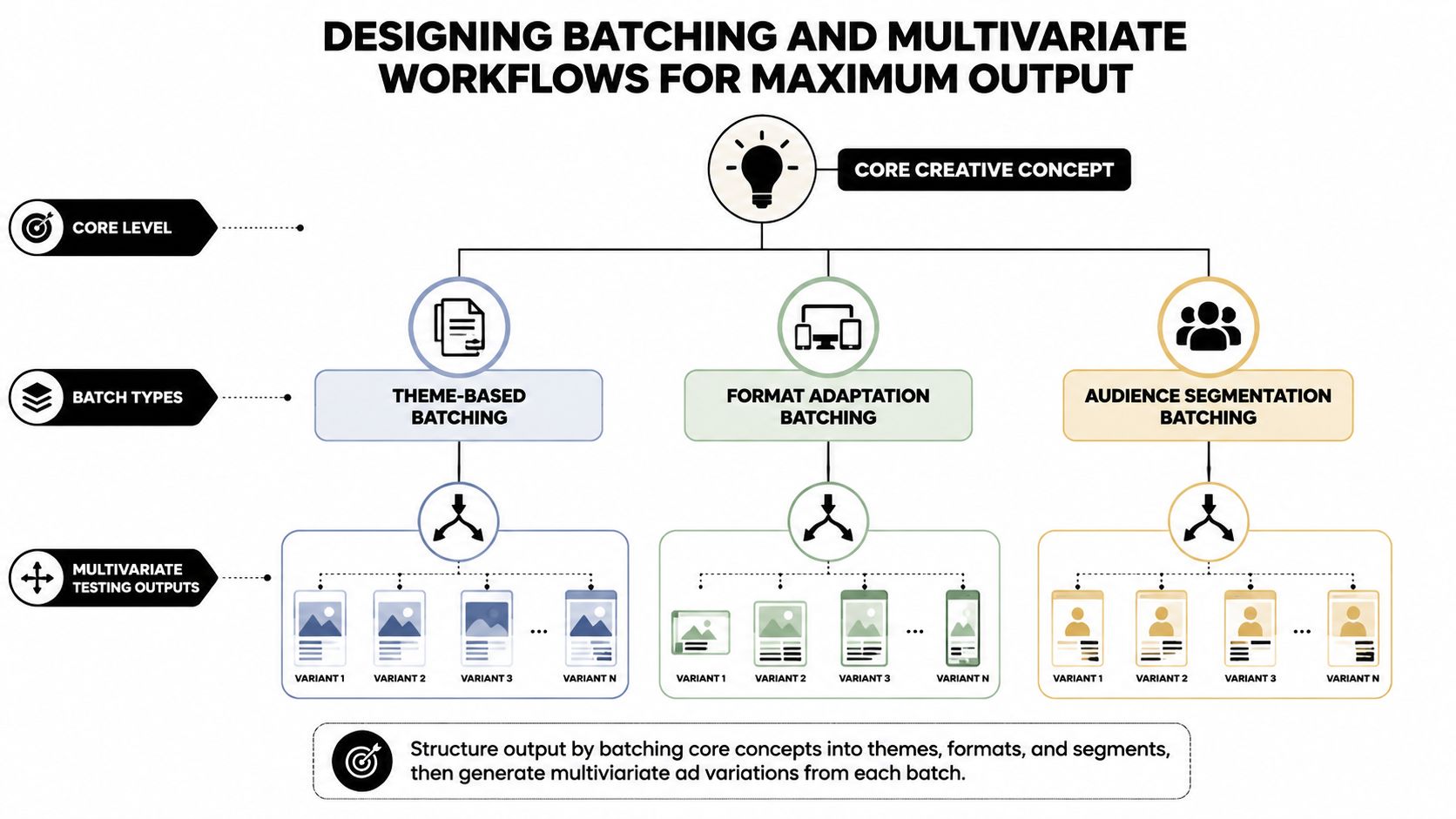
The most efficient creative pipeline doesn't treat every ad as a separate project. It treats each ad as a combination of reusable components. A practical structure separates the hook, body, and CTA, then schedules production by component rather than by finished variation.
A hook may be a problem statement, a founder opening, a customer objection, or a visual interruption. The body carries the demonstration, testimonial, offer explanation, or product experience. The CTA closes the sequence with a direct action, benefit reminder, or urgency angle. Each component needs its own brief, owner, acceptance criteria, and source assets.
Build the batch before building the combinations
Start with a core concept and create component batches around it:
- Hook batch: Write and storyboard multiple openings around one audience problem or promise.
- Body batch: Produce demonstrations, testimonials, product sequences, or explanatory sections that can support several hooks.
- CTA batch: Prepare closing frames, voiceovers, captions, and end cards that match the campaign objective.
- Assembly batch: Combine approved components into variations, then run platform and brand checks.
A weekly rhythm might place concept development and hook production early in the cycle, body production next, and assembly after the source pieces have cleared review. The exact days matter less than the dependency order. Editors shouldn't wait for hooks while polishing unrelated finished ads, and reviewers shouldn't receive an unstructured folder containing every possible combination.
The variation matrix should show which components are approved, which combinations are planned, and which outputs have already shipped. Use full combinations when every interaction is strategically important. Use a narrower experimental design when the team needs to learn efficiently without producing every possible pairing. The correct choice depends on the question being tested, not on a desire to maximize the raw variation count.
Make briefs modular
A modular brief should identify:
- Audience: Who should recognize themselves in the opening?
- Hypothesis: What behavior or belief is the variation testing?
- Component role: Hook, body, CTA, or assembly.
- Dependencies: Required footage, claims, talent, music, or product views.
- Acceptance rule: What must be true before the piece moves forward?
- Reuse permission: Which campaigns, formats, or audiences can use the component?
This structure makes rework more targeted. If a CTA fails review, the team doesn't need to rebuild the body. If a body becomes outdated, approved hooks can remain available for new combinations.
For teams balancing breadth with budget, traffic-aware A/B test design offers useful context on aligning test structure with the traffic available to evaluate it. The production schedule should reflect that same discipline. Don't manufacture a large matrix that the media plan can't meaningfully interpret.
Platforms such as a multivariate ad testing tool can support component-based assembly, but the operating rule comes first. Automation can't rescue a batch whose naming, ownership, and hypothesis fields are unclear.
Allocating Resources and Integrating AI Asset Management
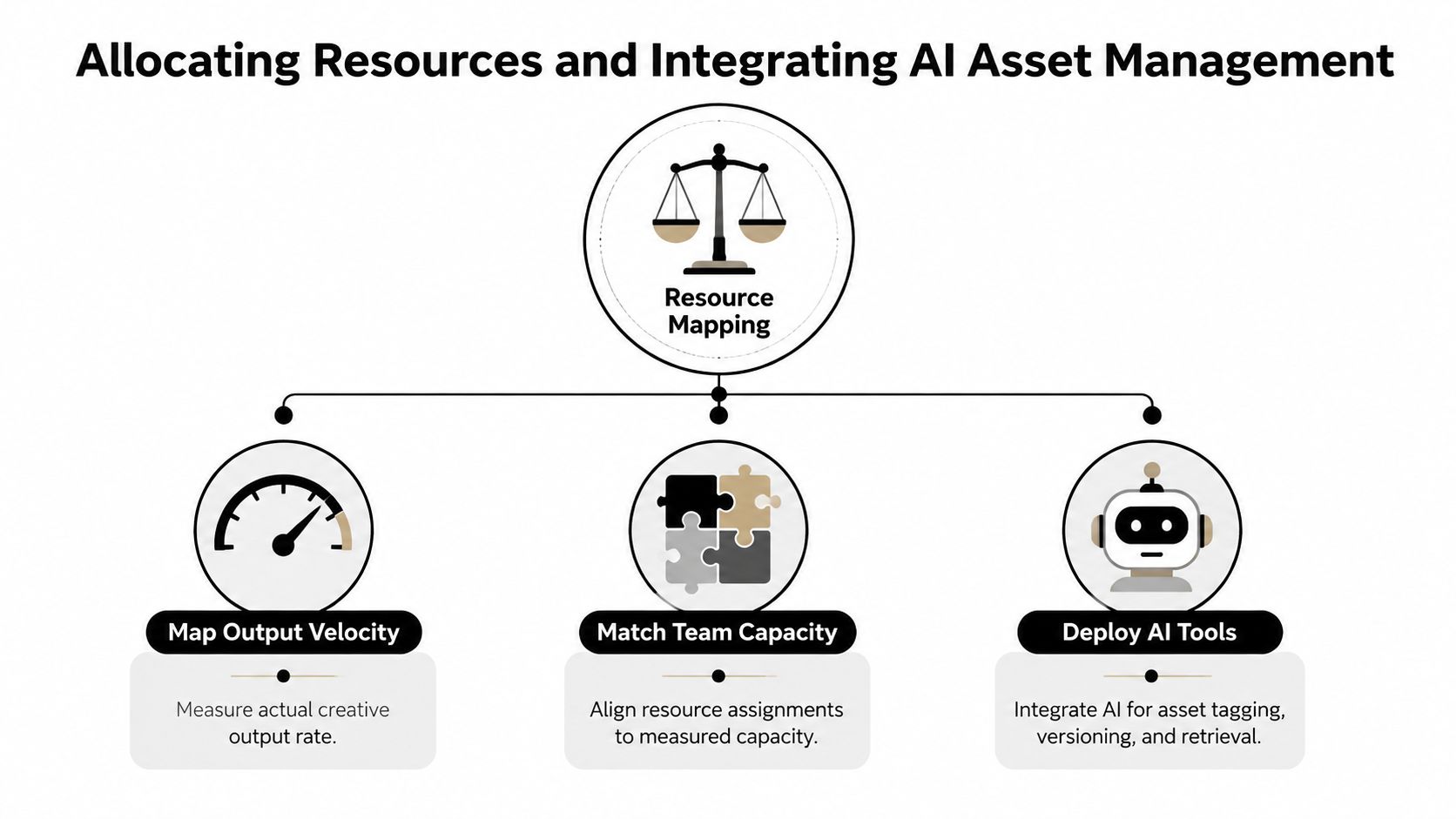
Capacity planning starts with observed output, not an aspirational target. Review what each role has completed across recent cycles, then separate the work by complexity. A simple format adaptation doesn't consume the same effort as a new UGC edit with sourcing, captions, sound design, and several review rounds.
Assign work by capability as well as availability:
- Concept developers shape hypotheses, hooks, angles, and briefs.
- Asset builders source footage, edit sequences, adapt formats, and prepare exports.
- Quality reviewers check claims, branding, pacing, legibility, compliance, and technical requirements.
- Media operators validate naming, tracking, campaign mapping, and launch readiness.
Don't fill every available hour with planned work. A buffer gives the team room to absorb urgent iterations, platform feedback, broken source files, and promising performance signals. The exact buffer should come from your own volatility and historical interruptions, not from a universal rule.
A schedule that has no recovery space isn't efficient. It's a queue waiting for its first disruption.
Build an asset system that reduces search work
An AI asset-management layer should make the source library useful at the moment a new variation is requested. It can centralize footage, detect scenes, extract transcripts, organize clips, and attach searchable metadata. That matters because teams lose time not only creating assets, but also finding the right proof point, product view, reaction, or opening frame.
Set metadata standards before importing the library. Useful fields include product, audience, angle, speaker, format, claim type, usage status, and campaign history. Pair automated tagging with a human review for sensitive claims and ambiguous footage. Search speed won't help if the system surfaces assets that are expired, unapproved, or impossible to license.
Sovran is one option for teams that need modular ad assembly, AI-supported asset organization, bulk text overlays, format adaptation, timeline editing, and direct Meta delivery in one workflow. It can sit alongside existing design and project-management tools rather than replacing the strategic decisions those systems don't make.
For broader planning discipline, resource allocation decisions in 2026 provides useful framing for connecting available capacity with priorities instead of distributing work evenly by default. Inside the creative pipeline, that means assigning scarce editing and review capacity to the experiments most likely to change a media decision.
Use asset management best practices to formalize permissions, naming, metadata, and lifecycle rules before the library becomes too large to clean manually.
Automating Handoffs and Tracking Performance KPIs
Automation works when it moves a completed decision forward. It doesn't work when it merely sends more notifications. Build the workflow around explicit state changes:
- A concept reaches an approved status.
- The system creates or updates the next production task.
- The owner receives the required assets and specifications.
- A quality gate checks the deliverable.
- The approved file enters rendering or deployment.
- Performance data returns to the testing and planning queue.
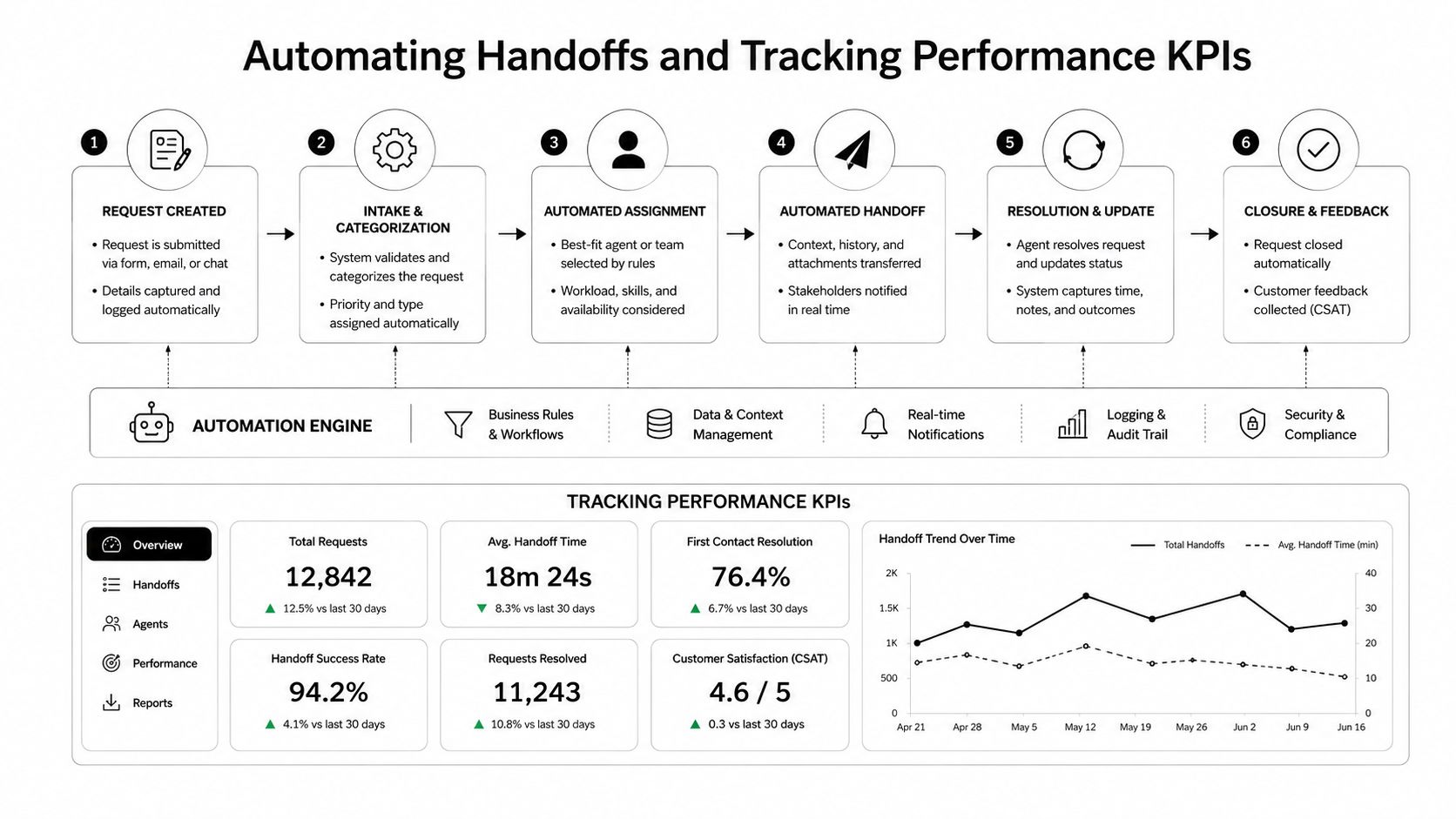
Each handoff needs a clear trigger and a clear failure path. If a video fails a caption check, it should return to the editor with the reason attached. If a required claim approval is missing, the system should block deployment instead of allowing a buyer to discover the problem inside Ads Manager. A good workflow makes the next action obvious without forcing people to search through comments.
Track operational health alongside media outcomes
Output volume is an incomplete KPI. A team can ship more files while increasing rework, lowering relevance, or producing combinations that don't answer meaningful testing questions. Track the measures that show whether the pipeline can keep operating:
- Time to first variation: How long it takes to move from approved concept to a launch-ready asset.
- Iteration velocity: How quickly a performance signal becomes a revised variation.
- Reuse rate: How often approved components contribute to new outputs.
- Review rework: Which quality checks send work backward most often.
- Queue age: How long the oldest blocked request has waited.
- Fatigue response time: How quickly the team can produce a relevant replacement when an active concept weakens.
Connect these measures to campaign results without pretending that production speed causes every performance outcome. If output rises while test quality declines, the schedule is optimizing for file count. If performance improves but the team depends on overtime, the system isn't stable enough to scale.
Run a weekly review with strategy, production, and media buying in the same room or shared workspace. Remove recurring blockers, adjust priorities, archive obsolete assets, and update capacity assumptions from completed work. A guide to reading test results can help teams turn performance feedback into the next production decision instead of treating reporting as a separate activity.
Templates and Timelines for Your Production Schedule
A useful schedule gives every request a home, every handoff an owner, and every deadline a reason. Start with a two-week sprint, then adjust it to your actual review cadence and campaign needs. The first week should create and validate the building blocks. The second should assemble, launch, read early signals, and prepare the next round.
| Component | Timeline | Key Deliverables |
|---|---|---|
| Prioritization and briefing | Sprint opening | Ranked hypotheses, audience definition, required components, owners |
| Hook and concept batch | Early production window | Approved openings, storyboards, copy variants, source requirements |
| Body and proof assets | Middle production window | Demonstrations, testimonials, product sequences, supporting footage |
| CTA and assembly | Late production window | Combined variations, format adaptations, captions, end cards |
| Quality and deployment | Launch window | Passed checks, standardized names, platform-ready files, launch map |
| Review and iteration | Following cycle | Performance readout, reuse decisions, fatigue response, next queue |
Keep a capacity sheet beside the schedule. Record role, complexity tier, available work time, planned assignments, blocked work, and actual completions. Use the sheet to expose overload before the deadline, not to justify an unrealistic promise after the queue has failed.
A variation matrix prevents accidental duplication. Give each hook, body, and CTA a unique identifier, then mark combinations as planned, in production, approved, live, paused, or rejected. This also makes reuse visible. A strong body shouldn't disappear into a finished ad when it can support another relevant hypothesis.
Your handoff checklist should cover the items people routinely forget:
- Strategic fit: The variation tests a defined hypothesis.
- Asset integrity: Footage, audio, logos, and claims are approved.
- Technical readiness: Dimensions, captions, safe zones, and export settings are correct.
- Naming clarity: The file name identifies the concept and component combination.
- Launch mapping: The media buyer knows the campaign, audience, and test cell.
- Feedback ownership: Someone is responsible for the next decision.
For projects with substantial filming or location work, external production planning guidance such as budgeting for a music video shoot can reinforce an important principle: production decisions become easier when scope, resources, and dependencies are defined before the schedule is locked. The same principle applies to modular ad production, even when the assets come from existing footage.
Keep an emergency concept bank with approved hooks, bodies, and CTAs. When a winning angle fatigues, the team should assemble a relevant response from known components instead of starting with a blank brief. That reserve is what turns schedule discipline into a growth capability.
Sovran helps performance teams organize source footage, build modular hook-body-CTA combinations, generate and adapt ad assets, and move launch-ready variations into Meta workflows. Visit Sovran to see how its asset management and creative testing workflow can support a production schedule built for higher testing volume without relying on constant manual handoffs.

Manson Chen
Founder, Sovran
Related Articles

8 Pattern Interrupt Techniques for Video Ads
- pattern interrupt techniques
- video ad hooks
- 3 more
Customer Journey Mapping for Performance Marketing
- customer journey mapping
- performance marketing
- 3 more
How to Reduce CAC: Creative Testing and Funnel Optimization
- reduce CAC
- customer acquisition cost
- 3 more