How to Turn UGC Into Multiple Ads: A Scalable Playbook

Jump to a section
You already have at least one UGC clip that looks promising. The creator sounds believable, the product is clear, and the first version is live. Then the familiar problem shows up. Results flatten, the team asks for more creative, and nobody wants to start the entire production cycle again.
That's where teams often waste time. They treat UGC as a finished ad instead of raw material.
If you want to learn how to turn UGC into multiple ads, stop thinking like a one-off editor and start thinking like a creative operator. The job isn't to squeeze one “winner” out of a creator video. The job is to build a system that keeps producing new testable variants from the same footage, with clean learnings and minimal chaos.
From Single Clip to Creative Engine
A single good UGC video feels valuable because it is. UGC has been reported to drive 2x more conversions than brand-created content and 4x higher click-through rates on ads, which is exactly why serious teams don't use it once and move on. In scaled accounts, it's common to keep 10 to 50 ads active in a single ad set and launch new batches weekly to maintain testing velocity, as noted in ShortStack's UGC statistics roundup.
That changes the operating model. The useful question isn't “Is this clip good?” It's “How many clean tests can this clip support before we need a new shoot?”
Most guides stop at remixing a few versions. That's not enough once you're managing spend across Meta and TikTok, working with multiple audience segments, or trying to fight fatigue before performance slips. The better approach is modular. You break a creator asset into reusable parts, keep the winning sections, replace the weak ones, and turn one session into an ongoing testing pipeline.
A lot of teams already understand the creative side of this. Fewer teams build the workflow side. That's why production slows down even when they have plenty of footage.
Practical rule: The asset is not the final ad. The asset is the source file for future ads.
This is also where a modular video ad framework becomes useful. The point isn't theory. It's operationalizing a repeatable way to create, label, test, and refresh variations without re-briefing the whole project every time.
What breaks when you don't systemize it
Three issues show up fast:
- Creative fatigue hits early: You may still believe in the core message, but the audience has already seen that exact presentation too many times.
- Editors become bottlenecks: Every “quick variation” turns into a custom request.
- Learnings stay fuzzy: If hooks, bodies, CTAs, captions, and pacing all change at once, you can't tell what actually drove the result.
The teams that scale UGC well treat creator footage like inventory. They preserve the raw parts, classify them properly, and build ads from modules. That's how one clip becomes a creative engine instead of a short-lived win.
The Foundation A Modular UGC Brief
The easiest way to fail at repurposing UGC is to ask a creator for “one ad.” That request almost guarantees a tightly stitched video with limited editing flexibility, fixed pacing, and not much room for controlled testing.
A modular brief fixes the problem before the shoot happens. Industry guidance recommends writing 3 to 5 distinct hook variations for every UGC ad brief and requesting 6-, 15-, and 30-second edits from the same clip so one session can become multiple testable ads, according to Cometly's UGC ad playbook.
Ask for ingredients, not a finished meal
The brief should define the message tightly and the performance of the creator loosely. That sounds contradictory, but it isn't.
You want control over:
- the audience
- the product angle
- the benefits that matter
- the formats you need
- the modules you expect back
You don't want to over-script every spoken line if that strips out the creator's natural delivery. Authenticity usually drops when creators sound like they're reading legal copy off-camera.
The strongest UGC briefs feel structured to the team and natural to the creator.
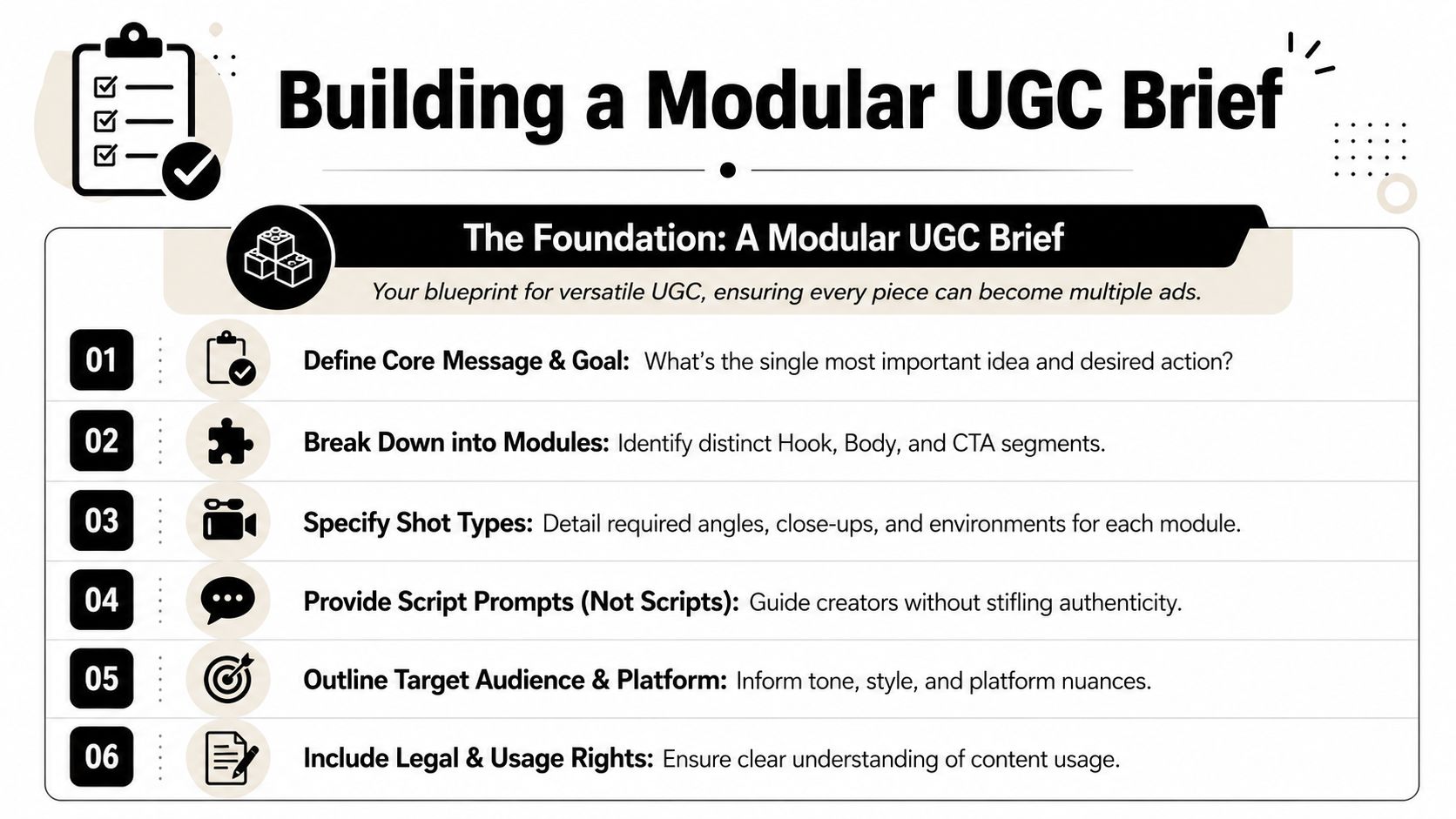
A useful way to frame it is through three modules: Hook, Body, CTA. The creator should know what each block needs to accomplish, but still have room to deliver it in a way that sounds like a person, not a brand deck.
What belongs in the brief
Here's a template that keeps the brief practical and remixable.
| Component | Instruction | Example |
|---|---|---|
| Product | State what the product is and what problem it solves | Daily supplement for people who want a simpler morning routine |
| Audience | Describe the buyer in plain language | Busy professionals who've tried more complicated wellness habits |
| Core benefit | Limit the message to 1 to 2 key benefits | Easy to use, fits into a rushed schedule |
| Hook directions | Request 3 to 5 distinct openings with different emotional entries | Pain-point hook, question hook, product-first hook, skeptical hook |
| Body prompts | Give talking points, not a word-for-word script | What problem you had, why you tried it, what changed |
| CTA options | Ask for more than one closing action | Shop now, learn more, try it today |
| Shot list | Specify needed visuals for future edits | Product close-up, in-use demo, face-to-camera explanation |
| Format outputs | Request multiple durations and orientation-ready footage | 6-second cut, 15-second cut, 30-second cut |
| Usage rights | Clarify paid usage and editing rights | Brand may edit, caption, resize, and run across paid social |
What usually works, and what usually doesn't
What works:
- Prompting creators with scenarios and proof points
- Asking for multiple opens in the same session
- Requesting pauses between lines so editors can cut cleanly
- Capturing extra b-roll even if it's not needed immediately
What doesn't:
- One locked script with no alternate intros
- A polished “final ad” exported by the creator with text burned in
- No product close-ups, no room tone, and no visual reset points
- Briefs that ignore where the ad will run
If your team needs a more complete planning structure, this guide on user-generated content strategy is a useful companion because it connects creator direction to testing output instead of treating content production and media buying as separate jobs.
Building Your High-Velocity UGC Asset Bank
Once the files come back, many teams throw them into a cloud folder and call it a library. It isn't. It's storage.
An asset bank is different. Storage holds footage. An asset bank helps your team find, compare, recombine, and relaunch footage fast enough to matter.
Why folders stop working
Folders break down when the account grows. One creator shoots for two products. One product has three audience angles. One angle works on TikTok but not on Meta feed. One hook wins, but nobody remembers where the raw take lives.
Now multiply that across campaigns, editors, and markets.
A proper bank needs a tagging structure that reflects how ads are built. The minimum useful taxonomy usually includes:
- Creator: Name, persona, demographic fit, content style
- Product: SKU, category, bundle, offer context
- Hook type: Pain point, question, demo-first, objection-led, reaction
- Body angle: Testimonial, walkthrough, unboxing, comparison, routine
- CTA: Shop now, learn more, try it, claim offer
- Format readiness: Feed, Stories, Reels, TikTok, square-safe, vertical-safe
- Status: Untested, tested, winner component, fatigued, archived
That's what lets a creative strategist say, “Pull female creator footage for Product A, pain-point hooks, demo body, learn-more CTA,” and get a usable list quickly.
Tag for retrieval, not for neatness
Many libraries encounter issues at this stage. Teams create tags they'll never search. They label footage in ways that sound organized but don't match actual production decisions.
Use tags based on the questions your team asks every week:
- Which creator intros are still untested?
- Which body segments explain the product clearly?
- Which clips have clean product handling?
- Which CTAs have already been paired with the current winning hook?
If a tag doesn't help someone make or launch an ad faster, it probably doesn't belong in the system.
Some platforms now support scene detection, transcript search, and clip-level organization. That matters because raw footage becomes searchable by spoken phrase, visual sequence, or segment type instead of being trapped in long source videos. The more footage you have, the more valuable that becomes.
If you're formalizing this process, these asset management best practices are worth reviewing because they focus on retrieval and production speed, not just file hygiene.
What a good asset bank changes operationally
A solid bank shortens the distance between idea and launch. Editors spend less time scrubbing footage. Media buyers stop waiting on net-new creative for every test. Strategists can identify reusable winners at the component level.
That's the shift. You're not maintaining a video archive. You're maintaining a production system.
Assembling Ad Variations the Modular Way
Once the footage is organized properly, building variants becomes much less about editing skill and much more about decision discipline.
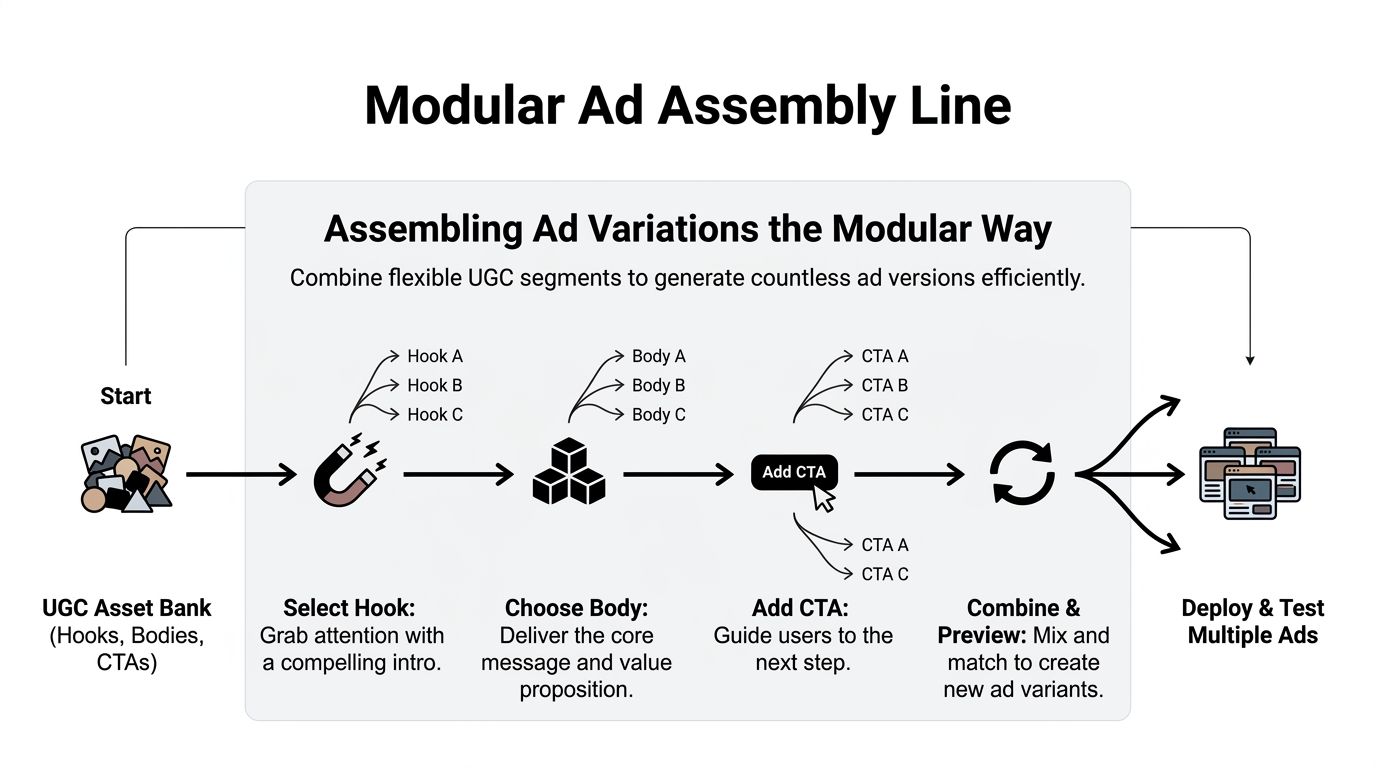
The cleanest method is still the simplest one. Treat every ad as three interchangeable blocks: Hook, Body, CTA. Then test changes one variable at a time.
A higher-resolution repurposing approach is to treat one UGC clip as a modular asset library, create 6-, 15-, and 30-second versions, test different CTAs, and keep the core message stable while changing only one element at a time so the result is interpretable, as outlined in Greater Than's guide to high-converting UGC ads.
Start with hook isolation
When a batch underperforms, teams often panic-edit everything. New intro, new creator, new body, new CTA, new text overlay. That feels productive. It usually destroys the learning.
A better sequence looks like this:
- Keep the body and CTA fixed if they're still strategically sound.
- Swap only the opening across several versions.
- Launch those variants as separate ads so each intro gets a clean read.
- Promote the best-performing hook to control.
- Then move to the next variable.
This is how you turn UGC into a repeatable testing mechanism instead of a guessing game.
Build version families, not random edits
Think in clusters. One source clip can produce a family of ads such as:
- Short hook cut: For fast-scrolling cold traffic
- Standard explainer cut: For broad prospecting with a fuller body
- Objection-handling cut: For warmer audiences
- CTA-swapped versions: Same message, different ask
- Caption-style variants: Same footage, different text treatment
That kind of output is easier to manage when your editing stack supports templates, batch captions, and reusable overlays. If you're comparing tooling for this stage, Keyvello's roundup of best AI video makers for ads is a practical resource because it focuses on platforms built for variation volume rather than one-off editing.
Sovran is one option in this category. It's built around modular ad assembly, clip segmentation, and batch rendering from saved hooks, bodies, and CTAs, which fits teams producing many variants from the same creator footage.
What to standardize in the edit
The fastest creative teams standardize the low-value choices so they can spend time on the meaningful ones.
Keep these consistent where possible:
- Caption style: Font, placement, animation rules
- Brand layer: End card or logo treatment
- Safe zones: Platform-specific framing for key text and product shots
- Naming convention: So the ad name reflects the variable being tested
If you want more examples of this workflow in practice, this piece on how to make 50 ads from one video shows the logic well. The core idea is simple. Reuse what's proven, vary what needs testing, and never edit blindly.
Adapting Variants for Meta and TikTok
A reusable UGC system only works if the final ad still feels native where it runs. That's where many repurposing workflows get sloppy.
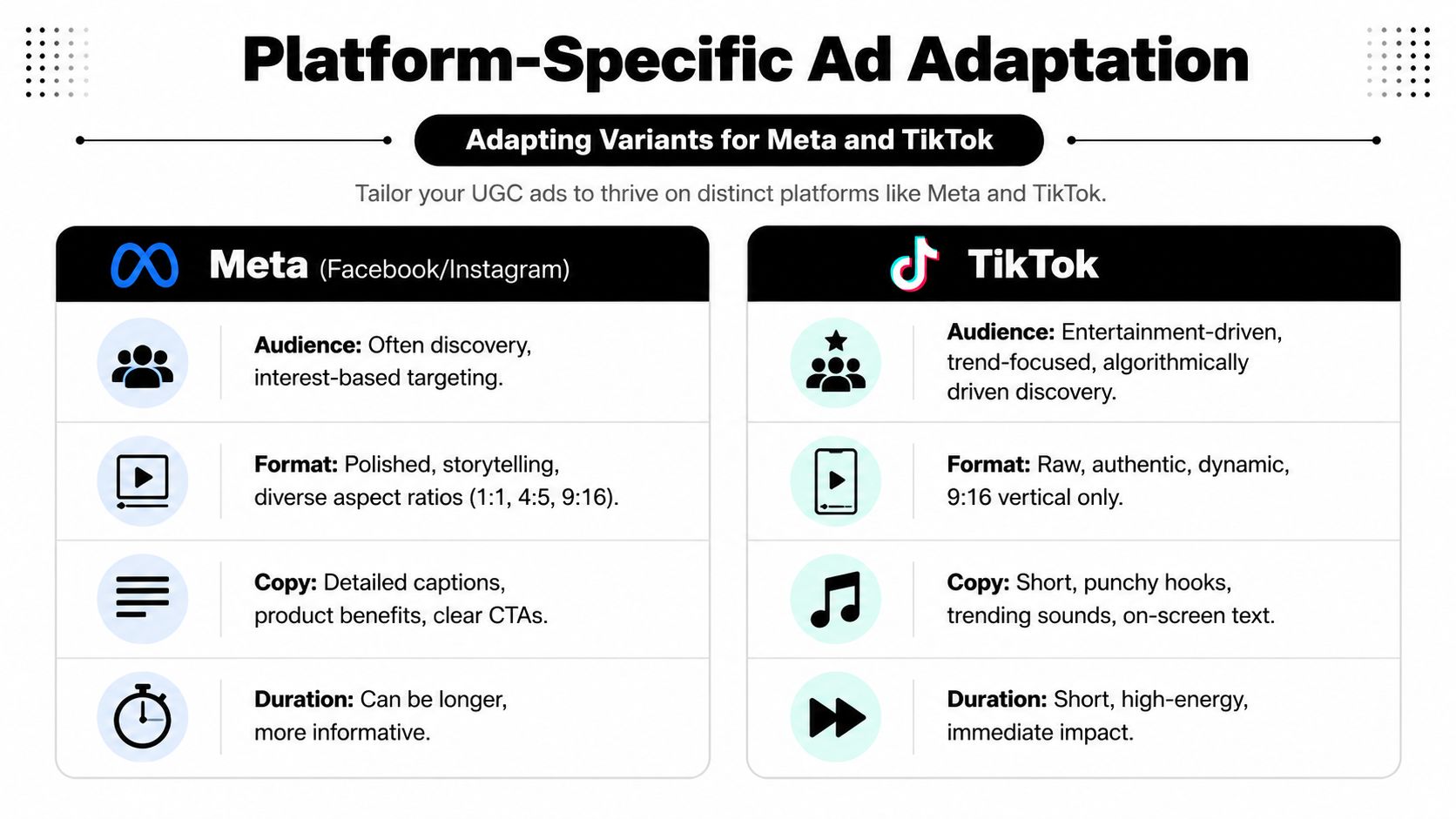
Teams often resize a vertical video, swap the ratio, and call it platform adaptation. Users notice the difference immediately. Meta and TikTok may both accept short-form video, but they don't reward the same creative texture.
A useful way to think about this is placement-specific credibility engineering. The hard part isn't making a video fit. It's making the video feel believable in context, especially when AI-assisted tooling is involved, as discussed in this YouTube breakdown of native-feeling UGC variation.
Meta asks for a clearer argument
On Meta, users will tolerate a bit more explanation if the ad earns it. You can usually support the creator with stronger benefit framing, more deliberate captioning, and a clearer CTA path.
What tends to fit Meta better:
- Slightly more structured story progression
- Benefit-led text overlays
- Product visibility earlier in the cut
- Cleaner framing for feed placements
- A stronger bridge between ad promise and landing page language
Meta doesn't require polished brand creative. It does punish confusion. If the viewer can't tell what the product is, who it's for, or why they should click, the ad often stalls.
TikTok asks for cultural fit
TikTok is harsher on anything that feels assembled by committee. The pacing has to feel immediate. The language has to sound natural. The creator can't look like they were cast from a stock footage catalog and dropped into a trend they don't understand.
What tends to matter more on TikTok:
- Faster visual movement in the first moments
- Less corporate copy on-screen
- More creator-led delivery and less “campaign voice”
- Native text density and casual framing
- Visual cues that match the expected style of the niche
The ad doesn't need to look unpolished. It needs to look socially plausible.
That becomes even more important when using AI-supported workflows for scripting, edits, voice layers, or content adaptation. If your team is working through those broader changes, BeyondComments has a thoughtful piece on AI social media strategy that helps frame where automation supports content and where it starts to flatten it.
Avoid the AI-looking trap
The biggest mistake isn't using AI. It's smoothing away the signals that make UGC trustworthy.
Watch for these problems:
- overly symmetrical framing
- unnatural speech rhythm
- generic facial reactions
- captions that feel too polished for the platform
- background cleanup that removes real-world texture
- creator and audience mismatch
The fix is usually selective imperfection. Keep authentic pauses. Keep some environmental context. Don't force every edit into the same visual mold. Native ads don't just match dimensions. They match expectations.
The Testing Workflow and Iteration Loop
Variations only matter if your testing structure can produce a decision. Otherwise, you're just making more files.
A practical workflow is to launch each variation as a separate ad set for 3 to 7 days, track CTR, CPC, CVR, ROAS, and CPA, then kill underperformers and scale winners. One industry guide also recommends refreshing creative every 4 to 6 weeks when CTR drops 30 to 40% due to fatigue, according to JoinBrands' UGC ads guide.

Read the metrics in sequence
Don't lump all metrics together. They answer different questions.
| Metric | What it helps diagnose |
|---|---|
| CTR | Whether the hook and packaging earn attention |
| CPC | Whether the ad is attracting clicks efficiently |
| CVR | Whether the message and post-click experience stay aligned |
| CPA | Whether the full path produces acceptable acquisition cost |
| ROAS | Whether the spend is producing revenue efficiently |
A strong CTR with weak CVR often means the ad promise and landing page don't match well enough. Weak CTR with decent CVR can mean the core offer is fine, but the opening doesn't stop the scroll.
That distinction matters because it tells you what to change next.
What to do when the first batch fails
At this point, many teams give up on a creator too early or overreact to a single result set.
Use a simple diagnosis path:
- If CTR is weak: test new hooks first
- If clicks come but conversion lags: inspect body clarity, offer framing, and landing-page continuity
- If one creator repeatedly underperforms across hooks: reconsider creator fit
- If performance fades after an initial run: refresh before fatigue spreads further
The useful discipline is preserving one stable component while you replace another. If the body explains the product well, keep it. If the CTA is already direct and relevant, don't rewrite it just because the intro missed.
Failed tests still have value when they narrow the next edit.
That's why a documented iteration loop matters. Log the variable, the result, and the next hypothesis. Over time, your team stops debating taste and starts building a reusable map of what your audiences actually respond to.
For teams building that process into production, this guide to video ad iteration strategy is useful because it connects creative diagnosis to the next batch decision instead of treating testing as an isolated reporting task.
The fastest-growing accounts don't just make more ads. They make each round of ads smarter than the last one.
If your team is trying to turn scattered creator footage into a real testing pipeline, Sovran is built for that workflow. It helps marketers organize clips into modular assets, assemble variations from hooks, bodies, and CTAs, and push high volumes of ad versions into production without rebuilding each edit from scratch.

Manson Chen
Founder, Sovran
Related Articles
Highlights Video Maker: The Ad Scaling Playbook for 2026
- highlights video maker
- video ad production
- 3 more
AI Talking Head Videos for Scaling Ad Creative
- ai talking head
- video ad production
- 3 more

How to Reduce Production Costs: A Playbook for Video Ads
- how to reduce production costs
- video ad production
- 3 more