A Performance Marketer's Guide to Video to Flipbook Conversion
Learn to convert video to flipbook formats that boost engagement. This guide covers actionable methods for ads, content, and scaling creative with AI in 2026.
Jump to a section
Turning your video clips into a flipbook is a seriously clever way to get more mileage out of your best ad creative. This trick takes your video content and transforms it into an interactive, thumb-stopping asset you can use in ads, on landing pages, or even in emails to fight off creative fatigue.
Why Bother Turning a Video into a Flipbook?
I know what you might be thinking. Why would you take a dynamic video and turn it back into a sequence of still images? It sounds like a step backward, but the magic is in the engagement and pure novelty of it. You're mixing old-school charm with modern interactivity, creating a unique experience that just stands out in a crowded feed.
This is a killer form of content repurposing. You’re taking your video library and giving it a second life. Instead of letting your winning clips get stale, you can spin them into a fresh format that feels new again. Getting a handle on the bigger picture of content repurposing makes it obvious why this is such a go-to strategy for performance teams. It's all about working smarter.
A Modern Spin on an Old Classic
Flipbooks aren't some new-fangled idea. They actually date back to 1868 in Europe, showing up long before motion pictures as the original form of animation. This little mechanical wonder used a sequence of images flipped by hand to create the illusion of movement, capturing people's imaginations way before screens were a thing.
Today's digital flipbooks use that same core idea but pack a much bigger punch for marketers. Curious about the data behind them? You can see how to analyze their performance with these insights on flipbook statistics.
Here's why they work so well now:
Interactivity: Users aren't just passively watching; they're actively clicking and flipping through the content.
Trackability: Unlike a basic GIF, a digital flipbook can give you detailed analytics on how users are engaging.
Novelty: It completely breaks the typical feed-scrolling behavior, making people stop and wonder, "What is this?"
For any performance marketer, the best reason to convert a video to a flipbook is to crush creative fatigue. When your audience has seen your video ad for the tenth time, a flipbook version of the same core message can re-engage them and actually drive action.
Digital flipbooks offer an interactive and trackable format that traditional static PDFs simply can't match. For performance marketing, where every click and interaction counts, the difference is night and day.
Digital Flipbook vs Static PDF Engagement Potential
Feature | Digital Flipbook | Static PDF |
|---|---|---|
User Experience | Interactive, flippable pages; engaging | Static, requires scrolling or zooming |
Multimedia | Can embed videos, GIFs, and pop-ups | Supports links, but no dynamic content |
Tracking & Analytics | Detailed per-page analytics, heatmaps | Basic download/open tracking only |
Mobile Optimization | Responsive, fits any screen size | Often difficult to read on mobile |
Lead Generation | Can embed interactive forms directly | Requires linking out to a separate form |
The takeaway is clear: if your goal is to drive action and understand user behavior, a digital flipbook is a far more powerful tool than a static PDF.
Strategic Asset Repurposing
This is exactly where a tool like Sovran becomes your secret weapon. Instead of just guessing which video to use, Sovran’s AI helps you pinpoint the perfect clips with strategic intent. You can use its natural language search to instantly find videos with specific hooks or pull up user-generated content (UGC) that you know already resonates with your audience.
From there, the process is straightforward—turning your best video moments into a brand new, highly testable creative. This isn't just about making something for the sake of it; it's about systematically squeezing every last drop of value from your winning assets. For a deeper look, check out our guide on repurposing video content for maximum impact.
By adding video-to-flipbook conversions to your workflow, you’re creating another powerful weapon for your A/B testing arsenal.
Creating a Printable Flipbook from Video Frames
Alright, let's get hands-on. We're going to start with the most tangible method: turning a digital video into a physical, hold-in-your-hand flipbook.
This works best with short, action-heavy clips—think 3 to 10 seconds of something punchy and memorable. It’s perfect for creating a unique piece of direct mail or some seriously cool brand merch that people will actually keep.
First things first, you need to break your video down into individual frames. You can do this with professional tools like Adobe Premiere Pro or a bunch of free online tools that can export a video as an image sequence. Just upload your clip and spit it out as a series of JPEGs or PNGs.
The whole idea is to deconstruct a single video asset and reassemble it into something new and interactive. It’s a simple but powerful workflow.
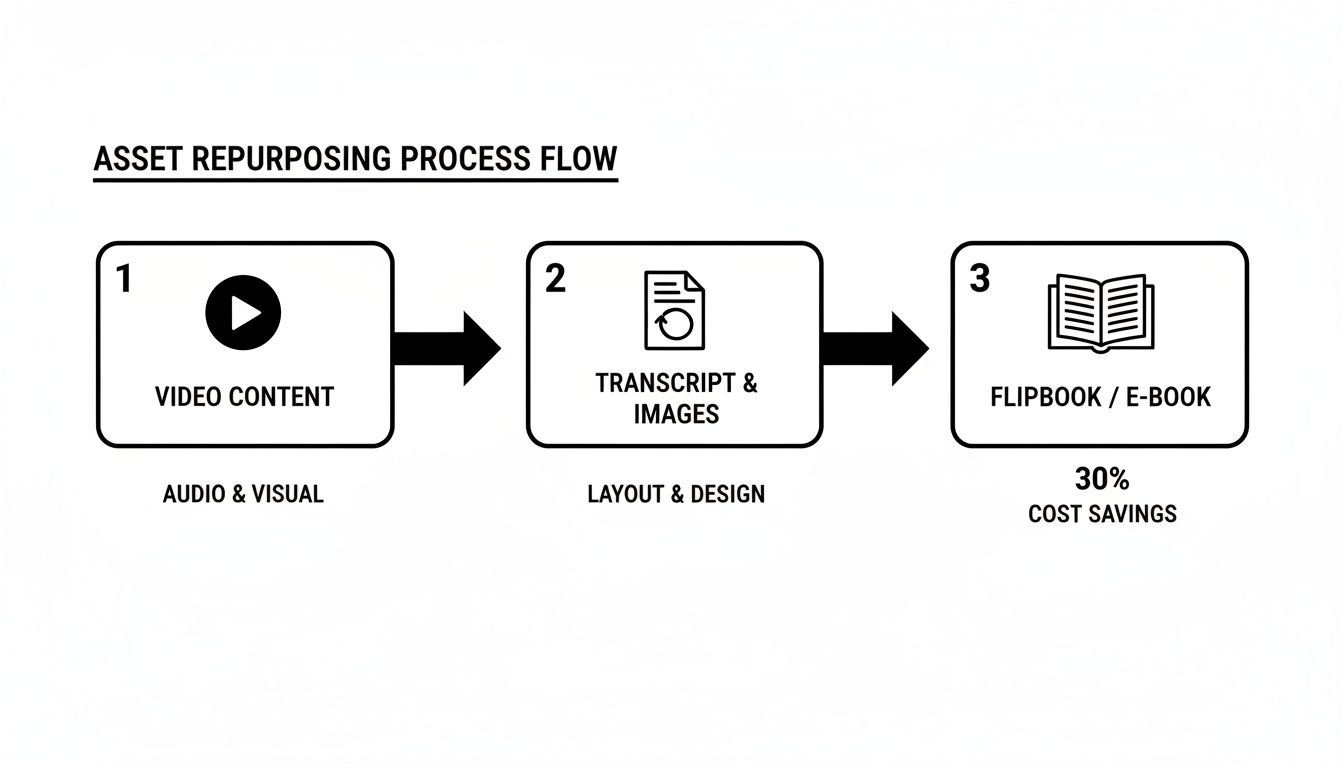
As you can see, you’re just taking one format and repurposing its core components into another.
Finding the Right Frame Rate Balance
Now, the frame rate you export at is a huge deal. A standard video running at 30 frames per second (fps) is pretty common. For a 5-second clip, that gives you 150 individual images. That's a great number for a smooth, pocket-sized flipbook.
But here’s a pro tip: exporting at a lower rate, like 15 fps, can be a really smart move. You slice the page count in half, which cuts down on printing costs and makes the book less bulky. You still get a decent animation effect, so you have to experiment to find that sweet spot between silky-smooth motion and a manageable stack of paper.
Once you have your image sequence, you need to compile them. The goal is to get all those frames into a single, multi-page PDF. Tools like Adobe Acrobat or any number of free online PDF mergers will get the job done.
Here's a step most people forget until it's too late: add page numbers before you print. A tiny, unobtrusive number in the corner of each frame is a lifesaver. It ensures that after you cut and stack the pages, they stay in the right order. Mess this up, and the entire project is toast.
Assembling and Binding Your Flipbook
With your multi-page PDF ready, it's time to print. For the best result, pay attention to these details:
Paper Choice: Don't use flimsy printer paper. Go for a slightly heavier cardstock. It feels more premium and will actually survive being flipped a bunch of times.
Printing Settings: Make sure your printer is set to print at actual size—no "fit to page" or scaling. This keeps every single frame perfectly aligned.
Binding: The classic, old-school feel comes from just using a strong binder clip. It's simple, effective, and gets the job done.
This hands-on method turns a fleeting digital moment into a real, physical object people can connect with. Getting your clips just right takes practice, and you can get deeper insights by checking out our guide on video editing for social media.
Alright, let's move beyond the old-school, frame-by-frame approach. We're going to dive into a more dynamic method that’s perfect for web content, emails, and especially lightweight ads. The idea is to take a short video clip, turn it into an optimized GIF, and then embed that right into an interactive HTML5 flipbook. This creates a really surprising, scroll-stopping experience for anyone who sees it.
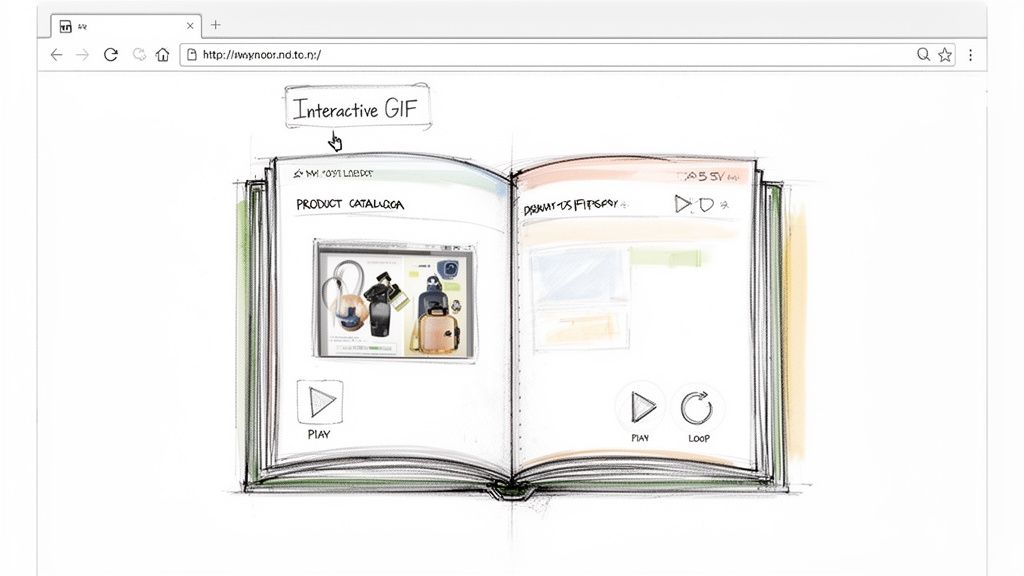
The first step is creating a high-quality GIF that doesn't tank your load times. Nobody’s going to wait around for a huge file to appear. Imagine you're flipping through a digital catalog, and a static image of a shoe suddenly rotates to show a different angle. That’s the "wow" factor we're after here—an unexpected bit of motion that instantly breaks the pattern of an otherwise static page.
Getting Your Video Ready for GIF Conversion
Before you even touch a GIF converter, you need the right source material. A GIF is just a silent, looping video, so your clip has to be short and punchy. A 2-4 second clip showing one clear action, like a product unboxing or a quick software UI demo, is usually the sweet spot.
When it's time to export your video to a GIF using a tool like Giphy or another online converter, you have to be ruthless with your settings:
Resolution: Keep it small. A width of 600-800 pixels is almost always enough for embedding in a digital doc.
Frame Rate: This is a big one. Dropping the frame rate to 10-15 fps slashes the file size without making the motion look too robotic.
Color Palette: Limiting your colors to 128 or even 64 is a classic GIF optimization trick that sheds a ton of kilobytes.
You're trying to find that perfect balance between decent visual quality and a tiny file size. A fast-loading GIF is always, always better than a high-res one that makes people bounce.
Embedding and Tracking Your GIF Flipbook
Once your lean, mean GIF is ready, you'll use a digital publishing platform like Flipsnack or Publuu. These tools let you upload a standard PDF and then just drag and drop your GIF onto any page. You can resize it, position it, and set it to loop, creating that dynamic moment inside your document.
But here’s the real kicker with this all-digital method: the data. Unlike just embedding a GIF somewhere, HTML5 flipbook platforms give you a goldmine of analytics. You can see exactly how users interact with it, turning a cool visual trick into a measurable marketing asset.
For performance marketers, this is where the value really clicks. Digital flipbooks built from video content deliver engagement stats that blow static PDFs out of the water. We've seen this with teams iterating on Meta and TikTok ads through Sovran's automation—the data is invaluable. A platform like Publuu, for instance, tracks views, page hits, average time spent, and even clicks on interactive hotspots. You get a full picture of what’s working. If you want to go deeper, you can learn more about analyzing these detailed flipbook metrics to really dial in your campaigns.
Using Direct Video to Digital Flipbook Converters
When you need to create a flipbook and you need it done yesterday, direct video-to-flipbook converters are your secret weapon. This is by far the quickest path from a video file to a shareable digital asset. It completely bypasses the manual frame-by-frame process or the extra step of creating a GIF.
Web-based tools like FlipbookDIY have made this workflow incredibly simple. You just upload your video file—think MP4s, MOVs, or AVIs, usually up to about 100MB—and the platform handles the rest. It automatically extracts the frames, stitches them into a flippable sequence, and gives you a link to share.
For performance marketers who need to iterate quickly, this automated approach is a lifesaver. Instead of getting bogged down in editing software, you can transform a video concept into a testable flipbook in just a few minutes. The trick is to use short, punchy clips that really shine in this format.
The Ideal Clips for Direct Conversion
Not every video is a good fit for this method. To get the best results from a direct video to flipbook converter, you need source material that is short, sweet, and focused on a single, clear action. Think in terms of quick, satisfying bursts of motion.
I’ve found that these types of clips work especially well:
A snappy product reveal or an unboxing moment.
A quick, funny clip of a pet doing a trick.
An animated logo or a short, impactful brand sting.
User-generated content that shows a genuine, clear reaction.
The accessibility of these tools has exploded, bridging the gap between analog charm and digital scale. Since flipbooks' 1868 debut as film's precursor, today’s AI-driven tools let you turn phone clips into animated assets instantly, which is perfect for automating ad creative. Find out more about how these modern tools are breathing new life into old concepts.
The sweet spot for video length is usually between 3 and 10 seconds. Anything longer tends to create a clunky, slow-loading flipbook with too many pages, which just waters down the impact. The goal is to capture one satisfying motion that makes the viewer feel something, not to cram an entire video ad into a flipbook.
How This Accelerates Your Ad Strategy
For ad teams using a platform like Sovran, this method is a total game-changer for creative testing. Let's say you’ve identified a top-performing video ad in your account. With Sovran, you can easily isolate that winning hook—those first few seconds that are grabbing all the attention.
From there, it's simple. Export that short clip and feed it into a direct converter. In moments, you have a completely new creative format ready to A/B test against your other assets. This lets you rapidly repurpose your best video concepts into something fresh, helping you fight creative fatigue and find out what really connects with your audience without a huge time investment.
Alright, so you’ve got a few solid methods for turning a video into a flipbook. That’s a great start. But the real magic happens when you move beyond one-off creatives and build this into a system that actually drives performance. This is where we shift from a neat trick to a scalable ad strategy.
For performance marketers in the trenches, the daily battle against creative fatigue is real. You need a constant stream of new, testable assets. This is where a platform like Sovran becomes your command center for the entire workflow.
Instead of digging through endless folders of video files, you can find your best-performing assets almost instantly. Sovran’s AI-powered search lets you use simple, natural language to find exactly what you’re looking for.
Here’s a perfect example. You can search for specific moments, like "UGG positive reactions," and immediately get AI-driven ideas for new creatives right there.
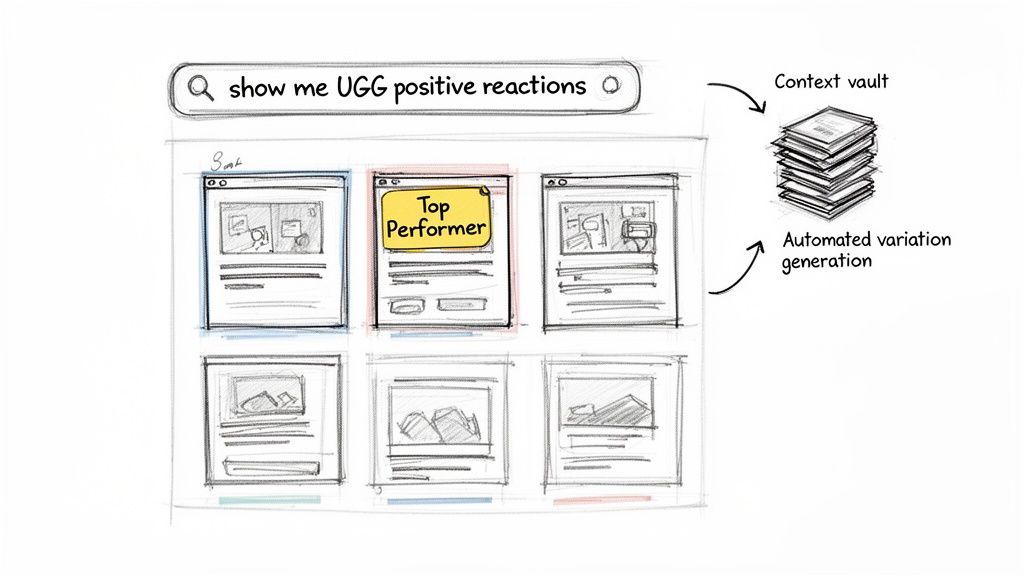
This isn’t just about finding files faster. It’s a workflow that connects strategic asset discovery with rapid content generation, all in one place.
Building Your Creative Assembly Line
The goal here is to stop thinking in terms of a linear, one-and-done production process. Instead, you want to build a modular, "assembly line" approach to creative. Your video library shouldn't be a dusty archive; it needs to be a dynamic source of reusable building blocks for your next big ad.
With Sovran, you can turn your content library into a powerful video asset management system. We have a whole guide on how to set one up, which you can check out here: video asset management system. This setup lets you tag clips, search with simple phrases, and quickly pull elements together for new ads.
Imagine you need to find all your UGC clips that show someone having a genuinely positive reaction to your product. Forget spending hours scrubbing through footage. You just search for "UGC clips with happy people," and Sovran instantly pulls every relevant video, ready to go.
Maintaining Brand Consistency at Scale
One of the biggest headaches when you're pumping out creative at volume is keeping everything on-brand. When you’re moving fast, it’s far too easy for messaging to get muddled or visuals to stray from your brand guidelines.
This is exactly why we built a feature like Sovran’s Context Vault. It's a central hub where you can store all your brand guidelines—approved copy, logos, color palettes, and even scripts from winning ads. When the AI generates new video variations or suggests text overlays, it references this vault to make sure every single asset is perfectly on-brand.
This means you can:
Apply consistent text overlays and CTAs across dozens of video clips in a single batch.
Ensure every ad uses the right font, colors, and logo placement without needing a manual review each time.
Generate ad copy that sticks to your proven messaging and unique brand voice.
The real game-changer is turning one creative concept into a massive testing opportunity. You can use Sovran to spin up dozens of video variations to quickly find out what resonates. Then, take those winning clips and turn them into flipbooks for a completely new round of A/B tests on different channels.
From Winning Video to Winning Flipbook
Your workflow should become a continuous loop: create, test, and repurpose. You start by generating a high volume of video ads to see what sticks with your audience. Once you have a clear winner—a video with great engagement and strong conversion metrics—you don't just let it ride off into the sunset.
You get more mileage out of it.
Take that exact video and use one of the methods we covered to transform it into an interactive flipbook. This new format lets you re-engage your audience on platforms where a flipbook might crush it, like in an email campaign or as an interactive element on a landing page.
This is how you turn your video to flipbook conversion from a simple technique into a data-driven strategy that squeezes every drop of value from your best-performing creative.
Common Questions About Video to Flipbook Workflows
As you start turning videos into assets, you're bound to run into some practical questions. We see the same ones pop up all the time with marketers tackling video to flipbook projects.
Here are some straightforward answers to help you avoid common mistakes and get to a high-quality asset faster.
What Is the Best Video Length for a Good Flipbook?
For both printable and digital flipbooks, we’ve found the sweet spot for video length is between 3 to 10 seconds.
This gives you just enough time to capture a complete action—like a product unboxing or a quick reaction shot—without creating an overwhelming number of frames.
Think about it this way: a standard 5-second video shot at 30 frames per second (fps) gives you 150 individual frames. That’s a manageable number for a physical, pocket-sized flipbook. It also keeps your digital version loading quickly so you don't lose the user's attention. Shorter is fine, but go much longer, and the final asset can start to feel clunky and slow.
Can I Add Sound to My Video-Based Flipbook?
A paper flipbook can't play sound, obviously, but an interactive HTML5 flipbook absolutely can. This is one of the biggest advantages of going digital and a huge opportunity for performance marketers.
When you use a platform like Flipsnack or Publuu, you can embed audio that plays automatically when a page is turned or when a user clicks an element. You can add the original video’s soundtrack, a voiceover, or just some background music. This creates a much richer, more immersive experience than silent images ever could.
For marketers, sound is a powerful tool. Adding a voiceover or the original audio from a testimonial clip transforms your flipbook from a simple visual gimmick into a persuasive, multi-sensory asset that can tell a more complete story.
Which Video File Format Is Best for Conversion?
Just stick with MP4. It’s the gold standard for a reason.
MP4 files are universally accepted by pretty much every video-to-flipbook tool out there, both online and on the desktop. More importantly, they give you the best balance between high video quality and a compressed file size.
While some converters might take other formats like MOV or AVI, you’re just asking for compatibility headaches or needlessly large files. If you're exporting short clips from a creative platform like Sovran, always choose MP4 as your output. It gives you maximum flexibility to repurpose that clip into a flipbook or any other asset down the road.
How Can I Track the Performance of My Digital Flipbook?
This is where the real value comes in for performance-focused teams. Professional digital flipbook platforms like FlowPaper offer surprisingly robust built-in analytics, giving you a clear window into user engagement.
You can track essential metrics that tell you exactly how your audience is interacting with your content:
Total Views: See how many times your flipbook has been opened.
Time Spent Per Page: Identify which pages are grabbing attention and which ones are getting skipped.
Clicks on Embedded Links: Measure if users are clicking your CTAs, product links, or embedded videos.
Many of these platforms also integrate directly with Google Analytics, letting you feed this engagement data right into your broader marketing analysis. This data is critical because it allows you to A/B test different flipbooks—each created from a different video hook—to see which creative concepts actually drive action.
Ready to scale your ad creative and find winning concepts 10x faster? Sovran automates the entire video ad production workflow, from asset management and AI-powered generation to launching campaigns directly on Meta and TikTok. Stop the manual grind and start making data-driven creative decisions at scale. Start your 7-day free trial on sovran.ai and see the difference.

Manson Chen
Founder, Sovran
Related Articles
How to Turn Link Into Video: Ads That Convert in 2026
Learn how to turn link into video for Meta & TikTok ads. Leverage AI to scale creation, boost ROI, and succeed in 2026.
8 High-Converting Static Ads Examples for 2026
Discover 8 high-performing static ads examples from top apps. Learn to create text-overlays, testimonials, and lifestyle ads that convert.
Your Guide to a Social Media Ad Generator in 2026
Discover how a social media ad generator revolutionizes creative production. Learn to automate video ads, scale testing on Meta & TikTok, and drive performance.