Your Guide to a Video Asset Management System
Let's be honest. For most performance marketing teams, your video files are a complete mess.Raw footage lives on one hard drive, the "final_final_v3.mp4" is...
Jump to a section
Let's be honest. For most performance marketing teams, your video files are a complete mess.
Raw footage lives on one hard drive, the "final_final_v3.mp4" is buried in a shared folder, and that one perfect clip you need is probably lost in someone's email chain from six months ago. Trying to find anything is a frustrating scavenger hunt that kills your creative flow and slows down campaign launches.
Now, imagine a different reality. Picture a perfectly organized creative library where every single video file, every variation, and every component is exactly where it should be, labeled and ready to go. That's what a Video Asset Management System (VAMS) brings to the table. It's an intelligent hub built specifically to manage the entire lifecycle of your video content.
It's More Than Just Cloud Storage
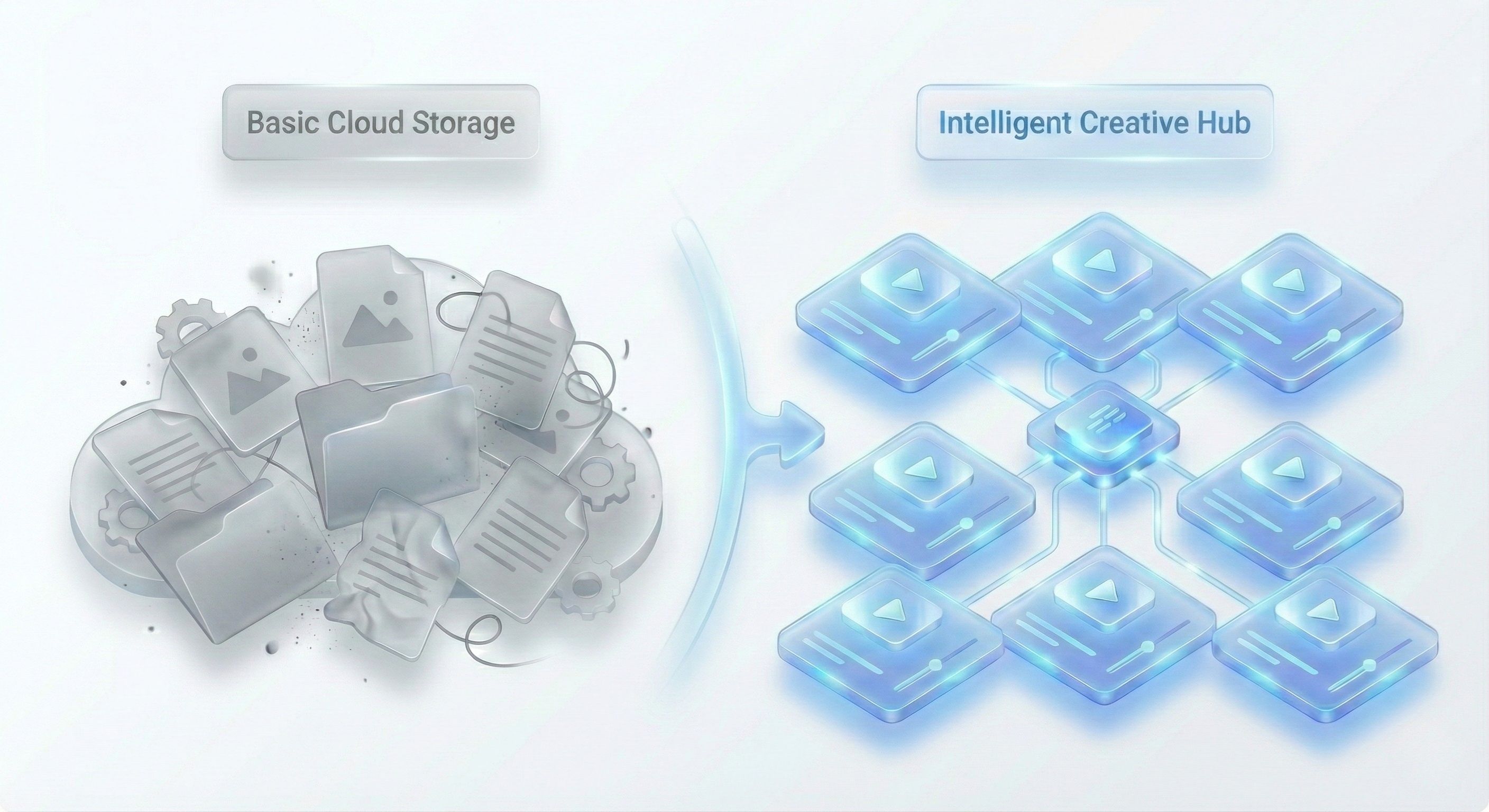
This is a key distinction. Your Google Drive or Dropbox is just a digital filing cabinet—a place to dump files. A VAMS, on the other hand, is a purpose-built system with tools designed to solve the unique headaches that video-heavy teams face every single day.
It's built from the ground up to eliminate common bottlenecks like:
Wasted Time: Hours spent digging for the right file or a specific version.
Version Control Nightmares: End the confusion over which file is the actual final version.
Repurposing Roadblocks: The constant struggle to find and reuse high-performing ads.
Brand Inconsistency: Accidentally using old logos, fonts, or outdated messaging.
Think of it this way: a VAMS takes the core principles of digital asset management best practices and applies them specifically to the chaotic, complex world of video.
A Quick Look: Manual vs. VAMS Workflows
To see just how big the difference is, let's compare a few common tasks. The efficiency gains become obvious pretty quickly.
Manual vs VAMS Video Workflow Comparison
Task | Manual Workflow (Shared Drive) | VAMS-Powered Workflow |
|---|---|---|
Find a Clip | Manually search through nested folders with vague file names. | Type "UGC," "testimonial," or "unboxing" and get instant results. |
Get Feedback | Email links back and forth, collect notes in a separate doc. | Leave time-stamped comments directly on the video preview. |
Check Versions | Compare file names like "ad_v2_final" and "ad_v3_FINAL_real." | See a complete, linear history of every version in one place. |
Share Finals | Generate and track multiple sharing links for different platforms. | Create one secure, trackable link with permissions and an expiration date. |
The takeaway is clear. One approach is pure friction, while the other is built for speed and scale.
A Growing Market Driven by Real Need
This isn't just a niche tool for big studios. The demand for VAMS is exploding because every brand is now a video-first brand.
The global video management system market was valued at USD 17.12 billion in 2024 and is projected to reach USD 108.77 billion by 2034, according to recent industry analysis.
A VAMS isn't just a library; it's an engine. It transforms a static pile of files into a dynamic, searchable, and scalable resource that fuels your marketing velocity and creative output.
Ultimately, a video asset management system is a must-have for any modern marketing team that wants to produce high-performing creative at scale. It cuts out the friction, speeds up your workflows, and makes sure every video asset you create delivers maximum value.
Core Features That Drive Marketing Velocity
A modern video asset management system is way more than a digital library; it's an active partner in your creative process. The right features don't just organize your content—they smash the daily bottlenecks that kill momentum. They turn your team’s creative energy into measurable marketing velocity.
Let's break down the core capabilities that make this happen.
AI-Powered Tagging and Intelligent Search
Imagine a marketer needs to find every video asset with a "customer testimonial" that happens in a "retail setting." In a normal shared drive, this is a complete nightmare. They’d have to manually scrub through dozens, if not hundreds, of poorly named files, just hoping they remember the right clips.
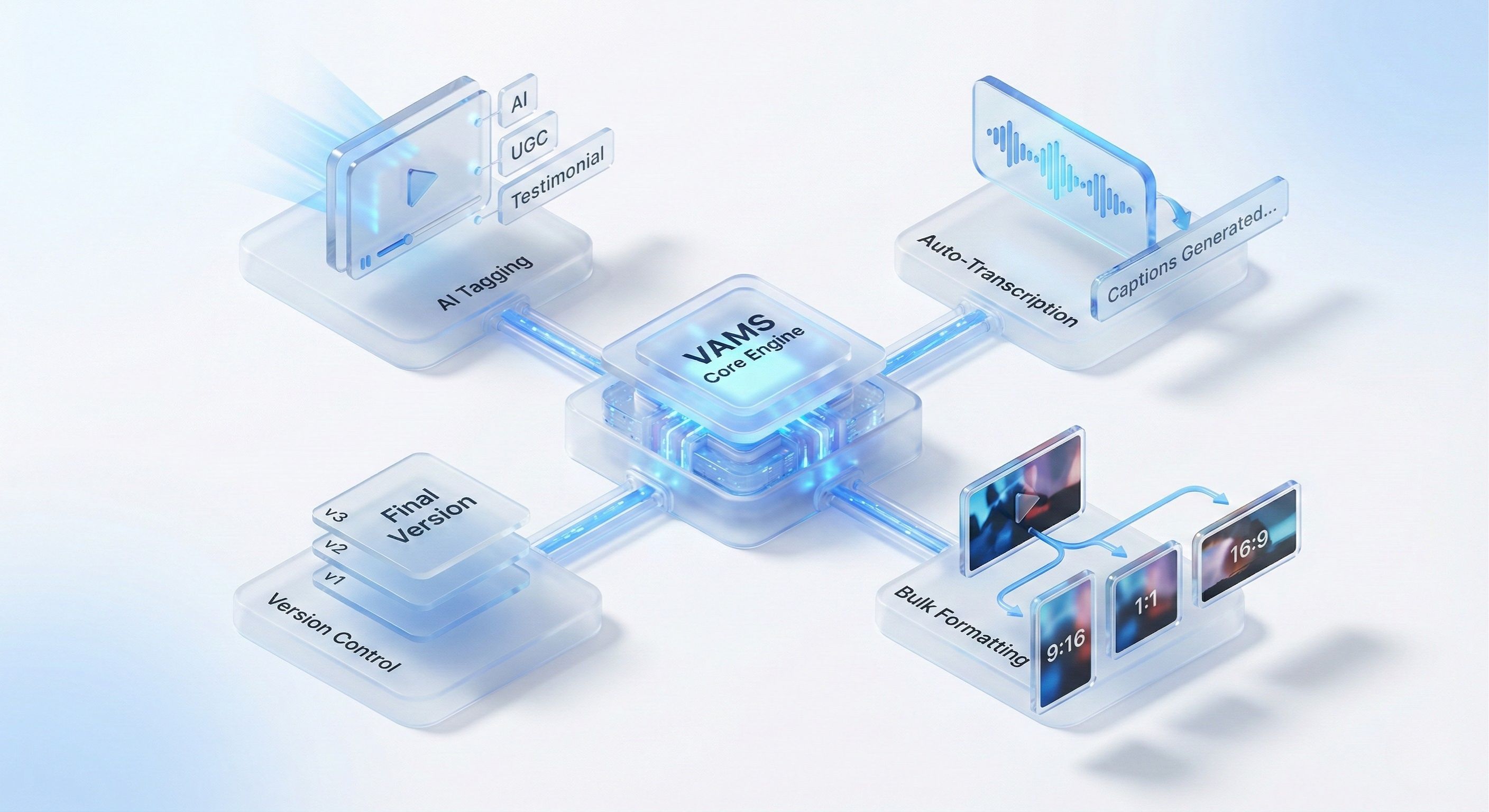
A VAMS with AI-powered tagging flips this script. When a video gets uploaded, AI analyzes its content and automatically slaps on relevant tags like "testimonial," "retail," "in-store," and can even spot specific products or emotions. Just like that, the marketer's search takes seconds, not hours.
Think of this intelligent search function as a super-powered Google for your creative library. It gets what you mean, letting your team find exactly what they need, right when they need it. This frees up so much time for actual strategic work instead of digital archeology.
Automated Transcription and Subtitles
Let's be real: a massive amount of social media video is watched with the sound off. Manually creating subtitles for dozens of ad variations is a tedious, soul-crushing task that grinds campaign launches to a halt. This is where automated transcription is an absolute game-changer.
With this feature, a VAMS can instantly pull accurate text from your video's audio. From there, your team can burn the subtitles right into the video file or export them separately.
A team can adapt an entire campaign of 20 video ads for sound-off platforms like Meta and TikTok in minutes. This single feature massively accelerates a team's ability to launch content that actually performs in silent-viewing feeds.
Seamless Version Control
Every creative team knows the pain of files named "final_ad_v2," "final_ad_v3_for_review," and the dreaded "final_final_REAL.mp4." This chaos leads to confusion, wasted effort, and the very real risk of running an old or unapproved ad. A proper video asset management system kills this problem with seamless version control.
Instead of creating endless duplicate files, a VAMS stacks every revision of an asset in one clean place. This creates a clear, linear history of every change, allowing anyone on the team to:
View Past Versions: Easily compare the current version to previous ones.
Restore an Old Version: Instantly roll back to an earlier iteration if a new direction isn’t panning out.
Track Feedback: See who changed what and when, giving you complete transparency.
This ensures everyone is always working from the correct file. It establishes a single source of truth for all creative and puts an end to costly versioning mistakes.
Bulk Rendering and Formatting
So, your best-performing video concept needs to be repurposed for different platforms—a 9:16 for TikTok, a 1:1 for the 'gram feed, and a 16:9 for YouTube. Manually re-editing and rendering each format is a huge time suck.
Bulk rendering lets you turn one core video into dozens of optimized variations automatically. You can apply different text overlays, swap out calls-to-action, or change background music across an entire batch of videos at once. This gets even more powerful when you pair it with emerging AI video creation tools that can generate new visual elements on the fly.
This kind of automation transforms a multi-day editing marathon into a task that takes just a few minutes. It enables teams to test creative at a scale that was pretty much unimaginable before.
Alright, let's move past the tech specs for a second. The real magic of a video asset management system isn't in the features list—it's what it actually does for your creative and performance teams on the ground. This isn't just about cleaning up your folders; it’s about completely changing how your teams create, test, and ultimately win.
A proper VAMS is designed to smash through those old, clunky workflows that kill productivity and burn budget. It's no wonder the video management software market is projected to hit USD 36.9 billion. Businesses are realizing that basic cloud storage just doesn't cut it anymore. They need specialized tools that give them a real competitive edge.
These systems deliver real, measurable results, and it all boils down to three core areas.
Pillar 1: Supercharge Your Creative Speed
Think about it. A huge cultural moment drops on TikTok. With a messy, shared-drive setup, your team wastes the entire day just digging for the right clips. By the time they frankenstein something together, the trend is over. Your ad is late to the party, and it shows.
Now, imagine that same scenario with a VAMS. The team instantly searches for assets tagged "UGC," "viral audio," or "product demo." In seconds, they pull the perfect user-generated clip, a branded end card, and a proven CTA. They stitch it together and get it live while the trend is still peaking.
An agile team can jump on a social media trend and launch a relevant, high-impact video ad in a few hours, not days or weeks. That speed is a massive competitive advantage. It lets you ride the cultural wave instead of getting washed away by it.
This kind of speed is only possible when you have a smart, centralized library. It kills the digital scavenger hunts that drain creative energy and empowers your team to move at the speed of culture.
Pillar 2: Squeeze Every Drop of ROI from Your Creative
Let's be honest, high-quality video production isn't cheap. The single biggest waste of money is shooting new assets from scratch when you've already got gold sitting in your archives, completely forgotten. A VAMS turns your library from a content graveyard into a treasure chest of reusable parts.
Take a single, killer hook that consistently stops the scroll. Without a VAMS, that clip is probably lost forever in a folder named "Final_V2_USE_THIS_ONE." With a VAMS, you can find it in a heartbeat, pair it with 20 different product shots or testimonials, and render out a whole new batch of ad variations.
The math is painfully simple:
Cost to Reshoot: Paying for talent, a videographer, and an editor for one new hook.
Cost to Repurpose: Pretty much zero.
By reusing that one proven asset across 20 new ads, you've essentially saved the entire production cost 20 times over. This stretches your creative budget way further, letting you test more, learn faster, and find more winners. It’s the kind of efficiency that dynamic creative optimization tools are built to amplify.
Pillar 3: Lock Down Brand Consistency, No Matter How Fast You Grow
As you scale your team and your ad spend, keeping everyone on-brand becomes a nightmare. Old logos, wrong fonts, and outdated taglines start creeping into your ads. It looks sloppy, dilutes your brand, and confuses your customers.
A VAMS fixes this by becoming the single source of truth for all your creative assets.
When every team member is pulling from the same library of approved logos, brand colors, official product footage, and legal disclaimers, the risk of going off-brand disappears. Every ad that goes out the door is guaranteed to be consistent, professional, and on-brand, strengthening your market presence with every single impression.
Choosing the Right Video Asset Management System
Picking a video asset management system isn't just about comparing feature lists. It's a strategic move. The best platform for you isn't the one with the most bells and whistles; it’s the one that seamlessly slots into your team's workflow and actually solves your biggest headaches. Make the wrong call, and you're stuck with a pricey tool nobody uses. But the right one? It's a massive force multiplier for your whole creative operation.
This isn't a small decision, especially when you look at the market. The video management system market was valued at USD 17.12 billion in 2024, with projections to reach USD 108.77 billion by 2034, reflecting massive industry growth.
So, how do you make the right choice? You need a practical way to evaluate your options, focusing on what your team actually needs.
Define Your Core Requirements
Before you even book a demo, you have to get real about your own pain points. A generic checklist won't do you any good. Instead, zero in on the critical functions that will make the biggest difference to your team’s daily grind and your long-term goals.
Start by asking the hard questions:
Integration Capabilities: Does this platform play nice with the tools we live in every day? I'm talking about project management software like Asana or Monday.com, your creative stack like Adobe Creative Cloud, and most importantly, your ad platforms like Meta and TikTok.
Scalability: Can this thing handle our library a year from now when it's three times the size? You need a solution that grows with you, not one that forces you into a massive, painful migration down the line.
User Experience and Adoption: Is the interface actually intuitive? If it’s clunky or confusing, your team will just fall back on old habits—and that shiny new investment will gather dust.
The goal is to choose a partner, not just a product. The right video asset management system should feel like a natural extension of your team, empowering them to do their best work faster and more efficiently.
Create a Practical Evaluation Checklist
Once you have a solid grasp of your core needs, you can build a more detailed checklist to stack up different platforms. As you evaluate, it helps to have a baseline understanding of general digital asset management best practices to see how each solution measures up against industry standards.
The table below is a great starting point. It’s a VAMS Evaluation Checklist designed to help you ask the right questions and focus on what truly matters for your team.
VAMS Evaluation Checklist
Evaluation Criteria | Key Questions to Ask | Importance (High/Medium/Low) |
|---|---|---|
Workflow Automation | Can we build automated pipelines for tasks like subtitle generation, formatting, and pushing ads to platforms? | High |
Search and Discovery | How powerful and intuitive is the search function? Can it find assets based on visual content, spoken words, or custom tags? | High |
Collaboration Tools | Does it offer time-stamped commenting and a clear version control history to streamline feedback and approvals? | Medium |
Security and Permissions | Can we set granular user permissions to control who can view, edit, or download specific assets? | High |
Customer Support | What level of onboarding and ongoing support is provided? Is there a dedicated success manager? | Medium |
Using a structured approach like this helps you cut through the marketing fluff and focus on the real, tangible value each video asset management system can bring to your team. That clarity is everything when you're making a decision that will drive your success and deliver a serious return on investment for years to come.
Putting Your VAMS to Work for Maximum Impact
A killer video asset management system is only as good as its setup. Just buying the software is like owning a race car but keeping it parked in the garage. To really get the engine roaring, you need to weave the VAMS into your team’s day-to-day grind. This is all about building a solid foundation that makes your new tool a genuine game-changer from day one.
And it doesn't start with the tech—it starts with logic. The single most important first step is creating a clear, consistent structure for how you organize and find your assets. This gets everyone on the team speaking the same language, making the system feel intuitive and stopping it from turning into just another messy, glorified Dropbox folder.
Nail Down Your Naming Convention and Tagging System
Before you even think about uploading a single file, you need to map out your organizational blueprint. That means creating a standardized file naming system and a smart tagging taxonomy. Think of it as building the Dewey Decimal System for your creative library; it’s the logic that makes everything instantly findable.
A solid naming convention kills all the guesswork. Instead of a mess like "Final_Ad_Blue_BG.mp4," a structured name gives you all the info at a glance:
YYYYMMDD_CampaignName_Platform_Dimension_Version20241026_FallPromo_Meta_1080x1920_v01
Next, build out a tagging taxonomy that actually reflects your business goals. This isn't just about simple labels; it's about categorizing assets based on how you think about your marketing.
Campaign-Specific Tags: "Q4-Holiday-Sale," "Summer-UGC-Push"
Creative Element Tags: "Unboxing," "Testimonial," "Product-Demo"
Performance Tags: "Top-Performer," "Winning-Hook," "Test-Variant"
Usage Rights Tags: "UGC-Approved," "Licensed-Music-2024"
A well-designed taxonomy isn't just for organization—it's a strategic asset. It turns your library from a passive storage closet into an active, searchable database that tells you which creative ingredients are actually driving performance. This is the bedrock of a successful video asset management system.
Set Up Automation Pipelines to Your Ad Platforms
Once your house is in order, it's time to cut out the grunt work by hooking your VAMS directly into your ad channels. The dream is one-click deployment. No more downloading, re-uploading, and manually setting up ads on every platform. This is where your asset library connects directly to your execution engine.
For instance, you can build automation pipelines that link your VAMS straight to Meta Ads Manager or the TikTok Ads platform. A media buyer could then whip up an ad variation inside the VAMS and push it live to a campaign without ever leaving the system. When you get this right, you can even automate the creation of tracking parameters and ad naming, which keeps your data clean and saves a ridiculous amount of time.
Get the Team On Board and Excited
New tech doesn’t change habits—people do. The final, and honestly most critical, piece of the puzzle is getting your whole team to actually use and love the new system. A VAMS touches everyone, from creative directors and video editors to performance marketers and campaign managers. Every single person needs to see exactly how this makes their job easier.
When you're rolling it out, focus the training on workflow wins, not just a boring tour of features.
For Creatives: Show them how version control ends the "final_final_v3.mp4" nightmare and how centralized feedback gets approvals done way faster.
For Marketers: Demo how they can find a winning ad, grab its best elements, and launch 10 new tests in minutes instead of hours.
For Leadership: Connect the dots to the bottom line by showing the ROI from lower production costs, faster creative output, and rock-solid brand consistency.
By focusing on these three pillars—structure, automation, and people—you turn your VAMS from a software subscription into a core strategic advantage. This intentional rollout is how you squeeze every last drop of value out of your investment and see real, measurable results across the board.
Putting Your Video Asset Management System to Work
Alright, enough with the theory. Let's get into the good stuff—seeing how a video asset management system actually works in the real world. This isn't just about storing files; it's about turning your creative library into a full-blown production engine that helps performance marketing teams test and iterate at lightning speed.
I'm going to walk you through a workflow we see all the time. The mission? To go from a handful of video ideas to hundreds of testable ad variations, and do it in a tiny fraction of the time it would take by hand. The secret sauce here is a modular creative framework.
The Hook-Body-CTA Assembly Line
Picture this: your creative team has been busy, but instead of making complete, finished videos, they've been creating individual components. Think of them as creative building blocks.
You've got:
10 Hooks: Different opening clips, all designed to stop the scroll.
5 Body Segments: The main part of the ad, showing off the product or explaining the core message.
4 CTAs: A few different calls-to-action to wrap things up.
Each of these clips gets uploaded into the video asset management system and tagged with something descriptive, like hook-UGC-style, body-feature-demo, or CTA-discount-offer. That simple step turns a messy folder of video files into a clean, searchable library. With just these parts, you can now create 200 unique ad combinations (10 x 5 x 4).
A video asset management system transforms your creative assets from finished, monolithic files into a flexible inventory of interchangeable parts. This modular approach is the key to unlocking scalable and data-driven advertising.
The diagram below shows the core steps you need to take to get your VAMS ready for this kind of high-speed production.
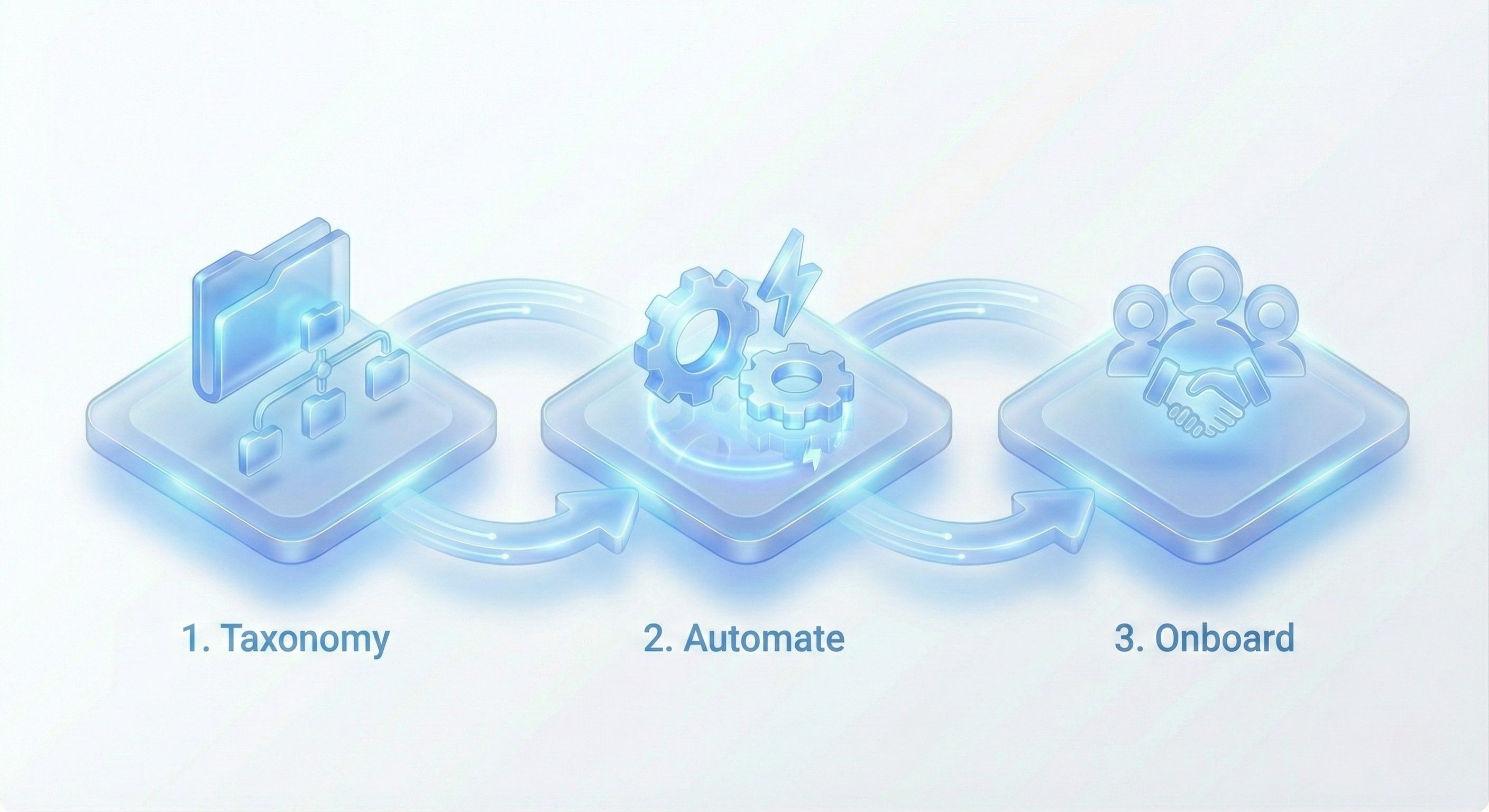
Nailing this flow—defining your taxonomy, automating workflows, and getting your team on board—is what turns your VAMS from a simple storage tool into a production powerhouse.
From Assembly to Action
Now for the magic. A marketer can set up a workflow to automatically assemble and render all 200 of those ad variations in just a few minutes. They just pick the tagged components they want to combine, and the system stitches them together, adding any branding, text overlays, or subtitles automatically. This is a game-changer for effective video editing for social media, where you need to pump out tons of content fast.
What used to take a video editor days of tedious, manual work is now an automated, hands-off process. The VAMS basically becomes a creative factory, churning out a massive volume of ads ready for testing.
And the final step closes the loop. Those 200 newly rendered ads aren't just dumped into a download folder. They're pushed directly from the video asset management system into a new Meta Ads campaign, already set up with proper naming conventions for clean A/B testing.
This is a perfect example of how a VAMS fuels a truly scalable, data-driven ad strategy. It empowers teams to stop testing just a few ideas and instead explore hundreds of possibilities, helping them find the winning combinations that lead to profitable campaigns, faster.
Still Have Questions About VAMS?
Thinking about adding a video asset management system to your workflow? It's a big step, so it’s totally normal to have a few questions. We've gathered the most common ones we hear from marketing and creative leaders to give you clear, straight-up answers.
Let's cut through the noise and get you the info you actually need.
Isn't a VAMS Just a Fancy Google Drive or Dropbox?
Not even close. While tools like Google Drive are great for basic file storage, a VAMS is a purpose-built machine for the entire video lifecycle. It’s packed with features that general storage platforms just don’t have, like AI-powered search, automatic transcriptions, and direct pipelines into your ad platforms.
Think of it like this: Google Drive is a storage locker. You can put stuff in it, and it stays there. A VAMS is a professional video editing suite—it not only holds your content but gives you all the tools to create, collaborate, and launch your work at lightning speed.
A VAMS is built to solve the exact problems video teams face, making you faster and more collaborative in ways generic cloud storage can't even touch.
Is This Kind of System Only for Big Enterprise Companies?
That used to be the case, but not anymore. Today, any team that's serious about producing video content at scale will see a massive return. We're talking direct-to-consumer brands, performance marketing agencies, and even scrappy, fast-growing startups.
Here's the gut check: if your team is constantly hunting for files, getting tangled in versioning nightmares, or struggling to repurpose winning content, a VAMS is a smart move. Modern platforms are cloud-based and have pricing that scales right alongside your business, making them accessible for teams of all sizes.
How Technical Do I Need to Be to Use a VAMS?
Good news: modern VAMS platforms are built for marketers and creatives, not IT wizards. The whole experience is designed to be intuitive. Expect simple drag-and-drop interfaces, search bars that actually work, and clear buttons for rendering or publishing your videos. You definitely don’t need to be a developer to get a ton of value out of it.
Any solid provider will also walk you through a guided onboarding to get your folder structures and key integrations set up. The goal is to get your team up and running almost immediately, without a steep learning curve getting in the way of your next winning ad.
Ready to stop the file-hunting chaos and turn your video library into a high-speed production engine? Sovran automates the production, iteration, and launching of video ads for Meta and TikTok, helping you find profitable winners up to 10x faster. Start your 7-day free trial and see the difference.

Manson Chen
Founder, Sovran
Related Articles

10 Digital Asset Management Best Practices for 2026
In the world of performance marketing and ad creation, speed and efficiency are everything. Creative assets, from video clips and ad variations to brand logos...
Master AI Video Ad Production Workflow
Imagine whipping up a video ad in minutes, without sacrificing quality. That’s the promise of AI video ads—they draft scripts, select visuals, handle...