What Is Quota Management and Why It Matters for Ad Ops
Jump to a section
Your campaign is ready, the creative team has the variations queued, and then the platform stops accepting new renders because some quiet limit got crossed. A media buyer sees the launch stall at variation 47, an editor waits on a blocked export, and everyone starts asking the same question, why did this happen now? That's the operational reality of quota management.
Quota management is the formal process of setting, tracking, and adjusting quantitative limits over a defined period. In sales, it measures performance against monthly, quarterly, or annual goals, and in ad ops or AI creative production, it does the same thing for renders, API calls, storage, and asset generation. The point isn't to make work harder. The point is to keep execution fast without letting costs, load, or scarce resources spin out of control.
When Quotas Stop Your Campaign Cold
The stall rarely looks dramatic at first. A performance marketer queues up a batch of 200 Meta variations, the creative tool starts generating, and the launch rhythm feels normal until the system refuses request number 47. The team didn't run out of ideas, it ran out of quota.
That's why quota management matters before anyone debates definitions. It gives teams a way to set, track, and adjust limits over a defined period, whether the unit is monthly ad renders, API calls, or asset credits. In sales terms, quota attainment is often calculated as actual results divided by target, but the same logic applies operationally, if you planned for 200 renders and only 47 got through, you can measure the gap instead of guessing at it. Industry guidance also says quotas work best when they're based on historical performance and market realities, not arbitrary targets, because they need to reflect what the team can ship.
Why ad ops should care
Quotas act as both a planning tool and a control system. Leaders use them to see whether a team is ahead or behind, then rebalance territories, incentives, forecasts, or in this case production priorities. That matters because quota plans often miss their intended performance levels, and a 2024 compensation study cited by QuotaPath found that 91% of surveyed companies failed to achieve 80% or more of their quota target. The exact number comes from sales research, but the operational lesson carries over cleanly, quota plans fail when they're disconnected from real throughput.
Practical rule: if a limit can stop a launch, it isn't just a finance setting. It's an execution constraint.
For ad teams, that means quota management isn't an abstract admin task. It's the layer that decides whether a campaign can keep moving when creative testing heats up, when bulk uploads spike, or when an AI workflow starts consuming renders faster than anyone expected.
The Architecture of a Quota System
Quota and rate limiting solve different problems, even though both can stop work. A quota system sets the total amount a team or platform can use, while the surrounding enforcement logic decides whether each request fits within that limit. In AI-driven creative production, that boundary has to cover render credits, API calls, storage, and asset generation without letting one workflow consume capacity meant for another.
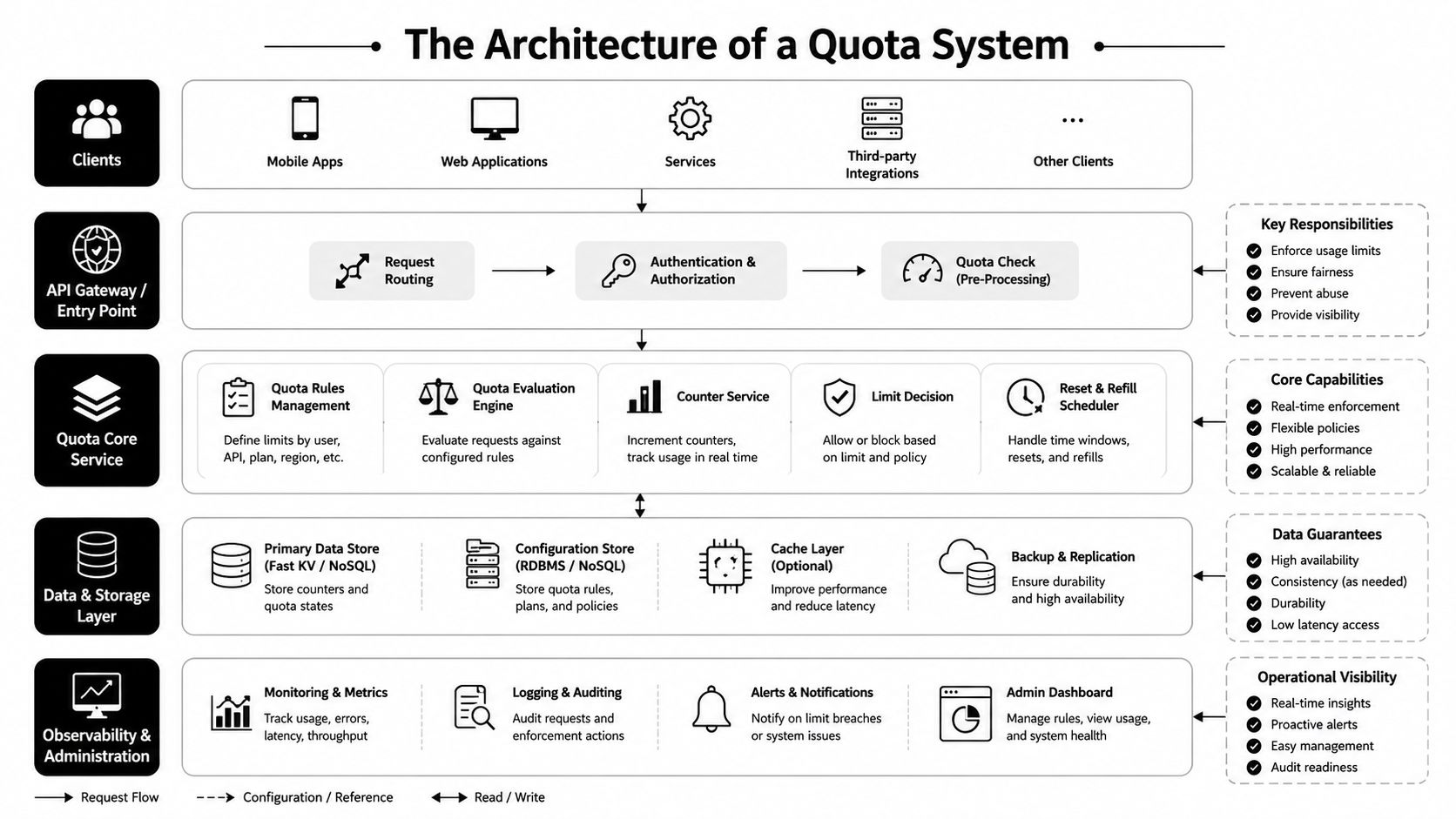
A practical quota schema usually tracks entity_type, resource_type, limit_value, period, and overage_policy. That structure lets one platform apply different rules to different resources, which matters when a creative team is managing multiple campaign queues at once. A render budget may follow one rule, while API usage or storage follows another.
Allocation is not the same as enforcement
A quota system has to separate allocation from enforcement. Allocation checks current usage, subtracts expired reservations, and figures out how much headroom is left. Enforcement decides whether the request can proceed now.
OpenStack Neutron follows that kind of flow, checking usage and limits before it saves a reservation. That sequence helps prevent race conditions and overcommit under concurrent load, which is the failure mode when a campaign manager, a scheduler, and an AI renderer all hit the same resource at once. If those steps are collapsed into one check, the system can approve work that no longer has room.
The operational payoff is straightforward. Allocation answers whether capacity still exists. Enforcement answers whether this request should pass now. Keep them separate and you can reserve capacity for the work that cannot slip.
Hard ceiling versus entry speed
Quota is the hard ceiling. Rate limiting controls how quickly requests are allowed through. A creative platform might allow a fixed number of API calls or renders over a billing period, while still slowing bursts so one script does not flood the service.
For ad ops, the difference is practical, not academic. If the goal is to cap the total number of video renders in a production cycle, quota is the right control. If the problem is a bulk upload hammering the API, rate limiting is the right guardrail. If both risks exist, both controls need to be in place.
The result is a resource-control layer, not just a billing setting. It keeps service quality intact, reduces overload, and leaves room for higher-priority jobs when demand spikes.
Quotas Versus Rate Limits
A quota sets a total ceiling. A rate limit sets a speed limit. Both can stop a request, but they solve different problems, and ad teams feel that difference fast when renders, API calls, or asset generation start backing up.
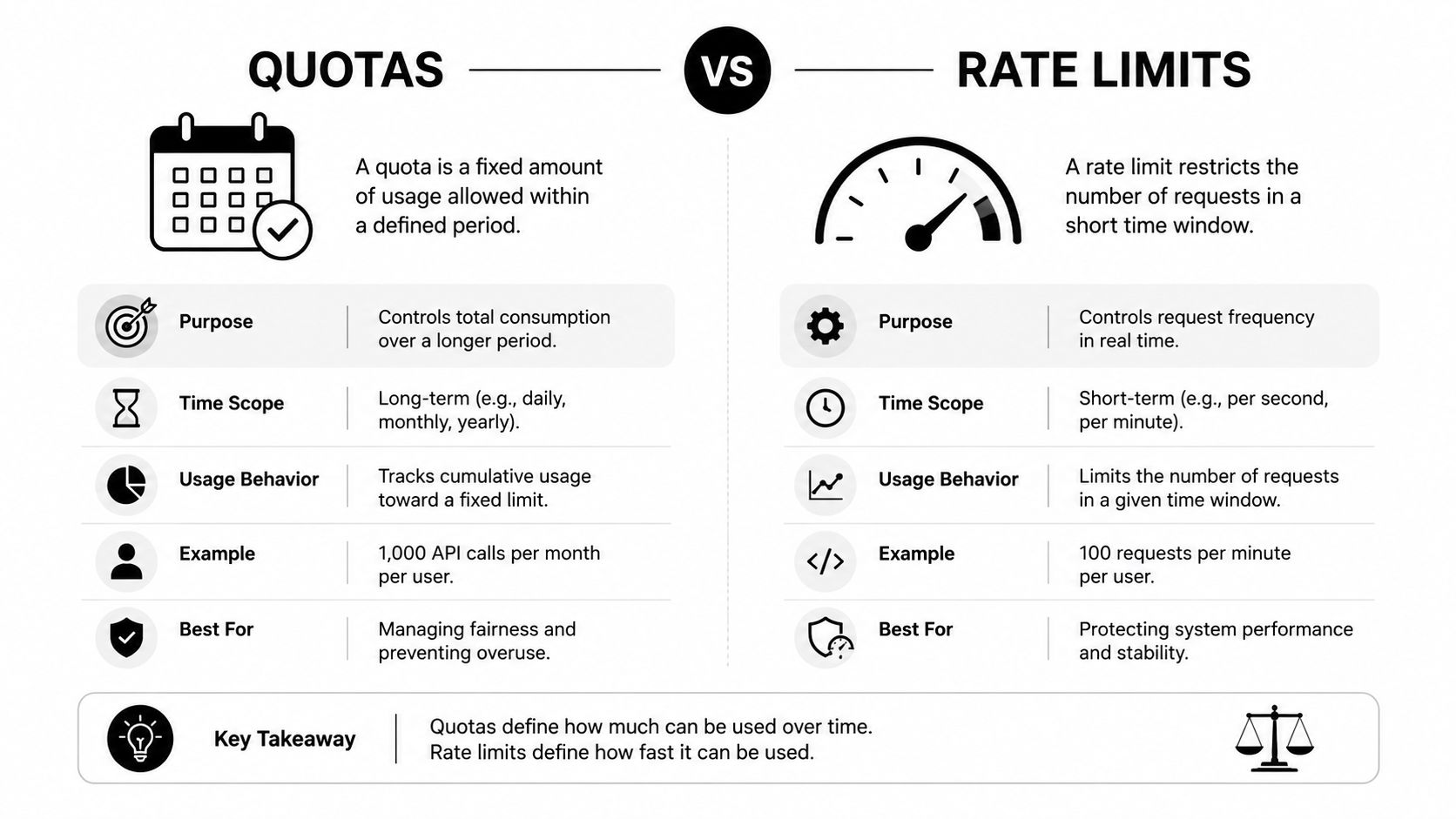
A creative platform can allow a fixed amount of use over a billing period and still slow bursts so the service does not get overwhelmed by traffic spikes. The quota decides how much total work is allowed. The rate limit decides how fast that work can enter the system.
What changes for ad ops
The operational choice is simple. If you need to cap the total number of video renders in a billing period, quota is the control you care about. If you need to stop a script from hammering the API during bulk upload, rate limiting is the guardrail that matters. If both risks exist, both controls need to be active.
The user experience is different too. A rate limit usually means the request can be retried after a pause, which is why bursty automation often recovers on its own. A quota means the ceiling has been reached, so the team needs a different plan, a workflow change, or a reset in the next period. Ad ops teams that treat those blocks as the same problem waste time fixing the wrong layer.
That separation becomes obvious in platform integrations, especially when Meta workflows sit inside a larger automation stack, as shown in this guide to Facebook Ads API workflows. The control that protects a launch window is not always the control that protects the platform itself.
The rule of thumb
If the issue is too much right now, you are probably dealing with rate limiting. If the issue is too much overall, you are dealing with quota.
That rule keeps teams from chasing the wrong fix. A retry loop will not help when the monthly ceiling is already gone.
Common Quota Types in Creative Scaling
Ad ops teams usually run into four quota types at once, and the bottleneck can move from one to another without warning. API limits slow down campaign updates, render quotas cap how many variants you can produce, AI-generation quotas govern how much new material you can synthesize, and asset limits determine how long your library can keep growing. Each one changes the shape of the workflow.
| Quota Type | Typical Range | What Happens When You Hit It |
|---|---|---|
| API calls | Request limits tied to platform policy | Bulk edits slow down or fail until the window resets |
| Monthly renders | Plan-based production ceiling | New creative variations stop until capacity renews or expands |
| AI generation | Usage credits for B-roll, voice, or captions | Experimentation pauses or gets rationed across the team |
| Asset storage | Library or file capacity | Teams archive, delete, or consolidate files to keep working |
What each quota does to the workflow
API call limits hit real-time work first. If a media buyer wants to push dozens of campaign changes at once, the API quota decides whether those changes land cleanly or have to wait. Monthly renders shape creative testing velocity, because each render spent on one concept is a render you can't use elsewhere. AI-generation quotas control experimentation, especially when teams want to test multiple hooks, voiceovers, or B-roll combinations before launch.
Asset limits are less visible until they become painful. Once storage fills up, the team starts deleting useful clips, duplicating files across folders, or wasting time hunting for the “latest” version of a scene. That's where quota management stops being a technical concept and becomes a workflow tax.
Where to look first
If your team wants to audit bottlenecks, start with the resource that gets touched most often. That's usually API usage in reactive campaign work, and render or generation quotas in creative production. The fastest way to reduce friction is to identify which quota gets exhausted first, then decide whether the fix is process, pruning, or a higher limit.
Teams that scale ad production well don't treat every quota as the same problem. They map each one to a specific task, then decide where to spend scarce capacity.
For a deeper look at how production volume compounds, see this breakdown of how to scale ad creative production.
Monitoring and Enforcing Quotas in Real Time
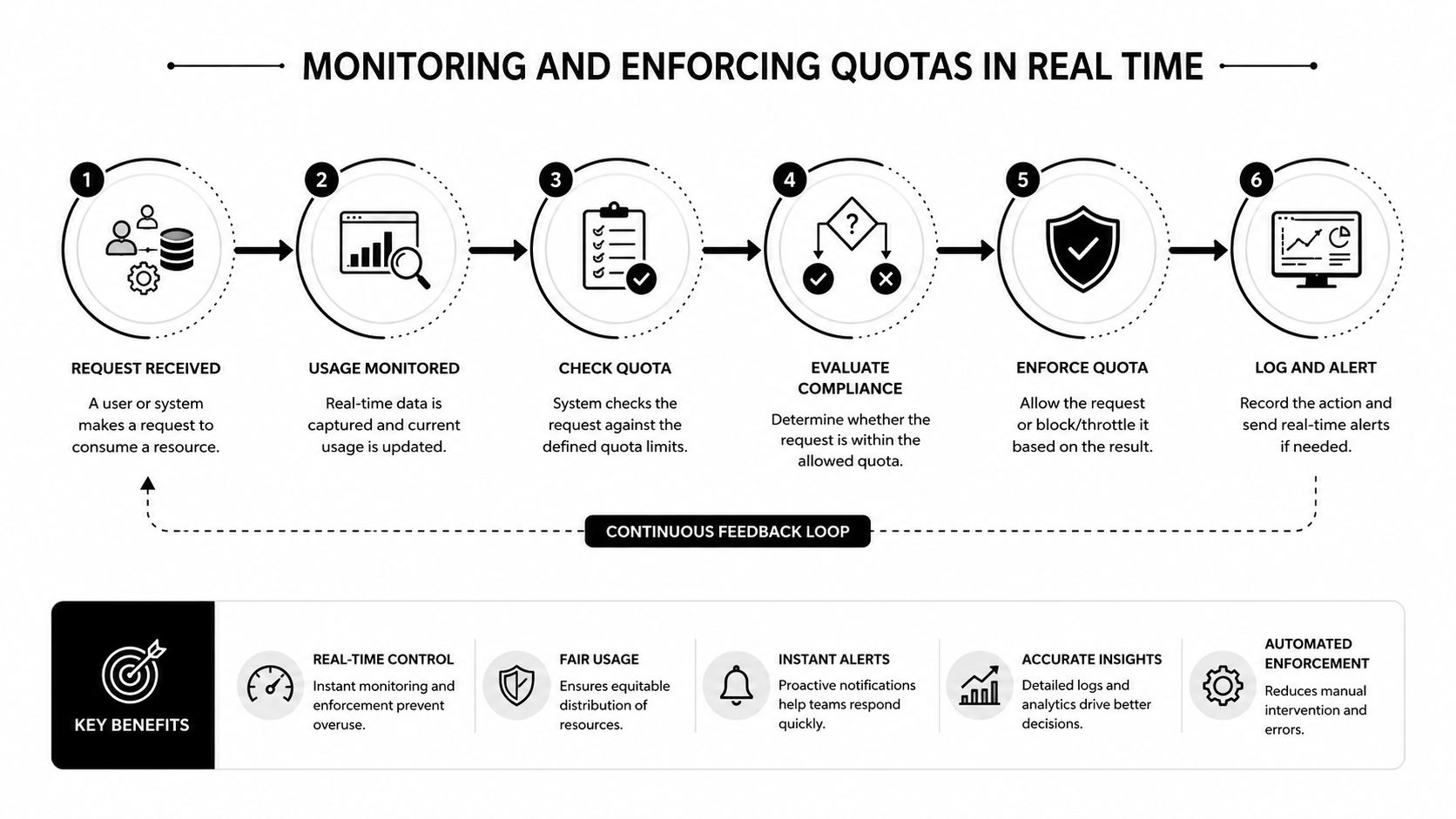
A quota system is only useful if the team sees it before it breaks the workflow. Dashboards that show percentage consumed, alerts at meaningful thresholds, and API endpoints that expose current usage all help teams make decisions early. Waiting until a request fails is the slowest possible monitoring strategy.
What good visibility looks like
A practical setup usually includes three layers. First, a dashboard widget that shows how much of the quota is already consumed. Second, automated alerts that warn the team before the ceiling arrives. Third, an endpoint or internal report that gives the actual remaining headroom so operators can make a go or no-go call.
That's not just a nice-to-have for engineering teams. A creative strategist who's about to launch a 200-variation test should know how many renders remain before the batch starts. A media buyer pushing campaign changes should know whether the API budget can absorb a bulk upload or whether the work needs to be split across windows.
Enforcement should match business priority
Enforcement isn't one-size-fits-all. Soft limits warn but allow overage, often with a charge or an internal approval step. Hard limits block the request outright. Tiered policies reserve capacity for high-value tasks and slow down lower-priority ones first.
That's the right mindset for ad ops because not every request deserves the same protection. A final QA render for a live launch is more urgent than a speculative test variant. If your policy can't distinguish between them, the quota system will still make the decision, just in a less useful way.
Operational note: teams break when they treat enforcement as a punishment instead of a prioritization tool.
A useful internal habit is to check remaining quota before initiating a large batch, not after it's already in flight. That one habit prevents a lot of avoidable delays and keeps campaigns from stalling at the exact moment the team needs speed.
For measurement discipline around thresholds and usage interpretation, the logic pairs well with confidence interval analysis in marketing reporting, because both disciplines are about acting before a single data point misleads the team.
Quota Governance as a Competitive Advantage
Teams that treat quota management as an afterthought lose time in places they don't notice immediately. They launch fewer variations, respond more slowly to performance signals, and spend more effort on cleanup than on learning. Teams that govern quotas actively get more useful work out of the same production budget.
The metrics that actually matter
Three measures tell the story cleanly. Quota utilization rate shows how much of the allowed capacity was used. Quota waste shows how much expired unused. Quota-related delays show how often campaigns or production tasks were postponed because a limit was hit.
Those metrics matter because they expose behavior, not just capacity. High utilization with low waste may signal healthy planning. High waste suggests the team asked for more than it needed or failed to move fast enough. Repeated delays mean the business is trying to run a larger operation than the quota system can support.
AI makes governance more important, not less
AI workloads change the shape of the problem. The resource is often API calls, compute time, or model usage rather than classical storage or a simple sales target. That turns quota management into an operational and security control, not just a budget line. It helps prevent runaway costs, denial-of-service scenarios, and model-extraction abuse, which is why older “quota as a finance gate” thinking falls short.
The important shift is this, quotas now protect both spending and system integrity. That's a broader job than counting usage at month-end.
Why this becomes a competitive edge
If a team can keep more of its quota available for high-value work, it can test more intelligently. If it can see consumption early, it can reassign resources before the deadline forces a bad decision. If it can prevent overage from eating into margin, it keeps more room for iteration.
The broader planning logic is similar to the way organizations think about budget allocation methods. The best operators don't just spend less, they spend where the next decision is most valuable.
That's the core advantage of quota governance. It lets creative teams move faster without pretending capacity is unlimited.
Best Practices for Optimizing Quota Usage
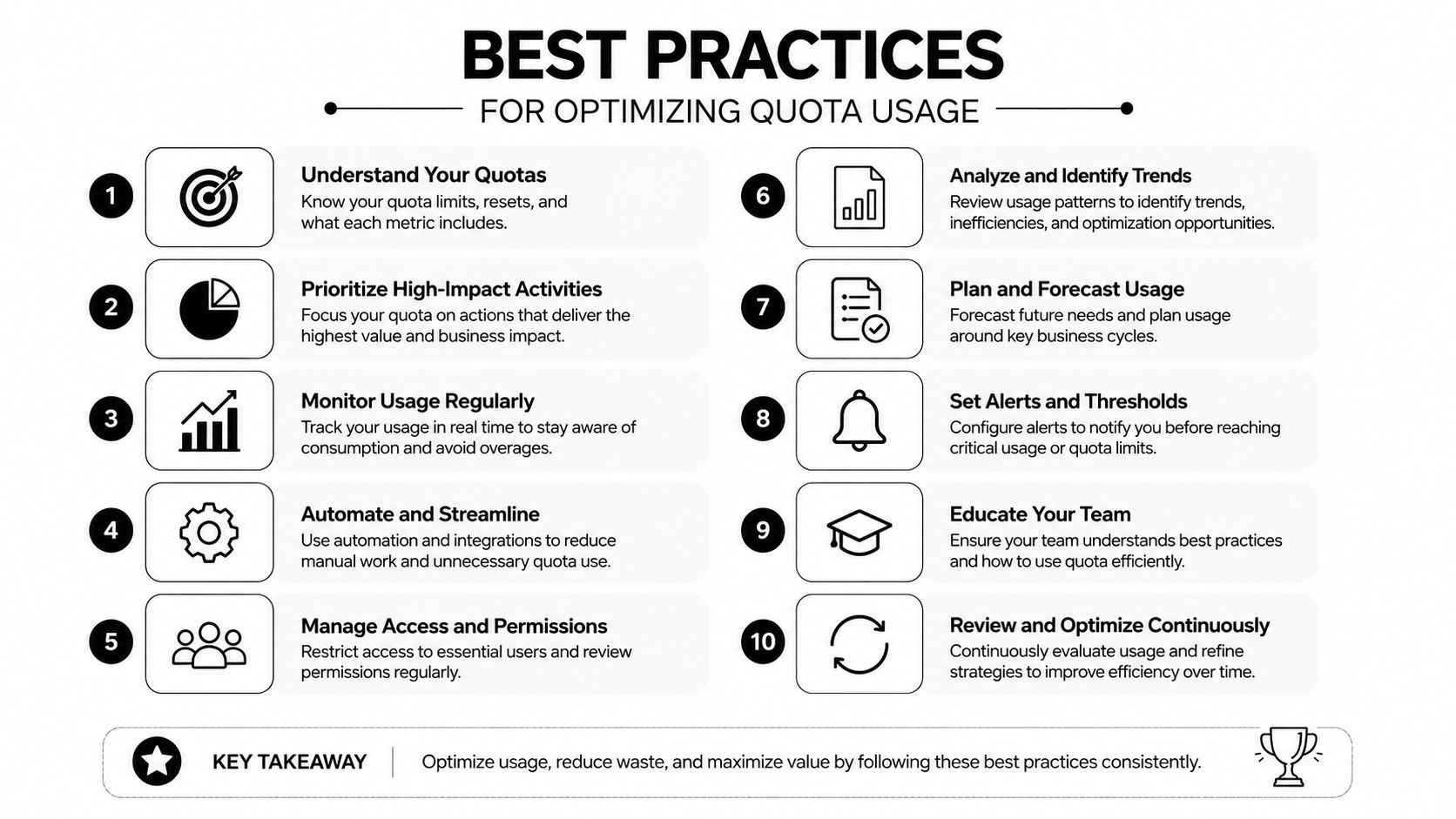
The best quota strategy is rarely to ask for more first. It's to remove waste, batch work intelligently, and reserve capacity for the tasks that move campaigns. That starts with treating quota as a finite production asset, not a background setting.
What to do inside the workflow
- Batch similar operations: Group renders, uploads, and API changes together so the team burns less time and context switching.
- Prioritize proven concepts: Put quota behind creative variations that already have a strong signal instead of spending all capacity on low-conviction tests.
- Archive unused assets: Move old clips, duplicate exports, and stale variations out of active circulation so storage doesn't fill up.
- Reuse structure where possible: If a hook, body, or CTA already works, recombine those parts rather than rebuilding every asset from scratch.
- Reserve room for reactive work: Keep enough quota available for mid-flight optimizations, not just planned launches.
How to avoid unnecessary regeneration
Platform workflows matter here. If the asset library can auto-tag scenes, transcripts, or clip structures, teams waste less time recreating material they already have. Bulk text overlays can also reduce the number of separate renders needed for common message changes. Multivariate tests work best when the team plans for learning density, not just creative volume.
That's where the cadence of the month matters. Front-load your highest-priority tests early, then keep some quota available for what the data tells you to do next. If every available render gets spent on day one, the team loses the ability to respond when a winning angle shows up later.
A simple audit checklist
Use a monthly audit to review consumption patterns, identify waste, and compare demand against actual usage. Adjust limits based on observed behavior, not wishful thinking. If utilization keeps running high over time, then a plan upgrade starts to make sense. If it doesn't, the better fix is usually workflow discipline.
For a practical lens on test sizing and creative volume, this guide to how many ad variations to test is a useful companion.
The best teams don't ask quota systems to do all the work. They design their production flow so the quota goes where it creates the most learning.
If you're building AI-driven creative production and keep running into render caps, API ceilings, or asset sprawl, Sovran gives you a practical way to manage that pressure without slowing the campaign. Visit Sovran to see how modular ad production, asset organization, and high-velocity variation workflows can help your team work within quota instead of fighting it.

Manson Chen
Founder, Sovran
Related Articles
How to Scale a Performance Creative Team: A Practical Guide
- how to scale a performance creative team
- creative team structure
- 3 more

Best Creative Automation Tool for Performance Marketers (2026)
Compare 7 creative automation tools for performance marketers. Feature table covering video ads, bulk rendering, API access, and pricing.
- creative testing
- tools
- 2 more
A Video Production Software Comparison for Marketers
Struggling to choose an ad creation tool? Our video production software comparison analyzes Sovran, Premiere Pro, and CapCut for performance marketers.
- video-production-software
- performance-marketing
- 4 more