How to Make Multiple Versions of a Facebook Ad at Scale
Jump to a section
You are likely following this process right now. You duplicate an ad in Meta Ads Manager, swap the headline, change the first line of copy, perhaps upload a new image, then repeat until the naming becomes messy and nobody remembers what was tested.
That workflow works when you need two or three quick variants. It breaks when your account needs fresh creative every week, multiple angles per audience, and enough volume to fight fatigue before performance slips. If you want to learn how to make multiple versions of a facebook ad without turning your team into a copy-paste operation, you need a system, not just more duplication.
The shift is simple: stop treating each ad as a one-off file. Start treating ads as assemblies built from reusable parts.
Beyond Duplication Why Your Ad Workflow Is Broken
Manual duplication feels productive because Ads Manager makes it easy to create another version fast. The problem is what happens after version four. Asset names drift, variables get mixed together, old winners get reused without context, and the team spends more time rebuilding than learning.
Most accounts don’t struggle because they lack ideas. They struggle because they don’t have a repeatable way to turn ideas into clean tests. A marketer writes three hooks, a designer exports two statics, an editor cuts one UGC video, then someone manually combines them. By launch time, the structure is already gone.
Duplication solves the first step, not the workflow
Plain duplication is useful for quick iteration inside the same audience. It is not a creative operating system.
Here’s what usually goes wrong:
- Variables pile up: You change the opening line, thumbnail, CTA, and format in one pass. If the ad wins, you don’t know why.
- Assets disappear into folders: A strong hook from last month becomes impossible to find because it lives inside an old project export.
- Testing speed drops: Every new round starts from scratch instead of from a reusable library.
- Reporting stays ad-level: You know which ad won, but not which message, visual pattern, or CTA drove the result.
Practical rule: If your team can’t tell which component was being tested from the ad name alone, your workflow is already leaking insight.
Creative velocity matters more now because the platform rewards fresh iterations and punishes stale ones. That’s why broader planning around content pipelines matters just as much as campaign setup. Teams thinking seriously about social media strategies 2026 are already moving toward repeatable content systems instead of isolated post and ad production.
A better model is a creative engine
A scalable workflow has three traits:
- Reusable inputs such as hooks, body segments, testimonials, product demos, headlines, and CTAs.
- A clear test structure so each variation exists for a reason.
- A launch process that can handle dozens or hundreds of combinations without manual chaos.
That’s the difference between making more ads and building an engine that keeps producing better ones.
Plan Your Creative Hypotheses Before You Build
A team briefs six new Facebook ads on Monday, launches them on Wednesday, and by Friday nobody can explain what was tested. One ad used a stronger offer, a different opening line, a new visual, and a new CTA at the same time. The result may be useful for that single ad, but it does not help you build a repeatable creative system.
Start with a hypothesis map before anyone writes copy or opens the editor.
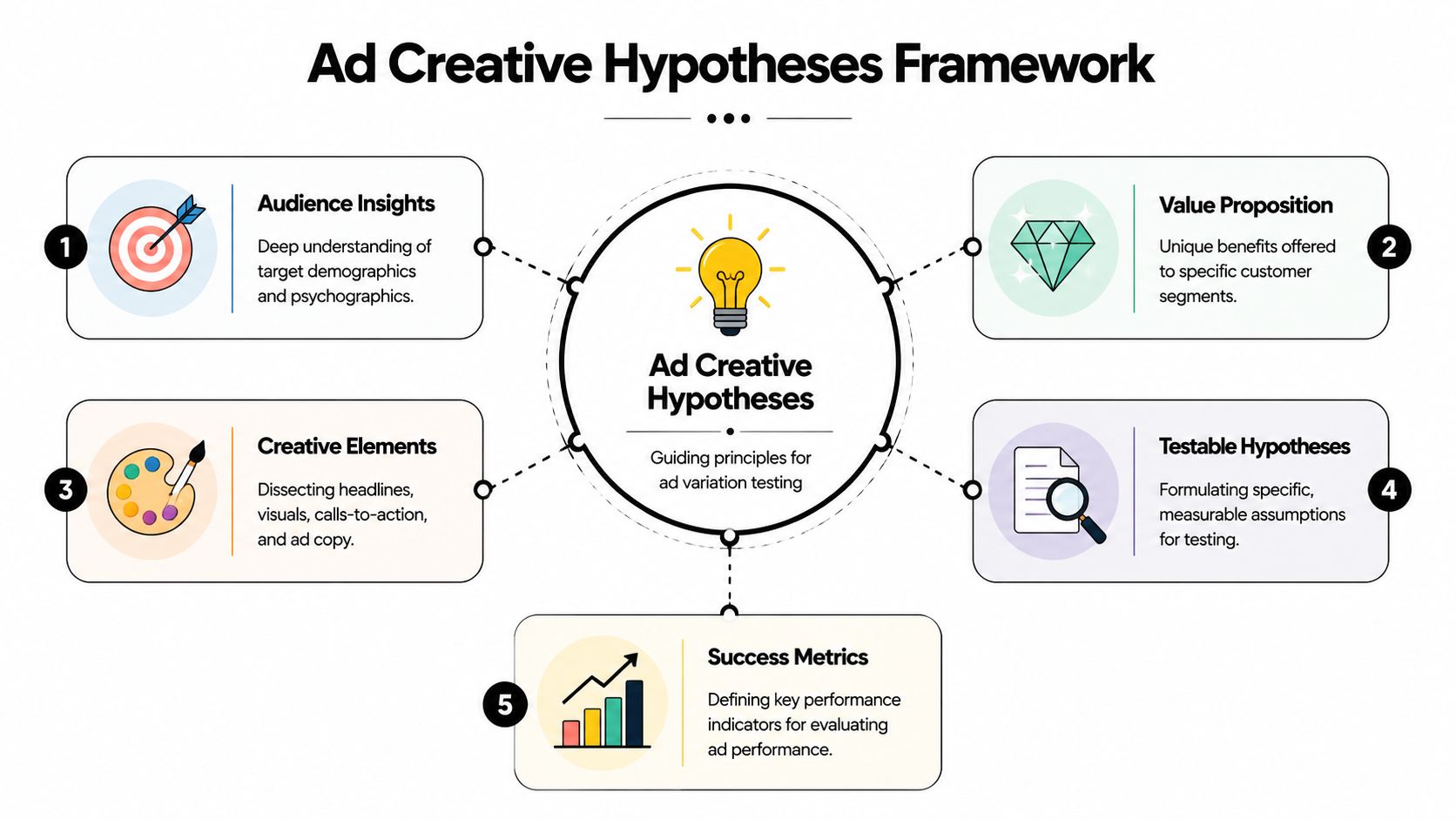
The goal is simple. Define what you believe will change performance, why it should work for a specific audience, and which creative component will carry that idea. That gives every variation a job. It also prevents the common mistake of producing a pile of ads that all differ in ways you cannot isolate later.
A working matrix can stay lightweight:
| Audience | Angle | Hook | Body proof | CTA |
|---|---|---|---|---|
| Warm site visitors | Objection removal | “Still deciding?” | Demo or testimonial | Shop now |
| Broad prospecting | Outcome-driven | “Get [result] without [pain]” | Product use case | Learn more |
| Competitor-aware | Differentiation | “Why people switch” | Comparison or feature focus | Try it |
That table does more than organize ideas. It sets up a modular workflow. Once angle, hook, proof, and CTA are defined separately, the team can produce reusable parts instead of one-off ads.
Keep the test narrow enough to produce a clear read
I usually start with a small batch of purposeful variations, not a giant launch. Meta’s own guidance on A/B testing ads in Ads Manager centers on isolating variables so you can compare one meaningful change at a time.
In practice, that means each round should answer one question.
- Round one: Hold the visual constant. Test the message angle or opening hook.
- Round two: Keep the winning message. Change the visual treatment, creator, or first scene.
- Round three: Keep message and visual direction steady. Test CTA framing, offer language, or headline support.
This approach only revises one layer at a time, which gives you a real test structure instead of a bundle of overlapping changes.
There is a trade-off. Narrow tests reduce creative chaos, but they can feel slower to teams that are used to shipping full ad concepts. The payoff is cleaner learning. Once a hook pattern or proof style wins, you can reuse it across dozens of future combinations without guessing what made the ad work.
Build hypotheses from tension, not from headline variations
Weak test plans usually come from copy tweaks. Strong ones come from a real creative tension in the market, the offer, or the audience’s awareness level.
Use pairings like these:
- Pain vs aspiration: Does the audience react faster to the problem or the promised outcome?
- Product-first vs user-first: Should the opening frame show the item or the person getting the result?
- Authority vs relatability: Does expert explanation beat customer proof?
- Direct response vs native tone: Does the ad need sharper sales language, or does looser creator-style delivery hold attention longer?
Those tensions generate variations with a reason behind them. Five headlines that all say the same thing in slightly different words rarely move a test forward.
For teams that want a repeatable planning layer before production, this creative testing framework for Meta ads is a useful model for turning hypotheses into a trackable matrix.
Name the ad before the ad exists
This step saves time later, especially once the testing program grows from ten ads to a hundred.
Every planned variation should get a pre-build ID based on its parts:
- AUD_Broad | ANG_Outcome | HK_StopScroll1 | BD_Demo2 | CTA_ShopNow
- AUD_Warm | ANG_Objection | HK_StillThinking | BD_Testimonial1 | CTA_LearnMore
If the name cannot tell you what changed, the hypothesis is still too loose. Clear naming forces clear planning, and clear planning is what turns ad production into an assembly line instead of a series of one-off creative guesses.
Build Your Modular Asset Library
The operational shift is to stop storing ads and start storing parts.
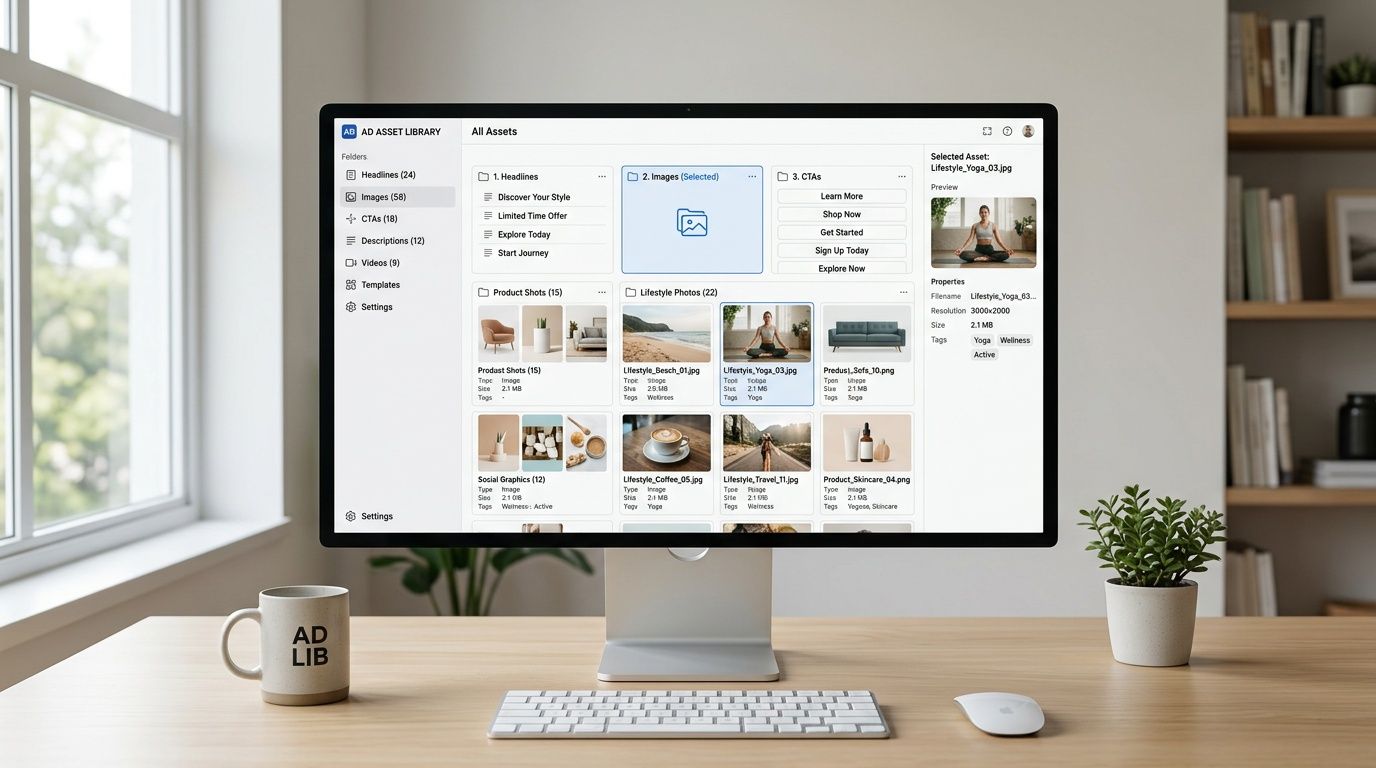
A finished ad is a bundle of decisions. The hook stops the scroll. The body delivers proof. The CTA closes. When you save only the final export, you trap those decisions inside one file. When you save the parts, you can recombine them indefinitely.
Break creative into reusable components
For video ads, organize your library into timeline-ready modules:
- Hooks: Opening scenes, first lines, pattern interrupts, big claims, problem statements
- Bodies: Product demos, feature walkthroughs, testimonials, before-and-after sequences, explainer clips
- Closers and CTAs: Offer slides, urgency frames, voiceover asks, end cards
- Support layers: Captions, overlays, B-roll inserts, social proof snippets, logos
For static ads, use the same logic:
- Visuals: Product-only, lifestyle, creator selfie, screenshot, comparison card
- Primary text blocks: Pain-led, benefit-led, objection handling, founder story
- Headlines: Offer, promise, question, comparison
- Descriptions and CTA variants: Short support copy and action framing
The key is that each asset should be useful outside the original ad it came from.
Tag for retrieval, not for aesthetics
Vague file naming often leads to a loss of speed. “Final_v3_new2.mp4” is useless. Name assets by function and angle.
A practical convention:
| Asset type | Example name | What it tells you |
|---|---|---|
| Hook | HK_UGC_Pain_Skincare_01 | UGC hook, pain angle, vertical-specific theme |
| Body | BD_Demo_FeatureA_02 | Product demo focused on feature A |
| CTA | CTA_Offer_FreeTrial_01 | Closing asset with free trial framing |
| Static image | IMG_Lifestyle_Couple_03 | Visual style and subject |
| Copy block | TXT_Benefit_TimeSaving_01 | Copy angle tied to benefit |
Use tags for audience, angle, format, product line, and quarter if your team runs a large volume of tests.
Build from what already worked
Your best library often starts with old winners. Don’t archive them as complete ads only. Slice them up.
Pull out:
- Openers that consistently held attention
- Body segments that explained the offer clearly
- CTAs that matched the landing page intent
- Visual motifs that kept reappearing in top performers
A winning ad is rarely one magic piece. It’s usually one strong hook plus one clear proof segment plus a CTA that fits the traffic temperature.
If your team works heavily in video, a modular video ad framework is a useful model for turning raw footage, testimonials, and product captures into reusable assets instead of one-time edits.
Set quality rules for every module
A modular library gets messy fast if you don’t define acceptance criteria. I like to approve assets at the component level before anyone assembles final variations.
Keep a simple checklist:
- Can the hook stand alone? It should make sense without the original ad around it.
- Is the body specific? “High quality” is weak. A feature demo or testimonial moment is stronger.
- Does the CTA fit the click intent? A soft CTA for cold traffic behaves differently than a hard conversion ask.
- Is the file export-ready? Correct aspect ratio, safe zones, captions if needed, and no baked-in references that limit reuse.
That library becomes your inventory. Once you have that, assembly stops being handcrafted work every single time.
Assemble and Generate Variations at Scale
A modular library only pays off once assembly is fast enough to keep up with testing. If your team still builds each ad as a one-off file, scale stalls at the production layer instead of the media layer.
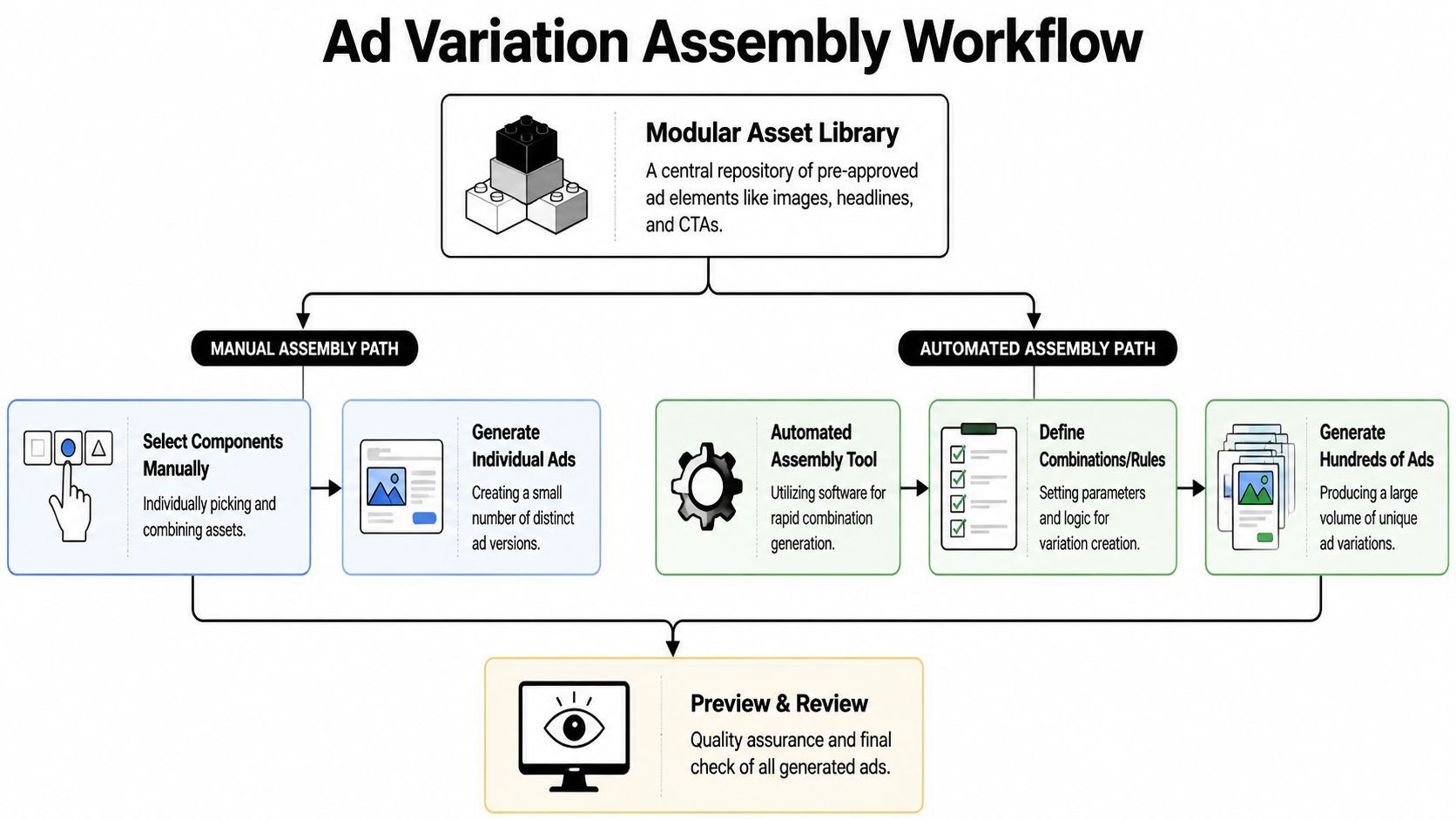
The practical question is simple. How do you turn approved hooks, body segments, CTAs, and visuals into enough testable combinations without creating version chaos?
There are three workable assembly paths: manual editing, Dynamic Creative inside Meta, and automated combination generation through a dedicated platform. Each solves a different bottleneck.
Manual assembly gives maximum control
Manual assembly still has a place. For hero creatives, regulated offers, or concepts where timing and scene order matter, editing variants by hand in Premiere, CapCut, or After Effects gives the team exact control over pacing, overlays, and transitions.
That control gets expensive fast.
Once the brief shifts from "make three polished ads" to "test 40 hook and CTA combinations," the bottleneck becomes editor time, render queues, filenames, and review cycles. I usually reserve manual assembly for concepts that have already earned attention or for assets that need brand review at the frame level.
Manual assembly works best when:
- You’re validating a new concept before expanding it
- The story depends on precise sequencing
- The batch size is small enough that file management stays clean
It slows down when:
- You need multiple first-three-second tests from one source edit
- You want audience-specific endings or offer stacks
- Several brands, products, or ad accounts share the same production team
Dynamic Creative is the fastest way to test component mixes inside Meta
Meta’s Dynamic Creative gives media buyers a middle layer between handcrafted ads and full automation. Meta documents that advertisers can upload multiple assets for headline, primary text, description, image, and video, then let the system deliver combinations across placements (Meta Dynamic Creative documentation).
That setup is useful when the goal is early signal. You can test a set of hooks, copy angles, and visuals without exporting every possible finished ad first.
The upside is speed:
- Less manual version building
- Faster feedback on which messages and assets attract clicks or conversions
- A practical way to pressure-test modules before committing editing time
The trade-off is operational, not theoretical. Reporting is less tidy than a fully named ad matrix, review teams have less control over exact live combinations, and rebuilding winners outside DCO often becomes a second step. Meta also notes that Dynamic Creative elements can vary by placement and delivery context, which is great for efficiency but less helpful when your team wants strict one-to-one creative comparisons (Meta Ads Guide on Dynamic Creative).
Automated assembly matters when volume becomes the testing edge
At scale, the hard part is no longer creating one more ad. It’s maintaining a production system that can assemble, review, and ship dozens or hundreds of variations without breaking naming rules or approval logic.
That is where automated assembly earns its place. A platform can pull from an approved hook bank, body bank, CTA bank, and visual set, then generate the allowed combinations in a repeatable format. The source unit is the component, not the finished ad.
This marks a significant shift away from basic duplication. Instead of cloning one ad and editing pieces manually, you define modules once, set assembly rules, and produce a large test matrix from the same inventory.
One option in that category is bulk Facebook ad creation workflows, where teams assemble combinations from reusable assets and send approved outputs into launch systems after review. If you’re comparing software in this category, it helps to first evaluate generative advertising AI against practical production requirements: asset governance, naming structure, export options, QA controls, and whether the tool fits your testing process.
A good automation layer does one job well. It removes repetitive assembly work so the team can spend more time on hypothesis quality, asset selection, and post-test analysis.
Use this decision filter
Choose the assembly method based on the constraint you need to remove first:
| Need | Better fit |
|---|---|
| Precision editing and strict brand control | Manual assembly |
| Fast component testing inside Meta | Dynamic Creative |
| High-volume modular testing with reusable parts | Automated assembly platform |
Teams that scale creative reliably stop treating the ad as the production unit. They treat the ad as the output of a system.
Bulk Export and Launch Your Tests in Ads Manager
You can build 120 variations in a day and still lose a week at launch if the handoff is messy.

At this stage, the goal is simple. Get approved variations into Ads Manager without renaming files, fixing URLs, or rebuilding ads one by one. If your launch process still depends on manual matching between copy, creative, and destination pages, the creative engine stalls right before delivery.
Choose the launch path by batch size
Ads Manager works fine for a small set of edits. If you are swapping one headline across three ads or testing a few new images, native duplication is fast enough.
That breaks down once the matrix gets larger. Meta supports bulk creation workflows through spreadsheet import, duplication, and API-based publishing, which is why high-volume teams standardize naming and asset references before launch instead of cleaning them up inside the ad account (Meta Marketing API documentation).
The trade-off is control versus speed. Manual setup gives tighter eyeball review inside Ads Manager. Bulk upload gives scale, cleaner naming, and fewer assembly mistakes if your source sheet is solid.
Build a launch sheet that acts as a manifest
A good CSV is not just an import file. It is the operating document for launch QA.
Use columns for:
- Campaign and ad set mapping
- Ad name with component IDs
- Primary text
- Headline
- Description
- Creative asset reference
- URL and UTM structure
- CTA type
I prefer ad names that preserve the module logic from production, something like H03_B02_CTA01_V07. That format looks rigid, but it saves hours once results start coming in because ops, media buying, and creative can all identify the variant without opening the ad.
Clean CSVs prevent preventable errors before spend starts.
A simple rule helps here. If a launch coordinator cannot verify the correct asset, message, and destination URL from one row, the sheet is not ready.
Here’s a useful walkthrough to pair with the workflow above:
Reduce handoff work with direct publishing
Once the team is launching modular tests every week, exporting files back and forth becomes the next bottleneck. Direct publishing shortens that path. Approved creatives can move into Meta with the naming structure and asset mapping intact, which cuts down on manual errors during launch.
For teams using a connected workflow, publishing reviewed ad variations directly into Meta helps keep review, approval, and launch in the same system.
One warning matters here. Bulk export is an operations advantage, not a testing strategy. If campaign structure, naming logic, and variation rules were loose upstream, bulk launch only helps you publish bad structure faster.
Analyze Performance and Feed Learnings Back into Your Engine
If you only ask “which ad won,” you’ll miss the core value of running multiple versions.

The purpose of a modular workflow is not just output volume. It’s learning at the component level. You want to know which hooks earned attention, which body arguments created intent, and which CTA framing closed.
Read the ad as components, not as one unit
A variation named properly tells you what happened without opening the creative file. If several ads share the same hook and all show stronger early engagement, that’s a hook insight. If different hooks all perform similarly but one body segment consistently drives stronger clicks, that’s a proof insight.
Useful component-level cuts include:
- Hook families: Question hook vs pain hook vs bold claim
- Body types: Testimonial vs demo vs explainer
- Visual style: UGC selfie vs polished product shot vs screen capture
- CTA framing: Hard conversion ask vs softer curiosity ask
At this stage, naming conventions stop being admin work and start becoming analysis infrastructure.
Build a simple review cadence
It is common to either judge too early or wait too long and let poor variants spend unchecked. A better pattern is a fixed review cadence tied to the test design.
For each test batch, review in layers:
- Early signal review: Which hooks are clearly attracting more attention?
- Mid-test behavior review: Which combinations are getting quality clicks, not just cheap ones?
- Conversion review: Which body and CTA pairings hold up after the click?
You don’t need perfect certainty on every creative decision. You need enough signal to decide what gets expanded, what gets paused, and what gets repackaged.
When an ad wins, ask which component earned the win. When an ad loses, ask whether the failure came from the hook, the proof, or the close.
Feed winners back into the library
At this stage, the engine compounds. Winning components should be promoted back into the asset bank with notes, tags, and context.
Use a short status system:
| Status | Meaning | Action |
|---|---|---|
| Proven | Repeatedly useful across tests | Keep available for reuse |
| Promising | Good initial signal, limited sample | Retest in another context |
| Fatigued | Previously worked, now fading | Refresh or combine differently |
| Rejected | Weak signal across clean tests | Archive but keep searchable |
A proven hook can be paired with new body segments. A strong body proof can be reused with colder audience openers. A CTA that works in warm retargeting may fail in broad prospecting, so store the audience context with the asset.
For a stronger reporting layer, a guide to measuring creative tests in Facebook ads reporting is useful if you’re trying to tie ad names, components, and outcome patterns together consistently.
What actually improves over time
When this process is working, the account changes in visible ways:
- The team produces new variations faster because the inputs are already tagged.
- Creative reviews improve because people discuss components, not vague opinions.
- Launches get cleaner because names and structures were set before production.
- The next test cycle starts with stronger assumptions because prior winners are reusable.
That’s the answer to how to make multiple versions of a facebook ad at scale. You don’t just duplicate ads faster. You build a system that turns creative into reusable modules, turns modules into structured tests, and turns test results into the next round of better inputs.
If your team needs a practical way to build that system, Sovran gives performance marketers a way to organize modular assets, generate large sets of video variations from hooks, bodies, and CTAs, and move those creatives into Meta without as much manual assembly and upload work.

Manson Chen
Founder, Sovran
Related Articles

8 Pattern Interrupt Techniques for Video Ads
Customer Journey Mapping for Performance Marketing