How to Bulk Create Facebook Ads: A 2026 Guide
Jump to a section
- Why Manual Ad Creation Is Costing You Money
- The Foundation A Solid Naming Convention
- Quick Scaling With The Duplicate Workflow
- The Power User Method The CSV Bulk Upload
- Ultimate Control The Marketing API Approach
- From Bulk Creation To Creative Automation With Sovran
- Your Post-Launch QA Checklist And Best Practices
You’re probably in one of two situations right now. Either you’re stuck inside Ads Manager building the same ad over and over with tiny copy changes, or you’ve already hit the point where manual setup is the bottleneck and not strategy.
That’s where most Meta accounts stall. The team has ideas for more hooks, more angles, more audiences, more placements. But nobody wants to spend the next several hours clicking through ad-level setup, checking URLs, fixing naming mistakes, and re-uploading assets that should’ve been organized before the brief was written.
If you want to bulk create facebook ads well, the true goal isn’t just speed. It’s building a workflow that lets you test more creative combinations without turning your account into a mess. That starts with the right operating model. Sometimes that’s a simple duplicate workflow in Ads Manager. Sometimes it’s a CSV upload. Sometimes it’s an API-driven system. And once video variation volume grows, the problem usually shifts from ad setup to creative production and compliance.
Why Manual Ad Creation Is Costing You Money
Monday morning, the brief calls for 24 ad variants across three audiences and four placements. If the team builds every ad by hand in Ads Manager, the full cost starts before spend even goes live. Launch slips. QA gets rushed. The first round of learnings comes back later than it should.
Manual setup breaks testing speed.
Meta performance improves when teams can ship enough clean variations to find a winning hook, format, and message before fatigue sets in. If setup is slow, the account tests fewer ideas, keeps weak creatives in market longer, and learns less from each spend cycle. The problem is not just labor. It is delayed feedback.
I see the same pattern in growing accounts. Buyers spend hours on ad assembly instead of reading breakdowns, checking comments, and spotting where CPA is drifting. Creative teams keep producing concepts, but those concepts sit in folders waiting for someone to turn them into live ads. The bottleneck moves from strategy to operations.
Manual workflows create expensive mistakes
The biggest losses usually come from small execution errors:
- wrong destination URL on one variant
- inconsistent UTMs across a test
- old copy pasted into one ad
- mismatched creative attached to the right ad name
- one placement edit applied to half the set, not all of it
Those mistakes distort results. A bad ad can look like a bad concept when the actual issue was setup. That leads to the worst kind of decision making. Teams kill angles that never got a fair read.
Manual work also makes compliance harder to control, especially once you start scaling modular video, offer-driven copy, and multiple brand voices. The more versions you publish, the easier it is for one claim, disclaimer, or outdated promo to slip through. Good bulk workflows reduce that risk because they force structure into the build process.
Speed matters because creative velocity matters
High-volume testing is not a media buying trick. It is a creative operations discipline.
A fast build system lets the team test more hooks, more first-three-second intros, more offers, and more format cuts without turning the account into clutter. That is the strategic reason to care about bulk creation. The technical method, duplicate workflow, CSV, API, or a creative automation stack, only matters if it helps the team get clean ads live faster and learn from them faster.
Organized asset management is part of that. If files are scattered, naming is inconsistent, or approved variants are mixed with drafts, bulk creation gets messy fast. A structured asset library workflow for ad teams cuts down on upload errors and makes version control much easier.
The real trade-off
Manual creation still has a place. It works for a small account, a one-off launch, or a fast fix inside an existing campaign. Past that point, it gets expensive.
What works depends on volume and complexity:
- Duplicate inside Ads Manager for small tests where speed matters more than structure.
- Use CSV uploads once the campaign pattern repeats and hand-building becomes a drain.
- Use the API when ads need to be generated from rules, feeds, or internal systems.
- Use creative automation when ad setup is no longer the bottleneck and producing enough compliant, on-brand variations is the actual constraint.
Strong teams switch methods as the account grows. They do not stay manual out of habit.
The Foundation A Solid Naming Convention
Most bulk workflows break before the upload step. The root problem is usually naming.
If campaign names, ad set names, ad names, and file names aren’t structured, you won’t be able to troubleshoot imports cleanly or analyze winners later. You’ll end up with dozens or hundreds of ads that technically launched but don’t tell you anything useful.
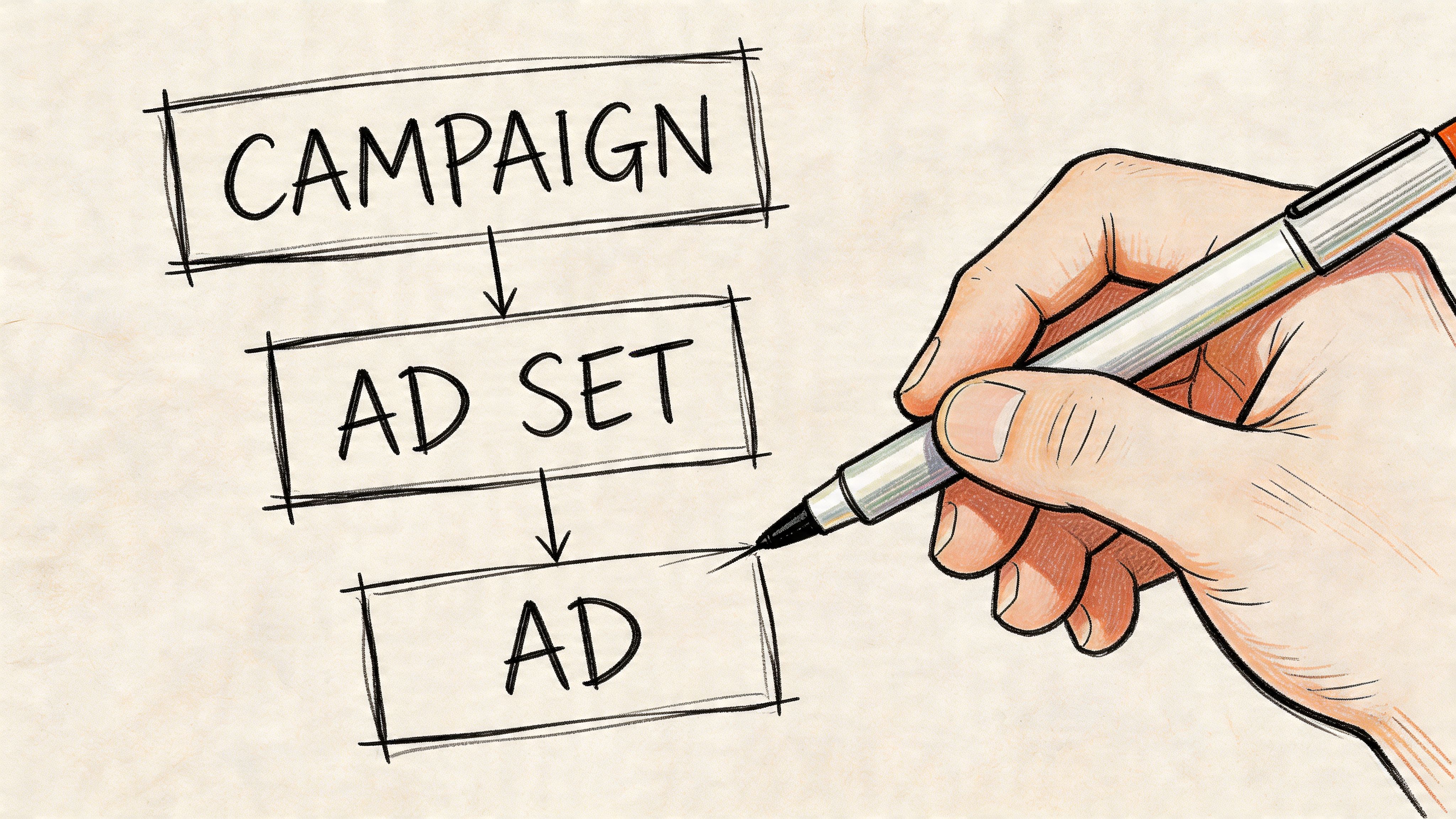
A naming system that scales
Keep the structure simple enough to use daily, but detailed enough to filter in reports.
A practical framework:
- Campaign name:
Date_Objective_Offer_Geo - Ad set name:
Audience_Placement_Optimization - Ad name:
Concept_Hook_Format_Version
That gives you names like:
2026-01_CONV_FreeTrial_USLAL-WebsiteVisitors_Feed+Stories_PurchaseUGCProblemHook_9x16_V03
This kind of structure helps in three ways:
- Filtering becomes easy inside Ads Manager.
- CSV rows stay readable when you’re editing at scale.
- Creative learnings stay attached to the variable that changed.
File names matter more than people think
Your asset library should mirror your ad naming logic. If your team exports video files with names like final_v2_last_edit_REALFINAL.mp4, bulk creation gets messy fast.
Use file names that identify the creative clearly:
- Hook-led naming:
SleepAngle_Hook03_9x16.mp4 - Variant-led naming:
FounderStory_Body02_4x5.mp4 - CTA-led naming:
Testimonial_CTAFreeTrial_1x1.mp4
If you’re organizing a large asset bank, it helps to keep folders and tags aligned with your naming rules. Sovran’s guide on organizing your asset library is a useful reference for setting that up before you start publishing at volume.
Practical rule: If someone else on your team can’t identify the creative, audience, and purpose from the name alone, the naming system isn’t good enough.
Naming is the backbone of automation
This gets even more important once you start using tools that auto-generate combinations. Advanced platforms like AdEspresso can generate 36 unique combinations instantly from 3 images × 4 headlines × 3 descriptions, as described in AdManage’s bulk creation guide. That only works cleanly when assets and copy are named and grouped in a way the system can interpret without confusion.
If you skip this foundation, every later workflow becomes harder:
- duplicate workflows get cluttered
- CSV uploads produce preventable errors
- API systems become harder to debug
- creative automation turns into asset chaos
A clean account starts before the first upload.
Quick Scaling With The Duplicate Workflow
The duplicate button is still the fastest way to move when the test matrix is small and the account structure already exists.
It’s not glamorous, but it’s useful. If you need to launch a handful of audience tests, placement tests, or copy swaps today, duplicating inside Ads Manager is usually faster than opening a spreadsheet and formatting a template from scratch.
When duplication is the right tool
Use duplication when one variable is changing and everything else should stay mostly fixed.
Examples:
- one winning ad needs to be tested across several interest audiences
- one ad set structure needs to be copied into a new campaign
- one ad needs headline swaps without changing the rest of the setup
This workflow is especially practical for operators who are still building the account’s testing discipline. If that’s your stage, this breakdown of how to scale Facebook ads is a useful companion because it ties setup choices to testing logic.
A clean duplicate workflow
Inside Ads Manager, duplicate at the level that matches the test.
At the campaign level Use this when the full structure is proven and you need the same architecture for a new offer, market, or budget bucket.
At the ad set level This is the usual move for audience testing. Duplicate the ad set, rename it immediately, then change only the audience variable.
At the ad level Best for fast creative iteration. Duplicate the ad, swap the hook, headline, thumbnail, or primary text, then keep the rest intact.
A few habits make this method safer:
- Rename first: Don’t leave duplicated objects with default names while editing.
- Edit one variable only: If you change audience, creative, and placements at once, the duplicate loses its value as a test.
- Review inherited settings: Advantage+ toggles, placements, and tracking fields sometimes carry over in ways you didn’t intend.
Where this method starts to fail
Duplication breaks down once the account needs real volume.
The moment you’re building dozens of ad-level variants across multiple ad sets, Ads Manager becomes a slow interface for repetitive work. You can still do it, but you shouldn’t. The larger the test matrix gets, the more duplication creates clutter and the harder it becomes to maintain clean naming and QA discipline.
If you need to count how many times you’ll click “Duplicate,” you’re already close to the point where a bulk workflow will save you time.
Use duplication for speed at small scale. Don’t force it into a job meant for spreadsheets or automation.
The Power User Method The CSV Bulk Upload
A team can go from 12 ads to 120 fast. The bottleneck is rarely the idea. It is the build process.
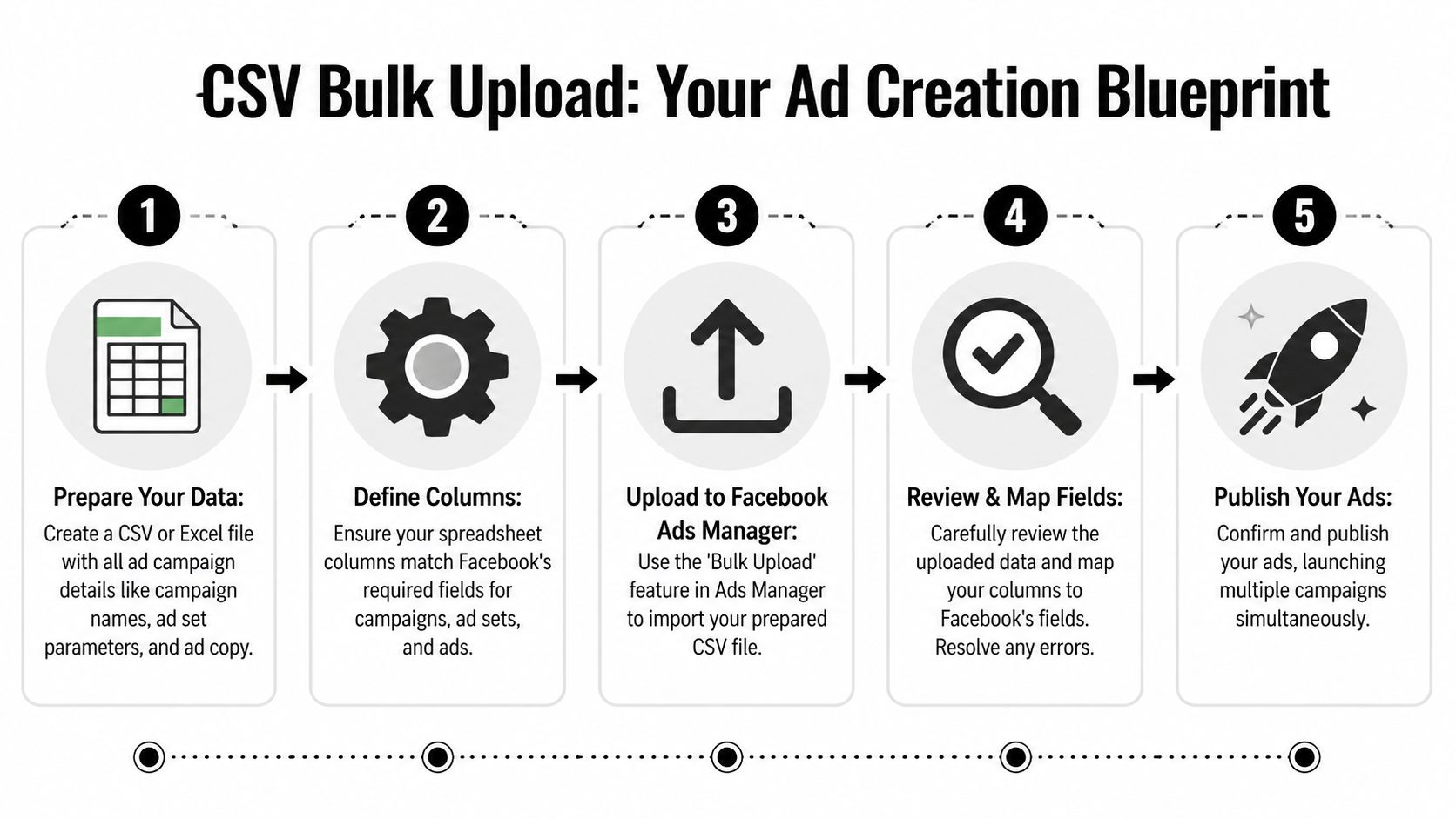
CSV bulk upload turns ad creation into an operations workflow inside Ads Manager. Instead of recreating the same structure by hand, you define it once in a spreadsheet, expand the rows, then import the file under Import & Export. That shift matters because high-velocity testing depends on repeatable production, not heroic clicking.
Why CSV is still the core bulk workflow
CSV is the middle ground between manual work and a custom API setup. It gives media buyers and operators direct control over scale without waiting on engineering.
That matters when the strategy is bigger than “make more ads.” Serious testing programs need a way to map creative variables, audience splits, naming, URLs, and tracking fields in one place. A spreadsheet handles that well. It also exposes structural problems early. If the campaign logic looks messy in rows and columns, it will be messier after launch.
A clear structure before you build the file saves hours later. This guide to Meta campaign structure for scalable builds is useful if the primary issue is how campaigns, ad sets, and ads are organized before import.
The columns that matter
The exact template changes by objective, but the best CSVs stay boring and predictable. Every column should answer one question.
Campaign-level fields
- campaign name
- objective
- buying type or budget settings if applicable
Ad set-level fields
- ad set name
- audience targeting
- placements
- optimization event
- budget or budget inheritance, depending on setup
Ad-level fields
- ad name
Titlefor headlineBodyfor primary text- destination URL
- creative reference such as image or video asset mapping
Field names inside the spreadsheet do not always mirror Ads Manager labels. That is normal. What matters is that the file matches Meta’s import format and your team uses the same naming logic every time.
A practical build process
The cleanest CSV uploads usually follow the same pattern.
Define the test matrix first
Decide what changes at each level. Keep campaign variables separate from ad set variables, and keep creative variables at the ad level unless there is a strong reason not to.Standardize assets before the sheet
File naming is where many teams lose control. If your video or image names do not clearly map to rows, QA gets slow and approval mistakes creep in.Build a small working prototype
Start with one campaign, one ad set, and two ads. If that imports cleanly, scale by duplication inside the sheet.Expand rows with intention
Change one variable set at a time. For example, swap hooks across ads while holding audience steady, or duplicate ad sets across geos while keeping creative constant.Import to drafts and inspect everything
Draft review catches errors cheaply. Published mistakes cost time, delivery stability, and sometimes learning quality if the wrong variables go live together.
You can watch the mechanics here before building your first file:
Where CSV works best
CSV uploads perform well when the structure repeats and the test plan is clear.
Good use cases include:
- geo expansion, where the same setup runs across countries, regions, or language splits
- audience matrix testing, where several audiences need the same creative package
- creative batch launches, where dozens of ads share URLs, UTMs, CTA logic, or compliance-approved copy blocks
- modular creative programs, where hooks, intros, offers, and end cards are assembled into many combinations
That last use case is the one many teams underuse. CSV is not just a speed tool. It is a bridge between production and strategy. If the goal is high-volume creative testing, the sheet becomes the control layer for your matrix. That is also where compliance gets easier to manage. Approved text blocks, offer language, disclaimers, and destination URLs can be reused consistently instead of being retyped ad by ad.
If you are also tightening event tracking before launch, use this to understand Meta's CAPI. Bulk creation loses value fast when measurement is shaky.
What usually goes wrong
Common CSV failures include:
- bad naming, which makes rows hard to audit and easy to mispublish
- asset mismatch, where the row references the wrong image or video
- field inconsistency, where one value conflicts with the objective or ad format
- URL and tracking errors, where UTM logic breaks across a batch
- overbuilt templates, where the sheet becomes so dense that QA takes longer than manual setup
I have seen one more problem repeatedly. Teams use CSV to create volume without fixing the creative supply chain. The file imports fine, but the videos are late, the copy blocks are inconsistent, or compliance review happens after the ads are already built. At that point, the spreadsheet is organized, but the system around it is not.
CSV is a strong method for a few dozen or a few hundred variations when the account structure is stable and the creative inputs are ready. It is cheap, fast, and controllable. The ceiling appears when the business wants constant testing velocity and the bottleneck shifts from ad assembly to creative production.
Ultimate Control The Marketing API Approach
The Marketing API is for teams that don’t just want to bulk create ads. They want ad creation to happen based on rules.
Here, the workflow moves beyond spreadsheets and into programmatic operations. Agencies with large client portfolios, ecommerce brands with dynamic product logic, and SaaS teams with internal tooling usually benefit most from this setup.
What the API changes
The API lets a team build custom creation and management workflows on top of Meta’s advertising infrastructure.
That means ad creation can react to operational triggers such as:
- product feed changes
- inventory status
- regional availability
- internal approval states
- performance-based rules
Instead of someone manually generating another batch of ads, a system can create or modify them according to predefined logic.
For teams exploring that route, Sovran’s overview of Facebook Ads API workflows is a practical starting point because it frames the API in terms of production systems rather than developer theory.
Who should use it
Not every team needs this. Most don’t.
The API makes sense when volume is consistently high, structures are repeatable, and the business can justify engineering support. According to Madgicx’s review of bulk Facebook ad creation tools, high-volume platforms built on the Marketing API are designed for users launching hundreds of thousands of ads per month, and AI-powered evolutions can analyze 30-90 days of performance data to generate new variations.
That’s not a normal SMB workflow. It’s an operating model for companies that treat ad production like infrastructure.
The trade-off most teams underestimate
The API gives you control, but it also creates responsibility.
You need clear specs, stable naming rules, validation layers, and clean tracking. If the data flowing into the system is messy, the API will create messy ads faster. And if your measurement setup is weak, automation scales confusion.
That’s why it helps to understand Meta's CAPI before you go too deep into custom ad creation. Better signal quality makes automated decisioning more reliable.
Programmatic creation only works when the account taxonomy, tracking, and asset inputs are already disciplined.
There’s also a middle ground. Many third-party platforms provide a UI layer on top of the API, which gives non-technical teams some of the same scale benefits without requiring them to build everything in-house.
From Bulk Creation To Creative Automation With Sovran
A team can solve bulk publishing and still miss the scaling target.
The failure point usually shifts from ad creation to creative supply. Ads Manager, CSVs, and API-based tools can push large batches into Meta. The harder part is producing enough usable video variants, with clean messaging and low review risk, to justify that publishing speed in the first place.
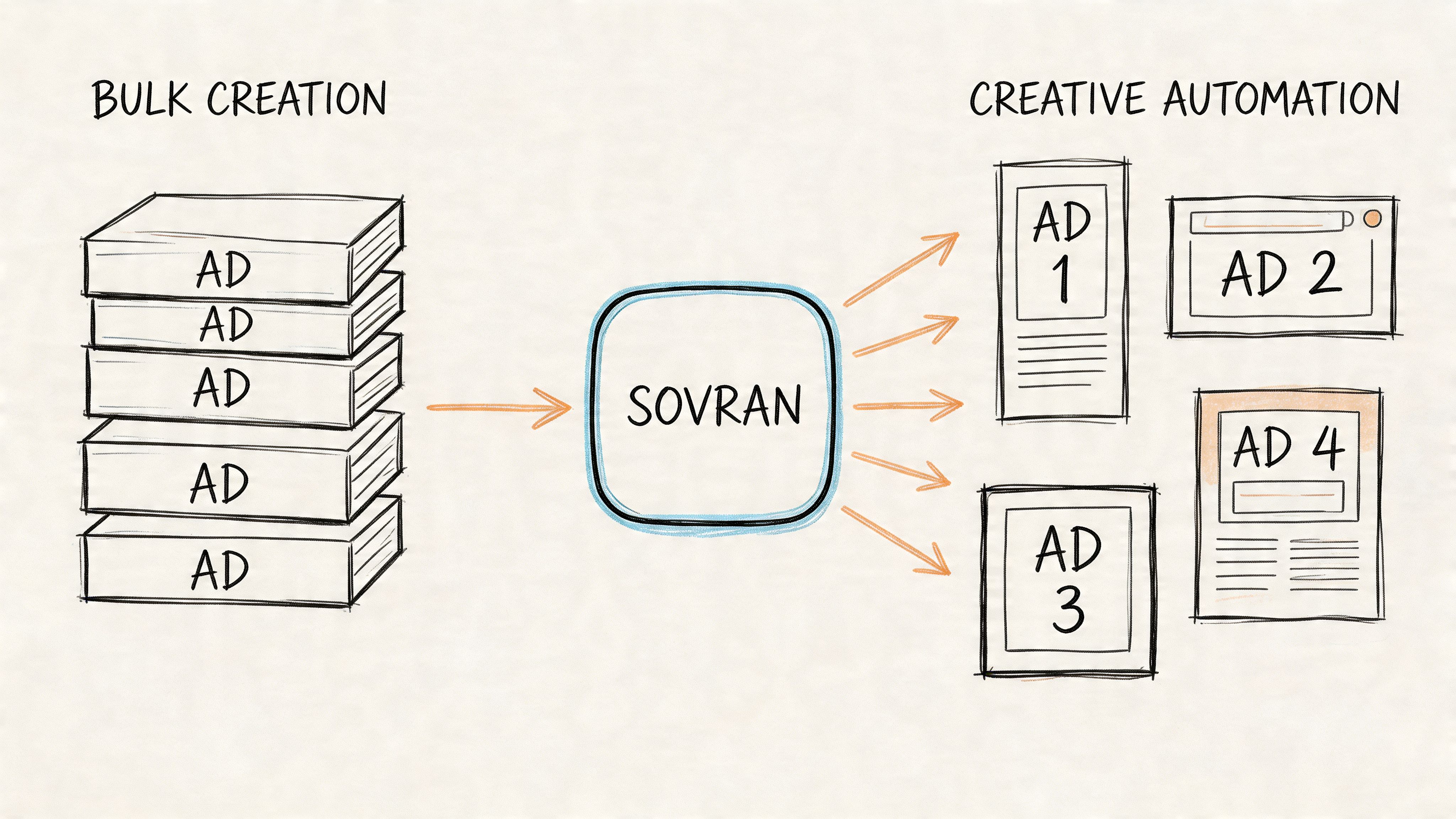
A bigger scaling issue is producing modular creative
High-velocity testing depends on modular creative systems. Teams split ads into reusable parts such as:
- hooks
- body segments
- proof sections
- CTAs
- aspect ratio adaptations
- text overlay variants
That setup supports more than production speed. It gives media buyers a way to test messaging angles, proof formats, pacing, and offers without sending every new idea back through a full edit cycle.
Sovran fits into that workflow by connecting modular assembly with publishing. Sovran’s Meta ads publishing workflow is built to assemble and publish video variations directly into Meta environments, which matters when the bottleneck is no longer campaign setup but keeping creative, metadata, and launch operations in sync.
Why compliance gets harder as output increases
Bulk creation advice often stops at mechanics. Build the spreadsheet, map the fields, upload the ads. That covers distribution, but it ignores the review risk that comes with modular video.
In practice, approval rates often get worse when teams start assembling many video variants from interchangeable parts, especially if overlays, claims, subtitles, and CTA language are inconsistent across versions. Meta’s review systems can treat these batches differently from a small set of manually built ads. Teams usually discover this after a launch gets delayed, not before.
I have seen this happen in accounts that moved fast on variation count but stayed loose on creative rules. The issue was rarely volume alone. It was sloppy combinations, weak tagging, and no pre-publish check for claims, on-screen text, or mismatched audio and visuals.
Fast publishing only helps if the batch survives review and says what you intended.
What a workable automation flow looks like
Good creative automation starts upstream.
Asset bank first Store raw clips, finished cuts, hooks, bodies, CTAs, overlays, and format variants in a structured library with tags your team will use. If naming is vague, the system breaks later.
Modular assembly second
Build combinations around message logic. A UGC-style hook, a clinical proof segment, and a hard-sell CTA do not automatically belong in the same ad just because the software allows the combination.
Validation before publishing
Check claims, subtitles, branding, pacing, offer accuracy, landing page alignment, and visual continuity before anything gets sent to Meta. This step is what protects speed.
Bulk publishing last
Once the variation set passes internal review, push the approved batch live through the publishing layer instead of rebuilding ads one by one.
For agencies standardizing this work across clients, the surrounding operating system matters too. Teams that want to tighten process design beyond trafficking can explore DocsBot for agency automation.
What works and what fails
What works:
- modular assets with clear tags and usage rules
- approved combination logic instead of unlimited remixing
- pre-launch review for claims, subtitles, and sync issues
- one workflow connecting creative production to publishing
What fails:
- random recombination of clips with no message hierarchy
- weak asset naming and inconsistent tags
- no review step before bulk submission
- assuming video batches will behave like static ad uploads
Bulk creation solves the technical how. Creative automation solves the strategic why. It gives teams a way to test more angles, ship faster, and keep review risk under control without burning the creative team out.
Your Post-Launch QA Checklist And Best Practices
Publishing the batch isn’t the finish line. It’s the handoff from production into quality control.
Teams that bulk create facebook ads successfully usually have a simple rule. Every large launch gets reviewed twice: once in the creation environment, and once inside Meta drafts before publish.
Choosing Your Bulk Creation Method
| Method | Best For | Complexity | Key Benefit |
|---|---|---|---|
| Duplicate workflow | Small tests and quick edits inside Ads Manager | Low | Fastest way to launch a limited set of variations |
| CSV bulk upload | Repetitive campaign builds and structured testing | Medium | High control without engineering resources |
| Marketing API | Large-scale, rules-based ad creation | High | Programmatic control and deep automation |
| Creative automation | Video-heavy accounts with modular testing workflows | Medium to High | Connects creative production to bulk publishing |
A post-launch QA pass that catches real mistakes
Before publishing drafts, check the basics in a fixed order.
- Start with destination integrity: Confirm URLs, final landing pages, and UTM patterns are correct across the batch.
- Review naming consistency: Campaign, ad set, and ad names should match your taxonomy. If they don’t, reporting gets messy later.
- Check budgets and optimization settings: Make sure ad sets or campaign budgets reflect the intended structure.
- Inspect placements visually: Open previews for feed, Stories, and Reels where relevant. Watch for cropping, subtitle overlap, or unsafe text placement.
- Confirm creative-to-copy fit: Headline, primary text, CTA, and asset should feel like the same ad. Bulk systems can create mismatches if the matrix is too broad.
- Verify tracking objects: Pixel, event mapping, and attribution settings should match the campaign goal.
- Pause obvious duplicates: Not all duplication is intentional. Clean these before approval and publish.
How to manage a large test without getting buried
The biggest mistake after launch is trying to learn from everything at once.
Use a simple review structure:
Group by variable
Read results based on the thing you changed. If the batch was testing hooks, evaluate hooks first. Don’t jump immediately into audience conclusions if audience wasn’t the controlled variable.
Cut noise early
Kill broken variants fast. That doesn’t mean overreacting to small sample volatility. It means removing ads with obvious setup problems, weak message alignment, or clear formatting issues so budget doesn’t drift into low-quality inventory.
Preserve winners properly
If a creative wins, don’t just duplicate it blindly across the account. Document what won. Was it the opening line, the proof sequence, the format, or the CTA framing? The point of scale is not just to find a winner. It’s to understand the component that made it win.
A bulk workflow is only valuable if it improves the next round of decisions, not just the current round of launches.
Best practices that hold up over time
Three habits separate clean bulk operations from chaotic ones.
Keep the test matrix narrow enough to interpret
More ads isn’t always more insight. Test enough combinations to generate signal, but not so many that nobody can explain the learning afterward.
Separate production logic from learning logic
You may need a wide production system, but your reporting should stay focused. Build broadly, analyze narrowly.
Design the next iteration before the current one ends
Bulk workflows work best when the next batch is already taking shape from the current findings. That keeps the account moving without rebuilding the whole process from zero each week.
If your bottleneck has shifted from ad setup to producing and publishing modular video variations cleanly, Sovran is worth evaluating. It’s built for teams that need structured asset management, modular creative assembly, and direct Meta publishing in one workflow, especially when high-volume testing creates compliance and organization problems that spreadsheets alone won’t solve.

Manson Chen
Founder, Sovran
Related Articles

Storyboard Development: Scale Video Ad Production in 2026

8 Pattern Interrupt Techniques for Video Ads