Smarter Video Production Project Management for Ad Creatives
A practical guide to video production project management. Learn the frameworks and tools to streamline your ad creative workflow for Meta & TikTok at scale.
Jump to a section
Video production project management is more than just a fancy title; it's the specific playbook for planning, creating, and launching video content, especially when you're in the trenches of performance advertising. This isn't about generic task tracking. It's a whole different beast that has to wrangle creative asset management, lightning-fast iterations, and the sheer volume of content needed for platforms like Meta and TikTok.
Why Traditional Project Management Breaks Under Pressure
Look, standard project management tools like Asana or Monday.com are fantastic for straightforward, linear work. But throw them into the chaotic, high-speed world of performance ad creative, and they just can't keep up. This isn't a theoretical problem; it’s the daily headache for creative strategists and UA managers trying to stay ahead of the curve.
Imagine you're juggling dozens of ad variations for just one campaign. You’ve got multiple hooks, different body segments, and various calls to action for each. A traditional system might let you check off "Video Project" as done, but it completely fails at managing the complex web of individual creative assets and, more importantly, their performance data. This is where things start to fall apart.
The Chaos of Unstructured Assets
The real bottleneck almost always starts with the raw footage. Without a system built for video, teams end up with messy, nested folder structures on a shared drive. Finding a specific clip—that perfect 3-second shot of a user smiling while holding the product—turns into a manual scavenger hunt through hours of unorganized files. That kind of slow, painful asset retrieval kills creative momentum before you even get started.
The core problem is that generic project management software sees a video as a single, final file. A specialized video production system knows that a great ad is actually a collection of dozens of smaller, reusable components.
This disorganization spills directly into the feedback loop. Vague comments buried in long email chains or scattered across Slack threads just create confusion. "Can you make the logo bigger in that one part?" is useless feedback without time-stamped context. This inevitably leads to endless back-and-forth, wasted hours, and a team that’s completely burnt out.
The Downward Spiral of Creative Fatigue
When your process is bogged down by friction, what happens? Your team naturally starts producing fewer creative variations. They stick to what's safe because experimenting is just too painful and time-consuming. This leads to another huge problem: creative fatigue. Audiences on TikTok and Instagram get bored seeing the same ad over and over, and performance plummets.
A system that can't support rapid testing and iteration is actively hurting your campaign results. The goal isn't just to produce a video; it's to find winning combinations of creative elements and do it at scale. Traditional project management simply wasn't built for this. To stay competitive, it's critical to adopt modern video production best practices designed for speed.
Without a framework built for the unique demands of video, teams are stuck in a reactive cycle of bottlenecks, burnout, and diminishing returns.
Building Your Scalable Kickoff and Briefing Process
A video project is won or lost long before anyone hits record. The kickoff and briefing phase isn't just a box-ticking exercise; it's where you lock in a single source of truth that will save you from a world of pain, time, and budget overruns later. Get this right, and the entire production machine runs like a dream.
A flimsy or incomplete brief is the number one reason projects get bogged down in scope creep and endless revision cycles. When key info is missing, your creative team has no choice but to guess, and their assumptions rarely line up perfectly with what stakeholders have in their heads. That gap is where friction, delays, and frustration are born.
It creates a vicious cycle that probably feels familiar: initial chaos leads to bottlenecks, which inevitably leads to burnout.
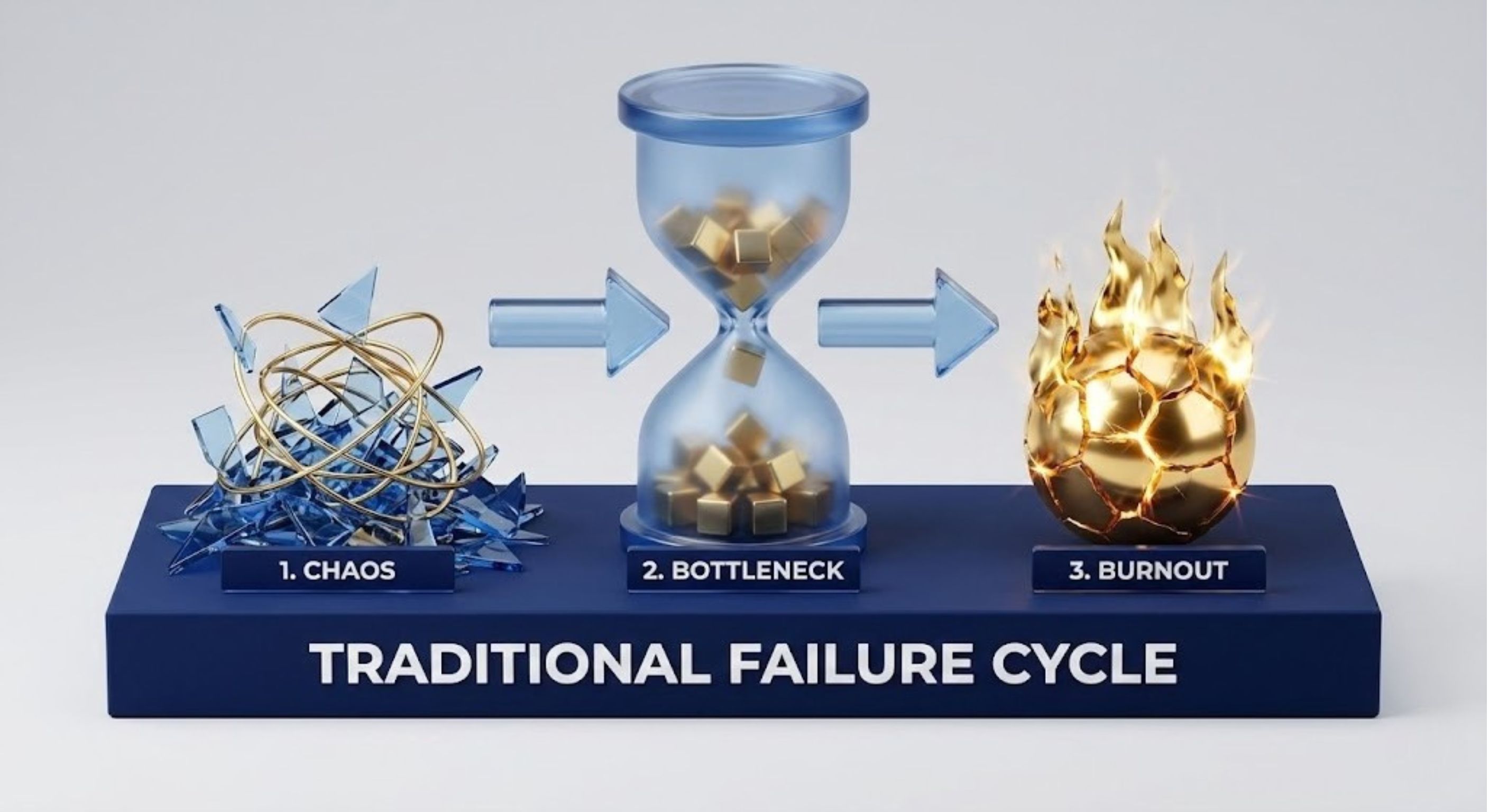
This isn't just an inconvenience. This operational drag makes it almost impossible to produce creative at the speed and scale performance marketing demands.
Crafting a Bulletproof Creative Brief
Think of your creative brief as the strategic blueprint for the entire project, not just a request form. To make it work for high-volume ad creative, it has to be brutally specific and answer questions before they're asked. This means ditching vague goals like "increase brand awareness."
For platforms like Meta or TikTok, a high-performance brief needs to get granular:
Target Audience Personas: Who, exactly, are we talking to? Go beyond basic demographics. What are their pain points? What motivates them? A video for a 22-year-old on TikTok is a completely different universe from one for a 45-year-old exec on LinkedIn.
Core Messaging Hooks: What is the single most important thing we need to land in the first 3 seconds? You should provide several angles to test, like pitting a pain-point-driven hook against a benefit-driven one.
Platform-Specific Specifications: Spell out the required aspect ratios (e.g., 9:16 for TikTok/Reels, 1:1 for Meta feeds), max durations, and text-safe zones. This simple step prevents incredibly costly re-edits.
The Desired Action: What do you want the viewer to actually do? "Learn More" is not the same as "Shop Now," and the entire creative needs to be engineered to drive that specific action.
Without this level of detail, you're just hoping for the best. A standardized, robust brief ensures every single project starts with the same strategic clarity. It's the first real step to a scalable system.
Building Your Centralized Context Vault
Beyond the brief for an individual project, your team needs one central place for all the evergreen stuff—what I call a "Context Vault." This is a living, breathing repository that gives anyone on the team the foundational knowledge they need to create on-brand content, ensuring you get consistency across hundreds of video variations.
It’s the shared brain of your creative operation. It completely eliminates the "Hey, where can I find the logo files?" or "What's our official tagline again?" questions that kill momentum in a fast-paced environment.
A well-maintained Context Vault transforms tribal knowledge into a scalable asset. It ensures that even a new freelancer can produce on-brand, effective creative from day one.
So, what goes in this vault? Here are the essentials that need to be organized and easily accessible.
Key Components of a Context Vault:
Brand Guidelines: This is non-negotiable. Logos, color palettes, font rules, and, crucially, the official brand voice and tone.
Customer Testimonials and Reviews: A searchable database of your best customer feedback, both text and video. This is gold for creating authentic, UGC-style ads.
Winning Ad Scripts and Concepts: Don't let your past successes disappear. Maintain a swipe file of top-performing ads so the team can see what worked and build on those winning formulas instead of reinventing the wheel.
Product B-Roll and Screen Recordings: A clean, organized library of high-quality product footage that editors can easily pull from for new cuts.
By front-loading the strategic work with a rock-solid kickoff process and a centralized Context Vault, you’re not just managing projects; you’re building a repeatable framework for excellence. This is the secret to finally unlocking the speed and scale you need from your video production pipeline.
Organizing Creative Assets for Rapid Production
A great brief gets you started, but the single biggest bottleneck I see in high-volume video production is almost always asset management. When you're cranking out dozens of ads a week, a chaotic "Final_V4_USE_THIS_ONE.mp4" system on a shared drive doesn't just slow you down—it brings the whole creative engine to a grinding halt.
If you want to scale, you have to graduate from messy folders to an intelligent, searchable library. This is where your team stops wasting time searching and starts spending it creating.
From Manual Searching to AI-Powered Discovery
Picture this: you need a shot of a "woman smiling while using her phone indoors." In a typical setup, that means scrubbing through hours of raw footage, just hoping you spot it. It’s a massive time sink that kills creative velocity.
Modern asset management completely flips this script by using AI to do the heavy lifting for you.
AI-powered systems can automatically watch your raw footage and apply descriptive tags based on what's actually happening in the video. This goes way beyond simple filenames.
Object Recognition: The AI can identify things like a 'laptop,' 'coffee cup,' or 'blue sofa.'
Action Tagging: It spots actions like 'typing,' 'running,' or 'unboxing a product.'
Emotional Analysis: It can even detect sentiments like 'happy,' 'surprised,' or 'frustrated.'
Suddenly, your asset library becomes a powerful, searchable database. Instead of guessing a folder name, you can search with natural language like "woman happy using app" and instantly get every relevant clip. This one capability can reclaim countless hours for your creative team.
An intelligent asset library doesn't just store your files; it understands them. By making your creative searchable, you unlock the full value of every piece of footage you've ever shot.
This approach is the foundation of effective video production project management at scale. It turns a disorganized archive into an active creative resource. You might also want to explore our deeper guide on the benefits of a video asset management system to see how it fits into the bigger picture.
Implementing a Systematic Versioning Convention
AI tagging solves the problem of finding raw footage, but you also need a logical system for tracking the finished ads you create. Without a clear naming convention, your ad platform analytics become a jumbled mess, making it impossible to know which creative combination is actually driving results.
The key is to adopt a systematic versioning structure that tells a story at a glance. A great format includes the key variables from your testing strategy.
Example Naming Convention:V1_HookA-Problem_BodyB-Demo_CTA-ShopNow_US_9x16
Let's break that down:
V1: This is the first major creative concept.HookA-Problem: This tells us the hook used (e.g., "Hook A" focuses on a pain point).BodyB-Demo: This details the main video content (e.g., "Body B" is a product demo).CTA-ShopNow: This specifies the call to action.US: This indicates the target geographic market.9x16: This defines the aspect ratio, perfect for platforms like TikTok.
This kind of structured approach makes your files self-documenting. It ensures that when you hand assets over to the media buying team, they know exactly what they’re launching, and the performance data that comes back can be tied directly to specific creative choices.
Leveraging Batch Processing for Efficiency
Another huge time-saver is batch processing. So many tasks in video ad creation are repetitive—adding subtitles, applying text overlays, rendering clips in different aspect ratios. Doing these one by one in tools like CapCut is tedious and a recipe for human error.
Modern platforms let you apply these changes across dozens or even hundreds of clips at once. For instance, you could select 50 clips and, with just a few clicks, add perfectly synced subtitles and a branded text overlay to all of them.
This transforms what used to be a full day of monotonous work into a five-minute task. Your editors are now free to focus on high-value creative strategy instead of mind-numbing production work.
Using Modular Frameworks for Faster Iteration
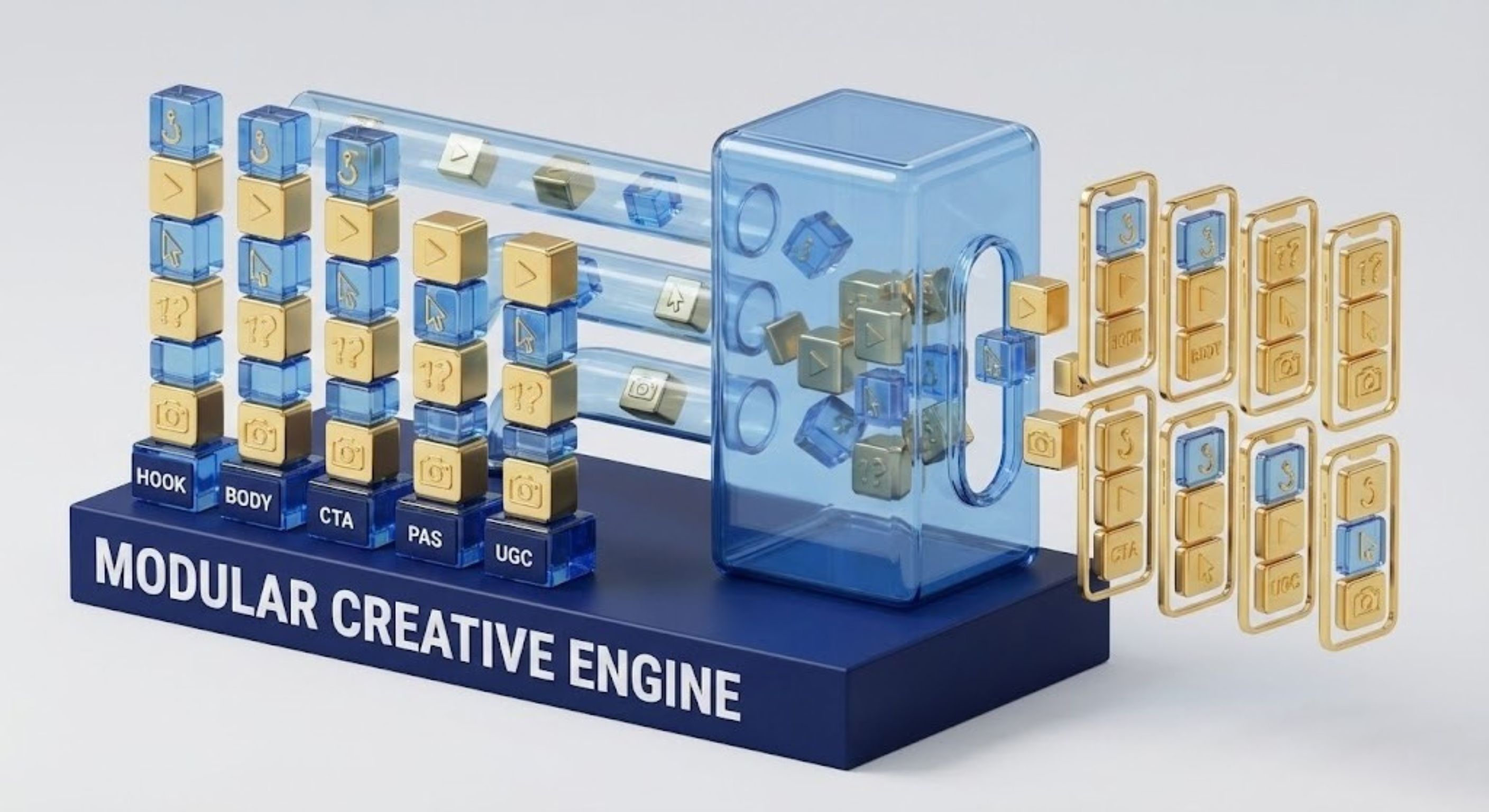
Okay, so you've got your assets organized. That's a huge step. But the real leap in scaling video ad production happens when you stop thinking about making individual videos and start thinking in modules. This is where your video production project management evolves from just tracking tasks to building a genuine creative engine.
By breaking down your ads into reusable "building blocks," you can churn out hundreds of unique ad variations from just a handful of core assets.
This modular strategy is your best weapon against creative fatigue. Instead of painstakingly building every single ad from the ground up, you can mix and match proven components. This lets you rapidly test new combinations, find what actually clicks with your audience, and keep your campaigns feeling fresh and effective. It turns a linear, one-and-done workflow into a dynamic system built for speed.
The Classic Hook-Body-CTA Framework
The most fundamental modular setup is the Hook-Body-CTA structure. It’s dead simple, wildly effective, and it’s the bedrock of almost every high-performing video ad out there. Each piece has a specific job to do.
The Hook (First 3 Seconds): This is it. Your entire first impression. Its only job is to stop the scroll and hook the viewer. A killer hook might introduce a problem, make a bold claim, or just show something visually jarring.
The Body (3-15 Seconds): Once you've got their attention, the body delivers your core message. This is where you show the product in action, highlight the benefits, or expand on the story you started in the hook.
The Call to Action (CTA) (Last 3-5 Seconds): This is the closer. It tells the viewer exactly what to do next—whether that’s "Shop Now," "Download," or "Learn More." A clear, compelling CTA is non-negotiable if you want to turn that attention into action.
Let's say you create three different hooks, two body sections, and three CTAs. With just those assets, you can instantly generate 18 unique ad combinations (3x2x3). This allows for fast, methodical testing to find out which specific combination drives the best results. For a deeper dive, our guide on crafting a versatile video ad template offers more structured examples.
The Problem-Agitate-Solution Model
For a more psychological angle, there’s the Problem-Agitate-Solution (PAS) model. This framework is incredibly potent for any product that solves a clear customer pain point. It works by tapping into emotion to build a strong desire for your solution.
Here’s the breakdown:
Problem: Start by clearly identifying a relatable problem your viewer faces. Something like, "Tired of spending hours editing videos?"
Agitate: Don't just state the problem—twist the knife a little. Magnify the frustration and emotional cost of it. "All that manual work just for your ads to tank? It's a massive waste of time and money."
Solution: Now that the viewer is feeling the pain, you swoop in with your product as the obvious, easy solution. "What if you could generate hundreds of high-performing video ads in minutes? That's exactly what our platform does."
The PAS model works so well because it aligns your product directly with a pain the viewer already has. By validating their frustration first, you position your solution not just as a nice-to-have, but as an essential fix.
UGC Mashups and Listicle Formats
Two other powerful modular frameworks are User-Generated Content (UGC) mashups and listicles. Both are perfectly suited for social media, where authenticity and snackable content reign supreme.
A UGC mashup is simply stitching together short clips from multiple customer testimonials or influencer reviews. You can create different versions by swapping out the opening clip (the hook), changing the order of testimonials in the body, or testing a different final CTA. This approach leverages social proof to build instant trust.
Listicle videos (e.g., "3 Reasons Our App Will Change Your Life") are modular by nature. Each numbered point can be treated as a self-contained "body" module. You can easily test different opening hooks or reorder the points to see which sequence holds attention the longest. This format is highly engaging because it sets clear expectations and delivers info in a digestible way.
Adopting these frameworks within your video production project management workflow is the secret to unlocking true creative scale.
To help you decide which framework to start with, here’s a quick comparison of the most common ones we use for performance ads.
Modular Creative Framework Comparison
This table breaks down the key performance ad frameworks, their best use cases, and the components that make them tick.
Framework | Best For | Hook Component | Body Component | CTA Component |
|---|---|---|---|---|
Hook-Body-CTA | General purpose, direct response, brand awareness. A versatile starting point for any campaign. | A visually disruptive or curiosity-driven clip (first 3 seconds). | Product demos, benefit explanations, or short storytelling. | A clear, direct instruction like "Shop Now" or "Learn More." |
Problem-Agitate-Solution (PAS) | Products that solve a distinct pain point. Best for resonating with an audience's frustrations. | Highlighting a common problem or showing a "before" state. | Amplifying the negative emotions or consequences of the problem. | Presenting the product as the definitive solution. |
UGC Mashup | Building social proof and trust. Great for D2C brands and app downloads. | The most compelling customer testimonial or reaction shot. | A rapid sequence of different users sharing positive experiences. | Encouraging viewers to join the community of happy customers. |
Listicle | Educating the audience or breaking down complex features into digestible points. | A title card or voiceover stating the topic (e.g., "Top 5 Reasons..."). | Each numbered point presented as a mini-module with visuals. | Prompting the viewer to experience the benefits for themselves. |
Choosing the right framework really depends on your product and campaign goal. The key takeaway is that you don't need to reinvent the wheel for every ad. Start with one of these proven structures, build out your modular components, and you'll be set up to test and iterate at a speed you never thought possible.
Streamlining Your QA Review and Platform Handoff
The final mile of any video production workflow is often the bumpiest. You’ve put in the work to create brilliant, modular assets, but getting them approved and launched without friction is where a lot of teams stumble.
A messy Quality Assurance (QA) and handoff process can derail all your hard work, creating bottlenecks that kill campaign momentum right before you cross the finish line.
It's time to end the nightmare of confusing email chains filled with vague feedback like, "Can we make this part pop more?" A truly effective QA process is built on clarity and context, making sure every piece of feedback is actionable and every approval is tracked. This isn't just about making life easier—it’s about speeding up your entire creative learning cycle.
Establishing a Clear and Contextual QA Process
The real key to a solid review cycle is getting feedback out of scattered emails and into one central, collaborative space. When reviewers can drop comments directly on the video timeline, ambiguity just melts away. A comment at 0:02 saying, "Hook feels a bit slow," is infinitely more helpful than some generic note lost in a thread.
To give feedback that your team can actually use, learning how to annotate video like a pro is a game-changer. It ensures your editors know exactly what needs to be changed, which drastically cuts down on the number of revision rounds.
On top of that, a great QA system needs clear, non-negotiable statuses. Vague terms like "Needs work" simply don't cut it. You need a simple system that everyone on the team understands and respects:
In Review: The asset is ready for stakeholders to provide feedback.
Changes Requested: Specific, time-stamped revisions are required.
Approved for Launch: The asset is locked, final, and ready for the media buying team.
This simple structure gives you at-a-glance visibility into where every single creative asset stands, preventing the costly mistake of an unapproved ad accidentally going live.
The Critical Handoff to Media Buyers
Once an ad is approved, the handoff to the media buying or user acquisition team is the next crucial step. A sloppy handoff can corrupt your A/B testing data before the campaign even starts. The solution is a rigorously enforced naming convention that embeds strategic data right into the filename.
A standardized name like Campaign_Audience_CreativeID_Version makes your analytics clean and insightful from the get-go. For instance:
SummerSale_Lookalike1_UGC-Testimonial_V3-HookB-CTA-ShopNow
This structure tells the media buyer everything they need to know without ever opening a spreadsheet. More importantly, when the performance data comes back from Meta or TikTok, you can instantly see that "HookB" is crushing "HookA" with your lookalike audience. This allows for smarter, faster creative decisions down the line. And of course, make sure your production process respects platform-specific requirements; you can review our guide on TikTok video ad specs to ensure every launch is a smooth one.
The handoff isn't just a file transfer; it's a data transfer. A clean, automated naming convention is the bridge that connects your creative choices to their real-world performance metrics.
Closing the Loop with Direct Platform Integration
The ultimate goal here is to create a seamless loop: create, launch, test, and learn. Modern video production project management tools make this possible by connecting your workflow directly to ad platforms like Meta. Instead of downloading final files and manually re-uploading them, you can push approved ads straight to the ad manager.
This kind of integration does more than just save time. It closes the feedback loop much faster, ensuring that performance data is tied directly back to the creative assets in your library. When you see an ad starting to fatigue, you can quickly find its modular components, iterate on the hook or CTA, and launch a fresh version in minutes.
This connection between your creative hub and your ad platform is a powerful catalyst for growth. The right tools are essential here; research shows that 66% of companies using project management tools completed projects within their original budget, compared to just 47% of those without them. By tightening up the QA review and platform handoff, you transform your video production from a series of disjointed tasks into a high-velocity learning engine.
Got Questions? We've Got Answers
Switching to a more structured system for video production always sparks a few questions. Here are some of the most common ones we hear from teams trying to get a handle on their ad creative workflow.
What Are the Best Tools for Managing Video Ad Creative Workflows?
You could try to wrangle a generic tool like Asana or Trello, but you'll quickly find they aren't built for the unique chaos of high-volume ad creation. For teams who are serious about scaling, you need a specialized platform that gets the entire creative lifecycle.
Look for a tool that rolls these critical functions into one place:
Asset Management: A central library for every piece of raw footage, graphic, and audio file you own. No more hunting through folders.
AI Tagging: This is a game-changer. It automatically tags your video content so you can search for clips using plain English, like "woman smiling with product."
Modular Editing: You need features that let you rapidly assemble and remix ads using proven frameworks like Hook-Body-CTA.
Review and Approval Tools: Time-stamped commenting and clear approval statuses are non-negotiable for cutting down on feedback loops.
The goal isn't just to manage tasks; it's to find a solution that understands your process from the initial brief all the way to pushing the final ad live on your ad platforms.
How Can a Small Team Implement These Scalable Processes?
This is a big one. You don't need a huge team or a pricey software subscription to get started. The secret is to build solid organizational habits before you even think about tools.
First, standardize your creative briefing process. Create one detailed template, and make it mandatory for every single project. No exceptions. At the same time, start building out your "Context Vault"—this can be as simple as a shared Google Drive folder that holds your brand guidelines, best-performing ad scripts, and top customer testimonials.
Once that's in place, agree on a logical folder structure and a naming convention for your assets that everyone understands. These foundational steps cost you nothing but time and instill the discipline you absolutely need for effective video production project management.
What Is the Biggest Mistake to Avoid in Video Project Management?
Easy. The single most damaging mistake we see is failing to establish a single source of truth. When critical information is scattered everywhere, your team is flying blind.
Chaos is the direct result of decentralized information. When briefs are in one place, assets in another, feedback is buried in emails, and final versions are hiding on someone's desktop, you create friction. Production slows to a crawl and costly mistakes become inevitable.
Centralization is the cure. Your entire team—from strategists to editors to media buyers—has to operate from one shared space. This is where they can find the latest brief, access all approved assets, see feedback in context, and grab the final, approved ad file. Without this central hub, you're not producing creative; you're just constantly putting out fires.
Ready to stop juggling chaotic folders and endless revision cycles? Sovran is the AI-powered platform that automates your entire video ad workflow. Turn your raw clips into a searchable, modular library and start generating hundreds of high-performing ad variations in minutes, not days. Find your winning ads 10x faster and scale your creative output without burning out your team.

Manson Chen
Founder, Sovran
Related Articles
10 Actionable Ad Creative Ideas That Convert in 2026
Discover 10 actionable ad creative ideas for Meta & TikTok. Get hooks, scripts, and testing frameworks to boost your ROAS and combat creative fatigue.
- ad-creative-ideas
- video-marketing
- 6 more
How to Turn Link Into Video: Ads That Convert in 2026
Learn how to turn link into video for Meta & TikTok ads. Leverage AI to scale creation, boost ROI, and succeed in 2026.
- ai-video-generation
- link-to-video-ads
- 6 more
Your Guide to a Social Media Ad Generator in 2026
Discover how a social media ad generator revolutionizes creative production. Learn to automate video ads, scale testing on Meta & TikTok, and drive performance.
- social-media-ad-generator
- ai-video-creation
- 4 more