The Ultimate Video Ad Template to Scale Your Campaigns
Discover how a modular video ad template can revolutionize your Meta and TikTok campaigns. Automate creation, beat fatigue, and find winning ads faster.

Jump to a section
Think of a video ad template as a reusable recipe. It's a smart framework that lets you quickly cook up dozens of ad variations by simply swapping out key ingredients—like your hook, the main body content, and the final call-to-action. This whole approach is designed to kill off repetitive, soul-crushing manual edits and finally let you scale creative production for platforms like Meta and TikTok.
Why Your Ad Creative Workflow Is a Soul-Crushing Bottleneck
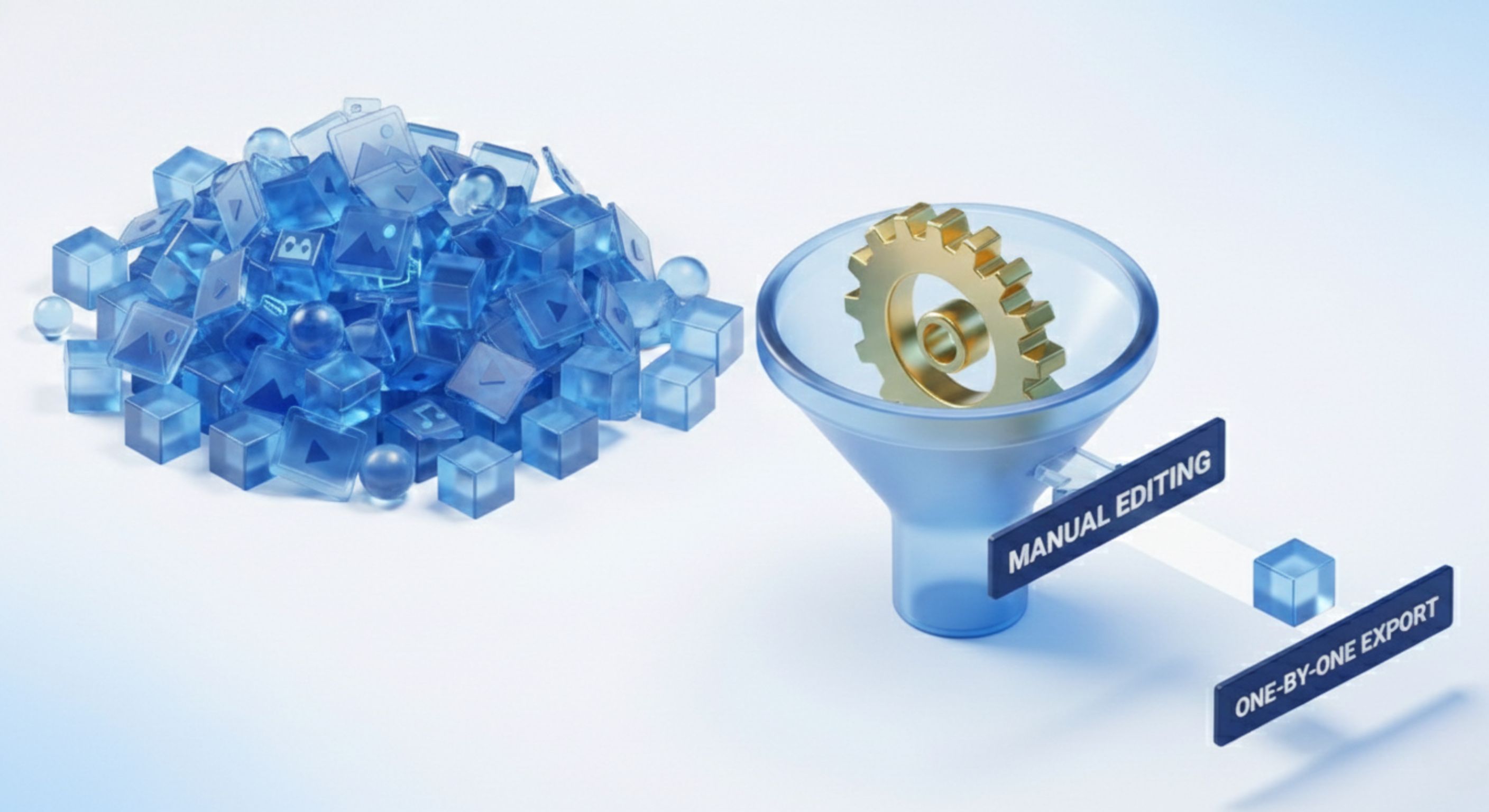
If you've ever spent an afternoon endlessly duplicating projects in CapCut just to change the first three seconds of a video, you get it. The old way of making ad creative is fundamentally broken. It’s a grind—a repetitive, time-sucking process that was never meant for the speed and volume required in modern performance marketing.
The algorithms on TikTok and Meta crave freshness and volume. They reward accounts that are constantly in the lab, testing new concepts. But your manual process? It’s the unavoidable traffic jam holding everything up. Every single new ad idea demands a painstaking, one-by-one editing session. This hamster wheel doesn’t just burn through your team's time; it actively kneecaps your ability to find winning ads and actually scale your campaigns.
The Downward Spiral of Creative Fatigue
Creative fatigue isn't just some marketing buzzword; it's a direct torpedo to your campaign performance. The moment your audience sees the same ad for the tenth time, engagement dies, and your costs go through the roof. The only real cure is a constant IV drip of fresh creative, but your current workflow makes that almost impossible to sustain.
You get stuck in a reactive loop: performance tanks, you scramble to bang out a few new variants, and the cycle starts all over again. This constant fire drill leads to burnout and pulls your team away from high-level strategy. Instead of analyzing what's working and dreaming up the next big idea, you're just stuck on the assembly line.
The Unscalable Reality of Manual Ad Variation
Let's get real. Imagine you want to test five different hooks against three unique body segments and two calls-to-action. If you're doing this manually, that's 30 individual video exports (5 x 3 x 2). Each one needs to be opened, edited, rendered, and named. For a single creative, that tedious task can easily torch an entire day.
This linear process is riddled with problems:
A Massive Time Sink: Precious hours evaporate on low-value, repetitive tasks like swapping clips and nudging text overlays around.
Huge Risk of Error: Manual naming and file management are recipes for disaster. One typo can wreck your tracking and make it impossible to know which test actually won.
It Kills Bold Testing: When every new variation is a labor-intensive project, you’re far less likely to experiment with ambitious, weird ideas. You just stick to minor, "safe" tweaks.
The root of the problem is that you're treating each video ad like a unique, handcrafted piece of art. To truly scale, you have to shift your mindset. Stop creating individual ads and start building an efficient system for ad production.
This is exactly where a modular video ad template becomes a complete game-changer. It flips your creative process from a manual chore into a strategic, scalable operation. By setting up a reusable structure and treating your assets like interchangeable building blocks, you can assemble hundreds of unique ad combinations in minutes, not days. This isn't about working harder; it’s about building a smarter framework that turns your creative workflow from a bottleneck into your most powerful growth lever.
Designing Your Modular Ad Framework

Before you can even think about building ads at scale, you need a solid blueprint. The best video ad templates I’ve ever worked with aren't just a single, rigid design. They're flexible, modular frameworks that allow for near-endless creative combinations.
Think of it like this: stop seeing your ads as finished videos and start seeing them as a set of LEGO bricks you can snap together in dozens of different ways. This mental shift is everything.
The most reliable structure for this approach is the classic Hook-Body-CTA framework. It’s brutally simple, wildly effective, and perfectly built for the thumb-stopping pace of Meta and TikTok.
Deconstructing the Hook-Body-CTA Structure
This three-part formula is the DNA of almost every successful short-form video ad out there. Each piece has a very specific job to do, guiding a viewer from casual scrolling to taking action.
The Hook (1-3 seconds): This is your scroll-stopper. Its one and only job is to jolt the viewer out of their feed and give them a reason to stick around for a few more seconds.
The Body (5-20 seconds): Now you deliver on the hook's promise. This is where you dig into the problem, show off your solution, feature the product, or flash some killer social proof.
The CTA (2-5 seconds): The call-to-action is your closer. It tells people exactly what you want them to do next. "Shop Now." "Learn More." "Download the App." No ambiguity.
Getting how these three parts flow together is the first step. The real magic happens when you apply this structure to your own content and start spotting the modular pieces in your best ads.
Analyzing Your Winners to Find Your Framework
Your own ad account is a goldmine. Seriously. The best guide for building a powerful video ad template is hiding in your own performance data.
Go pull your top-performing videos from the last six months. Don't just look at which ads won; your job is to deconstruct why they won. As you watch each one, start categorizing the core components. You'll quickly see patterns emerge—themes and angles that your audience can't get enough of.
Start by asking these questions for each winning ad: What was the opening visual or line that made people stop? How did the middle section build trust or demonstrate value? What was the final prompt that drove the click? This is how you reverse-engineer your success into a reusable formula.
For example, you might realize your best ads almost always use a raw, User-Generated Content (UGC) testimonial in the Body. Or maybe your hottest hooks consistently lead with a direct question that calls out a specific pain point. These are the building blocks of your framework.
Popular Frameworks to Inspire Your Template
While your own data is king, you don't have to reinvent the wheel. You can draw inspiration from battle-tested marketing formulas that fit perfectly into the Hook-Body-CTA structure. Adopting one of these can give you a huge head start.
Here are a few proven frameworks to consider:
Framework Type | Hook | Body | CTA |
|---|---|---|---|
Problem-Agitate-Solution (PAS) | "Still struggling with [Problem]?" | "It gets worse... [Agitate Pain Point]. But what if you could [Solution Preview]?" | "Fix [Problem] for good. Tap 'Learn More'." |
UGC Testimonial | "This is why I'll never go back..." | A customer shows the product and explains its benefits in their own words. | "See what everyone's talking about. Shop Now!" |
Listicle / "Top 3" | "3 reasons your [Goal] is failing." | Quickly list three surprising tips, with your product as the final, ultimate solution. | "Get all the tips. Download our free guide." |
When you plan your video ad template around structures like these, you're not just making a single video. You're building an engine for creative testing and diversity. If you want to go deeper on this, check out our guide on how to scale paid growth with modular video ads to turn this concept into a core growth strategy.
With this foundation in place, the next step is planning your asset library—figuring out the exact hooks, body clips, and CTAs you need to fuel this new template system.
Your modular framework is the engine, but the creative assets are the fuel. Without a well-organized and easily searchable library of clips, even the most brilliant video ad template will stall out. This is where we move from theory to practice and build the reusable asset library that will power your entire ad production.
We’ve all been there: digging through a nightmare of nested folders and confusing filenames. You spend way too much time hunting for that one specific UGC clip you know would be perfect, only to give up and use something that's just "good enough." The goal here is to kill that friction entirely. We're going to transform your scattered assets into a dynamic, intelligent database.
The process kicks off by getting everything in one place. Gather all your raw video clips, b-roll, existing ads, and user-generated content, then upload them into a single platform. This step alone is a huge leap in efficiency, but it’s just the starting line.
How AI Tagging Replaces Manual Sorting
Once everything is uploaded, the real magic happens. Forget manually creating folders like "UGC_Testimonials_Q3" or "Product_Demos_Angle_B." Instead, you can let an AI-powered system analyze and categorize everything for you, automatically.
Sovran's AI essentially watches every frame of your footage, listens to the audio, and actually understands the context. It then applies descriptive tags based on what it sees and hears. This is a fundamental shift from the old way of doing things.
This intelligent system can identify and tag assets based on several key criteria:
Content Type: Is it a product demo, an unboxing video, a customer testimonial, or maybe a screen recording?
Structural Role: Does this clip work best as a 'Problem Statement,' a 'Benefit Showcase,' or a 'Call to Action'?
Visual Elements: Does the clip feature a specific product, a person talking to the camera, or an animated graphic?
By applying these kinds of tags, the AI effectively deconstructs your raw footage into strategic building blocks. Every single clip becomes instantly discoverable not by its filename, but by its purpose within your advertising framework. To get the most out of this, it's crucial to apply Essential Asset Management Best Practices as you build out your library.
Finding the Perfect Clip with Natural Language
This AI-driven approach completely changes how you find what you need. You can forget trying to remember exact filenames. Now, you can search your entire library using simple, conversational language—just like you would with Google.
Imagine you need a clip for a new ad variation. Instead of digging through folders, you can just type a query.
Example Searches:
"A customer testimonial mentioning how easy setup was"
"Show me all hooks that ask a question about back pain"
"Product demo showing the blue widget in action"
The system instantly pulls up every relevant clip that matches your description, tagged and ready to be dropped into your template. This simple capability saves countless hours and unlocks creative possibilities that were previously buried under layers of disorganized files.
This level of organization is non-negotiable in a fast-paced environment. Video ad templates have changed the game for how businesses produce content, with 48% of marketing videos being developed from some combination of premade templates. This isn't just a trend; it's a necessity. Especially when digital video ad spend is projected to hit $214.76 billion globally in 2025. Without an efficient system to feed them, templates just can't deliver on their promise.
Ultimately, building a smart asset library is the most critical prep work you can do. A well-tagged library ensures every piece of creative you’ve ever shot is at your fingertips, ready to be remixed into countless new ad combinations. This is the foundation of a truly scalable https://sovran.ai/blog/video-asset-management-system.
Turning Your Templates into an Ad Factory with Bulk Rendering
This is where all the prep work really pays off. You've designed a smart modular framework and built an asset library with meticulous tagging. Now, you get to step out of the never-ending cycle of manual ad creation. You've essentially built an engine, and it’s time to fire it up and generate ad variations at a scale you probably thought was impossible.
Bulk rendering is what takes you from spending hours in an editor like CapCut to getting the job done in just a few clicks. It’s a fundamental shift. You’re no longer just a video editor creating ads one by one; you're a creative strategist orchestrating a high-volume production system that can finally keep up with the demands of modern ad platforms.
The idea is straightforward: you tell the system which building blocks to use, and it automatically remixes them into dozens—or even hundreds—of unique video ads.
From Manual Remixing to Automated Assembly
Let's imagine you've identified ten winning hooks, five solid body segments, and four different calls-to-action, all neatly tagged in your library. If you were to create every possible combination by hand, you’d be staring down the barrel of producing 200 individual videos (10 x 5 x 4). That's not just a ton of work; it's a creative and logistical nightmare.
With a bulk rendering tool, you can get this done in minutes.
You simply select your modular framework, choose the asset tags you want to combine, and hit render. The platform acts as your tireless production assistant, assembling every single permutation for you.
The workflow usually looks something like this:
Pick Your Framework: Start by choosing the ad structure you want to populate, like your go-to Hook-Body-CTA template.
Choose Your Ingredients: Dive into your tagged library and select multiple assets for each module. For instance, you could grab all clips tagged as 'Problem Statement' hooks and all those tagged as 'UGC Testimonial' body segments.
Lock in Your Branding: You can also batch-apply branding elements like text overlays, logos, and subtitles across every single variation at once. This keeps your brand looking sharp and consistent without you having to touch each video individually.
Start the Render: Hit the button, and the system gets to work, generating every possible combination from your selections.
This clean flow—upload, tag, search, and assemble—is the absolute backbone of scalable ad production.

As the diagram shows, investing time upfront to organize assets makes them instantly searchable and ready for this kind of automated assembly.
The difference in time and effort is staggering when you compare the old way with a template-based system. Just look at what it takes to produce 50 ad variations.
Manual Editing vs. Automated Bulk Rendering
Task | Manual Process (e.g., CapCut) | Automated with a Template |
|---|---|---|
Asset Gathering | 2-4 hours (Locating, sorting, and importing files) | 15-30 minutes (Filtering by tags in the library) |
Video Assembly | 10-15 hours (Duplicating projects, swapping clips) | 5-10 minutes (Selecting tags and initiating render) |
Branding/Text | 2-3 hours (Manually adding logos/subtitles to each) | 2 minutes (Applying brand elements to all at once) |
Rendering/Export | 3-5 hours (Exporting each video one by one) | 30-60 minutes (Batch rendering in the background) |
Total Time | 17-27 hours | ~1-2 hours |
The numbers speak for themselves. This isn't just a minor improvement; it’s a complete transformation of your creative workflow.
Keeping Your Creative Pipeline Full with AI
But what happens when you burn through all your existing footage? An automated system is only as good as the assets you feed it. To keep your creative pipeline from going dry, the best platforms now integrate AI to help you generate fresh b-roll and new hooks on demand.
Instead of waiting weeks for the next shoot, you can generate entirely new visuals from a simple text prompt. This is a massive advantage, ensuring you always have new angles to test and can react to performance trends almost instantly.
For example, let's say you discover an ad with a "surprised reaction" hook is crushing it. You can use AI to generate five more variations of that exact concept in minutes. This is especially crucial for creating engaging short-form video ads on platforms like TikTok Reels, where trends move at lightning speed.
When you combine a modular video ad template with AI-powered asset generation, you create a self-sustaining creative ecosystem. This level of automation doesn't replace creativity; it amplifies it by tearing down the technical barriers that slow down testing and learning. For a much deeper dive into this process, check out our guide on the bulk video ad editor for Meta.
Streamlining Your Ad Launch and Testing Process
So, you've built a system that can pump out hundreds of killer ad variations. That's a huge win, but it's only half the battle. If your launch and testing process is a clunky, manual mess, you’ll never see the true speed and learning potential of what you've created. This is where we close the loop, connecting your high-volume creative output directly to campaign performance.
The goal here is to completely erase the friction between rendering a video and seeing its results in Ads Manager. A seamless workflow at this stage is just as critical as the creative production itself. Without it, you’re just left with a folder of perfectly rendered ads and hours of tedious, error-prone setup work ahead of you.
This final piece of the puzzle transforms your video ad template from a simple production tool into a full-fledged growth engine. It ensures the speed you worked so hard to gain isn’t lost in the final mile.
Connecting Your Ad Accounts for Direct Launching
First things first, let's build a direct pipeline between where you create your ads and where you run them. Manually downloading hundreds of videos, uploading them one-by-one to Meta or TikTok, and naming each one is a massive bottleneck. It's a low-value, high-risk task that slows you down and is practically begging for costly human error.
Modern platforms like Sovran let you connect your ad accounts directly. This means that once your bulk rendering is complete, you can push the finished ads straight into your ad manager’s media library with just a few clicks.
This integration is way more than a simple convenience; it’s a strategic advantage that lets you:
Move Faster: Go from an idea to a live test in minutes, not hours.
Eliminate Errors: Forget about misnamed files or uploading the wrong creative to the wrong ad set.
Maintain Momentum: Keep your team focused on high-level strategy instead of getting bogged down in administrative grunt work.
The Power of Automated Naming Conventions
This is easily one of the most underrated features of a truly scalable ad system. When you’re testing dozens (or hundreds) of creative variations, clear and consistent naming is absolutely non-negotiable for accurate analysis. Trying to remember if Final_Ad_V3_new.mp4 was the one with the UGC hook or the product demo is a recipe for a massive headache and bad data.
Automated naming conventions solve this problem for good.
As your videos are rendered, the system automatically generates a filename based on the specific modular components used in each one. This creates a clear, human-readable label that tells you everything you need to know at a glance.
Imagine a filename that looks like this: UGC-Hook_Problem-Agitate_Shop-Now-CTA. You instantly know the exact recipe for that specific ad without ever having to watch it. This simple feature makes performance analysis clean, fast, and incredibly accurate.
When you see that this particular combination is crushing it, you know precisely which elements are driving its success. This kind of clarity is what allows you to make smart, data-driven decisions about your next round of creative iterations.
Structuring Campaigns for Rapid Learning
With a library of clearly named ad variants ready to go, the final step is to structure your campaigns for efficient testing. Just dumping 50 different creatives into a single ad set will only confuse the algorithm and torch your budget. The key is to test methodically.
A proven approach is to isolate one variable at a time.
Test Your Hooks: Set up a campaign where you test 5-7 different hooks against your single best-performing Body and CTA combination.
Test Your CTAs: In a separate campaign, pit 3-4 new CTAs against your winning Hook and Body.
This structured approach lets you accelerate your learning cycles exponentially. Because your naming is automated and your ads are already in your library, setting up these tests is incredibly fast. You can quickly identify winning components and double down on what works, helping you find profitable ads up to 10x faster than with a manual, disorganized process.
Common Questions About Video Ad Templates
Jumping into a modular video ad workflow is a big shift, and it’s totally normal to have questions. You're basically swapping out old, clunky habits for a system built from the ground up for speed and scale.
Let's walk through some of the most common questions performance marketers have when they're ready to make the leap. These answers should clear things up and help you dodge a few common roadblocks.
How Do I Choose Which Ad Frameworks to Use?
The answer is already sitting in your ad account. Don't guess—let your data do the talking. Pull up your best-performing ads from the last 6 to 12 months and start breaking them down.
What patterns do you see? Are your biggest winners built on a classic Problem-Agitate-Solution (PAS) structure? Or maybe raw UGC testimonials or listicles are the ones crushing it for you. Your own performance history is the most reliable playbook for building your first video ad template.
Once you spot your most successful framework, build your first template around that. The goal isn't to create five different templates right out of the gate. Master one, prove the concept, and then branch out to test other proven frameworks and explore new creative angles.
What If I Don't Have Enough Video Assets?
This is probably the most common worry we hear, but it’s easier to solve than you think. First off, get scrappy. You'd be surprised what you can do with what you already have. Even short product clips, simple screen recordings, or high-quality static images can be woven into a compelling story within your template.
Second, this is the perfect time to bring in AI to fill the gaps. Modern creative platforms like Sovran have powerful AI video generation models built right in. This means you can create high-quality, relevant b-roll—and even brand new hooks—from nothing more than a text prompt.
Need a shot of a frustrated user staring at their laptop to set up the "problem" in your ad? You can generate that in seconds. By blending your existing assets with AI-generated content, you’ll have more than enough raw material to keep your templates fueled and your ad pipeline flowing.
How Many Ad Variations Should I Test at Once?
The goal here isn't just to make a ton of ads; it's about intelligent, structured testing. Fight the urge to dump a hundred random variations into one ad set. That’s just a fast way to burn through your budget without getting any clear takeaways.
A much smarter approach is to isolate your variables methodically.
Hook Testing Campaign: Set up an ad set to test 5-7 different hooks against a single "Body + CTA" combo that you already know performs well.
CTA Testing Campaign: In a completely separate campaign, test 3-4 different CTAs against your winning "Hook + Body" combination.
This structured method is the only way to know with confidence which specific parts of your ad are actually driving performance. And when your platform uses automated naming conventions, tracking the results of these tests becomes ridiculously simple and accurate.
Will Using Templates Make My Ads Look Generic?
Absolutely not. This is a total myth. A video ad template is a structural framework, not a cookie-cutter visual design that locks you in. The creativity and freshness of your ads come directly from the quality and variety of the assets you feed into that structure.
If you’re constantly supplying your asset library with new hooks, different customer testimonials, fresh b-roll, and updated product shots, your final ads will always feel unique and native to the platform.
Plus, advanced template systems allow for bulk customization of key visual elements. You can easily apply different text overlays, swap out fonts, and make sure your branding is on point across hundreds of variations. The template is there to automate the tedious assembly work; the creativity still comes from the modular pieces you create and combine. Think of it as a tool to amplify your creative strategy, not replace it.
Ready to stop the manual grind and build an ad creation engine that actually scales? With Sovran, you can turn your raw assets into hundreds of high-performing ad variations in minutes, not days. Stop editing one-by-one and start testing at the speed of the market. Start your 7-day free trial today and discover your winning ads up to 10x faster.

Manson Chen
Founder, Sovran
Related Articles
How to Turn Link Into Video: Ads That Convert in 2026
Learn how to turn link into video for Meta & TikTok ads. Leverage AI to scale creation, boost ROI, and succeed in 2026.
- ai-video-generation
- link-to-video-ads
- 6 more
8 High-Converting Static Ads Examples for 2026
Discover 8 high-performing static ads examples from top apps. Learn to create text-overlays, testimonials, and lifestyle ads that convert.
- static-ads
- performance-marketing
- 5 more
A Performance Marketer's Guide to Video to Flipbook Conversion
Learn to convert video to flipbook formats that boost engagement. This guide covers actionable methods for ads, content, and scaling creative with AI in 2026.
- video-repurposing
- performance-marketing
- 4 more