TikTok Ad Specs 2026: Video Sizes, Safe Zones, and Creative Checklist
Use this TikTok ad specs guide to export compliant vertical videos, avoid safe-zone mistakes, choose the right format, and turn approved footage into more ad variations.
Jump to a section
- Quick Reference: TikTok Ad Specs
- TikTok Ad Placement Specs At A Glance
- Core TikTok Video Specs Explained
- In-Feed TikTok Ad Specs
- TikTok Safe Zones
- Spark Ads Specs And Authorization
- TopView Specs And Safe-Zone Notes
- TikTok Creative Specs: What To Check Beyond The File
- Managing TikTok Ad Specs At Scale
- Create TikTok Variations Without Rebuilding Every Edit
- TikTok Ad Specs Checklist Before Launch
- Common TikTok Ad Specs Mistakes
- Frequently Asked Questions About TikTok Ad Specs
- Final Takeaway
TikTok ad specs are the export rules that decide whether your video can run, how it appears in the feed, and whether your best product shot, caption, or CTA is visible once TikTok's interface sits on top of it.
If you need the quick answer, use this as your default TikTok ad export:
- Aspect ratio: 9:16 vertical
- Resolution: 1080x1920 recommended
- Format: MP4 or MOV
- Length: test 9 to 20 seconds first for most direct-response In-Feed ads
- File size: keep it comfortably under the platform limit so upload and review stay smooth
- Audio: include voice, music, product sound, or another intentional sound layer
- Safe zones: keep logos, captions, product claims, prices, and CTA text away from the lower and right edges
That checklist will cover the most common paid social use case: vertical In-Feed creative designed to look native on the For You feed. But it is not the whole job.
TikTok video specs are table stakes. The better question is whether the ad is built for the placement. A technically compliant TikTok ad can still perform poorly if the hook is buried, the product shows up too late, the offer sits under the caption overlay, or the team has to rebuild every variation manually.
This guide covers the core TikTok video specifications, the main placement differences, safe-zone mistakes, Spark Ads, and the creative workflow performance marketers need after the file passes review.
Quick Reference: TikTok Ad Specs
Use this table as the working checklist before you send a video into TikTok Ads Manager.
| Spec | Recommended Default | Why It Matters |
|---|---|---|
| Aspect ratio | 9:16 vertical | Fills the mobile screen and feels native in the TikTok feed |
| Resolution | 1080x1920 | Keeps captions, product details, and UI-safe text sharp |
| File format | MP4 or MOV | Widely supported and clean for ad upload workflows |
| Duration | Start with 9 to 20 seconds for direct response | Long enough to hook, prove, and ask for the click without drifting |
| File size | Keep under the platform limit | Smaller clean exports process faster and load more reliably |
| Audio | Required in practice for native feel | TikTok is sound-led, even when users watch with captions |
| Safe zones | Keep key elements centered and clear of overlays | Prevents TikTok UI from covering copy, product, or CTA details |
Hard specs should always be checked against TikTok's official help center before a large launch. TikTok's auction In-Feed documentation was shown as updated in June 2026 and includes current safe-zone resources and Spark pull details. For this refresh, cite TikTok's official documentation only.
TikTok Ad Placement Specs At A Glance
Different placements need different creative decisions. The safest way to plan is to separate the technical spec from the job of the ad.
| Placement | Best Use | Creative Control | Practical Spec Notes |
|---|---|---|---|
| In-Feed Ads | Scalable direct-response tests | High | Build vertical, clear, fast-moving assets with product and offer visible early |
| Spark Ads | Creator proof, native credibility, whitelisting | Medium | Uses an organic post from your account or a creator account with permission |
| TopView Ads | High-impact awareness and launches | High | Full-screen open-screen placement that later adapts into feed-like display |
| Video Shopping Ads | TikTok Shop and ecommerce selling | High | Treat as In-Feed creative plus product-card and catalog accuracy |
For performance marketers, In-Feed and Spark usually matter most. In-Feed gives you control. Spark gives you native context. TopView can be powerful, but it is usually not the first place a lean team tests everyday creative angles.
Core TikTok Video Specs Explained
Most TikTok ad specs problems start with the same few mistakes: wrong aspect ratio, low-resolution export, tiny captions, covered product details, bloated files, or edits that take too long to show the point.
Think of specs as a creative constraint. The 9:16 frame is not just a file shape. It changes how you compose the product, where the creator's face goes, where captions sit, and how quickly a viewer understands the offer.
Aspect Ratio: Use 9:16 Unless You Have A Specific Reason Not To
TikTok is a vertical-first platform. A 9:16 video fills the phone screen and gives you the most space for product action, creator face, text overlays, subtitles, and CTA cues.
Square and horizontal assets may be accepted in some contexts, but they usually waste space. Square creative can feel repurposed. Horizontal creative often appears letterboxed, which immediately tells the viewer the ad was not built for TikTok.
Use 9:16 as the default for:
- Product demos
- UGC and creator ads
- Founder videos
- Before-and-after stories
- TikTok Shop and ecommerce ads
- Hook tests
- Spark Ads candidate posts
If you are also building assets for Reels, Shorts, and other placements, link the TikTok export checklist to your broader social media video specs workflow so the team is not guessing platform by platform.
Resolution: Export Sharp Enough For Captions And Product Detail
Use 1080x1920 as the recommended export target for vertical TikTok ads. Lower-resolution files may upload, but they can make the ad look soft after compression, especially when the edit includes small captions, app UI, product packaging, or before-and-after details.
Resolution affects trust. If the viewer cannot read the claim, see the product clearly, or understand the visual proof, the ad loses persuasion before the CTA has a chance.
For every TikTok export, check:
- Is the product visible in the first few seconds?
- Are subtitles readable on a small phone screen?
- Are before-and-after details large enough to understand?
- Does compression make the footage look cheap or blurry?
- Are UI screenshots or app demos cropped too tightly?
File Type And File Size: Keep Exports Clean
Use MP4 or MOV for the cleanest TikTok ad workflow. MP4 is usually the default for paid social teams because it is broadly compatible and easy to manage across editors, drives, and ad accounts.
The goal is not to max out the file size. The goal is a sharp, efficient export. A smaller clean file is easier to upload, review, share, and reuse across campaign builds.
For teams producing many ads, standardize export presets:
- TikTok In-Feed 9:16 MP4
- TikTok Spark candidate 9:16 MP4
- Reels 9:16 MP4
- Shorts 9:16 MP4
- Square or 4:5 only when the media plan requires it
A shared preset prevents subtle spec drift when multiple editors, creators, or agencies touch the same campaign.
In-Feed TikTok Ad Specs
In-Feed ads are the everyday performance format. They appear inside the For You feed and need to feel close enough to organic TikTok content that the viewer does not reject them instantly.
The best In-Feed ads usually do three things quickly:
- Show the product or problem.
- Give the viewer a reason to care.
- Move toward proof or an offer before attention drops.
Recommended In-Feed Video Setup
| Element | Recommended Setup | Notes |
|---|---|---|
| Ratio | 9:16 vertical | Build for full-screen mobile viewing |
| Resolution | 1080x1920 | Use high resolution so captions and product details stay legible |
| Format | MP4 or MOV | Keep a consistent export preset |
| Opening | Product, problem, or visual interruption in first 1 to 2 seconds | Do not spend the first beat on a logo bumper |
| Captions | Large, high contrast, safe-zone aware | Assume some viewers watch without sound |
| CTA | Simple and visible | Do not hide the next step under the interface |
TikTok may allow a wider range of technical inputs, but performance creative should be built for what users actually see: vertical, fast, sound-led, and visually clear.
Brand Name, Caption, And CTA Copy
TikTok specs are not only about the video file. Account name, captions, CTA text, landing page, and overlays all affect review and performance.
Keep ad copy short. If the viewer has to decode the caption and the video at the same time, the edit is doing too much.
Use captions for:
- The pain point
- The product promise
- The proof point
- The offer
- The CTA
Do not use captions for every word if that makes the ad visually noisy. A few clear captions usually beat a wall of text.
TikTok Safe Zones
Safe zones are the parts of the video where important content stays visible after TikTok adds interface elements like captions, usernames, profile buttons, engagement buttons, anchors, and CTAs.
This is one of the easiest TikTok ad specs mistakes to miss because the file can look perfect in your editor and still fail in the live placement.
The practical rule:
- Keep product, logo, price, claim, and CTA text away from the bottom.
- Keep important elements away from the lower-right side.
- Keep captions large and centered enough to read.
- Preview the ad with TikTok's placement tools before launch.
TikTok's official In-Feed documentation notes that safe-zone size can change based on dimension, caption length, and add-ons. TopView guidance also notes that the ad can be displayed differently between the open-screen moment and the later feed stage, so key branding elements need to stay inside the applicable safe-zone files.
Safe-Zone Editing Checklist
Before export, check the final frame on a phone-sized canvas:
- Can the viewer read the core claim without squinting?
- Is the product or outcome visible when UI overlays appear?
- Does the CTA sit above the caption area?
- Are subtitles covered by the right-side buttons?
- Does the edit still work if the bottom 20 percent is visually busy?
If the answer is no, do not "fix it in Ads Manager." Fix the edit. Safe-zone issues are creative issues, not just upload issues.
Spark Ads Specs And Authorization
Spark Ads promote organic TikTok posts from your own account or from a creator's account with permission. TikTok describes Spark Ads as a native format that uses organic posts and attributes post engagement back to the original post.
That makes Spark Ads useful when the organic post already has credibility:
- A creator demo that feels believable
- A product review with real comments
- A founder explanation that has traction
- A UGC post with a strong opinion
- A tutorial that already looks native
Spark Ads are not a shortcut for weak creative. If the original post rambles, hides the product, has poor framing, or misses the offer, paid spend simply amplifies those problems.
Spark Ads Vs. Standard In-Feed Ads
| Decision Point | In-Feed Ads | Spark Ads |
|---|---|---|
| Message control | Higher | Lower, because the post is already created |
| Native feel | Depends on execution | Usually stronger |
| Creator credibility | Must be added in the asset | Built into the organic post |
| Editing flexibility | Full | Limited by the original post |
| Best use | Controlled testing | Creator proof and native distribution |
Use In-Feed when you need controlled hook, body, CTA testing. Use Spark when the creator, post, and comment context are part of the persuasion.
For creator Spark Ads, get authorization before planning media spend. TikTok's Spark Ads flow lets creators generate authorization for advertiser use. That permission step protects the creator relationship and keeps the paid promotion tied to the original post.
TopView Specs And Safe-Zone Notes
TopView is built for reach and visibility. It appears when users open TikTok, then can adapt into a feed-like experience. That means the creative must work in more than one display context.
For TopView, the creative question is not only "does the file meet specs?" It is:
- Is the opening visually strong without needing context?
- Are the brand and product clear before the ad transitions?
- Do logos and text stay inside the safe zone?
- Does the ad still make sense when it appears with feed UI?
TopView can support large launches, seasonal campaigns, product drops, and awareness pushes. For most performance teams, though, it should not replace regular In-Feed and Spark testing. Use the cheaper, faster placements to learn which hooks and messages work, then bring those learnings into larger moments.
TikTok Creative Specs: What To Check Beyond The File
Technical specs get the ad approved. Creative specs make it worth spending on.
A high-performing TikTok ad needs:
- A visible product or problem early
- A first-frame reason to stop scrolling
- Captions that work inside safe zones
- A clear point of view
- Native pacing
- Proof before the CTA
- A landing page that matches the promise
This is why TikTok creative specs and TikTok video specs should sit in the same production checklist. The export might be right, but the creative can still fail if the hook is vague or the proof arrives too late.
Hook, Body, CTA Checklist
Use a modular creative structure:
- Hook: first line, first visual, or first pattern interrupt.
- Body: product demo, customer proof, problem explanation, or comparison.
- CTA: what the viewer should do next.
The advantage is testing clarity. If one hook wins, keep it and test new bodies. If one body proves the product well, pair it with new hooks. If the edit gets clicks but weak conversions, test a stronger CTA or more proof.
Recommended video to embed here:
How to test video ad hooks and 10x customer acquisition
This video shows how to refresh video ads by changing hooks, reviewing TikTok and competitor patterns, and combining hook variants with proven body videos.
Managing TikTok Ad Specs At Scale
The harder problem is not exporting one compliant TikTok ad. It is keeping dozens or hundreds of variants compliant while the team tests hooks, creators, offers, body clips, CTAs, and platforms.
That is where an asset system matters.
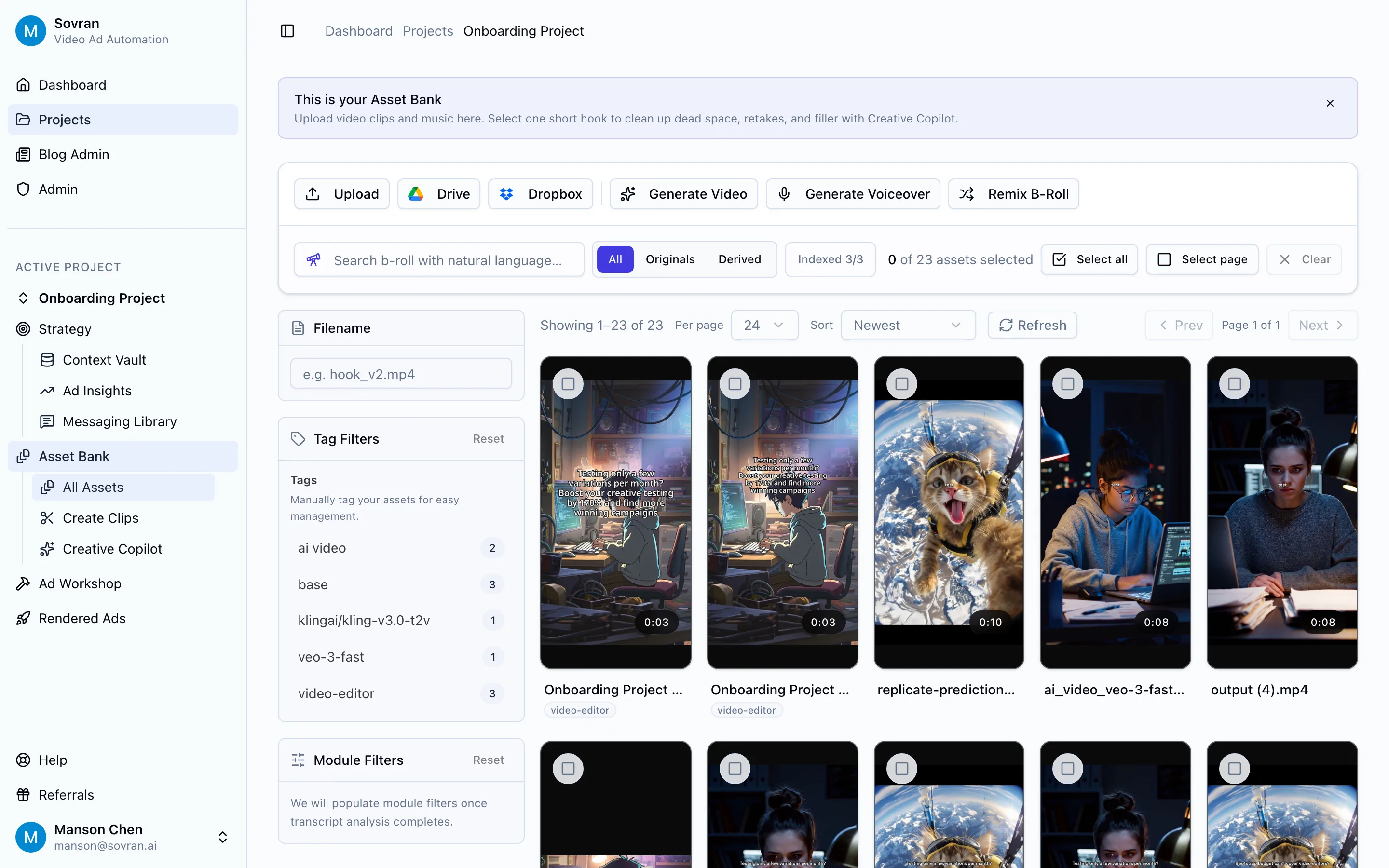
Use a reusable asset bank to organize:
- TikTok hooks
- Creator clips
- Product demos
- Testimonials
- Before-and-after clips
- B-roll
- CTAs
- Safe-zone-approved overlays
- Winning body videos
- Platform-specific exports
Then tag each asset by product, persona, pain point, format, creator, platform, and performance signal. The next time the media buyer asks for five new TikTok hooks against the same body video, the team should not need to dig through drives or rebuild the ad from scratch.
Sovran's value is strongest here. Rewardify used Sovran to increase creative tests by 170% month-over-month by exploring new combinations of hooks and body videos. Fuelin reported a 40% CAC reduction after increasing creative output and scaling spend more efficiently.
Create TikTok Variations Without Rebuilding Every Edit
Once the assets are organized, split videos into reusable modules:
- Hook
- Body
- CTA
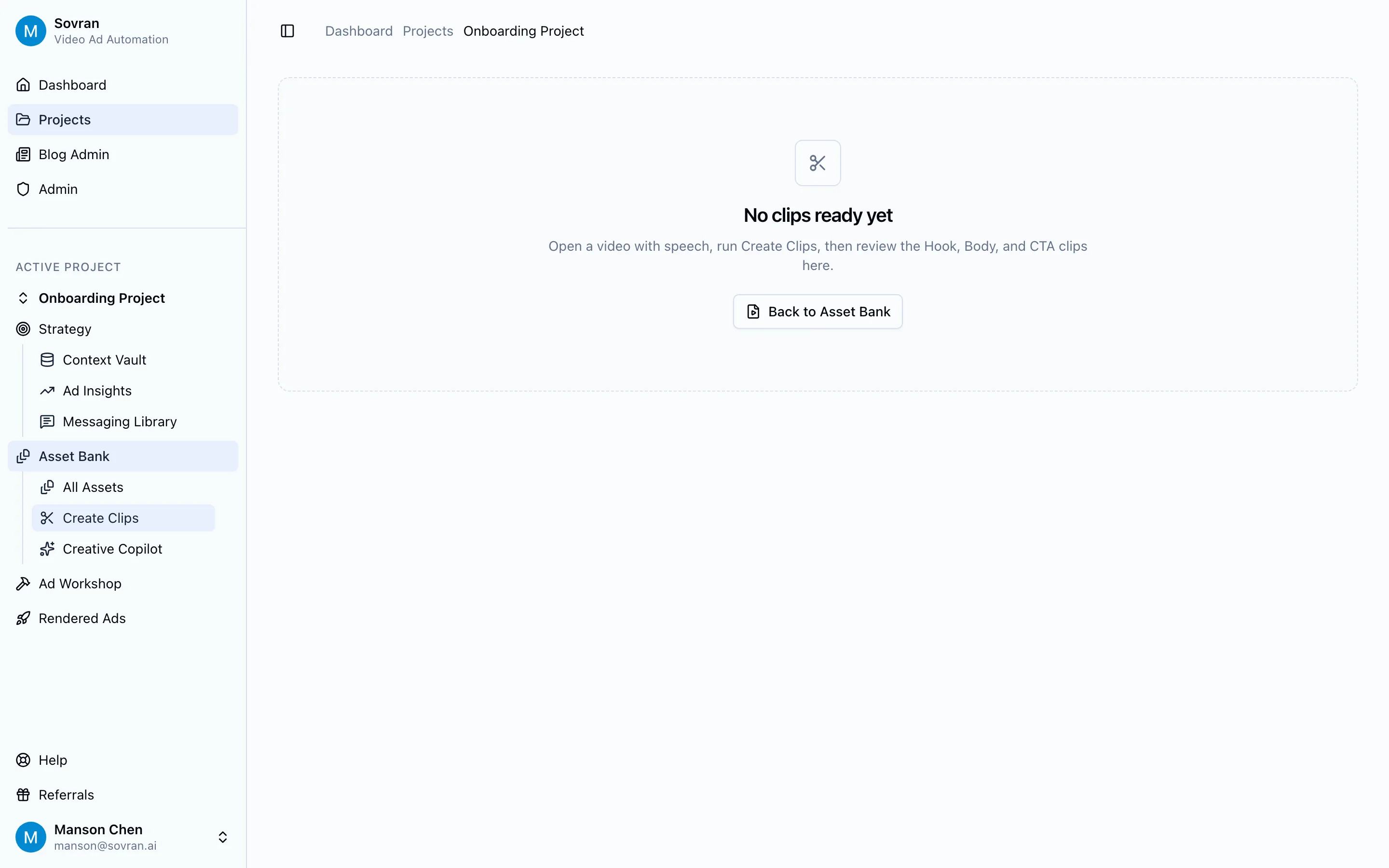
This matters because TikTok ad specs are easier to enforce when the production workflow is modular. You can keep approved vertical exports, safe-zone captions, and clean CTA endings in a controlled system instead of relying on every editor to remember every rule.
The workflow looks like this:
- Upload old winners, creator clips, demos, and testimonials.
- Split each source video into hook, body, and CTA modules.
- Tag each module by platform, angle, persona, and offer.
- Combine new variants using approved modules.
- Export in 9:16 with safe-zone-aware captions.
- Launch tests and feed performance learnings back into the asset bank.
That turns specs from a manual checklist into an operating system.
Recommended video to link here:
How to remix your video ads and get fresh variations in minutes with Sovran.ai
TikTok Ad Specs Checklist Before Launch
Use this before every campaign build.
File And Format
- 9:16 vertical export
- 1080x1920 recommended resolution
- MP4 or MOV
- Clean file size
- Audio included
- Captions readable on mobile
Safe Zones
- Product visible away from TikTok UI
- Logo not hidden by profile or buttons
- CTA text not near the bottom edge
- Captions not fighting with the native caption area
- Preview checked against the intended placement
Creative Quality
- First second has motion, product, face, or a strong visual change
- Product or problem appears early
- Hook and body match the target audience
- Claim is specific and supportable
- Proof appears before the CTA
- CTA is simple
Campaign Fit
- Landing page matches the ad promise
- Spark authorization is complete when using creator posts
- Commercial music usage is allowed
- Ad copy avoids unsupported claims
- Variants are named clearly for analysis
Common TikTok Ad Specs Mistakes
Mistake 1: Treating Horizontal Video As Good Enough
Horizontal video may upload in some scenarios, but it rarely feels native. The viewer sees unused space before they understand the offer. If the team has horizontal footage, reframe it for vertical instead of dropping it into a 9:16 canvas with empty bars.
Mistake 2: Putting The Offer Under The UI
Prices, discounts, product names, and CTAs often end up too low. That might be fine in the editor and unreadable in the feed. Move critical text up and keep it centered.
Mistake 3: Starting With A Logo Bumper
TikTok users do not wait for brand intros. Start with the product, result, problem, claim, or creator point of view. Brand can appear once the viewer has a reason to keep watching.
Mistake 4: Making Every Variant From Scratch
If every ad is a custom timeline, the team will test too slowly. Use modular creative. Keep winning bodies, test new hooks, and reuse compliant CTAs.
Mistake 5: Confusing Spark Credibility With Spark Performance
Spark Ads feel native because they come from organic posts, but they still need a selling job. Promote posts that show the product clearly, carry a real opinion, and make a believable case for action.
Frequently Asked Questions About TikTok Ad Specs
What are the basic TikTok ad specs for video?
For most TikTok In-Feed video ads, start with a vertical 9:16 video, 1080x1920 resolution, MP4 or MOV format, intentional audio, readable captions, and safe-zone-aware overlays. TikTok supports additional ratios and placement-specific rules, but 9:16 vertical is the default most paid social teams should build around.
What size should TikTok ads be?
Use 1080x1920 for a 9:16 vertical TikTok ad. This fills the phone screen and keeps product details, captions, and text overlays legible after compression. Lower resolutions can make app demos, product packaging, and testimonials look soft.
How long should a TikTok ad be?
For direct-response In-Feed creative, start by testing 9 to 20 seconds. Go longer only when the product needs more proof, comparison, or education. The right length is not the maximum allowed length. It is the shortest edit that delivers the hook, proof, and next step clearly.
What are TikTok safe zones?
TikTok safe zones are the visible areas that remain clear after the app overlays captions, usernames, profile details, engagement buttons, anchors, and CTA elements. Put important copy, product details, logos, and prices away from the bottom and right edges.
Are Spark Ads different from regular TikTok ads?
Yes. Spark Ads promote organic TikTok posts from your account or a creator account with permission. They keep the post's native context and engagement attribution. Standard In-Feed ads give advertisers more control over the asset, message, caption, and landing-page flow.
Can I use a horizontal video for a TikTok ad?
You may be able to upload horizontal creative in some contexts, but it is usually a poor default. Horizontal video wastes vertical space, often appears letterboxed, and feels repurposed. Recut or reframe the footage into 9:16 before launch.
Why was my TikTok ad rejected if the video specs were correct?
Technical specs are only one part of review. TikTok can also reject ads for unsupported claims, prohibited products, landing-page problems, copyright issues, unlicensed audio, misleading copy, or poor user experience. Check the video, caption, music rights, claim support, and destination URL before resubmitting.
Final Takeaway
TikTok ad specs are not just upload requirements. They shape how your ad feels in the feed, how quickly viewers understand the offer, and whether your product, proof, and CTA stay visible when the platform UI appears.
Start with the spec baseline: 9:16 vertical, sharp resolution, MP4 or MOV, readable captions, audio, and safe zones. Then build the workflow that makes those specs repeatable across many variations.
The winning team is rarely the one that exports one perfect TikTok ad. It is the one that can keep producing compliant, native, testable creative before performance fatigue catches up.
Sovran helps performance teams do that by organizing reusable video assets, splitting clips into hook/body/CTA modules, and turning approved footage into new ad variations without rebuilding every edit by hand.
Turn TikTok-ready footage into more ad variations
Use Sovran to organize reusable assets, split clips into hook/body/CTA modules, and render more compliant paid social ads from footage you already have.
Start with SovranFrequently asked questions

Manson Chen
Founder, Sovran
Related Articles
Types of Facebook Ads: 10 Formats, Examples, and When to Use Each
Compare the main Facebook ad types, when each format works best, and how paid social teams can turn source footage into more image, video, carousel, Reels, and lead ad tests.
- Facebook Ads
- Meta Ads
- 3 more
10 Best Hook Testing Tools for Video Ads (2026)
I've tested 10 hook testing tools for short-form video across TikTok, Reels, and YouTube Shorts. Here's the 2026 ranking for DTC brands and performance marketers.
- hook testing
- video ads
- 3 more

Understanding Value Proposition for High-Velocity Video Ads
- value proposition
- performance marketing
- 3 more