12 Creative workflow management software You Should Know

For performance marketing teams, the volume and velocity of creative production can be a major bottleneck. The constant demand for fresh ad variations for Meta, TikTok, and other channels puts immense pressure on creative strategists, video editors, and user acquisition managers. Managing this complex process with scattered tools like spreadsheets, Slack, and cloud storage folders is inefficient and leads to costly mistakes, missed deadlines, and creative burnout.
Effective creative workflow management software is designed to solve this exact problem. It provides a central hub for your entire creative production process, from initial briefing and asset management to modular creative assembly, review and approval cycles, and performance analysis. Before diving into specific tools, it's helpful to understand what exactly a workflow is and how a structured process can impact your team's output. By centralizing operations, these platforms reduce manual work, improve collaboration between marketing and creative teams, and ultimately help you produce more high-performing ads, faster.
This guide provides a detailed, curated roundup of the top platforms available today. We move beyond generic feature lists to offer a comprehensive resource for performance-focused teams. For each tool, you'll find an honest assessment of its strengths and limitations, specific use-case scenarios for roles like UA managers and creative strategists, and direct links to explore further. We will cover a range of options, including Sovran, Adobe Workfront, Wrike, and monday.com, to help you identify the best fit for your team's specific needs, whether you're a large agency managing multiple clients or a startup trying to scale your ad production.
1. Sovran
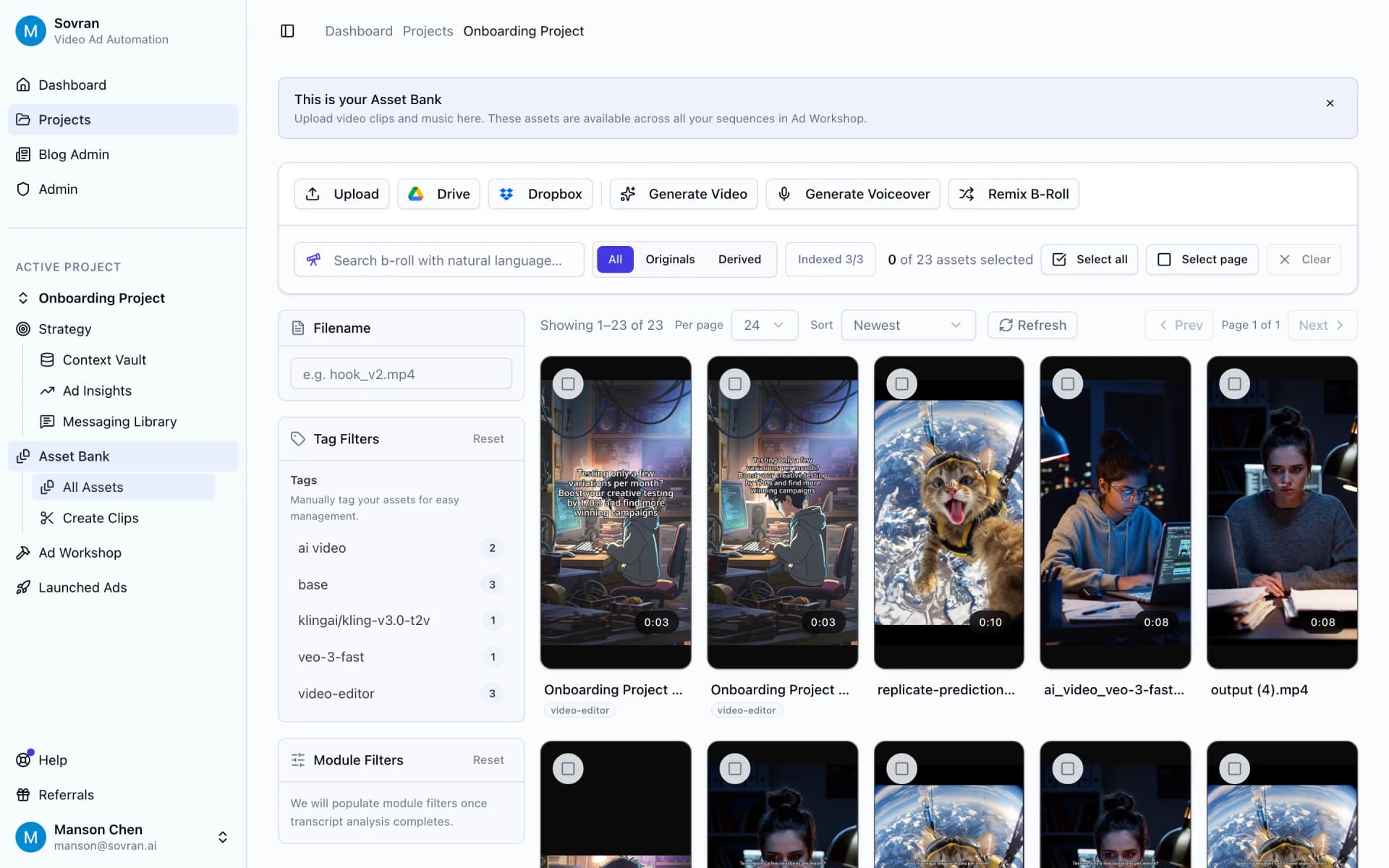
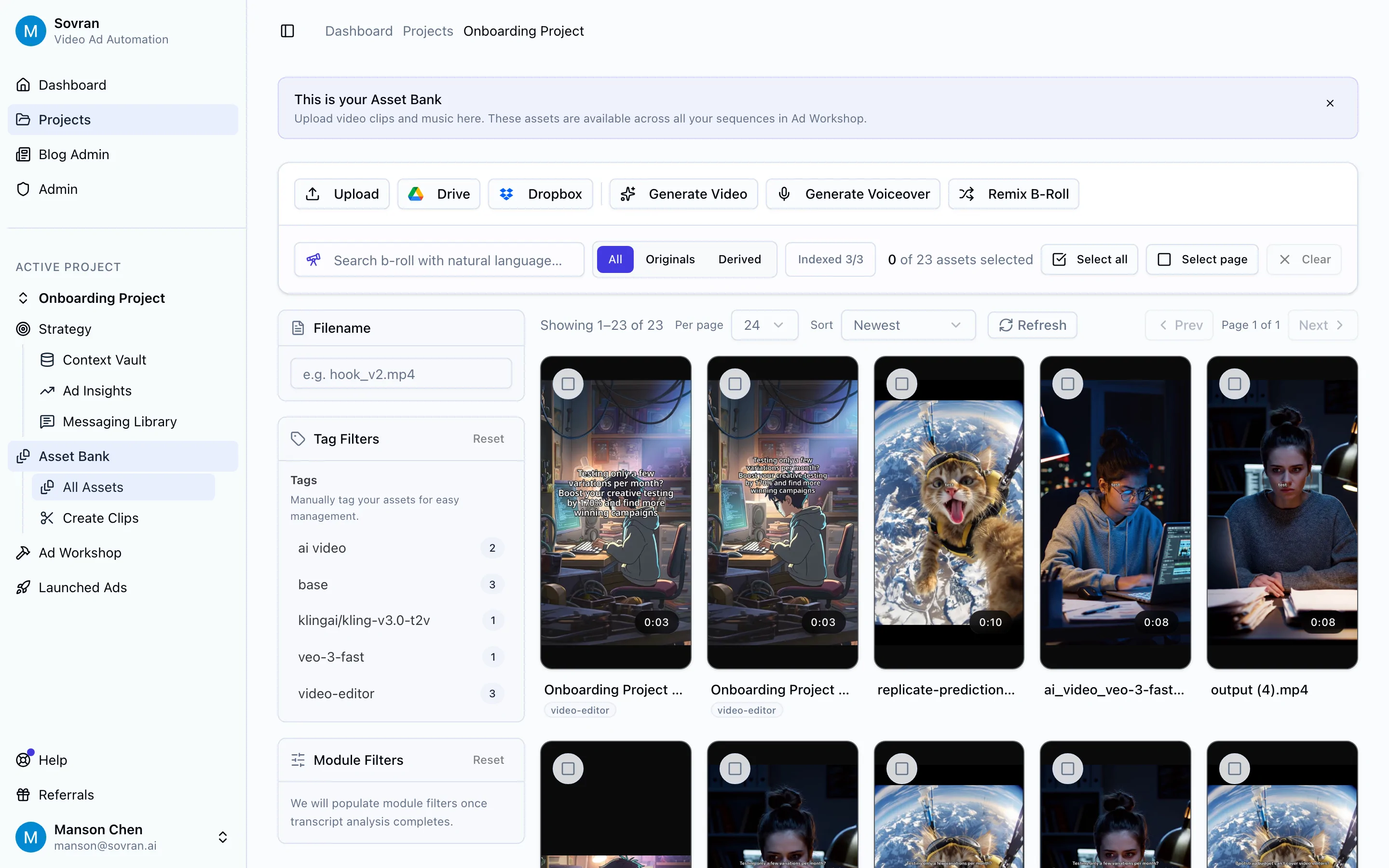
Sovran establishes itself as an essential creative workflow management software for performance-focused marketing teams. It’s a dedicated platform built to automate the high-volume production, iteration, and deployment of short-form video ads specifically for Meta and TikTok. This sharp focus makes it a powerful asset for user acquisition managers, media buyers, and agencies who need to generate a constant stream of ad variations to combat creative fatigue and scale campaigns effectively. The core workflow is designed for maximum velocity: you upload existing creative assets, and Sovran’s AI automatically tags them, making clips searchable through natural language.

What distinguishes Sovran is its end-to-end integration with the performance marketing lifecycle. Assets are not just stored; they become reusable components within modular frameworks (like Hook-Body-CTA or UGC mashups). The Context Vault stores brand guidelines, scripts, and customer proof, ensuring all AI-assisted or bulk-generated concepts remain on-brand. The platform’s bulk rendering and text overlay features can generate hundreds of ad variations in minutes, a task that would otherwise consume hours in manual editing software. For a deeper look into organizing these fast-paced projects, their blog offers practical advice on managing video production workflows.
Key Features & Use Cases
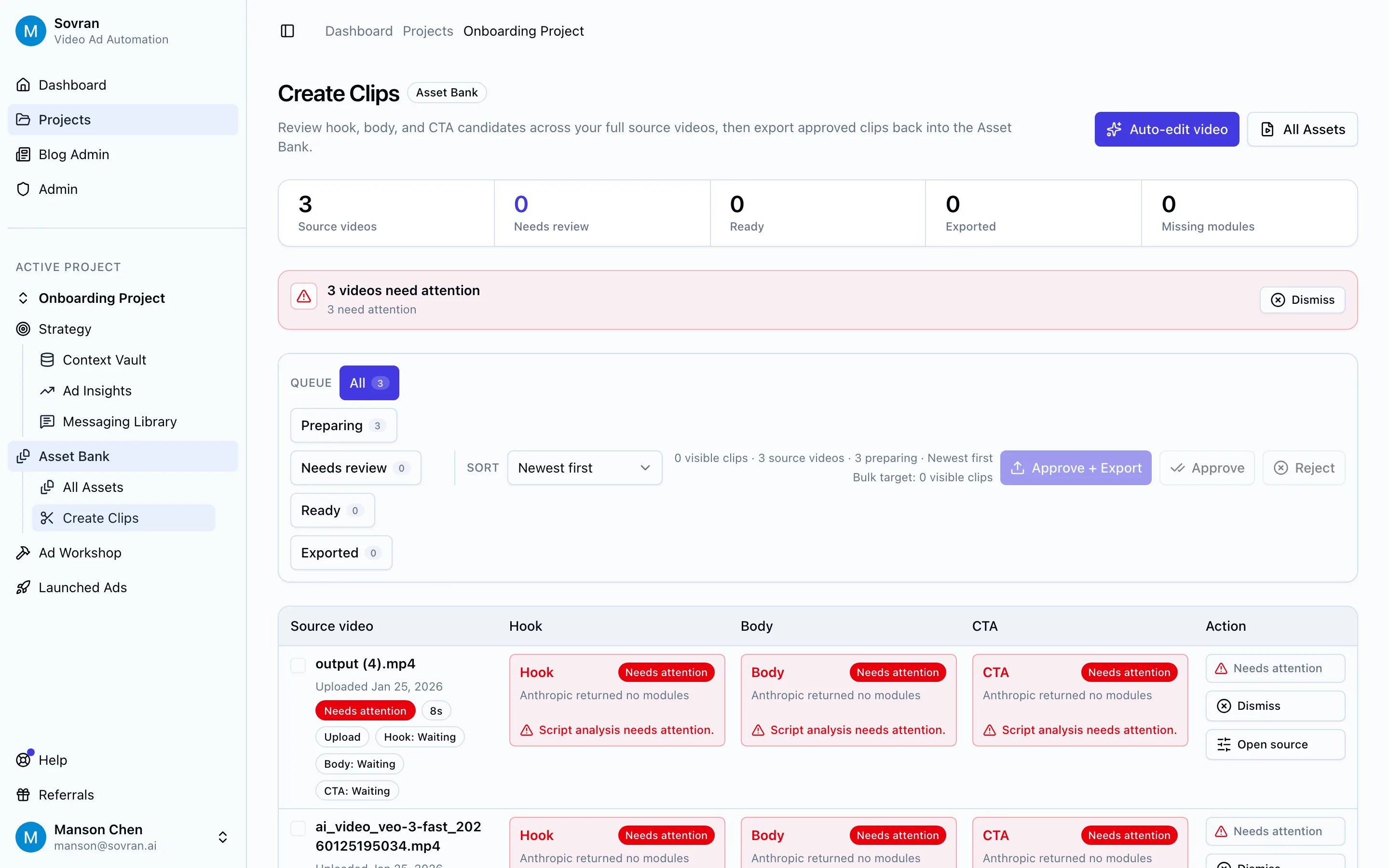
Modular Creative Assembly: Combine pre-tagged hooks, main content, and calls-to-action to rapidly build and test new ad concepts. This is ideal for A/B testing which specific opening seconds or closing offers drive the best performance.
Bulk Rendering & Direct Publishing: Generate hundreds of ad variants with different text, music, or captions at once. The direct Meta API integration (on Pro and Premium plans) pushes these ads straight into Ads Manager with automated campaign structures and naming conventions, saving significant operational time.
AI Creative Generation: When existing assets are exhausted, Sovran can generate new b-roll, hooks, and voiceovers using integrated Sora 2 and Veo 3 models. This helps teams refresh their creative library without needing a full production cycle.
Centralized Brand Consistency: The Context Vault acts as a single source of truth for brand voice, key messaging, and customer testimonials, ensuring that even at scale, all generated ads align with strategic goals.
Pricing and Access
Sovran provides a 7-day free trial and a 30-day money-back guarantee. Plans are available monthly or with a discount for annual billing (equivalent to four months free).
Base: $99/month for 50 video ads.
Pro: $199/month for 150 ads and 15 AI-generated videos.
Premium: $399/month for 300 ads, 30 AI videos, Meta API integration, and a dedicated onboarding call.
All plans come with unlimited asset storage, the timeline editor, and the Context Vault.
Assessment
Pros | Cons |
|---|---|
Dramatically scales creative testing with modular assembly and bulk rendering. | Platform focus is specific to Meta and TikTok; not a general-purpose project manager. |
End-to-end performance features from AI asset search to direct Meta publishing. | Advanced automation (Meta API, 1:1 onboarding) is reserved for higher-tier plans. |
AI generation capabilities help augment existing creative assets and fight ad fatigue. | Requires human oversight; AI outputs need review for brand safety and creative nuance. |
Proven efficiency gains, with users reporting faster iteration and reduced CAC. | Video count limits on lower tiers may be restrictive for very high-volume teams. |
Bottom Line: Sovran is the superior choice for performance marketing teams whose success depends on high-volume video ad testing on Meta and TikTok. It replaces manual, repetitive editing tasks with an automated, scalable system, enabling teams to find winning ads faster and maintain campaign profitability.
Website: sovran.ai
2. Adobe Workfront
Adobe Workfront is an enterprise-grade work management platform built for the complex demands of large-scale marketing and creative operations. It moves beyond simple task tracking to offer end-to-end project management, from initial request intake and strategic planning to final delivery and performance analysis. Its core strength lies in providing a single source of truth for all creative work, ensuring alignment across massive, distributed teams.

The platform’s deep integration with Adobe Creative Cloud is a significant advantage for design-heavy teams. Creatives can view tasks, manage proofs, and log time directly within Photoshop or Premiere Pro, minimizing context switching. Workfront’s native proofing tool and automated approval routing are also key features, creating auditable trails for compliance-focused organizations. For a deeper dive into organizing creative assets, consider exploring options for dedicated brand asset management software.
Use Case and Limitations
Best for: Large enterprise marketing departments that require strong governance, detailed resource planning, and deep integration with the Adobe ecosystem.
Pros: Excellent for scaled creative operations, provides robust compliance and audit trails, and offers an enterprise support model.
Cons: Pricing is quote-based and can be prohibitive for smaller teams. Implementation is a major project, often requiring change management consulting.
Website: https://business.adobe.com/products/workfront.html
3. Wrike
Wrike positions itself as a versatile work management platform with powerful features tailored for marketing and creative teams. It successfully combines general project management capabilities with specific creative workflow tools, making it an excellent choice for organizations needing cross-functional visibility. The platform uses customizable request forms to standardize project intake, while its automation engine can route tasks and trigger approvals, reducing manual administrative work.

Its built-in proofing and approval system is a standout feature, allowing reviewers to comment directly on images, videos, and PDFs without leaving the platform. This creates a centralized feedback loop and clear version history. While Wrike offers strong project management, teams focused on producing high-volume ad creative may find its asset generation tools limited. To explore platforms built specifically for that purpose, you can read more about what an AI creative automation platform offers. Wrike's strength is in managing the process around creative production rather than the production itself.
Use Case and Limitations
Best for: Cross-functional teams and marketing agencies that need a single platform to manage diverse projects and standardize their creative approval process.
Pros: Balances project management and creative review features well, scales from small teams to enterprise tiers, and offers clear packaging options.
Cons: Higher tiers require annual commitments and are sold in seat bundles, which can reduce flexibility. Specific pricing and plan details for larger deployments are often hidden behind a sales process.
Website: https://www.wrike.com
4. monday.com Work OS
monday.com positions its Work OS as a flexible and highly visual platform for managing any type of work, and it has gained significant traction among creative teams. Its core is a system of customizable boards, which can be configured to manage everything from creative request intake and content calendars to asset tracking and campaign performance. The platform's strength is its approachability and rapid setup, allowing teams to build functional workflows quickly using a large library of pre-built templates.

Automation is a key component, enabling teams to set up "if-then" rules to handle recurring tasks like status updates, notifications, and task assignments. This makes it a solid piece of creative workflow management software for reducing manual overhead. The platform's extensive integration marketplace allows it to connect with a wide array of tools, from Slack and Adobe Creative Cloud to marketing and CRM systems. This connectivity, combined with its different product offerings for Work Management, CRM, and Dev, creates a unified operational hub.
Use Case and Limitations
Best for: Agencies and in-house creative teams that need a visually intuitive, quickly adopted platform with strong automation and reporting for recurring workflows.
Pros: Fast to stand up with a broad template and app marketplace, strong reporting and automation for recurring creative tasks, and easy stakeholder onboarding.
Cons: Minimum seat requirements and recent pricing model changes can be a hurdle for small teams. Some advanced features are only available in higher-priced tiers.
Website: https://monday.com
5. Asana
Asana is a widely adopted project and portfolio management platform that excels at organizing cross-functional work, making it a strong contender for creative workflow management software. It provides clear traceability from initial request to final delivery across multiple assets and campaigns. The platform’s strength is its clear information architecture, which allows marketing and creative teams to coordinate complex projects with ease using shared calendars, timelines, and workload views.

Standardized intake through its robust Forms feature ensures that all creative briefs are complete from the start, while the Approvals function creates a clear, auditable trail for feedback and sign-offs. Asana’s Portfolio and Goals features provide marketing leaders with a high-level view of how creative initiatives are tracking against strategic business objectives. With a large library of integrations and emerging AI features for drafting tasks and building workflows, Asana connects creative production to the broader organizational ecosystem.
Use Case and Limitations
Best for: Marketing teams needing strong cross-functional coordination, clear project traceability, and a system that scales from small teams to enterprise-level operations.
Pros: Excellent for managing projects across different departments, mature portfolio and goal-tracking features, and scales effectively with options for SSO and data loss prevention (DLP).
Cons: Paid plans come with seat minimums which can be a constraint for smaller teams. Advanced reporting, workload management, and administrative controls are locked behind higher-priced tiers.
Website: https://asana.com
6. Airtable
Airtable is a highly flexible, spreadsheet-database hybrid that allows teams to build their own bespoke creative workflow management software without writing code. It excels at tracking and connecting every piece of the creative production process, from initial briefs and talent information to final assets and usage rights. Its core strength is its relational database structure, which lets you link records together, creating a powerful, interconnected system for managing complex operations.

The platform’s "Interfaces" feature is a key differentiator, allowing you to build user-friendly, app-like dashboards on top of your data for stakeholders who don’t need to see the underlying complexity. This means you can create a custom portal for submitting briefs or a visual calendar for tracking campaign launches. Its built-in automations and integrations with tools like Slack and Google Drive further reduce manual work, making it a central hub for creative ops.
Use Case and Limitations
Best for: Teams that want to build a completely custom system for creative production, asset tracking, and project management without needing developers.
Pros: Extremely customizable to fit any workflow, great for centralizing briefs, versions, and shot lists, and a growing library of templates and extensions.
Cons: Complex builds can require dedicated admin expertise. Business and Enterprise pricing is quote-based, and costs can increase with usage and features.
Website: https://airtable.com
7. ClickUp
ClickUp positions itself as an all-in-one work hub, aiming to replace multiple applications with a single, highly customizable platform. It integrates tasks, documents, whiteboards, and dashboards, making it a powerful tool for teams that want to centralize their entire operational process. For creative teams, its native proofing and markup tools for images, PDFs, and even videos (on higher tiers) are a standout feature, allowing feedback to happen directly within the project management environment.

The platform’s strength is its flexibility. With custom fields, multiple project views (List, Board, Gantt, Calendar), and a robust automation engine, you can design a creative workflow management software setup that perfectly matches your team’s process. Features like Docs for creative briefs, Whiteboards for brainstorming sessions, and Goal tracking for campaign objectives make it a versatile choice. The ability to assign comments as actionable subtasks during asset review is particularly useful for performance creative teams needing rapid iteration.
Use Case and Limitations
Best for: Agile creative teams and marketing agencies looking for a single, cost-effective application to manage planning, collaboration, and asset feedback.
Pros: Broad feature set for the price with strong templating, native proofing and annotation tools are integrated with project tracking, and the platform is frequently updated with new AI features.
Cons: The sheer number of features can feel overwhelming, and plan rules for guests and advanced admin controls can make costs escalate unexpectedly for larger teams.
Website: https://clickup.com
8. Frame.io
Frame.io is the industry-standard review and approval platform for video, rich media, and images. Acquired by Adobe, it has become an essential component in video-centric pipelines, allowing teams to collaborate with frame-accurate precision. Its primary function is to centralize feedback, eliminate confusing email chains, and accelerate the sign-off process from internal stakeholders and external clients. The platform excels at showing work in progress and securing actionable, time-stamped comments directly on the video timeline.

Its tight integration with Adobe Premiere Pro and After Effects is a major draw for production teams, allowing editors to see comments and upload new versions without leaving their editing software. Features like version stacking, side-by-side comparisons, and secure share links with password protection make it a powerful piece of creative workflow management software for performance marketing teams that produce high volumes of ad creatives. The "Camera to Cloud" feature is a game-changer for remote productions, instantly uploading footage from the set to the cloud for immediate editing and review.
Use Case and Limitations
Best for: Video production teams, marketing agencies, and performance creative departments that need a best-in-class tool for video review and client collaboration.
Pros: Gold-standard video collaboration tool trusted by editors, exceptional Adobe workflow integration, and a fast, intuitive client review experience that scales from freelancers to enterprise.
Cons: Primarily focused on video and image review, not a full-project management suite. Storage limits and advanced security features like watermarking are tied to higher-priced tiers.
Website: https://frame.io
9. Ziflow
Ziflow is a purpose-built online proofing platform designed to automate and standardize the creative review and approval process. Rather than being an all-in-one project management tool, it focuses intently on one critical part of the creative workflow: getting feedback and sign-off. Its main advantage is its broad support for nearly any creative format, including complex types like video, HTML5 banners, and even live websites, making it a go-to for agencies and production-heavy in-house teams.

The platform shines with features like automated, multi-stage approval routing and side-by-side version comparison, which clarifies feedback and tracks changes effectively. One of its most compelling aspects is its model for external reviewers, which allows teams to include clients and stakeholders in the approval process without extra fees. With robust audit trails and new AI-assisted review checks for common errors, Ziflow offers a powerful layer of quality control and compliance for creative workflow management software stacks.
Use Case and Limitations
Best for: Agencies and large in-house creative teams that need a dedicated, high-powered solution for reviewing and approving a wide variety of file types.
Pros: Excellent file-type coverage including rich media and live sites, scales approvals across many stakeholders without extra reviewer fees, and offers transparent annual discounts on some tiers.
Cons: Full enterprise features like advanced security and API access are available only in the top tiers. Exact pricing details for enterprise plans may require contacting sales.
Website: https://www.ziflow.com
10. Filestage
Filestage is a review and approval platform that excels at simplifying the feedback process with external clients and stakeholders. It’s designed to eliminate confusing email threads and disjointed feedback by providing a centralized space for commenting on videos, designs, documents, and web pages. The platform’s main strength is its extreme ease of use for reviewers, who can leave feedback without needing to create an account, making it an excellent client-facing tool.

This tool shines with its structured approval workflows, allowing teams to set up multi-stage review cycles and track asset status with clear indicators. Key features include side-by-side version comparison, automated reminders for reviewers, and the ability to turn comments directly into to-do list items. Integrations with creative tools like Adobe Creative Cloud and project management platforms like monday.com help connect the review process to the broader creative workflow management software ecosystem, while exportable reports provide a clean audit trail for compliance.
Use Case and Limitations
Best for: Agencies and in-house teams that need a simple, client-friendly solution for managing external feedback and securing formal approvals on creative assets.
Pros: Very easy for external reviewers; no login required for commenting. Helps standardize approvals and maintain a clean audit trail. Scales with seat bundles and generous storage on higher tiers.
Cons: Numeric pricing is often not shown publicly and is packaged in seat bundles. Enterprise SSO and certain security controls are add-ons or locked behind higher-tier plans.
Website: https://filestage.io
11. PageProof
PageProof is a secure, compliance-focused online proofing platform that shifts the center of creative workflow management to the review and approval stage. It excels in environments where audit trails and security are paramount, such as in finance, healthcare, or legal marketing. The system manages multi-stage approvals with powerful routing, ensuring the right stakeholders review assets in the correct sequence, from initial design drafts to final video cuts and interactive web pages.

Its strength lies in detailed annotation tools, version comparison, and digital sign-off capabilities that create an unbreakable record of feedback and approvals. Integrations with Adobe Creative Cloud (including InCopy and Premiere Pro), Slack, and Jira mean it connects directly into existing creative and project management stacks. This allows designers and editors to receive feedback without leaving their primary applications, while managers can track approval progress within their PM tool.
Use Case and Limitations
Best for: Regulated industries and marketing agencies needing an auditable, secure proofing system with multi-stage approval workflows.
Pros: Strong security and compliance features, including encryption and audit logs. Supports a wide array of file types for review. Direct integrations with Adobe tools and project management software.
Cons: Public pricing is not readily available and often requires a sales consultation. The interface, while powerful, may present a learning curve for external stakeholders or non-technical reviewers.
Website: https://pageproof.com
12. Bynder
Bynder is an enterprise digital asset management (DAM) platform that excels by building creative workflow capabilities directly around a central asset library. It is designed for large brands aiming to centralize their creative assets and enforce brand guidelines at scale. Its approach treats the asset as the core of the workflow, managing processes from initial brief and content creation to final approval and multi-channel distribution.

The platform’s strength comes from its Content and Asset Workflow modules, which provide structured, auditable paths for review and sign-off. This makes it an effective piece of creative workflow management software for teams that need strict governance. Features like detailed metadata management, usage rights tracking, and external collaboration portals ensure that all stakeholders, internal and external, work from a single source of truth. Bynder’s numerous integrations and connectors automate the delivery of approved assets to various marketing and sales channels, reducing manual effort and risk.
Use Case and Limitations
Best for: Global brands and enterprise marketing teams that need a robust DAM with integrated workflow automation to manage brand consistency across many markets and channels.
Pros: Creates a centralized, governed brand asset hub that acts as a single source of truth. Speeds up the review-to-publish cycle across numerous channels. Holds a strong, established reputation in the DAM category.
Cons: Implementation and licensing are geared toward enterprise clients. Pricing is not publicly available and requires a detailed scoping and quotation process.
Website: https://www.bynder.com
Top 12 Creative Workflow Management Tools Comparison
Product | Core focus & key features | UX & performance (★) | Pricing & value (💰) | Target audience & USP (👥 ✨) |
|---|---|---|---|---|
🏆 Sovran | AI asset tagging, modular Hook–Body–CTA building blocks, Bulk Video Renders, Context Vault, Sora 2 / Veo 3 generation | ★★★★★ Fast bulk renders & automated publish to Meta/TikTok; high testing velocity | 💰 From $99/mo; 7‑day free trial; annual discounts; ROI-focused | 👥 UA managers, performance teams, agencies ✨End‑to‑end ad generation + direct Meta integration |
Adobe Workfront | Enterprise work management: intake, resourcing, proofing, Adobe CC integrations | ★★★★ Robust governance and approvals for large orgs | 💰 Quote-based; enterprise SLAs; higher TCO | 👥 Large marketing ops & enterprise ✨Deep Adobe Creative Cloud integration & compliance |
Wrike | Flexible Work OS with templates, proofing, automation, dashboards | ★★★★ Good balance of PM + creative review | 💰 Tiered seat pricing; some sales-led tiers | 👥 Cross-functional teams & agencies ✨Custom workflows + extensive integrations |
monday.com Work OS | Visual boards, templates, automations, campaign calendars | ★★★★ Fast adoption and visual tracking | 💰 Per-seat tiers; marketplace apps; seat minimums | 👥 Agencies & in‑house teams ✨Quick setup with broad template marketplace |
Asana | Project/portfolio management, approvals, workload, automations | ★★★★ Clear architecture for cross-team coordination | 💰 Per-seat plans; enterprise add-ons | 👥 Marketing leaders & ops teams ✨Strong portfolio/goals tracking |
Airtable | Relational DB for briefs, assets, interfaces & automations | ★★★★ Highly customizable for bespoke ops | 💰 Freemium → paid tiers; enterprise pricing sales-led | 👥 Creative ops builders & teams needing custom systems ✨Flexible database + Interfaces |
ClickUp | All‑in‑one work hub: tasks, docs, proofing, whiteboards | ★★★★ Broad feature set for price; native proofing | 💰 Competitive tiers; costs grow with guests/advanced features | 👥 Small→mid teams seeking single app ✨Docs + native annotation + templates |
Frame.io | Video-first review: frame-accurate comments, version stacks, Camera-to-Cloud | ★★★★★ Best-in-class video collaboration & editor workflow | 💰 Tiered by storage/features; enterprise options | 👥 Video editors, studios, production houses ✨Frame/timecode accuracy & Adobe workflow |
Ziflow | Purpose-built online proofing across rich formats with ReviewAI | ★★★★ Strong approvals & audit trails for agencies | 💰 Tiered; enterprise features sales-assisted | 👥 Agencies & large review workflows ✨Broad file coverage + automated routing |
Filestage | Client-friendly proofing with clear reviewer UX & exportable reports | ★★★★ Simple external reviewer experience | 💰 Seat bundles; some pricing hidden | 👥 Agencies & client-facing teams ✨No-login commenting & exportable review reports |
PageProof | Secure proofing with multi-stage approvals and digital signing | ★★★★ Compliance-oriented review workflows | 💰 Sales-assisted pricing; enterprise options | 👥 Regulated brands & design teams ✨Encrypted reviews + digital sign-off |
Bynder | Enterprise DAM with asset workflows, rights management, distribution | ★★★★ Centralized brand asset hub at scale | 💰 Enterprise licensing; implementation costs | 👥 Brand teams & global orgs ✨Governed DAM + automated delivery workflows |
Final Thoughts
We've explored a dozen powerful platforms, each offering a distinct approach to taming the chaos of creative production. From enterprise-grade behemoths like Adobe Workfront to flexible work operating systems such as monday.com and Airtable, the market for creative workflow management software is rich with options. Your final decision will not be about finding the single "best" tool, but about identifying the platform that best aligns with your team's specific pain points, scale, and performance goals.
The central theme connecting all these tools is the move away from disconnected, manual processes. Relying on a patchwork of spreadsheets, email chains, and cloud storage folders is no longer a viable strategy for performance-driven teams. The friction, missed deadlines, and lost assets inherent in that old model directly impact your ability to test, learn, and scale winning campaigns.
Key Takeaways for Your Team
As you reflect on the options presented, keep these core principles in mind. The right solution for your team will likely excel in these areas:
Centralization is Non-Negotiable: Your creative assets, feedback, briefs, and performance data must live in a single, accessible location. A central hub is the foundation of any effective creative workflow.
Automation is Your Scalpel: Repetitive tasks, like resizing assets for different ad placements, generating simple variations, or notifying stakeholders of status changes, are prime candidates for automation. Look for software that handles this grunt work, freeing up your team for high-value strategic thinking.
Integration Unlocks Performance: A creative workflow tool that doesn't connect with your ad platforms (like Meta and TikTok) or your data analysis tools creates new silos. True creative workflow management software bridges the gap between creation and performance, enabling a direct line of sight from asset to outcome.
Feedback Loops Must Be Tight: Tools like Frame.io and Ziflow demonstrate the power of precise, contextual feedback. The ability to comment directly on a video frame or a specific design element dramatically cuts down on revision cycles and miscommunication.
Making the Right Choice: A Practical Guide
Choosing and implementing new software can feel daunting. To simplify the process, start by auditing your current workflow. Map out every step, from the initial creative brief to the final campaign report. Pinpoint the exact moments where friction occurs.
Is your biggest bottleneck asset organization? Solutions like Bynder or the DAM capabilities within larger platforms might be your priority.
Are endless revision cycles killing your momentum? A dedicated proofing tool like PageProof or Filestage could provide immediate relief.
Is your main challenge scaling creative production for performance ads? This is where a specialized platform like Sovran, built for modular creative and direct integration with ad networks, becomes critical.
Once you identify your primary bottleneck, use that as the lens to evaluate your shortlist. Don't be swayed by a long list of features you'll never use. Focus on the one or two capabilities that will solve your most expensive problem. Run a pilot program with a small, motivated part of your team before committing to a company-wide rollout. This allows you to work out the kinks, build internal expertise, and prove the tool's value with a tangible win.
Ultimately, the goal of any creative workflow management software is to make your creative process a source of competitive advantage, not an operational burden. It’s about creating a system that supports rapid experimentation, data-informed iteration, and effortless scale. By selecting a tool that directly addresses your team’s unique challenges, you can build a more resilient, efficient, and impactful creative engine.
Ready to see how a platform designed specifically for performance creative can transform your workflow? Sovran combines asset management, AI-powered creative assembly, and direct ad platform integration to help you ship more winning ads, faster. Start your trial with Sovran today and turn creative chaos into a scalable system.

Manson Chen
Founder, Sovran
Related Articles

How to Create an AI Influencer: A Practical Guide
Learn how to create an AI influencer with this guide. Get a practical workflow for persona design, tech stacks, and scaling content for Meta and TikTok.

Promotional Videos for Companies A 2026 Growth Playbook
Learn how to use promotional videos for companies to drive growth. This guide covers production frameworks, AI tools, and platform-specific strategies for 2026.

Restaurant Growth with restaurant facebook ads: A 2026 ROI Playbook
Master restaurant Facebook ads with real-world tactics to boost reservations, optimize targeting, and maximize ROI.