A Guide to AI Generated Commercials for Modern Marketers
Learn to create high-performing AI generated commercials for Meta & TikTok. This guide covers asset prep, frameworks, and scaling ads for peak performance.
Jump to a section
Let's be honest—if you're a growth marketer, keeping up with the demand for fresh video ads on Meta and TikTok feels like a never-ending treadmill. The creative team is swamped, and you're constantly fighting to get new assets to test.
The good news? AI generated commercials aren't some far-off concept. They're what smart teams are using right now to create, test, and scale their ad creative faster than ever before.
The Big Shift to AI in Ad Production
Trying to manually produce all the video ads you need just doesn't work anymore. It’s not sustainable. Creative teams are hitting burnout trying to feed the social media algorithms, which are designed to reward a constant stream of new content.
The old cycle of brainstorming, shooting, and editing is slow and expensive. It’s the biggest bottleneck holding back campaign growth. This is where AI completely changes the game.
It's not about firing your video editor. It's about changing your entire creative strategy. Instead of spending weeks on a couple of ad concepts, you can now generate hundreds of variations in a few minutes. You get to shift from a "best guess" approach to one that's driven by real data, letting you test what actually resonates with your audience at lightning speed.
Breaking the Creative Bottleneck
The pressure to constantly pump out new ads leads to creative fatigue. We’ve all been there—even your best ideas start to feel stale after the tenth revision. AI tackles this problem head-on by automating the most mind-numbing parts of ad production.
Scale Your Winners: Take one great ad and instantly turn it into dozens of versions with different hooks, music, or calls to action.
Test at Speed: Go from an idea in a meeting to a live campaign in a matter of hours, not weeks. Your learning cycles get way shorter.
Cut Down on Costs: You can drastically reduce how much you rely on expensive video shoots and long, drawn-out editing projects.
This faster way of working is quickly becoming the new industry standard. A recent IAB report found that while just 22% of video ad creative used generative AI in 2024, that number is expected to nearly double to 39% by 2026. Smaller advertisers are moving even faster, with 45% of their video ads projected to incorporate AI by 2026. It just goes to show how valuable this is for teams of any size.
The real challenge for performance marketers isn’t a lack of ideas. It's the bottleneck in producing and testing those ideas fast enough. AI generated commercials are the direct solution to this execution gap.
This table really drives home the difference between the old way and the new AI-powered workflow. The efficiency gains are pretty dramatic.
Manual vs AI-Powered Ad Production
Metric | Manual Workflow (e.g., CapCut) | AI-Powered Workflow |
|---|---|---|
Time to First Ad | 1-3 Days | 15-30 Minutes |
Variation Output | 5-10 Variants per Week | 100+ Variants per Hour |
Testing Velocity | Slow; limited by production | Rapid; test hundreds of ads at once |
Asset Reuse | Manual and disorganized | Automated and searchable |
Required Skillset | Video editing expertise | Marketing and strategy focus |
By automating all the heavy lifting, you free up your team to do what humans do best: thinking about strategy, analyzing the results, and finding those winning ad combinations that scale.
If you want to go deeper, we've put together a full breakdown on our guide on AI-powered video creation.
Building Your AI Ad Production Engine
The real magic of AI-generated commercials isn't just about pressing a button and getting a video back. It’s about being smart with your organization and shifting your entire creative mindset. Think of it like building an engine: you get the parts right once, and it just keeps running for you. This all starts with an "upload once, use infinitely" philosophy for all your creative assets.
Instead of frantically digging through folders every time you need a new ad, you're going to build a central, intelligent library. The first step is a simple audit of everything you already have. Go through your folders of user-generated content (UGC), slick product shots, screen recordings, and even that B-roll from two years ago. Chances are, you're sitting on a goldmine of footage you've completely forgotten about.
Of course, to build a powerful AI ad production engine, you need to pick the right AI content creation tools for marketers. The goal here isn't just a video generator; you need a platform that helps you manage your assets so you can move faster.
Turning Chaos into a Creative Library
Once you’ve rounded up all your clips, the old-school way was to manually sort them into a maze of confusing folders. Thankfully, modern AI platforms do the heavy lifting for you. As you upload your assets, the AI gets to work, automatically analyzing and tagging every single clip.
Scene Detection: The AI figures out what's happening in each video. Is it someone unboxing your product? A finger swiping through your app? An emotional customer reaction? It knows.
Object Recognition: It can also tag specific products, logos, or key elements right inside the video frame.
Text and Audio Transcription: Any spoken words or on-screen text are automatically transcribed and made completely searchable.
This whole process turns your messy folder of "Final_Ad_V2_final_final.mp4" into a clean, structured database you can actually use. Now, if you need a five-second clip of a user smiling while using your app, you just type it in a search bar instead of scrubbing through hours of footage. This initial setup is the single most important thing you can do to scale your creative output.
This flowchart really shows the fundamental shift from the slow, manual way of doing things to a fast, automated AI workflow.
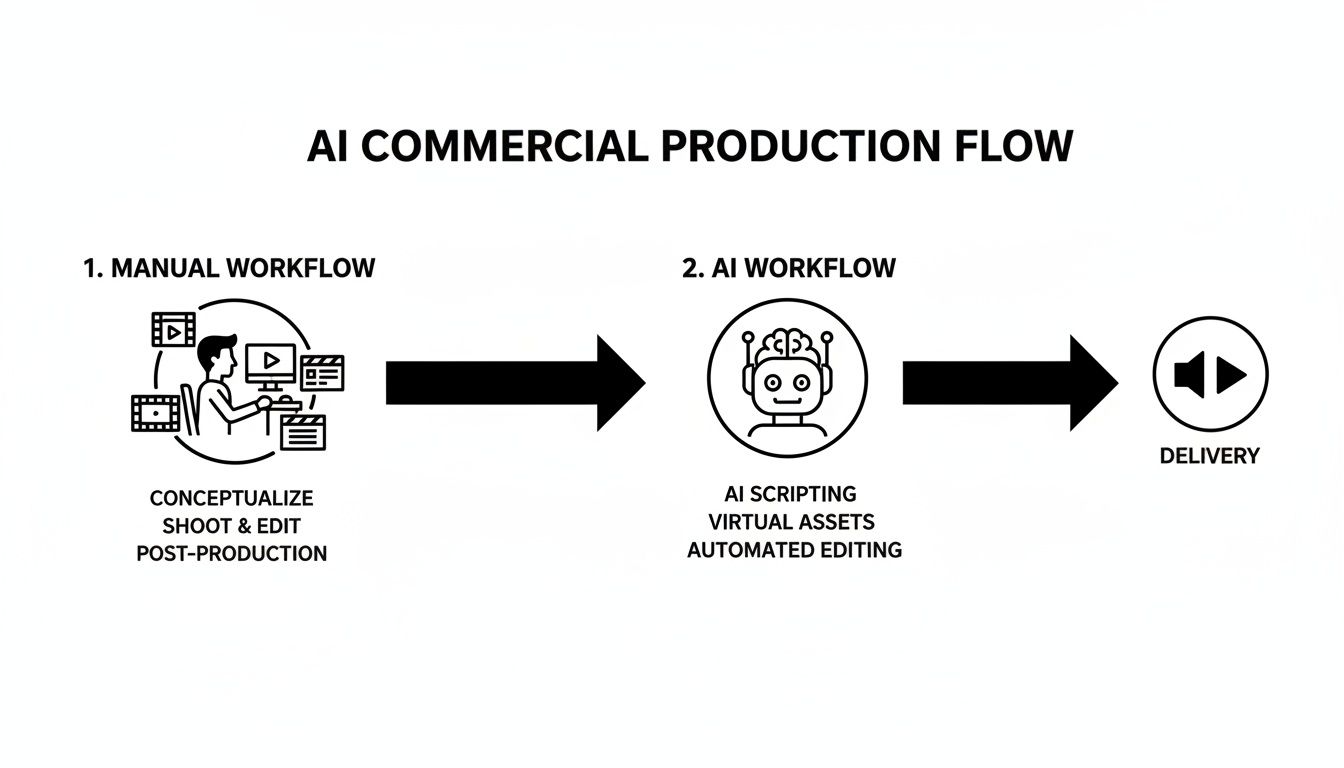
You can see how AI takes over the tedious, repetitive tasks, which frees you up to think about strategy and the bigger picture.
Establishing Your Brand's Context Vault
An intelligent asset library is only half the battle. To make sure every single AI-generated commercial is on-brand and optimized to perform, you have to give the AI some context. This is where a "Context Vault" or brand kit comes in. Think of it as a central hub for your brand’s soul.
Your Context Vault acts as the brand's DNA for the AI. By storing your best-performing elements, you're not just hoping for good ads; you're systematically engineering them for success from the very first render.
It’s like programming guardrails for your AI. Instead of starting from scratch every single time, the AI pulls from this pre-approved, high-performance knowledge base.
Here’s exactly what you should load into your Context Vault:
Brand Identity: Your logos, specific color palettes, and official fonts. This is non-negotiable for keeping your ads visually consistent, even when you're making hundreds of them.
Winning Copy: The headlines, body text, and calls-to-action (CTAs) from your all-time best campaigns. Why reinvent the wheel when you already know what converts?
Customer Testimonials and Reviews: Pull together a collection of your best five-star reviews and UGC quotes. The AI can then dynamically pull this powerful social proof into new ads.
Performance Data: Some of the more advanced systems can even learn from your past campaign data, spotting which types of scenes or messages tend to drive higher click-through rates.
Building out this vault is what ensures that even when you're generating hundreds of AI-generated commercials at scale, each one feels like it came directly from your brand team. This groundwork is absolutely essential if you want to go beyond basic editing and truly automate your ad creation. You can see more on how to set this up in our complete guide to using an AI video ad creator. With your engine built and your context set, you’re ready to start assembling ads that actually perform.
Mastering Creative Frameworks for AI
Alright, you've got your assets organized and your brand context dialed in. Now for the fun part: actually building high-performing AI-generated commercials. This is where a modular approach really starts to pay off.
Forget building every ad from scratch. We’re going to lean on proven advertising formulas as blueprints, letting the AI do the heavy lifting of building and testing countless variations. These frameworks are nothing new; they're the battle-tested structures that have powered direct response for decades. The game-changer is the speed and scale we can now apply them with.
By breaking down your ads into distinct blocks—think of them as creative Legos—you empower the AI to mix and match components. This turns creative production from a manual guessing game into a data-driven science.
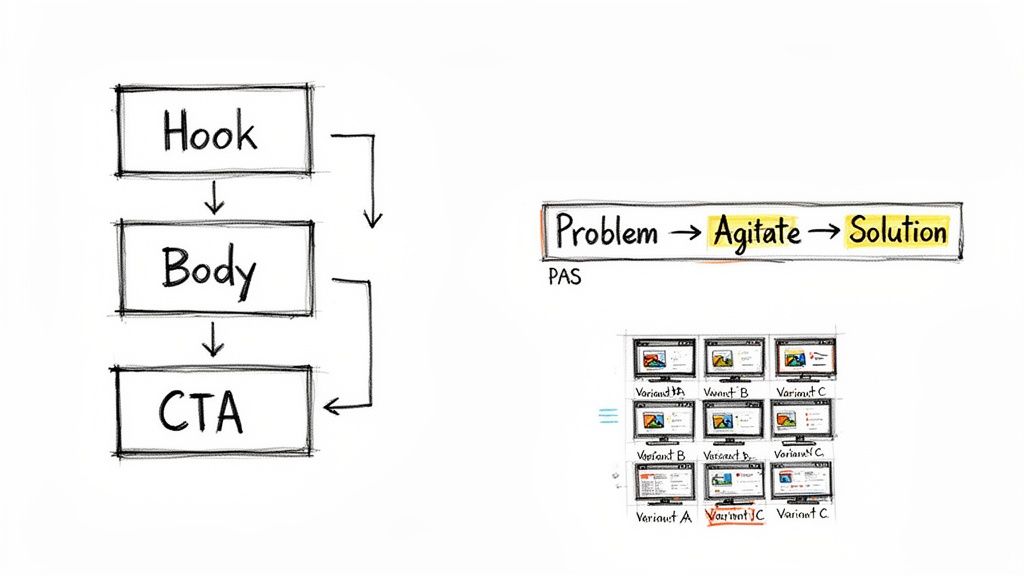
The Hook Body CTA Framework
This is your workhorse. The Hook-Body-CTA framework is the most fundamental and versatile structure for social media ads, period. Its simplicity is its greatest strength, making it absolutely perfect for rapid iteration.
An AI platform can take a single, solid "Body" and "CTA" and then test it against dozens of different "Hooks." This is how you quickly find out what actually stops the scroll in those first three critical seconds.
Let’s say you’re promoting a budgeting app. You could feed the AI these components:
Hooks (Test Group): Generate ten different openings. One might show a user looking stressed over bills. Another could be a bold text overlay saying, "Your Bank Account is Leaking." A third could be a quick-cut montage of receipts.
Body (Control Group): Use one consistent clip that clearly demonstrates the app's main budgeting feature. No need to change this part yet.
CTA (Control Group): Stick with your strongest call to action. For example, a shot of a user tapping "Download Now" paired with a 5-star rating overlay.
The AI can render all these combinations in minutes. Instead of your team manually editing ten videos over a week, you get ten ready-to-test ads instantly. This lets you pinpoint which opening message truly connects with your audience.
Problem Agitate Solution
The Problem-Agitate-Solution (PAS) framework is a direct-response classic for a reason—it just works. It's incredibly effective for anything that solves a clear pain point. With your assets tagged and organized, executing PAS with AI becomes a simple, repeatable process.
To get the most out of these frameworks, learning the art of creating and using custom AI prompts is key. This lets you give the AI much more precise instructions, ensuring the final videos perfectly match your strategic goals.
Imagine you're marketing a meditation app. You can tag your clips and let the AI build the entire narrative arc:
Problem: It starts with clips you've tagged "stress," "anxiety," or "distraction"—someone tossing and turning in bed or looking totally overwhelmed at their desk.
Agitate: Next, the AI pulls B-roll that amplifies that feeling. Think fast-paced cuts, chaotic city scenes, or a phone screen blowing up with notifications.
Solution: Finally, it transitions to clips tagged "calm," "focus," or "app in use," showing a serene user smiling as they listen to a guided meditation.
The AI automatically stitches these emotional beats together, creating a powerful story that positions your product as the hero.
Listicle and UGC Mashups
Two other frameworks that AI absolutely crushes are listicles and UGC mashups.
Listicles—like "3 Reasons Our App Saves You Time"—are fantastic for breaking down key features or benefits into a digestible format. The AI can pull from your tagged assets to dynamically insert the right product shots for each point, creating an endless supply of feature-focused ads.
UGC mashups, however, are where you can really strike gold. They are arguably one of the most powerful ad formats for building social proof and trust.
By feeding the AI your best customer testimonials, unboxing videos, and five-star reviews, you can generate a constant stream of authentic-looking ads. The AI can even overlay text from your best written reviews onto the video clips, creating a powerful combination of visual and textual proof.
The industry is catching on fast. Research shows that by 2026, 43% of enterprise marketing teams will use AI for at least some ad creative, a huge jump from just 18% in 2024.
Early adopters are already reporting 35-45% faster campaign launches and 22% lower production costs. This is why AI is the perfect engine for high-volume testing. These frameworks, powered by a smart AI tool, are your key to unlocking that same efficiency and finally scaling your creative output.
Scaling Creative Production with AI
Once you've got your assets organized and a good grasp on your creative frameworks, you can finally break free from the old constraints of manual production. This is where you graduate from making just a handful of AI generated commercials to operating at a scale that was pretty much impossible before. The name of the game is to kill creative fatigue and put your testing velocity into overdrive.
One of the first things we do when a creative library feels stale is to generate entirely new visuals. Using text-to-video models, you can pump out fresh hooks or supporting B-roll on demand. For example, if you need a quick shot of a "futuristic city skyline at sunset" to match your product's vibe, you can spin it up in seconds instead of hunting through expensive stock footage libraries.
This is a fantastic way to breathe new life into campaigns without a full-blown production shoot, but the real scaling magic comes from a different technique altogether.
Unleash the Power of Bulk Rendering
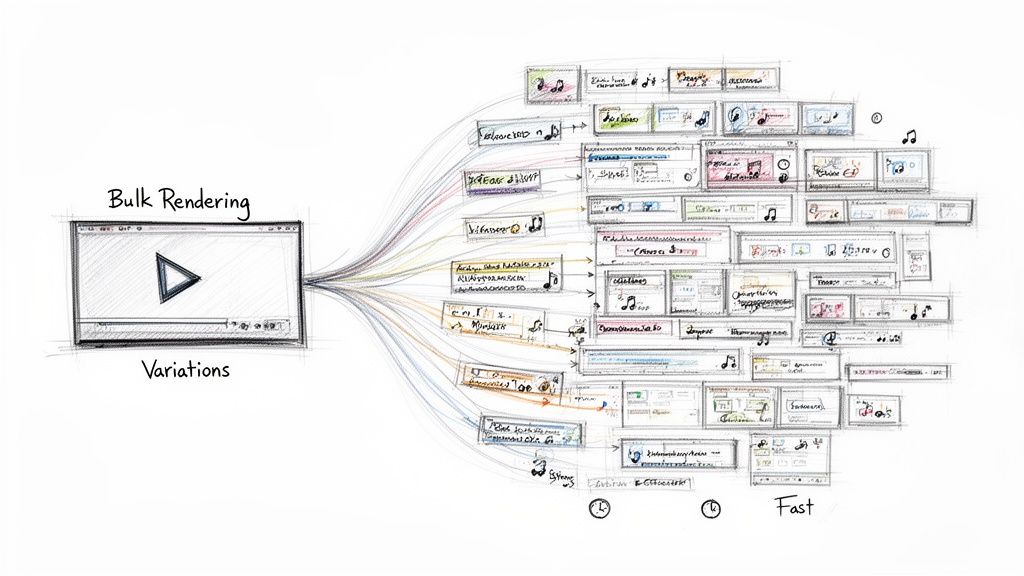
The single most impactful way to scale your creative output is through bulk rendering. This is the process of taking one core ad concept and telling an AI to automatically generate hundreds, or even thousands, of unique variations. We're not just talking about changing a color filter; this is about systematically remixing every single component of your video.
Think about one of your winning 15-second ads. If you were using a traditional editor like CapCut, creating just 10 new versions could easily burn an entire day. With an AI platform, you can set up a bulk rendering job in a few minutes, grab a coffee, and come back to a massive library of ads ready to test.
An AI can systematically swap out multiple elements at once:
Text Overlays: It can test dozens of different headlines and subheadings, pulling directly from the copy you've stored in your Context Vault.
Clip Order: The AI can re-sequence your video clips, testing different narrative flows within the same creative framework.
Music and Audio: It can cycle through different background music tracks to see which one hits the right emotional note and drives better performance.
Calls to Action: It can render versions with different CTA text, button styles, and end cards to pinpoint what actually drives clicks.
This is how you turn what used to be weeks of mind-numbing editing into a task that takes just a few clicks. The implications for A/B testing are massive.
Bulk rendering shifts your creative strategy from one of careful guesswork to one of massive, data-driven experimentation. You're no longer bottlenecked by production capacity; you're only limited by the number of hypotheses you want to test.
How Bulk Rendering Changes Your Workflow
Let's walk through a real-world scenario. Imagine you're running ads for a mobile game. Your team has found a winning formula: a Hook showing an "epic fail," a Body clip of exciting gameplay, and a classic "Download Now" CTA.
Instead of calling it a day, you can use bulk rendering to create 200 new variations almost instantly:
Hook Variations: You have 10 different "fail" clips you want to test. The AI creates a version of the ad for each one.
Text Overlay Tests: For each of those 10 hook versions, the AI tests 5 different opening text overlays (e.g., "Can you do better?", "98% of players fail here," etc.). You're now at 50 unique ad intros.
Music Variations: It then takes those 50 ads and renders each one with 4 different audio tracks—one epic, one funny, one intense, and one chill.
You've just created 200 distinct ad variations (10 hooks x 5 overlays x 4 music tracks) in the time it takes to get up from your desk and stretch. This level of output is simply impossible to achieve manually. A modern AI creative automation platform is built specifically for this kind of high-volume production, making it a cornerstone of any serious performance marketing team.
This approach lets you test every variable to find the exact combination that delivers the lowest cost per install (CPI) or the highest return on ad spend (ROAS). You move faster, learn quicker, and find winning ads before your competitors have even finished their first round of manual edits.
Launching and Iterating Your AI Commercials
Making hundreds of AI generated commercials is a great start, but it’s pointless if you can't figure out which ones actually convert. This is where the real work begins. You need a rock-solid loop for launching, measuring, and optimizing your ads. This is how you connect that massive creative output to real-world data and turn tiny insights into your next big winner.
Remember the old days? You’d manually download every video, upload them one by one into Ads Manager, and then try to come up with a name for each one. It was a huge bottleneck that killed any hope of rapid testing. Thankfully, modern AI ad creation platforms have fixed this.
With direct integrations into Meta and TikTok, you can push hundreds of ad variations live with just one click. This is the bridge between making your ads and making them work, letting you go from an idea to a live test in minutes, not days. That speed is exactly how you out-learn the competition.
Keeping Your Tests Organized with Smart Naming
When you launch hundreds of ads at once, your biggest enemy is chaos. Without a clear system, you'll have no idea which hook, body, or call-to-action is actually driving results. This is where automated naming conventions become your best friend.
A good AI platform doesn't just create your videos; it names them automatically based on the specific pieces you used. This gives you a clean, readable label that tells you exactly what’s in the ad without ever hitting play.
For instance, an ad's name might look something like this:
Hook3_UGC-Smile_Body-AppDemo_CTA-DownloadNow
This simple name instantly tells you the ad uses your third hook variant (maybe a text overlay), a UGC clip of a smiling user, the main app demo body, and your "Download Now" end card. When that data flows into your ad platform, you can immediately see which parts are winners.
Analyzing Performance to Find Your Winners
Once your campaigns are live and pulling in data, it’s time to dig in. Your goal is to get past simple metrics like "Ad A beat Ad B" and start analyzing the performance of the individual creative components.
Because your ads are named so systematically, you can easily filter your reports in Meta Ads Manager to isolate any variable you want.
Hook Performance: Filter for all ads containing "Hook1" and compare their average Click-Through Rate (CTR) against all ads with "Hook2." You'll quickly see which opening line is the best scroll-stopper.
CTA Effectiveness: Do ads with "CTA-LearnMore" have a better Cost Per Purchase than those with "CTA-ShopNow"? By filtering the name, you can find out in seconds.
Body Segment Impact: You can even see if certain body segments work better with specific hooks. Maybe "Hook3" crushes it when paired with "Body-Testimonial" but flops with "Body-AppDemo."
This kind of modular analysis is impossible with a disorganized, manual workflow. It allows you to find your winning creative DNA, not just a single winning ad.
The ultimate goal isn't just to find one winning ad. It's to build a "bank" of high-performing hooks, body segments, and CTAs that you can reuse and recombine for future campaigns. This accelerates your 'test-learn-iterate' cycle, letting you find profitable combinations up to 10x faster than with traditional methods.
When you discover that a specific UGC clip consistently brings in a high CTR, you can feed that insight right back into the AI. Tell it to generate another batch of ads, this time making sure to use that winning clip across different ad frameworks and with new text overlays.
This continuous feedback loop—where data from live campaigns directly informs the next wave of AI-generated creative—is what separates the top-performing teams from everyone else. You're no longer just guessing what might work; you're systematically building on proven success, one data point at a time. This iterative process is your best defense against creative fatigue.
Even with all the upside, it’s completely normal to have a few questions before diving into ai generated commercials. I get it. As a performance marketer, you need to know exactly what you’re getting into.
Let's walk through some of the most common hesitations I hear from creative strategists and growth teams. The answers here are straight from the trenches, designed to give you clarity and cut through the noise.
Will AI Replace Our Creative Team?
Absolutely not. That's a common fear, but it misses the point of these tools. Think of AI as a super-powered assistant for your creative team, not a replacement.
Its real job is to take over the soul-crushing, repetitive tasks that burn out your best people. We’re talking about manually resizing dozens of videos, adding subtitles to a hundred clips, or rendering endless tiny variations of a winning ad.
By offloading that grunt work, your strategists are free to focus on what actually moves the needle: high-level concepting, brand storytelling, and digging into performance data to find the next big winning angle.
Your team stops being a group of video editors and becomes a team of creative directors. The AI is just the engine that executes their strategic vision at a scale that was impossible before.
They get to spend their time on strategy and ideas, not on waiting for a video to export.
How Do I Keep AI Commercials On-Brand?
This is probably the most critical question, and modern AI platforms are built specifically to address it. The secret is a feature often called a "Brand Context" or "Context Vault." It’s your brand's single source of truth.
Before you even think about generating a video, you feed this vault with all your essential brand assets.
You can upload things like:
Visuals: Your logos, exact color palettes, and approved brand fonts.
Winning Copy: The headlines, hooks, and CTAs from your best-performing campaigns.
Brand Voice: Snippets of text from your website, testimonials, or ad scripts that capture your tone perfectly.
The AI uses this vault as a non-negotiable set of rules for every single video it touches. Since it’s also working from your own pre-approved video footage, this combination ensures every ad variant stays 100% on-brand. You maintain complete creative control from start to finish.
Are AI-Generated Ads Actually Effective?
Yes, and honestly, they're becoming table stakes for staying competitive. We consistently see performance data showing that AI-assisted creative can meet or even beat ads made entirely by hand on key metrics like Click-Through Rate (CTR) and Return On Ad Spend (ROAS).
But here’s the key: it’s not because the AI is magically "more creative" than a human. It's because it allows you to test at a volume that is physically impossible to do manually.
When you can launch hundreds of creative combinations in the time it used to take to make a handful, you find what really resonates with your audience much, much faster. The fact that giants like Meta are now baking their own generative AI tools directly into their platforms just proves this is where the industry is heading.
What Technical Skills Are Needed to Start?
You really don't need any. The best AI ad creation platforms are designed for marketers and creative strategists, not software engineers. If you've ever used Canva or Google Slides, you'll feel right at home.
If you can drag and drop files and type your ad copy into a simple form, you have all the technical skills you need. The whole point is to eliminate the steep learning curve and complexity of traditional video editing software. This makes high-volume ad production accessible to any growth team, no matter their video editing background.
The focus shifts from how to make the video to what video you should make—which is where your team’s real value has always been.
Ready to stop the manual grind and start scaling your ad creative with data? Sovran is the AI-powered engine that helps performance marketers create, test, and find winning video ads up to 10x faster. Start your free 7-day trial today and see the difference for yourself.

Manson Chen
Founder, Sovran
Related Articles
8 High-Converting Static Ads Examples for 2026
Discover 8 high-performing static ads examples from top apps. Learn to create text-overlays, testimonials, and lifestyle ads that convert.
Your Guide to a Social Media Ad Generator in 2026
Discover how a social media ad generator revolutionizes creative production. Learn to automate video ads, scale testing on Meta & TikTok, and drive performance.
How to Turn Link Into Video: Ads That Convert in 2026
Learn how to turn link into video for Meta & TikTok ads. Leverage AI to scale creation, boost ROI, and succeed in 2026.