Unlocking Creative Speed with Brand Asset Management Software
Discover how brand asset management software empowers marketers to streamline creative workflows, accelerate ad production, and boost campaign performance.
Jump to a section
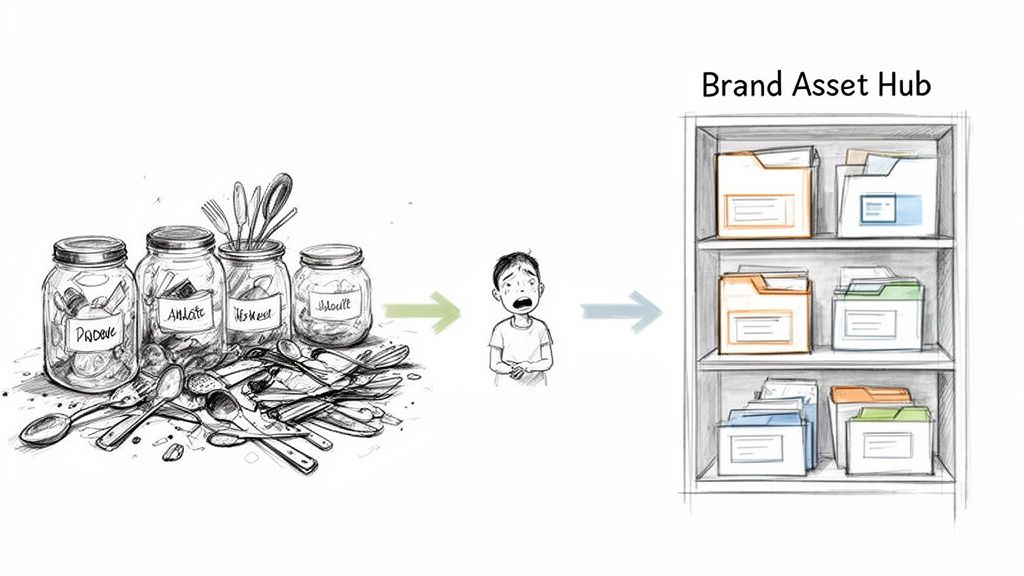
Ever tried to cook a gourmet meal in a kitchen where nothing is labeled and every drawer is a junk drawer? That's what running performance marketing campaigns can feel like without the right system in place.
Think of brand asset management software as the professionally organized kitchen for your marketing team. It's a central hub to find, use, and deploy every single creative asset you have, from that high-performing video hook to your official company logo.
Organizing Creative Chaos for Peak Performance
In modern marketing, the sheer volume of creative content gets overwhelming, fast. Teams find themselves digging through messy shared drive folders, wasting precious time hunting for the right file—or worse, accidentally using an old, off-brand version. This digital mess isn’t just annoying; it directly eats into your campaign performance and profitability.
The real issue is that tools like Google Drive or Dropbox are just digital storage lockers. They weren't built for the fast-paced, high-stakes world of performance marketing. They can't tell the difference between a top-performing UGC clip and a generic brand logo. This is exactly where brand asset management software flips the script, moving your team from reactive file-hunting to proactive campaign building.
The Shift From Just Storing to Actually Strategizing
A proper brand asset management system is built to solve the exact problems that kill creative momentum and drain your ad budget.
Here’s a quick look at the practical difference between the old way and the new way:
Manual Asset Chaos vs Automated Brand Management
Challenge | The Manual Approach (The Problem) | The BAM Software Approach (The Solution) |
|---|---|---|
Finding Assets | "Which 'Final_Ad_v4' is the real final one?" Hours are wasted searching. | Find any asset in seconds with smart tags, filters, and AI-powered search. |
Brand Consistency | Rogue assets and outdated logos creep into campaigns, diluting the brand. | Enforce brand guidelines automatically. Only approved, on-brand assets are available. |
Performance Tracking | It's a guessing game. Which creatives are actually driving results? | Link assets directly to campaign performance data to see what’s working. |
Collaboration | Endless email chains for feedback and approvals. Version control is a nightmare. | Centralized feedback loops and clear approval workflows right on the asset. |
Scaling | Creating variations for different platforms is a slow, manual process. | Quickly adapt, resize, and deploy assets for any channel in just a few clicks. |
By moving away from chaotic folders, you're not just getting organized. You're building a smarter, faster, and more profitable marketing operation.
The goal is to turn your asset library from a digital graveyard into a living, breathing engine that fuels high-velocity testing and drives real results on demanding platforms like Meta and TikTok.
This urgent need for speed and organization is why the global brand management software market, valued at USD 3.1 billion, is expected to nearly double to USD 6.1 billion by 2030. This explosion shows just how vital efficient asset management has become for anyone serious about advertising today.
Before we dive deeper, it’s helpful to understand the fundamentals of brand marketing and how it works hand-in-hand with performance goals. A solid brand asset management strategy doesn't just support one or the other—it empowers both, ensuring every ad not only converts but also builds a stronger, more memorable brand.
Core Features That Drive Marketing Performance
Let's be clear: effective brand asset management software is so much more than a digital filing cabinet. It’s a performance engine. The right setup doesn’t just organize your content—it actively speeds up your marketing workflows, making sure every creative asset works harder to boost your return on ad spend (ROAS).
Think of it as the central nervous system for your creative. At its heart is a centralized asset library. This isn't just another cloud folder; it's the single source of truth for every approved creative you have. It puts an end to the frantic Slack searches for "final_ad_hook_v3.mp4" and kills the risk of someone accidentally using an outdated or off-brand asset in a live campaign. For performance marketers, this means getting your hands on winning creatives instantly.
Find Your Best Assets Instantly
Relying on folder names and your memory to find the perfect piece of content is a massive waste of time. Modern platforms use advanced search and tagging to make your entire library searchable in a snap.
Imagine you need a UGC-style clip of a customer unboxing a product, shot vertically for a TikTok ad. Instead of scrubbing through hours of footage, you just type in a search. Seconds later, you have what you need. This is all powered by smart metadata and AI-driven tagging that can automatically identify objects, text, and even the sentiment within your videos and images.
For a performance team testing dozens of ad variations a week, finding the perfect creative in seconds instead of hours is a total game-changer. That time saved goes directly back into strategy, not searching.
Maintain Control and Brand Integrity
Once you have a massive library of assets, keeping control is everything. This is where you protect your brand and make sure your campaigns are actually performing as they should. Features like version control and brand guideline integration are non-negotiable.
Version Control: This is your safety net. Whenever an asset is updated, the changes ripple out to everywhere it's used. Old versions get automatically archived, preventing a team member from launching a campaign with last quarter's logo or an outdated offer. It happens more than you'd think.
Brand Guideline Integration: The software can literally embed your brand rules into the workflow. It can flag assets that use the wrong fonts, off-brand colors, or unapproved messaging. It’s like having an automated brand manager safeguarding consistency across every single ad.
The demand for this level of control is exploding as creative volume goes through the roof. The U.S. market for digital asset management (DAM) technology hit USD 3,095.8 million and is expected to rocket to USD 9,913.3 million by 2034. This growth isn't just noise; it shows how critical these tools have become. Enterprises are reporting 30-50% time savings on creative iteration alone.
When you connect these capabilities to your daily operations, your asset library stops being a passive storage folder and becomes an active, strategic tool that drives real marketing performance. To get a better sense of how all the pieces fit together, you can explore core features of a brand asset management solution.
Powering High-Velocity Creative Workflows
Good brand asset management software is much more than a digital filing cabinet; think of it as a production engine. It takes your collection of brand assets from being a passive archive and turns it into a living library of modular building blocks. This change is everything for performance marketers who need to create hundreds of ad variations at lightning speed.
Let's walk through a real-world example. A creative strategist needs to spin up a new campaign for a skincare product. Instead of starting from an empty timeline, they jump into the asset library where raw video clips are already uploaded and waiting.
The software’s AI has already analyzed and auto-tagged every single clip with its contents, actions, and even the sentiment it conveys. This tagging is the secret sauce to a high-velocity workflow.
From Raw Clips to Campaign-Ready Ads
Now, the strategist doesn't have to remember confusing file names or scrub through hours of footage. They can just type a natural language search like, "woman applying face cream happily in bathroom." Instantly, the system surfaces dozens of relevant, high-quality clips that match the request. This one action shaves hours off the old, manual process.
From this curated set of clips, the real magic happens. The strategist can now assemble entirely new ads by mixing and matching different components inside pre-set templates. This modular approach is a total game-changer.
Hook Testing: They can drag and drop five different opening hooks to see what grabs attention.
Body Variations: Then, they can pair those hooks with various product shots or user-generated content (UGC) testimonials.
Call-to-Action (CTA): Finally, they can stick multiple CTAs on the end to find out which one actually drives conversions.
This simple diagram breaks down how you find, control, and organize your assets for this kind of efficient workflow.
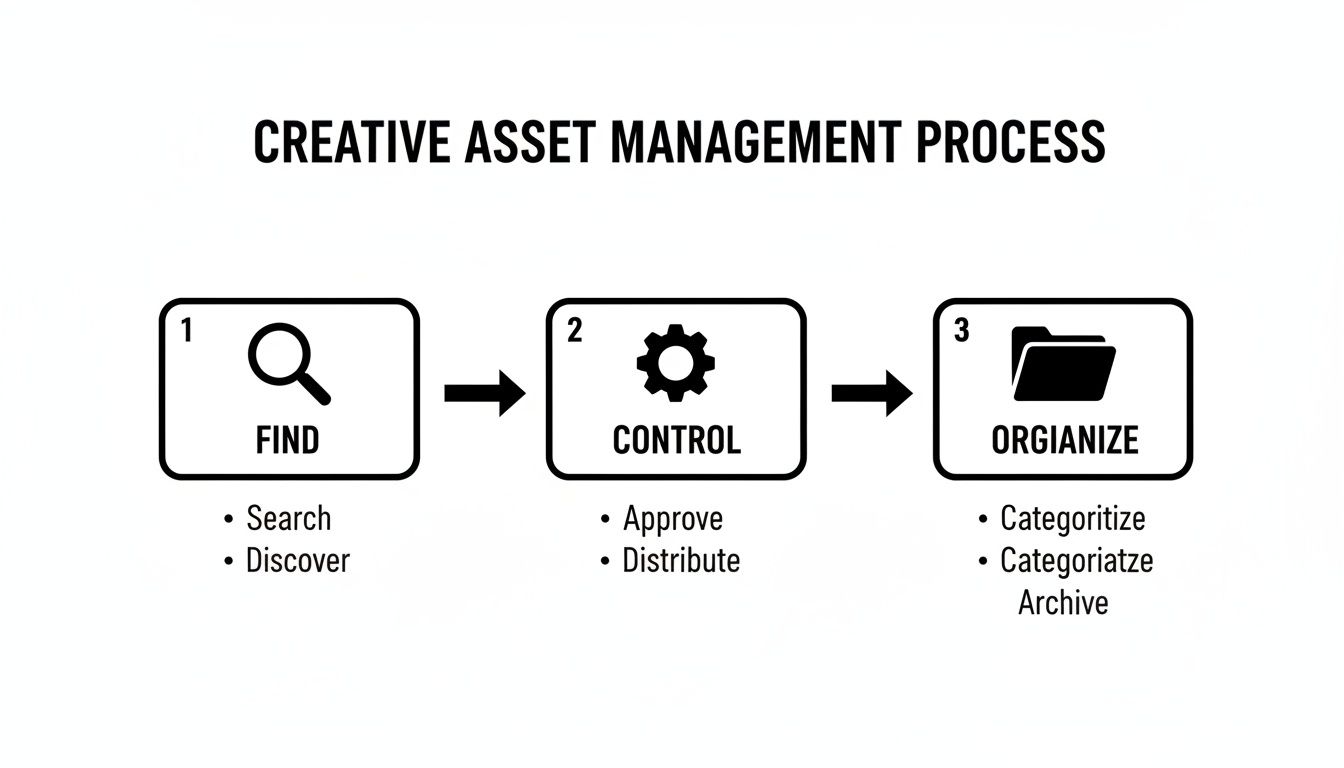
This process shows how a structured system can turn asset chaos into a clear, repeatable path for cranking out creative.
Scaling Creative Output Without Scaling Effort
This system completely changes how creative work gets done. It shifts the process from a slow, one-at-a-time task inside traditional video editing software to a scalable system built for high-volume testing. A team can generate 50 unique ad variations in the time it used to take to create just one.
This new speed allows teams to react to performance data almost in real-time. If a specific hook is showing signs of fatigue, new versions can be assembled and launched in minutes, not days. If you want to dive deeper into organizing video specifically, our guide on choosing a video asset management system has more targeted advice.
This isn't just about getting organized; it's about building a creative assembly line. You can test more ideas, find winning combinations faster, and keep your campaigns fresh and profitable without burning out your creative team.
Ultimately, this workflow turns your asset library from a cost center into a strategic advantage. It empowers your team to operate at a much higher velocity, making data-driven decisions that directly impact the bottom line.
How To Choose The Right Brand Asset Management Software
Picking the right brand asset management software isn't just a tech purchase; it's a strategic move that will either speed up your team or slow you down, directly hitting your campaign profitability. Not all platforms are built the same, especially for performance marketing teams who live and die by how fast they can test creative on Meta and TikTok.
The real goal here is to find something that actively crushes creative bottlenecks, not just another tool that neatly organizes files. To find that perfect fit, you need to go way beyond the generic feature list and start asking sharp questions that map directly to how your team actually works. A system might look amazing in a sales demo but completely fall apart under the pressure of high-volume ad creation if it wasn't built for that specific grind.
Your Core Evaluation Checklist
When you're vetting vendors, your focus needs to be laser-sharp on the features that lead to faster, smarter marketing. A beautiful interface means absolutely nothing if the engine can't keep up with your team's creative appetite.
Your evaluation should be built around a few non-negotiable pillars. Here are the critical questions to ask:
Does it actually integrate with my ad platforms? Can you push creative assets straight into Meta Ads Manager or TikTok Ads Manager? Having to manually export and upload files is a massive time-waster that the right software should make obsolete.
How smart is its AI? You need more than just basic auto-tagging. Does the AI analyze your content? Can it suggest which hooks have the most potential? Does it help you figure out why certain creative elements are driving performance?
Can this thing scale with us? Your asset library is going to balloon from hundreds to thousands of files in no time. The software has to stay lightning-fast and searchable even as your creative volume explodes.
Is it genuinely easy to use? Your whole team—from media buyers to creative strategists to designers—needs to be able to jump in and use it without a week of training. A complicated system that only a few power users can figure out will never get adopted.
Understanding Value Beyond The Price Tag
Of course, you have to compare pricing models, but the real value is in the efficiency you gain. A cheaper platform that costs your team hours of manual work every week is, in the long run, far more expensive. This inefficiency isn't just a creative problem; it's a broader trend in how businesses manage their tools.
The global software asset management market, currently valued at US$4.6 billion, is expected to skyrocket to US$10.4 billion by 2033. This massive growth is being fueled by businesses desperately trying to optimize their spending and cut out waste from tools they aren't even using. You can learn more about the rising importance of asset optimization in this research.
Your brand assets are exactly the same. Every creative that sits unused is just like idle software—a wasted investment.
Choosing the right brand asset management software is about maximizing the return on every single dollar you pour into creative. When you invest in a system that makes your team faster, you're not just buying a tool. You're building a more agile and profitable creative operation. A powerful system like a performance creative platform is built from the ground up to solve these exact challenges.
Implementing Your New System For A Seamless Rollout
Let’s be honest: adopting new software isn't about installing a tool. It's about changing your team's habits. A successful launch doesn’t come from features alone; it hinges on a smart, human-centric rollout that gets people on board quickly without causing chaos. Without a solid plan, even the best platform ends up as just another expensive, underused subscription.
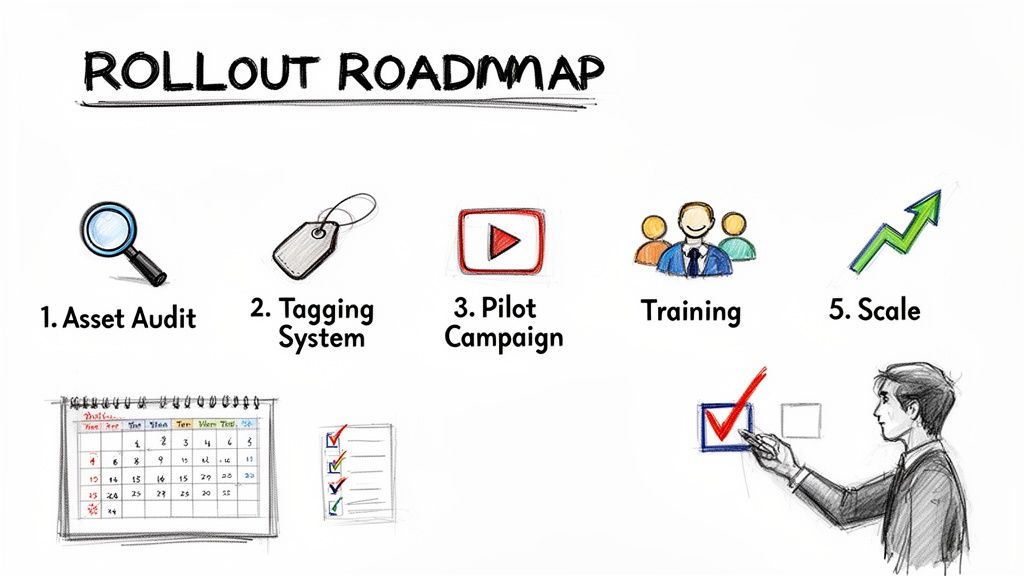
The very first step? An asset audit. Before you even think about migrating a single file, you have to declutter. Think of it like cleaning out your garage before you install that fancy new shelving system. Archive old campaigns, nuke duplicate files, and consolidate anything that's outdated. This ensures you’re starting with a pristine, high-quality library—not just a slightly tidier version of the mess you already have.
Building Your Foundation
With a clean slate, it’s time to build your organizational structure. This is way more than just creating folders; it's about architecting a logical system that can actually grow with you.
Here’s where you need to focus your immediate energy:
Establish a Tagging System: Decide on a consistent metadata and tagging convention from day one. This is, without a doubt, the most crucial step for making your asset library searchable. A solid tagging foundation will save your team hundreds of hours down the road.
Define a Scalable Folder Structure: Map out a folder hierarchy that makes sense for your team's workflow. Maybe it's organized by campaign, maybe by product line, or even by content type. The key is to keep it simple and intuitive enough for anyone to navigate.
Set User Permissions: Clearly define who has the power to upload, edit, and approve assets. This is your safeguard against accidental deletions and ensures only the final, on-brand creative makes it into circulation.
Securing Team Buy-In With Early Wins
The biggest hurdle you'll face is almost always resistance to change. The best way to dismantle that resistance? Show people immediate, tangible value. Don't try to boil the ocean by migrating everything at once.
Start with a pilot project. Pick a single, upcoming campaign and commit to running it entirely through the new software. This focused approach creates a crystal-clear "before and after" scenario, proving the time savings and efficiency gains to everyone involved.
Once your team sees for themselves how much faster they can find assets, collaborate, and launch a campaign, they’ll be clamoring to get on board. From there, you can scale the rollout across the department, confident that you’ve already won them over.
For more ideas on managing your creative library, our guide on digital asset management best practices offers a deeper dive into creating workflows that stick.
Got Questions? Let's Clear Things Up
Jumping into new tech always brings up a few questions. When teams start looking at brand asset management, a handful of practical concerns almost always pop up. Let's tackle them head-on.
So, How Is This Different From Google Drive Or Dropbox?
It’s a fair question. Think of Google Drive or Dropbox as digital storage lockers—great for holding onto files. A brand asset management platform, however, is more like an active creative workshop built specifically for marketers.
You're not just storing files; you're using intelligent tools like AI-powered search, version control, automated ad creation, and brand guideline enforcement. Your storage drive can't do that.
Is This Just For Big Companies?
Not at all. That’s an outdated idea. Modern, cloud-based platforms are built for marketing teams of every size.
In fact, the core benefits—speed, consistency, and better creative testing—are even more critical for smaller teams and startups. You need to make a big impact without a massive creative department, and this is how you level the playing field.
How Fast Will We Actually See Results?
With a smart rollout, teams often see real results within the first couple of weeks. The trick is to start small.
Migrate your top-performing assets first and run just one new campaign through the platform. This approach gives you a quick, undeniable win and proves the ROI by showing just how much faster your creative process can be.
Ready to stop searching and start creating? Sovran automates your entire creative workflow, helping you produce high-performing video ads up to 10x faster. Start your 7-day free trial today.

Manson Chen
Founder, Sovran
Related Articles
A Guide to AI Generated Commercials for Modern Marketers
Learn to create high-performing AI generated commercials for Meta & TikTok. This guide covers asset prep, frameworks, and scaling ads for peak performance.
- ai-generated-video
- ad-creative-production
- 4 more
How to Turn Link Into Video: Ads That Convert in 2026
Learn how to turn link into video for Meta & TikTok ads. Leverage AI to scale creation, boost ROI, and succeed in 2026.
- ai-video-generation
- link-to-video-ads
- 6 more
8 High-Converting Static Ads Examples for 2026
Discover 8 high-performing static ads examples from top apps. Learn to create text-overlays, testimonials, and lifestyle ads that convert.
- static-ads
- performance-marketing
- 5 more