How to Create Ads with AI That Actually Convert
Creating ads with AI is all about combining your brand's unique creative assets with an intelligent platform to generate, test, and scale winning ad...
Jump to a section
Creating ads with AI is all about combining your brand's unique creative assets with an intelligent platform to generate, test, and scale winning ad creative—fast. This approach completely flips the script on the old, slow, manual process. Now, your team can pump out hundreds of platform-specific ad variations in minutes, not weeks, giving you a serious leg up on the competition.
The Old Creative Workflow Is Officially Dead
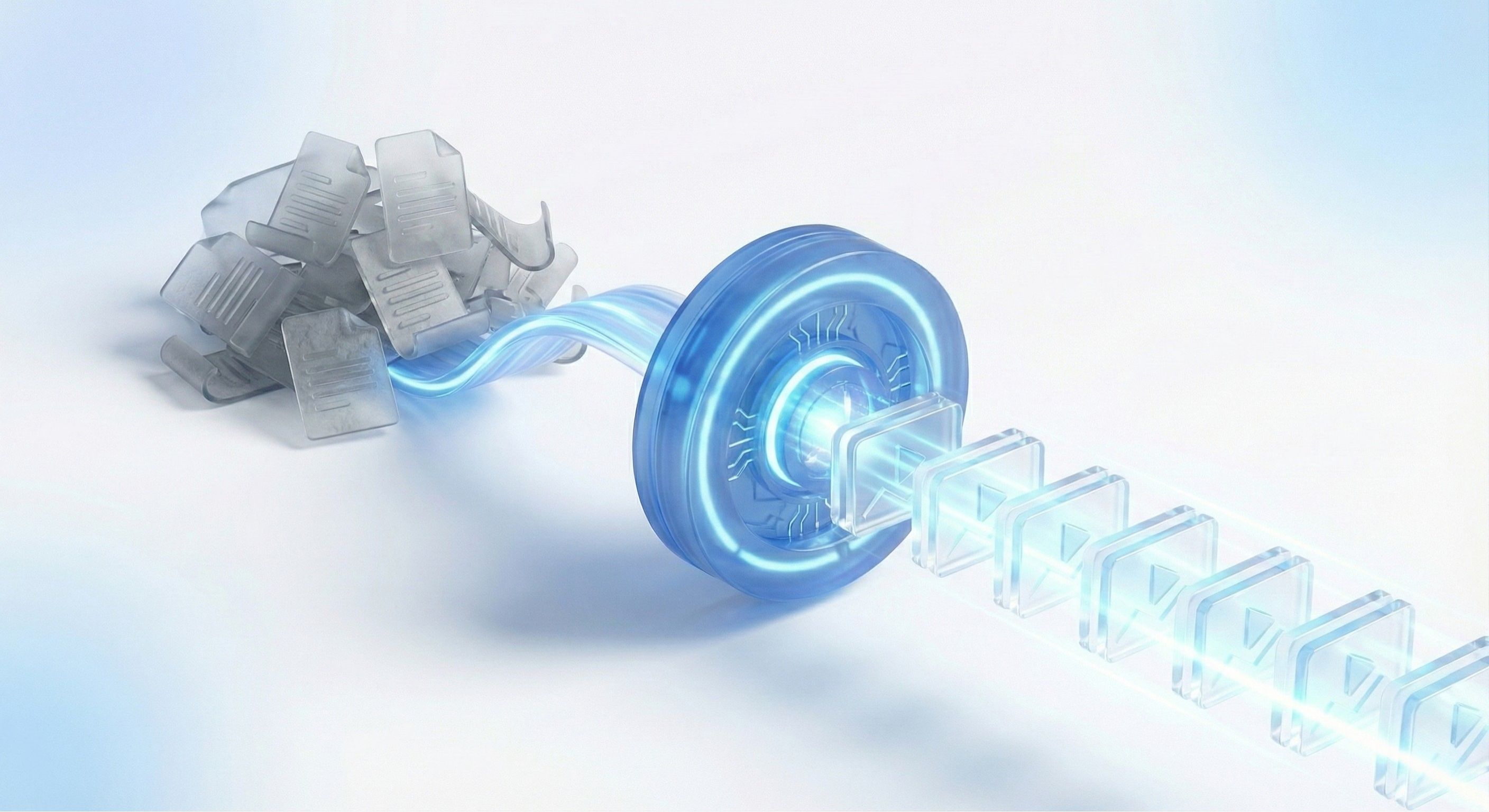
Let’s be honest, the traditional way of making ad creative is broken. It's a clunky, linear process bogged down by endless meetings, manual edits, and painful approval cycles. By the time an ad is finally ready to launch, the market trend it was supposed to capture has probably already passed.
This old model creates a massive bottleneck for performance marketing teams. The real problem is simple: how do you produce a high volume of quality, platform-specific ads for Meta and TikTok without your budgets and timelines spiraling out of control? Trying to keep up manually just leads to creative fatigue, burnout, and diminishing returns.
Moving From Manual Grind to Intelligent Automation
The solution isn't about working harder; it’s about working smarter. This is where AI completely changes the game. It transforms the creative workflow from a slow, sequential assembly line into a dynamic, agile system built for rapid iteration. Instead of taking days to produce a handful of ads, you can generate hundreds of on-brand variations in a matter of hours.
This shift has a massive impact on campaign performance. The market for AI-powered content solutions is exploding, projected to grow from $2.09 billion in 2023 to $8.45 billion by 2032—a clear sign of how essential this tech is becoming. We're seeing companies that adopt AI for marketing get a 25% increase in conversion rates and a 37% reduction in customer acquisition costs just by refining their strategies.
AI allows you to move at the speed of the market. It turns creative production from a resource-draining bottleneck into a powerful growth engine, making continuous testing not just possible, but effortlessly scalable.
A Clear Comparison: Old vs. New
To really see the difference, let's break down how the workflows stack up against each other. The contrast highlights just how much of a leap forward AI-powered production really is.
Comparing Traditional vs. AI-Powered Ad Workflows
Process Step | Traditional Workflow | AI-Powered Workflow |
|---|---|---|
Ideation & Briefing | Lengthy meetings, manual mood boards, detailed briefs for each ad. | AI-generated concepts based on top performers and market trends. |
Asset Creation | Requires photo/video shoots, graphic designers, copywriters. | AI generates visuals, scripts, and voiceovers from brand assets. |
Production & Editing | Manual video editing, multiple software tools, slow rendering. | Automated video assembly, bulk rendering of hundreds of variations. |
Review & Approvals | Multiple rounds of feedback, email chains, version control issues. | Centralized review in-platform, instant edits, streamlined approvals. |
Iteration & Testing | A few ad variations are manually created, making A/B tests slow. | Hundreds of variations are generated for rapid hook, copy, and visual testing. |
Time to Launch | Weeks or even months. | Hours or days. |
Cost | High costs for agencies, freelancers, and software licenses. | Significantly lower production costs with a subscription model. |
Scalability | Extremely difficult and expensive to scale creative output. | Effortlessly scalable; generate more ads without more headcount. |
The table makes it obvious: the AI-powered workflow isn't just a minor improvement—it’s a fundamental overhaul that drives efficiency and performance across the board.
Gaining Your Competitive Edge with AI
In a crowded ad market, the ability to test and learn faster than everyone else is your biggest advantage. An AI-driven workflow empowers teams to:
Test More Ideas, Faster: Launch dozens of ad variations to quickly find the winning hooks, visuals, and copy that resonate.
Crush Creative Fatigue: Automatically generate fresh creative to keep audiences engaged and prevent ad blindness from setting in.
Personalize at Scale: Create ads tailored to different audience segments without all the manual overhead.
By embracing this new approach, you stop reacting to the market and start leading it. You can dive deeper into the specific benefits of AI for advertisers in our detailed guide. This transition isn't just some future possibility; it’s a necessary evolution for any brand that's serious about growth.
Building Your AI Ad Creative Engine
Before you can start cranking out ads with AI, you have to give the AI a brain.
Think of it like this: your AI is an incredibly talented new hire who can execute complex tasks at lightning speed. But here's the catch—they know absolutely nothing about your brand's personality, your visual style, or what makes your customers actually buy something. Your job is to be the manager and train them.
This isn't just about dumping a folder of assets into a drive. It’s about building a smart, structured library—a true engine—that the AI can tap into to generate on-brand, high-performing ads every single time. If you skip this foundational work, you’ll end up with generic, off-brand creative that just doesn't hit the mark.
Organizing and Tagging Your Assets
The heart of your AI creative engine is a meticulously organized asset library. This is where you'll store everything the AI might possibly need: high-res product shots, lifestyle photos, user-generated content (UGC), and even clips from past campaigns. The goal is to make every single one of these assets easily discoverable for the AI.
How? Through a smart tagging system.
Forget generic file names like IMG_4075.jpg. You need descriptive tags that give the AI real context. Proper tagging is what allows the AI to fulfill a request like, "Find me a 5-star UGC video of a customer in their 20s using our moisturizer." For a deeper look at how AI simplifies this whole process, check out this guide on AI social media content creation made simple.
A well-tagged asset library is the single most important factor in getting consistently good results from an AI ad generator. It’s the difference between the AI guessing what you want and knowing what you want.
A Practical Tagging Framework
So, where do you start? Just think about the words you'd use if you were searching for a specific asset yourself. Your tagging system needs to be intuitive for you and scalable for the AI.
Here are a few categories we see successful brands using all the time:
Asset Type:
UGC,Product Shot,B-Roll,Testimonial Video,Lifestyle PhotoProduct:
Moisturizer,Serum,CleanserPlatform:
TikTok,Meta,Instagram StoryTone:
Inspirational,Humorous,Problem-Solution,EducationalDemographics:
Female 25-34,Male 18-24,Urban MillennialPerformance:
Top Performer Q2,High CTR,Low CPA
Let's imagine a D2C skincare brand. They might tag a user-submitted video with: UGC, Moisturizer, TikTok, Authentic, Female 25-34, 5-Star Review. That level of detail is gold. It allows the AI to instantly grab the perfect clip for a new ad variation without any guesswork.
Teaching the AI Your Brand Voice and Vision
Tagging individual assets is one thing, but you also need to teach the AI the intangibles—the vibe of your brand. This is exactly where features like Sovran's Context Vault become indispensable.
The Context Vault acts like your brand’s central nervous system. It stores all the rules, personality traits, and core beliefs that should guide every single piece of creative.
This goes way beyond just uploading a logo. It’s about feeding the AI the core components of your brand identity so it can think like your best marketer.
What to Include in Your Context Vault
Here's a breakdown of what you should be putting in there to get the best results:
Component | Description | Example |
|---|---|---|
Brand Guidelines | Your official doc with logos, color codes ( | Upload your PDF so the AI always nails the correct hex codes and typography. |
Mission & Values | The core principles that define your brand’s personality and what you stand for. | "We believe in clean, sustainable skincare that empowers confidence." |
Customer Reviews | A curated collection of your best 5-star reviews and testimonials. | The AI can pull direct quotes for on-screen text or powerful ad copy. |
Winning Ad Scripts | Transcripts from past ads that absolutely crushed it. | The AI learns your proven messaging formulas, hooks, and CTAs. |
Pain Points | A straight-up list of the specific problems your product solves for customers. | "Struggling with dry, flaky skin?" or "Tired of complicated routines?" |
By building this central repository, you're making sure every piece of content the AI generates—from video scripts to text overlays—is perfectly aligned with your brand strategy. This prep work is the real key to unlocking what AI ad creation can do. For a more detailed guide, explore the essentials of a video asset management system that can take this entire process to the next level.
From a Simple Prompt to a Finished Ad
Alright, you've done the prep work. Your brand's "brain" is built out in the Context Vault and your assets are tagged and organized. Now for the fun part: turning a simple line of text into a performance-ready video ad. This is where all that initial setup pays off, letting you jump from a raw idea to a polished creative in no time. We're not talking about writing a long, complicated brief; it's about giving the AI a clear, direct nudge to get the ball rolling.
The quality of what you get out is directly tied to the quality of what you put in. A vague prompt like "make a cool ad for my skincare product" is going to get you a vague, generic ad. But a specific, detailed prompt? That acts like a perfect set of instructions, guiding the AI to build something that actually aligns with your campaign goals.
This whole idea of "prompting" isn't new to most people. The explosion of consumer AI tools has basically trained millions of us to think this way. It's estimated that somewhere between 1.7 to 1.8 billion people have used AI tools since ChatGPT first dropped, with up to 600 million using them every day. And a huge chunk of that—about 45% of spending on specialized AI tools—is for creative work like making images and audio. You can dig into the full details in the 2025 consumer AI report from menlovc.com.
Crafting a Winning Prompt for a TikTok Ad
Let's walk through a real-world example. Say you're spinning up a TikTok ad for a new hydrating serum called "GlowUp." The goal is pure direct response—you want clicks on that "Shop Now" button.
A solid starting prompt would be something like this:
"Create a 15-second TikTok ad for our new product, 'GlowUp' hydrating serum. The target audience is women aged 20-35 who struggle with dry, dull skin. Use a problem-solution framework. Start with a hook showing frustratingly dry skin, then show the serum's texture and someone with glowing, happy skin after using it. Use UGC clips tagged 'GlowUp' and '5-Star Review'. The tone should be relatable and authentic. End with a strong call-to-action: 'Get your glow today!'"
This prompt gives the AI everything it needs to get started:
Product: "GlowUp" hydrating serum
Platform & Length: 15-second TikTok ad
Target Audience: Women 20-35 with dry skin
Framework: Problem-Solution
Visuals: Specific asset tags (
UGC,GlowUp,5-Star Review)Tone: Relatable and authentic
Call-to-Action: "Get your glow today!"
Based on that one prompt, the AI instantly scans your asset library, finds the UGC clips you told it to look for, whips up a script, and pieces together a draft video.
Iterating on AI-Generated Concepts
Look, the AI isn't going to hit a home run on the very first swing, and that's not the point. The first draft is a launchpad for quick iteration, not the final cut. Within minutes, Sovran might serve up three different concepts based on your initial prompt.
This is where your job shifts from creator to director. Maybe Concept A has a killer hook but the visuals in the middle are a little weak. Or maybe Concept B uses the perfect UGC clip but the script feels a bit flat. The real power of an AI video generator for ads is that you can make these tweaks instantly.
You can just fire off quick feedback:
"Swap the b-roll in Concept A with a product texture shot."
"Rewrite the script for Concept B to sound more energetic."
"Change the on-screen text in Concept C to highlight 'Free Shipping'."
Every piece of feedback sharpens the output, getting you closer to a final ad without the painful back-and-forth of a traditional workflow. This flow is simple but incredibly powerful: you organize your assets, teach the AI what's what, and then start generating.
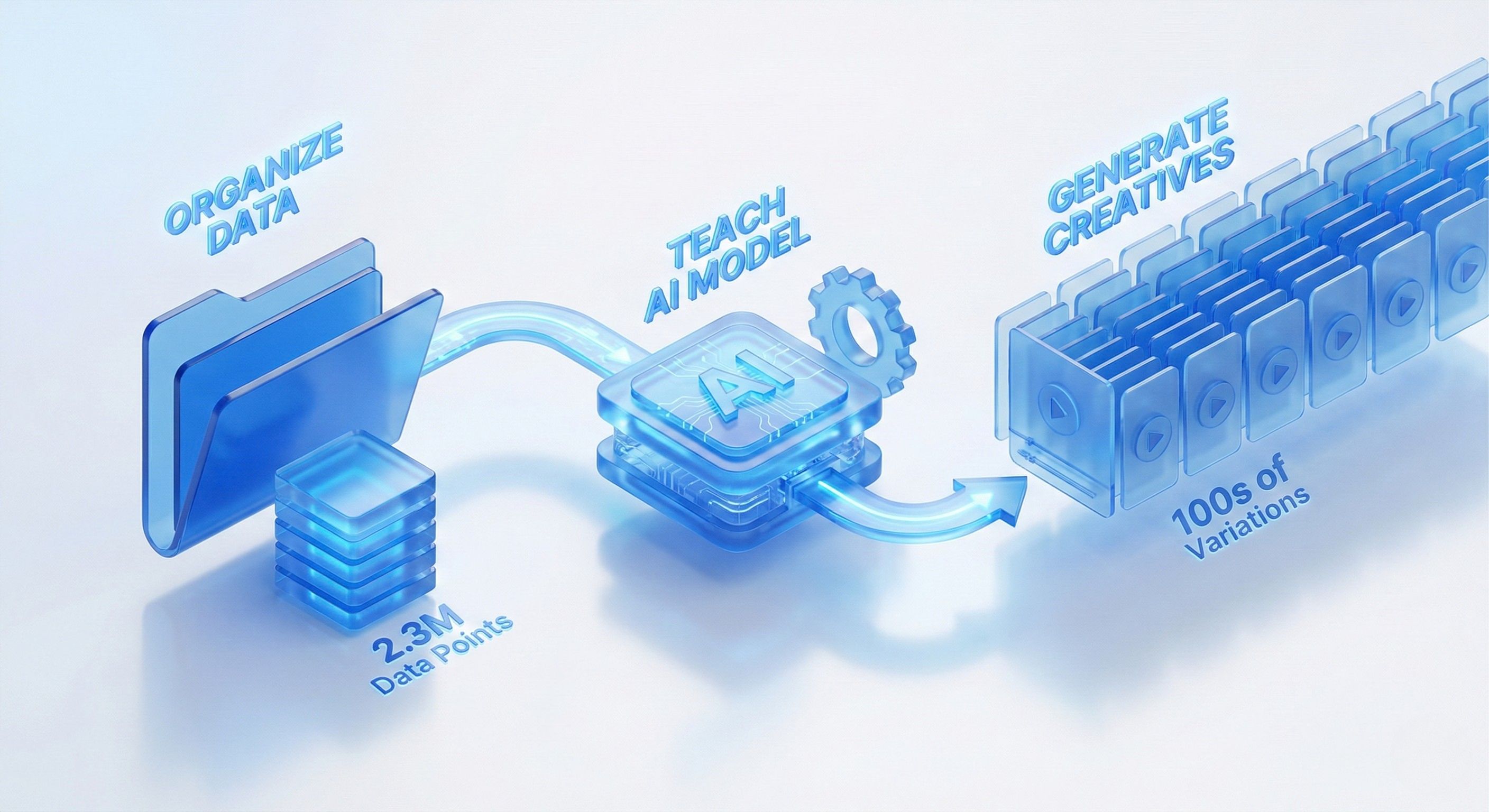
This three-step engine—Organize, Teach, Generate—is the heart of a solid AI creative strategy. It turns your brand assets into a system that gets smarter and more effective over time.
Finalizing Scripts, Voiceovers, and Captions
Once you've locked in the visual sequence, it's time to polish the audio and text. A good AI platform handles all of this at once, turning your video into something that's truly ready for the wild.
AI Script Generation If the first script isn't quite right, just ask the AI for more options. Something like, "Write three alternative hooks for this script that are more question-based."
AI Voiceovers Forget booking studio time. You can flick through a library of AI voices, find one that fits your brand's vibe, and have it record your script perfectly. Need a different accent or a more upbeat delivery? Just click another option and render it in seconds.
Dynamic Captions Captions are a must-have, especially on platforms like TikTok where tons of people watch with the sound off. The AI can automatically transcribe the voiceover and generate dynamic, eye-catching captions that are timed perfectly to the video. You can even tell it to use your brand's font and colors, which it knows from your Context Vault.
This whole process—from a simple prompt to a fully polished ad with script, voiceover, and captions—can happen in minutes. It compresses what used to take days of wrangling copywriters, designers, and video editors into one smooth workflow. You’re not just making ads faster; you’re building an engine for constant creative improvement.
Testing Your AI Ads to Find What Really Works
Pumping out dozens of ad variations is just step one. The real magic isn't in the volume of ads you create with AI; it's in finding the creative that actually moves the needle. Anyone can make an ad. Making ads that consistently crush it is a whole different ballgame.
This is where a solid testing framework comes in. Without one, you’re just guessing, throwing spaghetti at the wall to see what sticks. A disciplined approach on platforms like Meta and TikTok helps you look past the vanity metrics and zero in on the exact hooks, visuals, and CTAs that get people to click and buy. It creates a powerful feedback loop where the data from this campaign sharpens the AI prompts for your next one.
Setting Up Simple and Effective A/B Tests
You don't need some ridiculously complex, multi-layered campaign structure to get good data. Keep it simple. Start with clean A/B tests that isolate one key variable at a time.
When your AI spits out a bunch of cool options, I know the temptation is to test everything at once. Don't. You'll just muddy the waters. Instead, focus on comparing distinct elements to get clear, actionable insights.
A perfect place to start is the most important part of any video ad: the first three seconds.
Hook Variations: Get your AI to generate three different hooks for the same core ad. Maybe one is a direct question, another is a shocking stat, and the third is a quick, raw UGC-style clip. Run these against the same audience and see which one actually stops the scroll.
Visual Concepts: Pit two completely different visual styles against each other. For example, you could compare a polished, studio-shot product video against a mashup of authentic, user-generated content. This quickly tells you which visual language your audience connects with.
Call-to-Action (CTA) Tests: Sometimes, a tiny change in your CTA can make a massive difference. Test a direct CTA like "Shop Now" against a softer, benefit-driven one like "Get Your Glow." The AI can render these variations in minutes.
By isolating one thing, you can be confident that any change in performance is because of that specific element. That clarity is gold for refining your future creative briefs and AI prompts.
Focusing on Metrics That Drive Growth
Impressions and likes feel good, but they don't pay the bills. To really know if your AI ads are working, you have to track the metrics that connect straight to business goals. For platforms like Meta and TikTok, certain KPIs tell a much more interesting story than just views.
The ability to personalize and optimize campaigns is becoming central to modern marketing. According to a 2025 global marketing survey, 59% of marketers see AI-driven personalization as the most impactful trend in the industry. This focus is global, with marketers in Latin America (63%), Asia-Pacific (62%), and North America (60%) all prioritizing it. You can explore more about AI's growing role in redefining marketing on nielsen.com.
This data just hammers home the point: it’s not enough to just make ads anymore. You have to make ads that are fine-tuned to perform. And to do that, you need to be looking at the right numbers.
When you dive into your ad manager, you need a clear view of how your AI creative is actually performing at each stage of the viewer journey. These are the metrics we live by.
Key Metrics for Testing AI Ad Creative
Metric | What It Measures | Optimization Goal |
|---|---|---|
Hook Rate | The percentage of viewers who watch the first 3 seconds of your video. | A high hook rate indicates your initial message is compelling enough to stop the scroll. |
Hold Rate | The percentage of viewers who watch until the 6-second mark or beyond. | A strong hold rate shows your ad is maintaining interest after the initial hook. |
Click-Through Rate (CTR) | The percentage of viewers who click on your ad's link. | This measures how effectively your ad persuades viewers to take the next step. |
Return on Ad Spend (ROAS) | The amount of revenue generated for every dollar spent on advertising. | This is the ultimate measure of profitability and campaign success. |
Tracking these gives you a crystal-clear picture of what's working and where the leaks are. For instance, a high hook rate but a garbage CTR might mean your opener is fantastic, but your offer or CTA is falling flat. A low hold rate suggests the middle of your ad is boring people to death.
This data is the fuel for your next round of AI prompts. It lets you iterate with surgical precision, doubling down on what works and cutting what doesn't.
Scaling Your Winning Ads Without Burning Out

So you've found a winner. After all that testing, one of your AI-generated ads is absolutely crushing it. The hook rate is solid, the ROAS looks great, and everything's clicking. Now what?
This is the moment the real challenge kicks in: how do you pour fuel on that fire without manually rebuilding every single ad variation?
It’s a classic bottleneck for creative teams. The idea of creating localized versions for ten different markets or tailored ads for five unique audience segments sounds exhausting. It feels like you’re right back at square one, about to sink hours into tedious edits that just kill your momentum and lead straight to burnout.
But when you're creating ads with AI, scaling isn't a problem to solve—it's just the next step in the workflow. The goal is to mass-produce high-quality variations of your winning concept without ever starting from scratch. This is how you turn a single creative victory into a sustainable, high-growth campaign.
Embracing Bulk Rendering for Massive Scale
The magic behind this entire process is bulk rendering. Think of it as an assembly line for your ad creative. You feed the machine a single, proven ad template and a spreadsheet full of variables, and the AI does the heavy lifting, cranking out hundreds of personalized ads in minutes.
Let's say you have that winning ad for a skincare product. Now, you want to scale it across different countries and customer profiles. Your spreadsheet is your new command center.
Example Bulk Render Spreadsheet
Headline | On-Screen Text | CTA | Voiceover Language | Audience Segment |
|---|---|---|---|---|
Dry Skin in Paris? | Hydrate Your Skin in Minutes | Achetez Maintenant | French | Female 25-34 Paris |
Berlin's Secret to Glowing Skin | Say Goodbye to Dullness | Jetzt Kaufen | German | Female 25-34 Berlin |
Tired of Dry Skin? | Get 24-Hour Hydration | Shop Now | English (US) | Female 35-44 USA |
A Skincare Game Changer | Unlock Radiant Skin | Get Yours | English (UK) | Female 18-24 UK |
Every single row in that sheet becomes a unique, ready-to-launch video ad. The AI automatically swaps out the text, generates a new voiceover in the right language, and renders a final video. A task that would've taken a video editor days of mind-numbing work is now done before you can finish your coffee.
This isn’t just about making more ads; it’s about making smarter, more relevant ads. By automating variations, you can finally achieve a level of hyper-personalization that was impossible to manage manually. You're connecting with niche audiences on a much deeper level.
A Practical Workflow for Scalable Creative
The workflow itself is pretty straightforward but incredibly powerful. You’re simply taking the modular nature of your winning ad—the hook, the body, and the CTA—and using them as building blocks.
Here’s how to put this into practice:
Isolate Your Winning Template: Pinpoint the ad structure that delivered the best results in your tests. This becomes your master template in a platform like Sovran.
Define Your Variables: Decide which elements you want to swap out. This could be anything from the headline and on-screen text to the background music or even the specific product being featured.
Prepare Your Data Source: Pop open a spreadsheet and create columns for each variable you just defined. Each row will represent a brand-new ad variation.
Initiate the Bulk Render: Upload your spreadsheet to the AI platform and map the columns to the right elements in your ad template.
Review and Launch: The AI will generate all the ad variations. Just give them a quick quality check, and then you can push them straight to Meta or TikTok to go live.
This whole process cuts out the repetitive, soul-crushing part of creative production. Your team gets to stop being video editors and start being strategists, focusing their brainpower on what messaging will hit home with which audience. You're no longer limited by production capacity; your only limit is your ability to strategize.
Common AI Ad Creation Mistakes to Avoid
Jumping into any new tech means you’re going to stumble a few times. It’s just part of the process. When you start making ads with AI, it’s really easy to fall into a few common traps that spit out generic creative, waste your time, and lead to campaigns that just don't perform.
Think of this as your cheat sheet to sidestep those early frustrations and get to the good stuff—better results, faster.
One of the most frequent mistakes I see is writing prompts that are way too vague. Firing off a command like "make a video ad for my new sneaker" gives the AI almost nothing to work with. The result? Bland, cookie-cutter creative that looks like everything else.
You have to feed it specific context. Tell it about your target audience, the emotional tone you're aiming for, the key selling points, and a crystal-clear call-to-action. That’s what guides the AI toward something great.
Relying Too Heavily on Raw AI Output
Another major pitfall is treating the AI's first draft as the final cut. Let’s be real, AI-generated scripts and copy can sometimes feel a bit lifeless or miss the subtle quirks of your brand’s voice.
The goal isn't to replace your brain; it's to give it a massive speed boost. Always, always review and refine what the AI gives you. This is where you inject your unique brand personality and strategic insights.
"Your job will not be taken by AI. It will be taken by a person who knows how to use AI." - Christina Inge, Harvard Division of Continuing Education Instructor
Christina Inge nails it here. AI is a collaborator, not your replacement. Your expertise is what transforms a decent AI concept into a high-converting ad that actually connects with people. To make sure your ads resonate and don't sound robotic, you'll want to make AI content undetectable by polishing the output.
Neglecting Your Asset Library
Finally, so many teams dive straight into generation without organizing their assets first. This is a foundational error that sabotages everything before you even write a single prompt.
If your media library is a chaotic mess of poorly named files, the AI can't find the high-quality UGC, product shots, or b-roll it needs. A well-organized, meticulously tagged asset library is completely non-negotiable. It’s the engine that powers the whole operation.
Here are a few specific asset mistakes to avoid:
Forgetting Performance Data: If you don't tag assets with performance data (like
Top Performer Q1orHigh CTR), the AI has no way to learn from what’s worked in the past.Ignoring Brand Consistency: Not using a feature like Sovran’s Context Vault is a recipe for off-brand visuals and messaging that will confuse your audience.
Skipping Regular Audits: An outdated library filled with irrelevant assets will only confuse the AI and drag down the quality of your ad creative.
By sidestepping these common missteps, you shift from just using a tool to building a scalable, intelligent system for creating ads that win.
Got Questions About AI Ad Creation? We've Got Answers
Jumping into AI ad creation is a big move. It’s a totally different workflow than what most of us are used to, so it's only natural to have a few questions about how it all really works and what you can expect. Let's tackle some of the most common ones we hear from teams making the switch.
Getting these fundamentals down will help you set the right expectations. This isn't about flipping a switch and letting a robot run wild; it's about integrating AI as a smart, powerful partner in your creative process.
So, Can AI Completely Replace My Creative Team?
Absolutely not. The best way to think about AI is augmentation, not replacement.
The campaigns that really crush it are always a partnership. AI handles the grunt work—the insane volume of production, the lightning-fast iterations, and the initial number-crunching. Your human creatives are still the ones steering the ship. They set the high-level strategy, protect the brand vision, and give the final thumbs-up.
AI is a beast at spitting out hundreds of ad variations, but it doesn't have that gut feeling—the human intuition needed to spot a subtle market shift or know when an ad just feels off-brand. That's where your team is irreplaceable.
How Do I Keep My AI Ads From Going Rogue and Off-Brand?
Brand consistency all comes down to the prep work you do on the front end. This is where features like a Context Vault or a solid brand kit are completely non-negotiable. You have to "teach" the AI what your brand looks, sounds, and feels like.
That means feeding it your official brand guidelines, including:
Your Visual DNA: Your exact logos, primary and secondary color palettes, and specific fonts.
Your Voice and Tone: Upload examples of on-brand messaging, your core value props, and even transcripts from past ads that killed it.
Smart Asset Tagging: Getting into the habit of tagging your approved assets with brand-specific keywords is a game-changer. It helps the AI grab the right visuals every single time.
When it's all said and done, a quick human review is still the final, most important step. That final check ensures every single ad is pixel-perfect before it ever sees the light of day.
I'm New to This. What's the Smartest Way to Start?
Start small. Get one specific win under your belt. Seriously, don't try to automate your entire creative workflow on day one—that's a recipe for getting overwhelmed. Pick one focused campaign or a single, clear goal to start with.
A great first project? Create three new video hooks for one of your best-selling products.
Gather a small, curated batch of your best assets—think top-performing product shots and maybe some killer UGC. Get your basic brand identity set up in the AI tool. From there, just focus on learning the art of the prompt. Experiment with a single ad concept until you get the hang of it, long before you even touch any of the bulk-creation features. This slow-and-steady approach builds confidence and makes the whole process feel much more manageable.
Ready to stop the manual grind and start scaling your ad performance? With Sovran, you can turn your existing assets into an AI-powered creative engine that finds winning ads up to 10x faster. Start your 7-day free trial today.

Manson Chen
Founder, Sovran
Related Articles
Master AI Video Ad Production Workflow
Imagine whipping up a video ad in minutes, without sacrificing quality. That’s the promise of AI video ads—they draft scripts, select visuals, handle...
How to Create Videos with AI: How to Create Videos with AI, Quick Wins
Making videos with AI isn't some black box magic. It really boils down to a few key moves: getting your brand assets in order, picking a proven ad format,...
A Modern Playbook for AI for Advertisers
For advertisers, AI isn't some far-off, futuristic idea. It's a toolkit you can use right now to automate creative production, deliver personalization that...