Top AI Tools for Video Content Creation Automation (2026)
Compare 12 AI tools for content creation, video ad automation, TikTok content workflows, content review, editing, and performance creative production in 2026.
Jump to a section
- Quick Answer: Best AI Content Creation Tools by Workflow
- What Changed in AI Content Creation for 2026?
- 1. Sovran
- 2. ChatGPT
- 3. Claude
- 4. Gemini for Workspace
- 5. Microsoft 365 Copilot
- 6. Canva Magic Studio
- 7. Adobe Express and Firefly
- 8. Runway
- 9. Descript
- 10. CapCut
- 11. HeyGen
- 12. Jasper
- Best AI Content Review and Editing Tools in 2026
- Best AI Content Pipeline Automation Software for Creative Assets
- Watch: AI-Assisted Video Ad Workflows
- Proof From Teams Using Sovran
- How to Choose the Right AI Content Creation Stack
- Related Guides
Top AI Tools for Video Content Creation Automation in 2026
If you are looking for top AI tools for video content creation automation 2025 2026, start with the workflow you need to automate: strategy, scripts, footage, editing, review, variants, or publishing. The best AI content creation tools do not all solve the same problem.
This guide compares 12 AI tools for content creation in 2026, with a bias toward marketers who need short-form video, TikTok content, paid social ads, and repeatable creative pipelines. Use it as a stack map: one tool for ideas is not enough if your team still has to manually cut, review, resize, and launch every asset.
Quick Answer: Best AI Content Creation Tools by Workflow
For performance marketers, Sovran is the strongest fit when the bottleneck is turning existing footage, scripts, hooks, bodies, CTAs, demos, and proof clips into more testable video ads. General AI assistants are better for planning and drafts. Creative suites are better for design systems. Video generators are better for net-new footage or experimental scenes.
| Tool | Best for | Where it fits in the content pipeline |
|---|---|---|
| Sovran | Video ad creation automation for Meta, TikTok, and paid social | Asset library, modular clips, variant generation, launch workflow |
| ChatGPT | Campaign ideation, briefs, outlines, scripts, and repurposing | Strategy and text generation |
| Claude | Long-form editing, critique, summarization, and content QA | Review, synthesis, and rewriting |
| Gemini for Workspace | Teams already working in Google Docs, Sheets, Slides, and Meet | Collaborative planning and document workflows |
| Microsoft 365 Copilot | Enterprise teams working across Word, PowerPoint, Excel, and Teams | Internal documentation, sales assets, and deck creation |
| Canva Magic Studio | Fast brand-safe social designs, templates, and simple videos | Design, resizing, and non-editor production |
| Adobe Express and Firefly | Brand teams that need AI generation inside a familiar creative suite | Design, image generation, and Adobe handoff |
| Runway | AI video generation, visual R&D, concepting, and B-roll | Net-new footage and experimental creative |
| Descript | Transcript-based video editing, tutorials, podcasts, and UGC | Editing, captions, cleanup, and repurposing |
| CapCut | TikTok-native edits, captions, templates, and creator-style clips | Short-form editing and trend-aligned production |
| HeyGen | Avatar-led explainers, localization, and sales enablement videos | Presenter-style video generation |
| Jasper | Brand voice, campaign copy, content calendars, and marketing copy | Written content production and governance |
What Changed in AI Content Creation for 2026?
AI is no longer the differentiator by itself. HubSpot's 2026 State of Marketing reports that 80% of marketers use AI for content creation and 75% use it for media production. The new question is whether a team can turn AI output into assets that are on-brand, reviewed, testable, and tied to revenue.
Video is where the pressure is most visible. IAB's 2025 Digital Video Ad Spend and Strategy report says 86% of buyers are using or planning to use generative AI to build video ad creative, and buyers project GenAI creative will reach 40% of all ads by 2026. Wyzowl's 2026 video marketing survey found that 63% of video marketers have used AI video tools to create or edit marketing videos, up from 51% the prior year.
That makes tool selection more specific. The best AI tools for content creation 2026 are not just the ones that can generate words or images. They are the ones that help marketers create more finished assets, review those assets faster, and learn which creative variables actually move performance.
1. Sovran
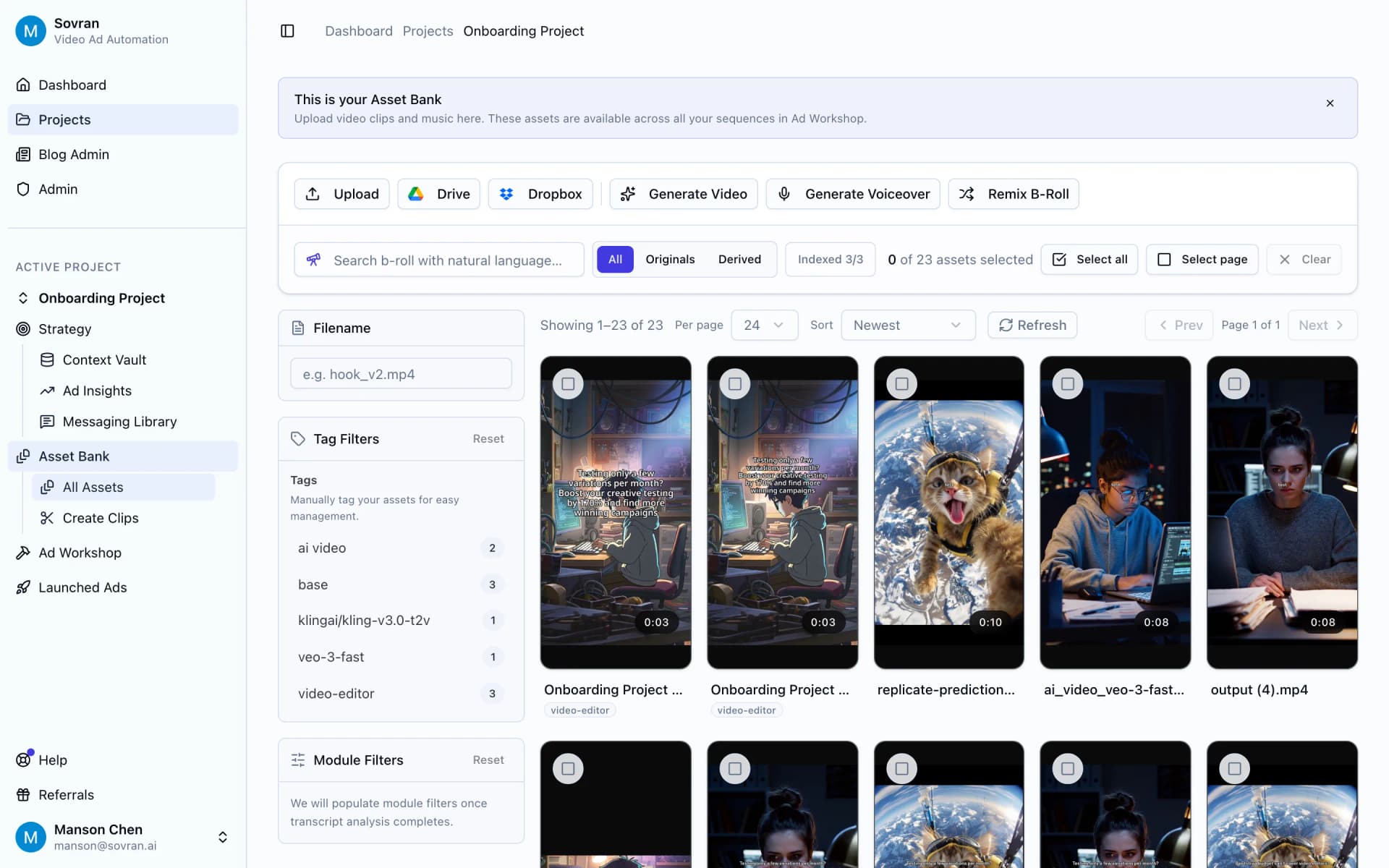
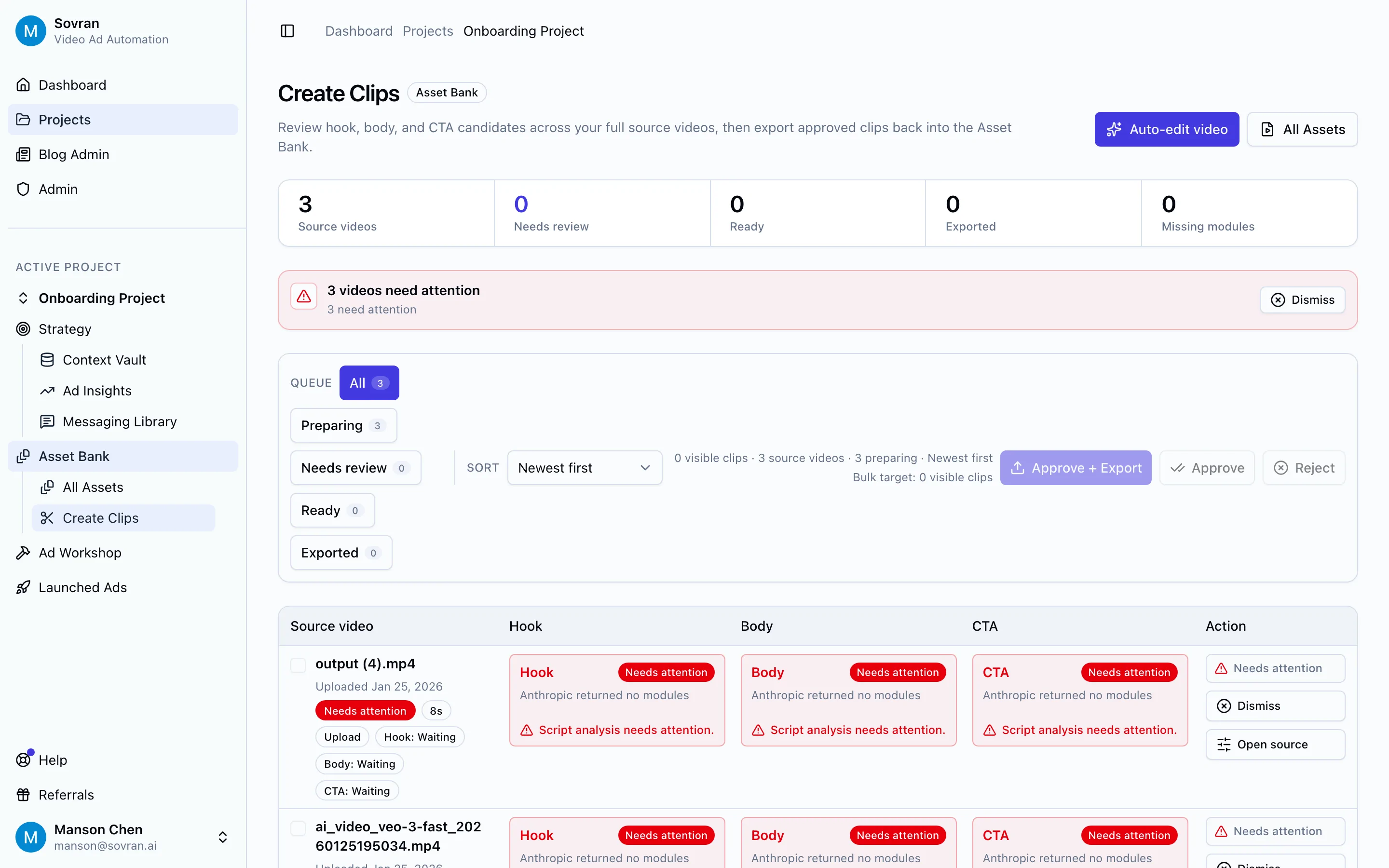
Sovran is built for AI video content creation automation when the content is meant to become paid social ads. It helps teams turn raw footage into organized creative assets, split source videos into reusable hooks, bodies, CTAs, demos, and proof clips, then create more testable ad variations from the same material.
Use Sovran when the problem is not "we need one AI-generated clip." Use it when the problem is "we need 40 credible Meta or TikTok variants this week, and we need to know what changed between them."
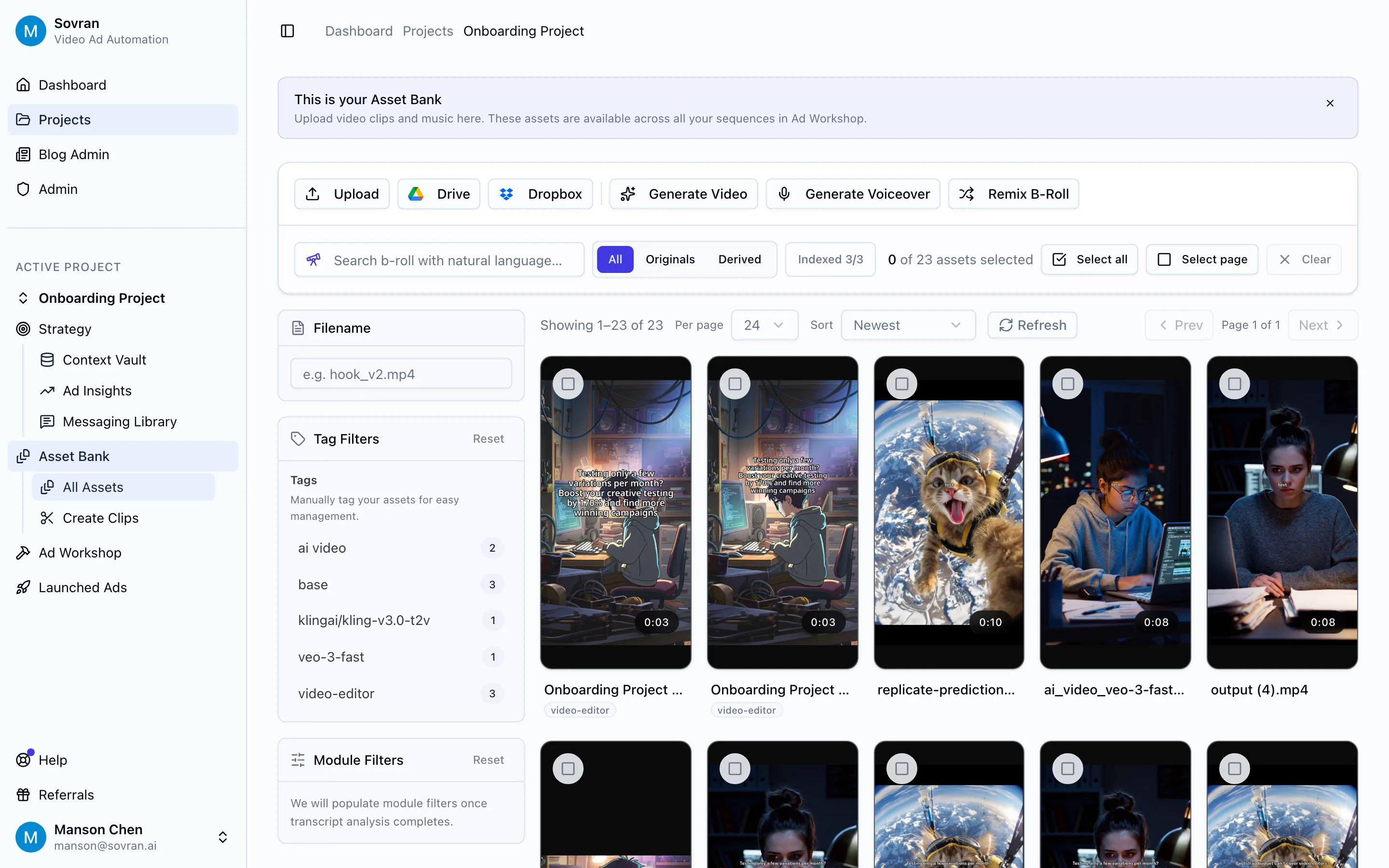
The strongest use case is modular creative production. A performance team can keep the same body clip while testing 12 hooks, or keep the same hook while testing different proof sections and CTAs. That is more useful for ad learning than asking a generic video generator for one polished asset.
Best for: growth teams, agencies, founders, and UA teams that need a repeatable content pipeline for Meta, TikTok, Reels, Shorts, and paid social testing.
Limitations: Sovran is not a general-purpose document assistant or a cinematic AI video model. Pair it with ChatGPT, Claude, Runway, or Canva when you need ideation, long-form writing, net-new footage, or brand design templates.
2. ChatGPT
ChatGPT is one of the most flexible AI tools for content creation because it can help with briefs, outlines, hooks, scripts, emails, landing page copy, campaign angles, and repurposing. It is especially useful at the beginning of a campaign when you need many directions before picking a few to produce.
For video content automation, ChatGPT is best used as a strategy and script layer. Feed it customer research, product positioning, objections, and past performance notes, then ask for hook families, creator briefs, proof angles, and CTA variants.
Best for: ideation, first drafts, script variants, briefs, and repurposing written material into video prompts.
3. Claude
Claude is strong for longer context, critique, rewriting, and content review. It is a good fit when a team needs to evaluate whether a content draft is clear, on-brand, accurate, and useful before sending it to design or video production.
For marketers, Claude often works well as an editorial partner: summarize customer calls, compare ad scripts against positioning, rewrite a landing page section, or score a batch of hooks against a creative brief.
Best for: content review, editing, summarization, long-form rewriting, and brand-voice checks.
4. Gemini for Workspace
Gemini for Workspace is useful when content creation happens inside Google Docs, Sheets, Slides, Gmail, and Meet. It is less about being the most advanced standalone AI writer and more about reducing friction inside the documents where work already happens.
Use it for meeting summaries, campaign briefs, first-pass outlines, spreadsheet analysis, and slide drafts. For teams that plan content in shared Google files, the workflow fit can matter more than raw model preference.
Best for: collaborative marketing teams already using Google Workspace.
5. Microsoft 365 Copilot
Microsoft 365 Copilot plays a similar role for organizations centered on Word, PowerPoint, Excel, Outlook, and Teams. It is strongest when marketing content needs to connect with internal documents, sales decks, account notes, and reporting.
Use it to turn research into a deck, draft internal enablement docs, summarize stakeholder feedback, or pull a campaign narrative from existing files. It is a practical choice for enterprise marketing teams where the approval chain already lives in Microsoft tools.
Best for: enterprise content workflows, internal enablement, sales collateral, and document-heavy teams.
6. Canva Magic Studio
Canva Magic Studio is one of the easiest ways for non-designers to create brand-consistent social posts, simple videos, thumbnails, carousels, and resized assets. It is valuable when the team needs polished output quickly without handing every request to a designer.
For TikTok and paid social teams, Canva is best for static and lightweight motion assets, not deep creative testing. Use it for thumbnails, end cards, offer cards, creator brief visuals, and fast resizing across placements.
Best for: social teams, founders, and marketers who need fast branded assets without complex editing.
7. Adobe Express and Firefly
Adobe Express and Firefly are strong when AI creation needs to connect with a broader Adobe workflow. Express gives marketers templates and lightweight video/design creation. Firefly gives teams generation and editing features that fit more naturally into the Adobe ecosystem.
If your team already uses Photoshop, Premiere, After Effects, or Creative Cloud libraries, Adobe's AI tools are easier to adopt than a standalone generator. The tradeoff is that high-volume paid social variation still needs a production system around the creative suite.
Best for: brand teams and creative teams that already rely on Adobe.
8. Runway
Runway is a strong choice for AI video generation, visual exploration, and creative R&D. It can help teams create B-roll, style explorations, concept footage, and scenes that would be expensive or slow to shoot.
For performance marketing, Runway is best treated as a source of raw or experimental creative, not the whole content pipeline. You still need a way to review the output, combine it with real product proof, create variants, and launch those assets into channels.
Best for: concepting, AI video generation, visual R&D, and production teams exploring new creative directions.
9. Descript
Descript is one of the best AI content review and editing tools for voice-led video. Its transcript-based workflow makes it easier to clean up founder clips, customer interviews, podcast cuts, tutorials, webinars, and UGC-style videos.
Use Descript when the edit starts with words: remove filler, tighten a script, cut silences, create captions, or repurpose a long recording into shorter clips. Pair it with a modular ad workflow when those clips need to become many paid social variants.
Best for: transcript-based editing, tutorials, founder videos, podcasts, captions, and UGC cleanup.
10. CapCut
CapCut remains one of the most practical AI tools for TikTok content creation 2026 because it is close to the visual language of the platform: captions, mobile edits, templates, sounds, effects, and creator-style pacing.
Use CapCut when the asset needs to feel native to TikTok or Reels. It is less useful for managing a large creative library, naming test cells, or producing controlled ad variants at scale, but it is excellent for fast creator-style editing.
Best for: TikTok edits, mobile-first short-form video, captions, templates, and creator workflows.
11. HeyGen
HeyGen is useful when the content needs an AI presenter, avatar, localization, or a sales-enablement style video. It can help teams turn written content into presenter-led explainers without booking a shoot.
For ads, use avatar video carefully. It can work well for product education, localization, and explainers, but performance teams should still test it against real creator footage, screen recordings, customer proof, and product demos.
Best for: avatar videos, localization, explainers, sales enablement, and repeatable presenter-led content.
12. Jasper
Jasper is built for marketing copy and brand voice workflows. It is useful when a team wants AI-assisted content calendars, campaign copy, landing page sections, email copy, and social variations with more governance than a blank chatbot prompt.
Use it when written content volume is the bottleneck. If video production is the bottleneck, pair Jasper with tools that can turn approved copy into clips, thumbnails, scripts, and ad variants.
Best for: marketing copy, campaign messaging, content calendars, and brand voice governance.
Best AI Content Review and Editing Tools in 2026
The review layer matters because AI makes it easy to produce more mediocre content. Use this stack when quality control is the bottleneck:
- Claude or ChatGPT for clarity checks, offer alignment, objections, and rewrite suggestions.
- Descript for transcript cleanup, captions, voice-led edits, and repurposing long recordings.
- Canva or Adobe Express for brand-safe visual review, resizing, and final social layouts.
- Sovran for reviewing and organizing hook, body, CTA, proof, and demo modules before rendering ad variants.
The practical rule: review the content at the same level you plan to learn from it. If you are testing hooks, review the hook set. If you are testing proof points, review the proof module. If you are testing full ads, review the whole sequence.
Best AI Content Pipeline Automation Software for Creative Assets
A real AI content pipeline needs more than generation. It needs source assets, brand context, review, versioning, approvals, exports, and performance feedback. For enterprise creative asset generation in 2026, think in layers:
| Pipeline job | Tool layer | Example tools |
|---|---|---|
| Generate ideas and scripts | AI assistant or marketing copy platform | ChatGPT, Claude, Jasper |
| Create or edit visuals | Creative suite or AI video generator | Canva, Adobe, Runway, HeyGen |
| Turn footage into ad variants | Performance creative production system | Sovran |
| Review and approve assets | Transcript, brand, and content QA workflow | Descript, Claude, Canva, Adobe |
| Launch and learn | Ad platforms and analytics | Meta, TikTok, Google Ads, Motion |
That is why a single "AI content tool" rarely replaces the whole workflow. The winning stack connects generation to review and distribution.
Watch: AI-Assisted Video Ad Workflows
YouTube search for this page-specific query surfaced the configured Manson Chen channel but not a direct "AI content creation tools" match, so the channel RSS feed was used as a fallback. The most relevant workflow videos are How to remix your video ads and get fresh variations in minutes with Sovran.ai, This Hook Body CTA Video Editor Systematizes Creative Production, and This performance video ad tool helps founders out-produce a bloated marketing team.
Proof From Teams Using Sovran
"Sovran allowed us to boost creative testing on our largest UA channel by 170% month-over-month. By exploring new combinations of hooks and body videos, we not only discovered new top-scaling ads but also identified themes that we might not have tested otherwise."
Dan Brosseau, Head of User Acquisition, Rewardify
"We supercharged our creative output with Sovran. That velocity helped us cut CAC by 40% and scale spend efficiently."
Jonathan Lee, CEO, Fuelin
"Working with Sovran has been a game-changer for our paid media strategy. They helped us streamline our creative testing process, significantly increasing the number of creatives we test. As a result, we were able to scale our monthly media spend while consistently hitting our KPIs."
Dominik Meyer, Head of Growth, Pickup Music
How to Choose the Right AI Content Creation Stack
- Start with the output. Blog drafts, TikTok clips, paid social variants, sales decks, and avatar videos need different tools.
- Separate generation from review. AI can create more options, but someone still needs to check accuracy, proof, brand fit, and performance intent.
- Choose for the bottleneck. If ideas are slow, use ChatGPT, Claude, or Jasper. If editing is slow, use Descript or CapCut. If variant production is slow, use Sovran.
- Preserve the learnings. Save winning hooks, proof clips, CTAs, formats, and objections so the next content batch starts smarter.
- Do not let AI erase proof. The best content still needs real customer quotes, product screenshots, performance data, and specific examples.
Related Guides
- Video ad creation software - compare tools for turning creative ideas into finished ads.
- Ad testing software - build the testing layer once your AI-assisted assets are ready.
- Video ad examples - study the formats to turn into reusable hooks, bodies, and CTAs.
- Automated video editing software - compare AI editing workflows for marketing teams.
- Sovran vs Runway - see where AI video generation ends and ad production workflow begins.
- Sovran vs HeyGen - compare avatar-led video with performance creative automation.
Need a starting structure before choosing software? See our free ad template guide for static, video, display, and modular paid social templates.
Turn AI content ideas into ad variants
Use Sovran to organize footage, create hook/body/CTA clips, and render more paid social video ads from the assets you already have.
Start with SovranMove from generic AI-tool lists to ad-specific workflows
Compare AI video tools for your next ad campaign. Use the structure builder to plan your hook, proof, and call to action before you create footage.
Compare Sovran Against AI Video Tools
Start with the comparison stack to see how Sovran fits against Runway, HeyGen, and other AI-video workflows.
Browse comparisons- WorkflowUse the builder
Turn AI ideas into a production-ready ad structure
Use a benchmark-backed builder to map hooks, proof, and CTA sequencing before you generate more footage.
- ComparisonOpen comparison
See how Runway fits into the stack
Compare Runway's AI video strengths against Sovran's ad-production workflow for performance teams.
- ComparisonOpen comparison
Compare against HeyGen for ad use cases
Understand where avatar-led AI video tools fit, and where they stop being enough for scaled ad production.
Frequently asked questions

Manson Chen
Founder, Sovran
Related Articles

Storyboard Development: Scale Video Ad Production in 2026
- storyboard development
- video ads
- 3 more

8 Pattern Interrupt Techniques for Video Ads
- pattern interrupt techniques
- video ad hooks
- 3 more
Customer Journey Mapping for Performance Marketing
- customer journey mapping
- performance marketing
- 3 more