Mastering Instagram Video Advertising
If you're not running video ads on Instagram, you're leaving a massive opportunity on the table. Let’s be honest, static images just don’t cut it anymore....
Jump to a section
If you're not running video ads on Instagram, you're leaving a massive opportunity on the table. Let’s be honest, static images just don’t cut it anymore. Video is the undisputed king of content on the platform, and getting good at it is non-negotiable for growth. The user mindset has completely shifted; people now expect dynamic, engaging, and story-driven content as they scroll.
This isn't just a hunch—the numbers tell the whole story. As of 2025, videos command 60% of the total time users spend on Instagram. That’s a huge chunk of attention. The viral potential is staggering, too, with Reels being reshared more than 3.5 billion times every single day.
From a performance standpoint, vertical Reel ads deliver a 48% lower cost per action (CPA) compared to old-school non-vertical formats. This means you can stretch your ad budget further and get better results.
This infographic really drives home why video is so powerful.
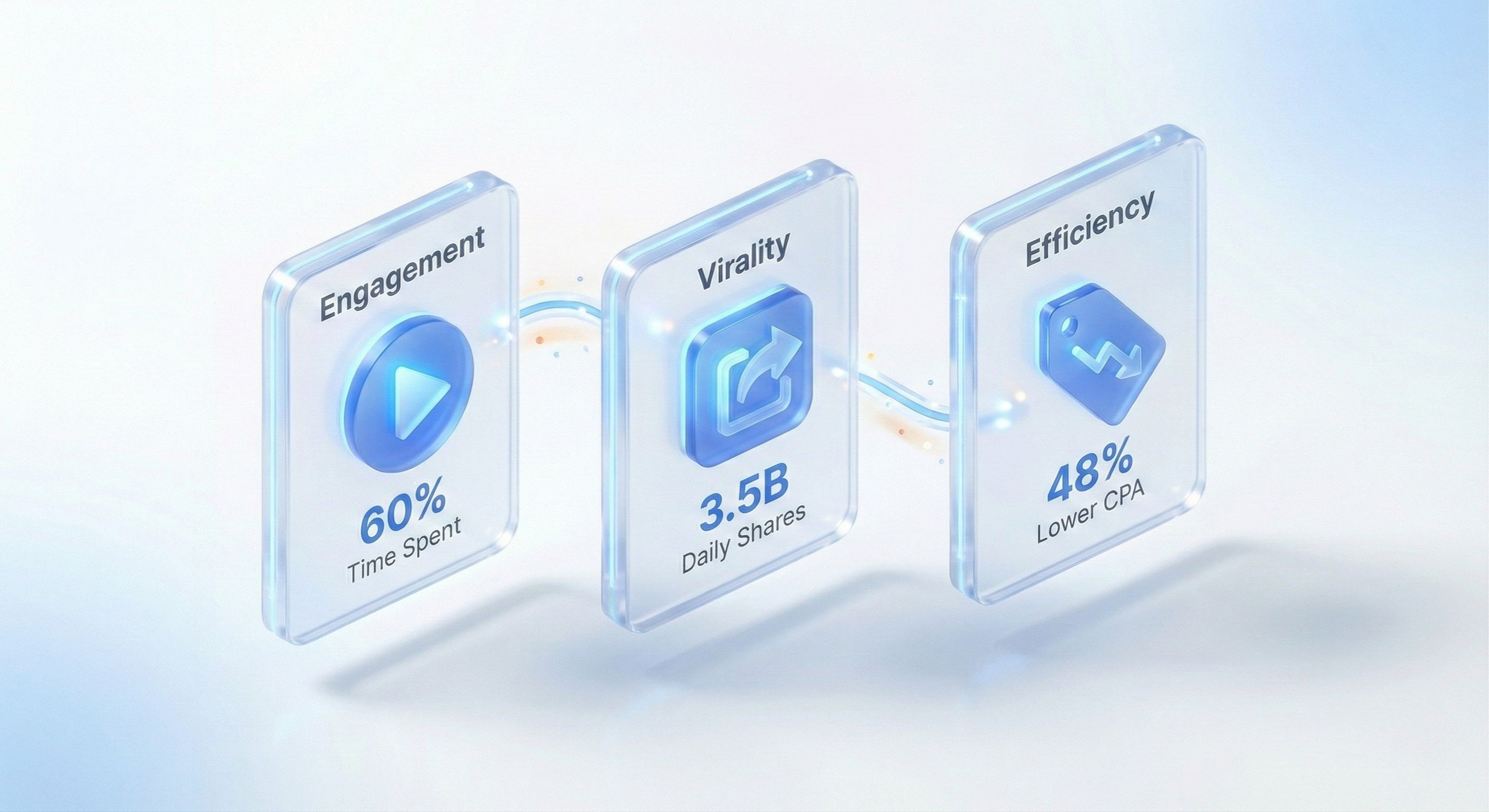
The data is crystal clear: users spend more time with video, they share it more, and advertisers get better results for less money. It's a win-win-win.
Instagram Video Ad Formats At a Glance
To really nail your strategy, you need to match your message to the medium. Each video placement on Instagram serves a different purpose because users are in a different frame of mind when they encounter it.
Here’s a quick breakdown to help you choose the right format for your campaign goals.
Format | Aspect Ratio | Max Length | Best For |
|---|---|---|---|
Reels | 9:16 | 90 seconds | Top-of-funnel awareness, viral content, UGC-style ads, and reaching new audiences in a discovery mindset. |
Stories | 9:16 | 60 seconds | Time-sensitive offers, behind-the-scenes content, interactive polls, and driving immediate action with a "Swipe Up" CTA. |
In-Feed | 4:5, 1:1, 16:9 | 60 minutes | Mid-funnel consideration, product demos, customer testimonials, and deeper brand storytelling. |
Choosing the right format isn't just a technical decision; it's a strategic one that aligns your creative with user intent.
Understanding the Key Ad Placements
Let's dive a little deeper into the mindset behind each placement.
Instagram Reels: This is prime real estate for top-of-funnel awareness. Users are here for discovery, mindlessly swiping through short, entertaining clips. Your ads need to feel native, energetic, and grab attention in the very first second. Think trending sounds, quick tutorials, or authentic-looking user-generated content (UGC).
Instagram Stories: Stories feel more intimate and immediate. Since organic content vanishes after 24 hours, users tap through them quickly. This placement is perfect for flash sales, behind-the-scenes glimpses, or interactive polls that get people to engage directly. The full-screen vertical format is super immersive and great for driving clicks.
In-Feed Video Ads: These ads pop up as users scroll their main feed. People are generally more relaxed here and willing to watch slightly longer, more detailed videos. This spot is gold for mid-funnel consideration and bottom-funnel conversions. Use it for product demonstrations, customer testimonials, or brand stories that need a bit more time to unfold.
The core of a winning strategy is understanding you're not just picking a format; you're targeting a user's state of mind. Someone scrolling Reels wants a quick laugh, while someone watching Stories might be more engaged with a brand they already follow.
The Anatomy of a Thumb-Stopping Video Ad
No matter the placement, every great Instagram video ad has a few key ingredients.
First up is the critical first three seconds. You have a tiny window to stop the scroll. Hit them with a bold visual hook, a provocative question, or an unexpected movement to snap them out of their scrolling trance.
Next, you absolutely have to design for mobile-first, sound-off viewing. Most people will see your ad without audio, at least initially. That makes clear, easy-to-read captions and on-screen text non-negotiable. Your message has to land visually before they even think about tapping for sound.
Finally, a crystal-clear Call-to-Action (CTA) is a must. Tell people exactly what you want them to do next, whether it's "Shop Now," "Learn More," or "Sign Up." Don't leave them guessing. For a wider view on advertising across the platform, you might find some useful insights by exploring general Instagram Ads topics.
Creating Video Ads That Actually Convert
Alright, let's get into what it really takes to make video ads that stop the scroll and get people to act. Gone are the days of sterile, corporate-style videos. On a platform as noisy and fast-paced as Instagram, your creative has to feel real, solve a genuine problem, and tell a story—all in a matter of seconds.
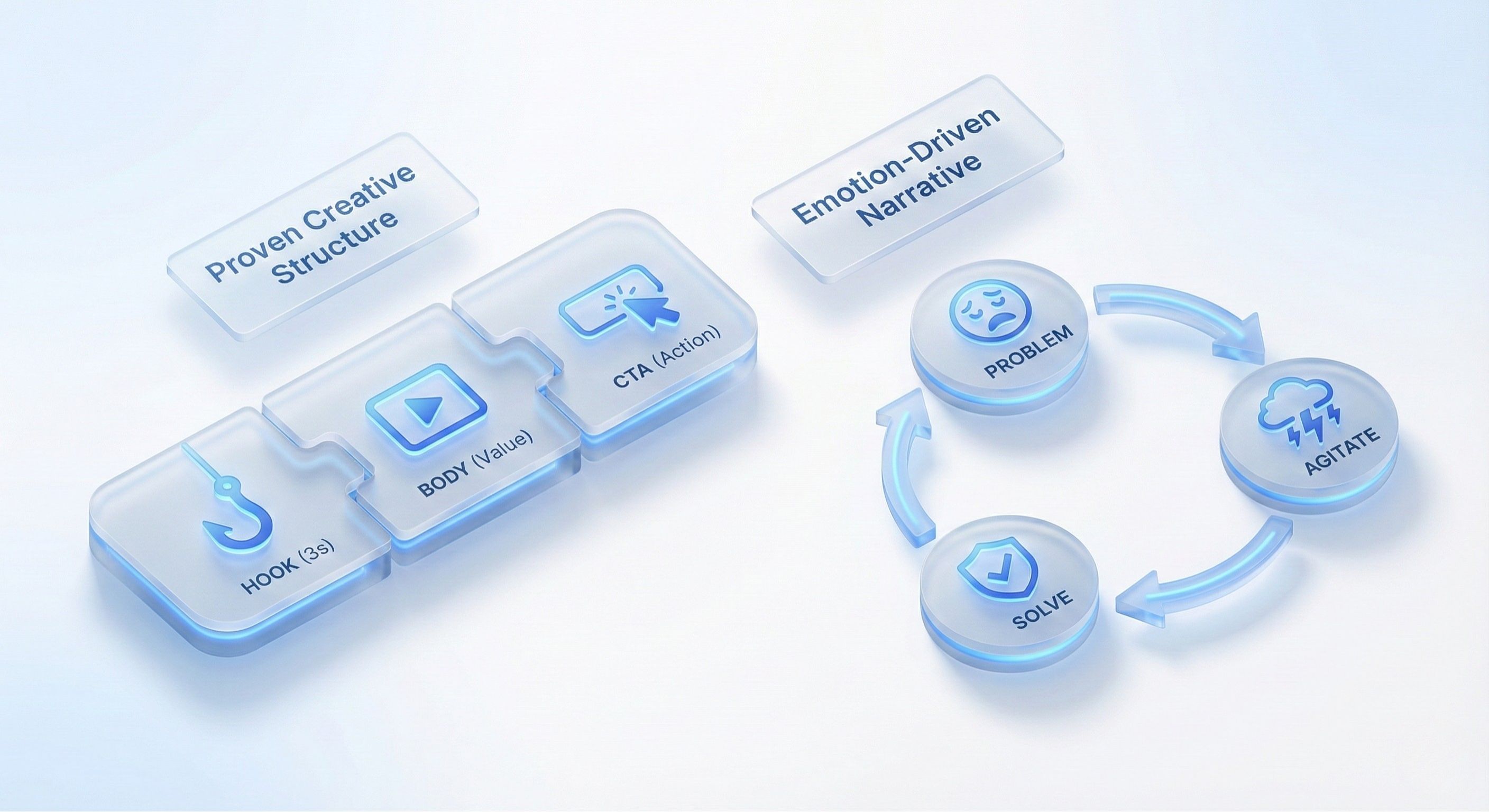
The best way to do this consistently is with a solid, repeatable framework. This isn't about killing your creativity; it's about giving it a structure that's proven to work. Two of the most reliable models I've seen crush it on Instagram are the classic Hook, Body, CTA and the emotionally driven Problem-Agitate-Solve (PAS) framework.
The Hook Body CTA Framework
This is the bread and butter of almost every successful video ad out there. It's straightforward, powerful, and built for the goldfish-like attention spans we're all dealing with on social media.
The Hook is everything that happens in the first 1-3 seconds. Its only job is to slam the brakes on a user's scrolling thumb. This could be a bold statement, a weird visual, or a super-relatable pain point. For a fitness app, a killer hook might be, "Tired of workouts you can't stick to?" It's direct and immediately finds the right audience.
Next up is the Body. This is where you deliver on the hook's promise. You'll showcase your product, explain its value, and build desire. Following our fitness app example, you’d show quick, energetic cuts of fun workouts, snippets of user testimonials, and how simple the app is to navigate. Keep it visually interesting and fast-paced.
Finally, the Call-to-Action (CTA). Tell people exactly what you want them to do next. Don't be shy. Use big on-screen text and a clear voiceover saying something like, "Download now for a free 7-day trial!" If you want to really master this structure, we break it down even further in our ultimate guide to creating high-converting video ads using the Hook, Body, CTA model.
The Problem Agitate Solve Framework
The PAS framework is a psychological powerhouse. It's especially effective for any product that solves a nagging problem, because it connects with viewers on an emotional level before you even mention your brand.
It breaks down like this:
Problem: You start by showing a problem your target customer knows all too well. For a skincare brand, this could be someone looking in the mirror, totally frustrated by an acne breakout.
Agitate: Now, you pour a little salt in the wound. You amplify the frustration tied to that problem. Maybe you show the person feeling self-conscious or deciding not to go out with friends. You're reminding them why this problem is so infuriating.
Solve: This is where you ride in on a white horse. You introduce your product as the obvious, simple solution. Show that same person later with clear, glowing skin, smiling and feeling confident.
This simple story arc makes your brand the hero that saves the day.
The Power of Authentic UGC
One of the single most effective creative angles right now is User-Generated Content (UGC). These are videos that look and feel like a real customer made them, not a brand with a marketing budget. UGC cuts through the noise because it feels genuine and builds instant trust.
Viewers retain 95% of a message when they watch it on video, and authentic, UGC-style content makes that message feel more like a recommendation from a friend than an advertisement. This authenticity is key to cutting through the noise.
You can either get content from your actual customers or hire creators who specialize in making content that has that raw, authentic vibe. The goal is to avoid anything that looks too polished. A slightly shaky camera, natural lighting, and unscripted-sounding dialogue almost always outperform a slick, high-budget production.
Practical Tips for High-Impact Creative
No matter which framework you use, there are a few technical details that are simply non-negotiable for success.
First, design for sound-off. Most people will see your ad without hearing it first. Use big, bold captions and on-screen text to make sure your message lands, even in silence.
But that doesn't mean you should ignore audio. Reel ads with audio see 56% higher click-through rates (CTR) and 93% higher ThruPlay rates. Sound is a massive performance lever, especially when you consider the nearly 47 million people in the U.S. expected to buy something on Instagram this year.
And please, for the love of conversions, avoid generic stock footage. It’s an instant "ad alert" that gets people to scroll right past. Stick to custom-shot footage, high-quality UGC, or even AI-generated b-roll to keep your visuals looking fresh. To really make your ads pop, brushing up on the latest Instagram Reels best practices is a must.
Your Practical Guide to Ads Manager
Jumping into Meta's Ads Manager for the first time can feel like you’re trying to pilot a 747. There are buttons and dials everywhere, and it’s easy to get overwhelmed. But here’s the secret: you only need to master a few key controls to get your campaigns off the ground.
Let’s cut through the noise and get straight to what actually matters for launching Instagram video ads that perform.
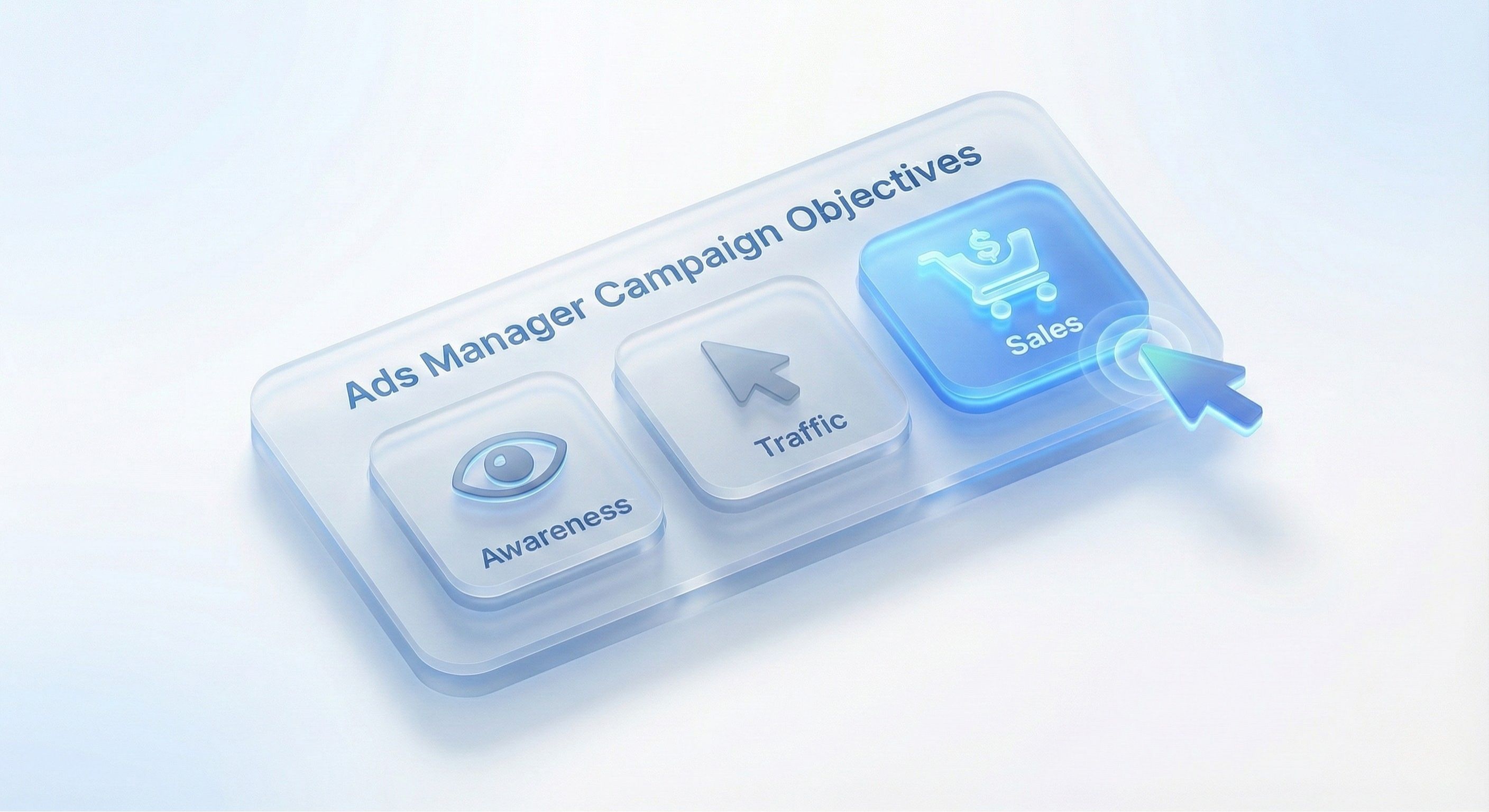
Your first move, and arguably the most important, is picking a campaign objective. This isn't just a box to tick—it’s you telling Meta’s algorithm exactly what you want to achieve. This single choice completely changes who sees your ads and how they’re delivered.
Looking to get as many eyeballs on your video as possible? That's what "Reach" or "Awareness" are for. Need to send people to your landing page? Choose "Traffic."
But for most of us running performance ads, the holy grail is the "Sales" objective (what used to be called "Conversions"). This tells the algorithm to hunt down people who are likely to actually buy something or sign up.
Selecting Your Campaign Objective
Think of the objective as the destination you punch into your GPS. If you tell Meta you want "Awareness," it will find the absolute cheapest impressions it can, showing your ad to people who will simply see it. If you select "Sales," it will actively seek out users who have a history of buying things from ads like yours, even if it costs a bit more to reach them.
A new e-commerce brand launching a product will live and die by the "Sales" objective. On the other hand, a big, established company might run a brand story video with a "Reach" objective just to stay top-of-mind.
Your campaign objective is the single most important setting at the campaign level. Picking the wrong one is like trying to drive to the beach by heading inland—you’re telling the algorithm to optimize for the completely wrong outcome, and your results will show it.
Once you’ve set your destination, it’s time to decide who’s coming along for the ride. This is where you build your audience.
Building Your Target Audience
This is where the real magic happens. Ads Manager gives you three incredibly powerful audience types to work with for your video ads.
Core Audiences: This is ground zero. You can target people based on their demographics (age, gender, location), interests (like "skincare" or "hiking"), and even behaviors (like "engaged shoppers"). The key is to be specific, but not so niche that you’re only talking to a handful of people.
Custom Audiences: These are your rockstars—your warmest leads. A Custom Audience lets you retarget people who already know you. You can build lists of website visitors, people who’ve engaged with your Instagram profile, or even users who watched a certain percentage of your last video ad. An e-commerce brand, for example, can create an audience of everyone who added a product to their cart in the last 14 days but didn’t buy, then hit them with a powerful video testimonial. Gold.
Lookalike Audiences: Once you have a killer Custom Audience (like a list of your best customers), you can ask Meta to clone them. The algorithm analyzes thousands of data points to find new people who "look like" your best customers. It's one of the most powerful ways to scale your campaigns and find new buyers.
Choosing Your Ad Placements
The final piece of the puzzle before launch is deciding where your video ad actually shows up.
Meta will push you towards "Advantage+ Placements" (their new name for Automatic Placements), which lets the algorithm decide for you. While this can work, it's often better to be selective, especially when you're starting out.
For video ads, the money is almost always in the Instagram Feed, Reels, and Stories. We already know each of these requires a slightly different creative approach. By unchecking placements like the Audience Network or Messenger, you make sure your budget is being spent on the most visually engaging, high-intent spots for video.
Mastering these settings is the foundation of a solid campaign setup. If you're ready to go deeper, our full guide on how to set up and test Meta video ads like the top 1% breaks down even more advanced strategies.
So, you’ve launched your Instagram video ad. That's the easy part. The real work—the stuff that actually makes you money instead of just burning through your budget—starts right now as the data begins to trickle in. It's easy to get distracted by vanity metrics like likes and shares, but those won't keep the lights on.
To turn your ad spend into a real growth engine, you have to get laser-focused on the key performance indicators (KPIs) that tell you if your ads are actually working.
Focusing on the Right KPIs
Your main job here is to look at your campaign performance like an accountant would. That means you need to get past the surface-level engagement and dig into the metrics that measure your financial efficiency and return.
These are the numbers I watch like a hawk on every single account:
Cost Per Action (CPA): This is your true north. It's the average price you pay for someone to take the action you care about, whether that’s a purchase, a lead sign-up, or an app install. It’s the ultimate report card on efficiency.
Return on Ad Spend (ROAS): This is the classic "money in, money out" calculation. For every dollar you put into ads, how many dollars in revenue do you get back? A ROAS of 3:1 means you're generating $3 for every $1 spent.
Click-Through Rate (CTR): This shows you the percentage of people who saw your ad and were compelled enough to click. While a high CTR doesn't guarantee sales, a really low one is a red flag that your creative just isn't stopping the scroll.
Conversion Rate (CVR): Of the people who did click, what percentage actually followed through and completed the desired action on your site? This metric tells you how effective your landing page and offer are.
Video is undeniably what drives business on Instagram. In fact, the 2025 Sprout Social Index found that 29% of Instagram users make purchases right inside the app, making it the third most popular platform for social shopping globally. And while in-feed ads still make up a huge chunk of ad revenue, Reels is catching up fast, proving just how critical video is for driving those sales. You can discover more about Instagram's commercial power on sproutsocial.com.
To help you get a clear picture of what you should be tracking, here’s a breakdown of the most important metrics.
Key Video Ad Metrics and What They Mean
This table breaks down the essential KPIs for measuring your Instagram video ad campaigns. Understanding these will help you interpret performance correctly and make smarter optimization decisions.
Metric | What It Measures | Why It Matters |
|---|---|---|
Hook Rate | The percentage of viewers who watch the first 3 seconds of your video. | This is your first impression. A low hook rate means your opener isn't strong enough to stop the scroll, and the rest of your ad doesn't stand a chance. |
Hold Rate | The percentage of viewers who watch through to a specific point (e.g., 15 seconds or 50% completion). | This tells you if the body of your ad is engaging. If people drop off early, your storytelling or value proposition is missing the mark. |
Click-Through Rate (CTR) | The percentage of impressions that resulted in a click to your landing page. | Measures how compelling your ad is. A low CTR often points to weak creative or a disconnect between your ad and your audience's interests. |
Cost Per Click (CPC) | The average amount you pay for each click on your ad. | This is a key efficiency metric. A high CPC can eat into your budget quickly, even with a good conversion rate. |
Conversion Rate (CVR) | The percentage of clicks that result in a desired action (e.g., purchase, lead). | This measures the effectiveness of your landing page and offer. A high CTR but low CVR suggests a problem post-click. |
Cost Per Action (CPA) | The total ad spend divided by the number of conversions. Your "cost per purchase." | This is one of your most important bottom-line metrics. It tells you exactly how much it costs to acquire a new customer or lead. |
Return on Ad Spend (ROAS) | The total revenue generated from your ads divided by your total ad spend. | The ultimate measure of profitability. This tells you if your campaigns are actually making you money. |
Understanding these metrics is the foundation of optimization. Once you know what each number means, you can start pulling the right levers to improve them.
The Art of A/B Testing Your Video Ads
The single fastest way to improve your KPIs is to stop guessing and start testing. A/B testing, or split testing, is where you run two or more versions of an ad against each other to see which one performs better. By changing just one thing at a time, you can figure out exactly what’s driving your results.
Don't ever test more than one variable at a time. If you test a new hook and a new CTA in the same ad, you'll have no idea which change was responsible for the lift (or dip) in performance. Be scientific about it.
Always start by testing the elements that can make the biggest difference. Here’s my typical testing hierarchy:
The Hook (First 3 Seconds): This is your biggest lever for improvement, hands down. Test two completely different opening scenes, headlines, or on-screen text overlays. Does a direct question work better than a bold, controversial statement? Does a raw, user-generated clip outperform a polished studio shot?
The Call-to-Action (CTA): Next, experiment with your offer. See how a simple "Shop Now" stacks up against something with more urgency or value, like "Get 50% Off Today Only." The way you frame your CTA can have a massive impact on your conversion rate.
Creative Concepts: Once you have a winning hook, pit two entirely different video concepts against each other. For example, you could test a fast-paced, energetic "Top 5 Reasons" listicle video against a more emotional, story-driven "Problem-Agitate-Solve" ad. This tells you what style of creative your audience connects with most.
Audience Segments: After finding a winning creative, test it against different audiences. See if a Lookalike Audience built from your best customers outperforms an audience based on broad interests. Sometimes the ad is great, but it's just being shown to the wrong people.
Tracking and Iterating for Success
You have to be disciplined about tracking your tests. I use a simple spreadsheet to log every test, noting the variable being tested, the start/end dates, the budget, and the final KPIs (CPA and ROAS are usually my primary metrics).
Once you have a statistically significant winner—for instance, Hook A consistently gets a 20% lower CPA than Hook B—it's time to act. Turn off the losing ad, and your winner becomes the new "control" ad to beat. Now, you take that new control and start the process over again, testing a new variable against it.
This constant cycle of testing, learning, and iterating is what separates amateur advertisers from the pros. It transforms your ad account from a gamble into a predictable, fine-tuned growth machine. To see exactly how to set this up in the platform, check out our deep dive on how to measure your creative tests in Facebook Ads reporting.
Advanced Tactics and Common Mistakes
Alright, you’ve got the basics down. You know how to stitch together a creative and navigate Ads Manager. This is where we separate the campaigns that just chug along from the ones that become genuine growth engines.
We're moving past just launching ads and into architecting a real customer journey. It’s about making sure your message evolves as someone gets to know your brand, taking them from a total stranger to a loyal customer.
Building Sequential Video Funnels
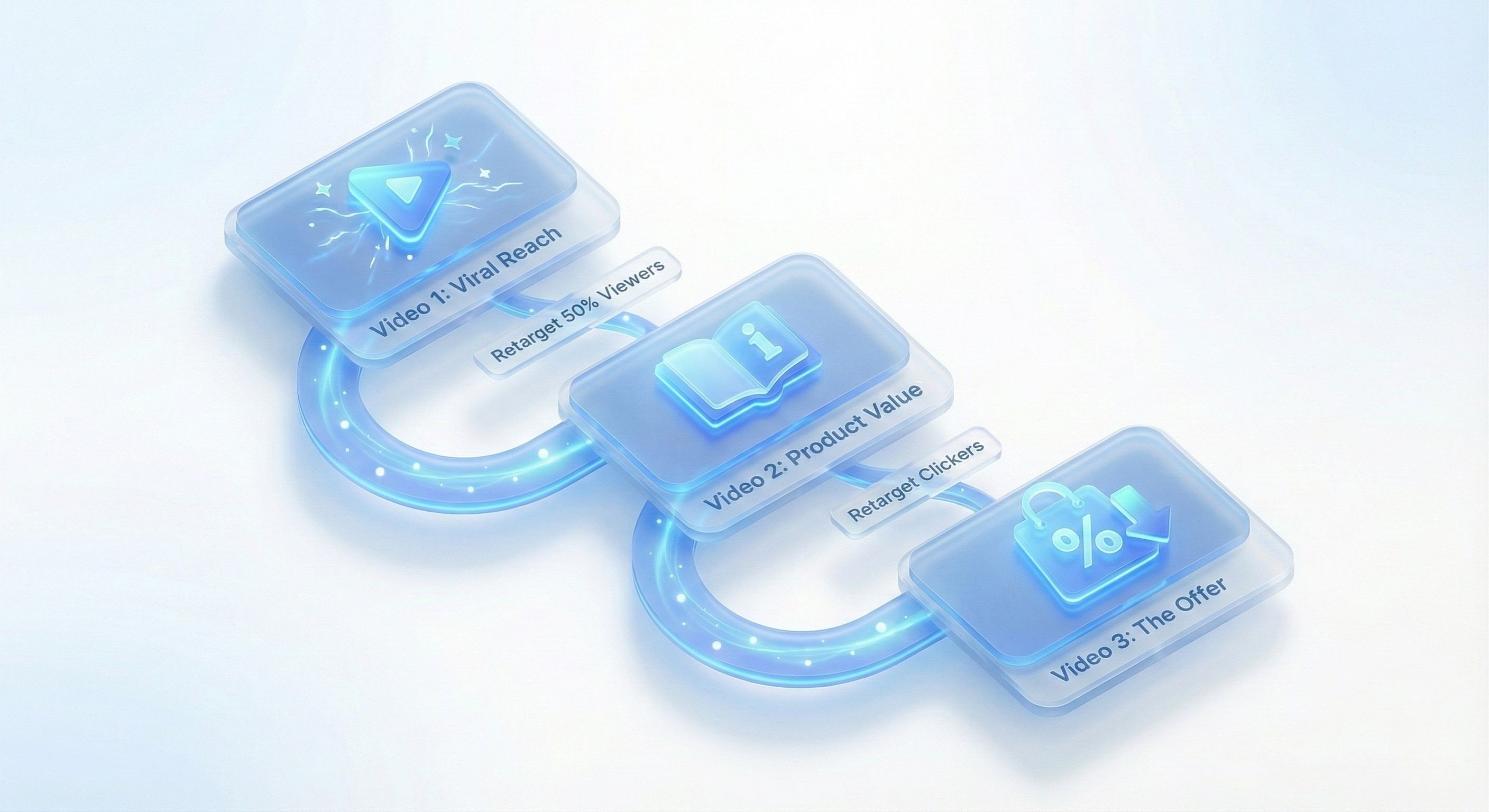
Think about it: hitting someone with the same hard-sell ad over and over is just annoying. A sequential funnel is the smarter way to play the game. You're essentially telling a story by showing a series of different videos to a user over time.
This approach builds trust and warms people up before you ever ask for the sale.
Let's use a direct-to-consumer coffee brand as an example. Their funnel could look something like this:
Video 1 (Top of Funnel): Start with a super energetic, fun Reel showing the satisfying ritual of making that perfect cup of morning coffee. The goal here is simple: Reach or Video Views. You're targeting a broad audience of coffee lovers.
Video 2 (Middle of Funnel): A week later, you retarget anyone who watched 50% or more of that first video. This ad is more educational. You could talk about what makes your beans special—maybe they're single-origin, ethically sourced, or have a unique roasting process. The CTA is soft, just a "Learn More."
Video 3 (Bottom of Funnel): Now for the knockout punch. Retarget the folks who clicked through from Video 2. Hit them with a powerful user-generated content (UGC) ad packed with customer testimonials and a killer offer like "Get 20% Off Your First Bag." The objective is crystal clear: Sales.
This layered approach just works. You’re delivering the right message to the right person at exactly the right time.
The Power of Video View Retargeting
This is one of the most powerful, and frankly underused, tactics in the playbook. You can create Custom Audiences in Meta Ads Manager based on how much of your video someone watched. That's a massive signal of interest.
Someone who watches 75% of your 30-second ad is way more invested than someone who just scrolled past and threw it a like. These are your warmest leads. You can create audiences for different view durations—3 seconds, 10 seconds, 25%, 50%, 75%, 95%—to slice and dice your audience by their level of intent.
Here's a pro tip: Always create a retargeting campaign that specifically excludes recent purchasers. It's a common and costly mistake to keep showing acquisition ads to people who've already bought from you. Don't waste that money.
Troubleshooting Common Campaign Killers
Even the best campaigns can hit a wall. Knowing how to spot and fix the usual suspects is what will protect your budget and keep performance high.
Ad Fatigue
This is the silent killer. Ad fatigue kicks in when your audience has seen your ad so many times they just tune it out. You’ll see it in the data: your Frequency score will climb while your Click-Through Rate (CTR) starts to nosedive.
The Fix: Don’t wait for performance to crash. I recommend setting up automated rules in Ads Manager to pause ads when Frequency gets too high (say, above 5 in a 7-day period for a cold audience). You should always have fresh creative waiting in the wings. Plan to rotate your video hooks and angles every 1-2 weeks to keep things from getting stale.
Plummeting Click-Through Rates
If your CTR suddenly falls off a cliff, that's a five-alarm fire. It’s a dead giveaway that your creative isn't working anymore. The hook isn’t hooking, the visual isn't stopping the scroll. This is usually the first sign of ad fatigue.
The Fix: It's almost always the first three seconds. Get back to your A/B testing framework and start testing new hooks immediately. Try a completely different opening shot, a bolder headline, or a new value prop to see what grabs their attention again.
Mysterious Ad Disapprovals
There's nothing more infuriating than having a winning ad get shut down for a policy violation you don't even understand. Most of the time, it’s an automated flag that got it wrong.
The Fix: First, breathe. Then, carefully read the exact policy they cited. Sometimes it’s an easy fix, like removing an over-the-top claim ("Guaranteed to work!") or swapping out a 'before and after' image. If you genuinely believe it's a mistake, request a manual review. Getting a human to look at it often solves the problem. But be prepared—if the appeal is denied, you'll need to build a new ad from scratch.
Got Questions? We’ve Got Answers.
Jumping into Instagram video ads can feel like there are a million little details to get right. If you’re focused on seeing a real return, you probably have a few questions. Let's clear up some of the most common ones I hear from advertisers trying to crack the code on Instagram.
What's the "Perfect" Length for an Instagram Video Ad?
This is the million-dollar question, and the honest answer is: it depends entirely on the placement. There’s no single magic number, but we have some very strong guidelines based on user behavior.
For Reels and Stories: Think fast. You’ve got 15-30 seconds, max. People are in a rapid-fire scroll-and-tap mindset. You have to land your entire message almost instantly, or you've lost them.
For In-Feed Ads: You technically have more time—up to 60 seconds. But just because you can doesn't mean you should. Unless you're telling a truly captivating story, shorter is almost always better.
The one rule that trumps all others? You absolutely must get your core message and brand front-and-center within the first 3 seconds. If you don't hook them right away, the rest of your video is just playing to an empty room. They’ve already scrolled on.
How Much Money Should I Set Aside for My First Campaign?
Good news: you don't need a massive budget to get started. In fact, throwing a bunch of money at your first campaign is a bad idea. It's much smarter to start small, learn, and then scale what works.
I always recommend starting with a manageable daily budget, somewhere in the ballpark of $10 to $20 per day. That’s enough to get you meaningful data on your creative and targeting without putting you in a tough spot financially.
Think of this first phase as pure R&D. Your goal isn't to get rich overnight; it's to find that winning mix of video, audience, and offer. Once you find a campaign that's actually making you money, that's when you can confidently start pouring more fuel on the fire.
Should My Video Ads Have Sound?
Yes, but—and this is a big but—you must design for sound-off first. An enormous number of people are scrolling through their feeds and stories with their phones on mute. If your entire message is trapped in a voiceover, you're invisible to a huge slice of your audience.
Use big, bold, easy-to-read on-screen text and captions. Make your value prop impossible to miss, even in total silence.
That said, sound is still incredibly powerful. Great music, snappy sound effects, or a compelling voiceover can create a much richer, more engaging experience for those who do have their sound on. The data is clear: ads with audio perform better on key metrics. But the "sound-off first" approach ensures you catch everyone from the get-go.
Ready to stop the endless cycle of manual video editing and start scaling your creative output? With Sovran, you can generate hundreds of high-performing video ad variations, test them faster, and find winning campaigns in a fraction of the time. Start your 7-day free trial today and see how our AI-powered platform can transform your Instagram video advertising workflow.

Manson Chen
Founder, Sovran
Related Articles
10 High-Impact Marketing Video Examples for Your 2026 Strategy
In performance marketing, scrolling is the enemy. On platforms like Meta and TikTok, you have less than three seconds to stop a potential customer from swiping...
Master AI Video Ad Production Workflow
Imagine whipping up a video ad in minutes, without sacrificing quality. That’s the promise of AI video ads—they draft scripts, select visuals, handle...
How to Scale Facebook Ads: A Guide to Profitable Growth
Trying to scale Facebook ads by just cranking up the budget is a classic rookie mistake. It's a surefire way to watch your ROAS tank. Real, sustainable scaling...