Changelog

New updates and improvements to Sovran.

AI Video Editor — edit your videos with natural language

  • AI Video Editor (Beta)Chat with the video editor to add clips, music, voiceovers, text overlays, and more using natural language. Say things like "add my cooking clips" or "put a CTA at the end" and the AI finds your assets and places them on the timeline.
  • 14 AI Editing ToolsThe AI assistant can search your assets, voiceovers, text library, and captions — then add, move, split, duplicate, reorder, or delete overlays. It can also change the canvas aspect ratio and background color.
  • Brand-Aware SuggestionsThe AI automatically pulls in your Context Vault — product specs, brand guidelines, testimonials, and ad scripts — so its suggestions stay on-brand without extra prompting.
  • Smart Suggestion ChipsContext-aware quick actions that adapt to your timeline. Empty canvas? Get starter suggestions. Already have clips? Get suggestions for music, CTAs, or format changes.

Create Clips from any video, new Asset Detail page, and upload reliability improvements

  • Create ClipsTurn any long-form video into short, ready-to-use clips. Sovran uses AI visual analysis to identify scene boundaries and suggest clip candidates automatically. Review the suggestions, pick the ones you want, and export them as new assets in one click.
  • Asset Detail PageClick any asset to open a dedicated detail page with a full-size player, transcript, clips, and an edit view — all in one place. Quickly jump between tabs to review, trim, or create clips without leaving the page.
  • Visual AnalysisAssets now get automatic visual analysis that categorizes scenes by content type — product shots, lifestyle footage, testimonials, and more. Use the results to filter and find the right footage faster.
  • Asset Origin TrackingEvery asset now shows where it came from — uploaded, AI-generated, clipped from another video, or synced from Meta. Filter your library by origin to quickly find what you need.
  • Upload ReliabilityRebuilt the media upload pipeline with better codec detection, real-time status tracking with automatic polling fallback, and improved error recovery. Uploads are now more reliable across all video formats.

Video editor undo/redo, saved text overlays, TikTok Sans font, and rotated video fixes

  • Timeline Undo & RedoThe video editor timeline now supports full undo and redo. Every edit — trimming, reordering, adding or removing layers — can be reversed or reapplied instantly.
  • Saved Text OverlaysSave your favorite text overlays for quick reuse across projects. Saved overlays are cached locally for instant access when you open the editor.
  • TikTok Sans FontTikTok Sans is now available as a font option in the video editor and text overlays. Includes all weight variants from regular to bold.
  • Rotated Video SupportVideos shot in portrait mode on phones now render correctly. Sovran detects rotation metadata and applies the right transform so your renders always look as intended.
  • Improved Media BrowsingThe audio and video library panels in the editor now support pagination and search, making it faster to find the right asset in large projects.
  • Consistent Font RenderingFont families are now normalized across the editor preview and final render output, eliminating mismatches between what you see and what you get.

Connect your Meta ad account and get weekly AI-powered creative suggestions

  • Weekly AI SuggestionsConnect your Meta ad account in the Context Vault and every Monday we'll analyze your top-performing ads, rank them by Ad Score (results relative to cost), and generate fresh creative suggestions — text hooks, visual hook directions, and voiceover scripts based on what's already working. For image ads, the AI sees your actual creative to give more specific feedback. Suggestions land in a new tab in your Messaging Library where you can accept the ones you like and save them for your next ad. You'll get an email each week when new suggestions are ready.

Team workspaces, improved signup, smarter AI, and reliability fixes

  • Team WorkspacesCollaborate with your team on video ads. Invite teammates by email, assign roles (Owner, Admin, Member), and manage permissions from the new Team page. Owners have full control, Admins can invite and remove members, and Members can view and edit all projects.
  • Claude Sonnet 4.6 for AI GenerationScript generation and text overlay variations now use Claude Sonnet 4.6, Anthropic's latest model — producing higher-quality ad copy, hooks, and CTAs.
  • Audio Rendering FixesFixed audio stuttering and sync issues in rendered video ads. The audio merge pipeline has been rebuilt to handle edge cases that previously caused glitchy playback.
  • Smoother Video UploadsUploaded videos are now automatically normalized on your device before upload, fixing issues caused by variable frame rates and non-standard encodings from screen recorders and phones.
  • Video Download ReliabilityDownloads are faster and more reliable, with proper Unicode filename support. ZIP exports now try the CDN directly before falling back to proxy.
  • Background Render SubmissionsYou can now minimize the render modal while your video ad is being submitted — no need to wait on the submission screen.
  • Free Marketing ToolsNew free Creative Testing Calculator and Creative Testing Matrix tools to help you plan and scale your ad testing strategy.

Kling 3 — a new AI video generation model to choose from

  • Kling 3 Video GenerationSelect Kling 3 alongside Veo 3.1 and Sora 2 when generating AI video clips. Kling 3 supports text-to-video and image-to-video modes with configurable duration and aspect ratio.

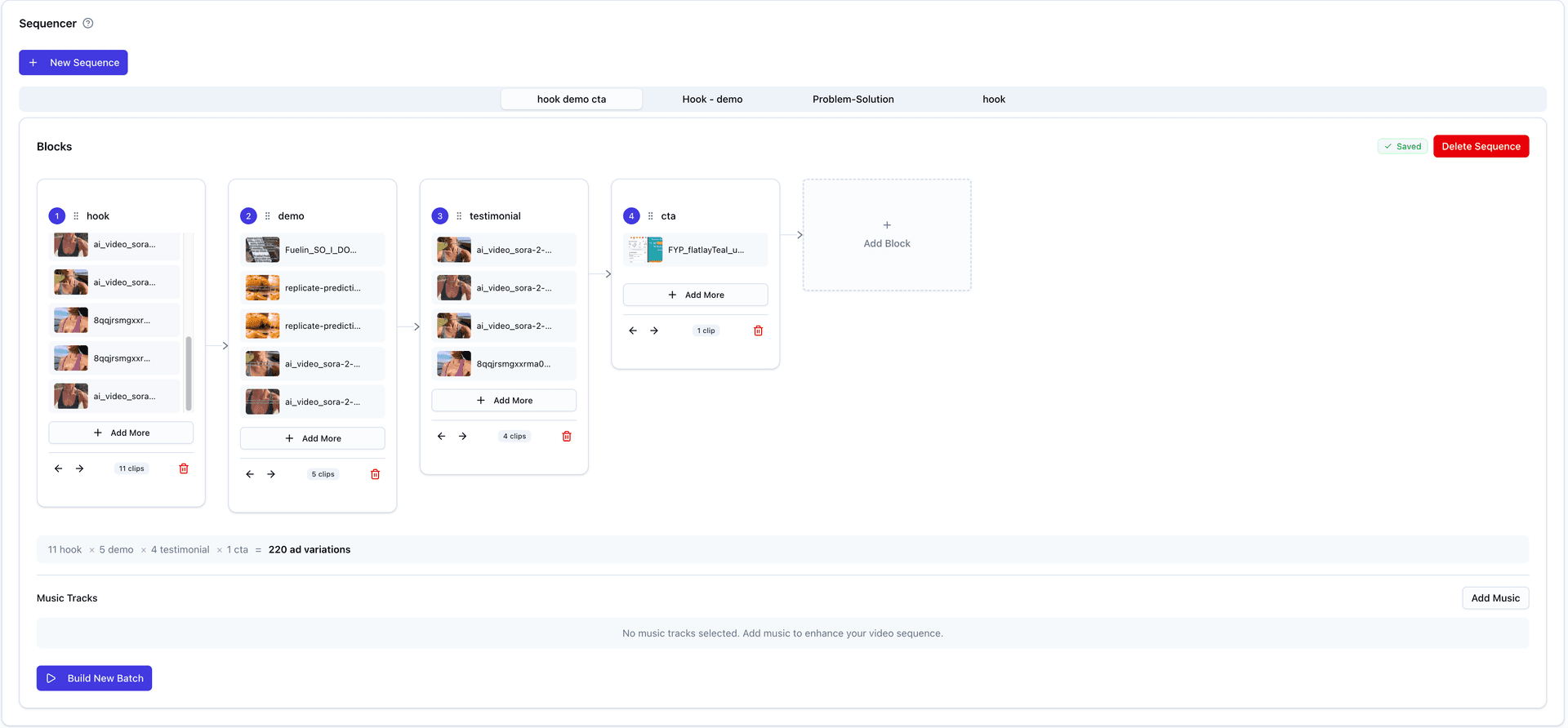
Ad Workshop — a redesigned sequencer built around how you actually think about modular ads

Ad Workshop — a redesigned sequencer built around how you actually think about modular ads
  • Timeline-Style Block LayoutBlocks now flow left-to-right like a video timeline. Each block shows clip thumbnails inline, and you can drag-and-drop to reorder.
  • Framework TemplatesStart new sequences from proven structures like Hook → Body → CTA, Classic Direct Response, or Hook Swap Test. Pick a template and your blocks are pre-populated.
  • Live Combination CounterA formula bar below the blocks shows exactly how many ad variations your sequence will produce (e.g., 3 hooks × 2 bodies × 1 CTA = 6 variations).
  • Upload & Create Directly in BlocksUpload clips or create text variations from each block's “+ Add” menu. Generated variants are automatically added to the block and tagged with its label.
  • Custom Block NamesName blocks whatever fits your creative process. Use the preset suggestions or type your own — blocks are just numbered slots until you rename them.
  • Simplified NavigationThe sidebar is now Strategy, Media Library, Ad Workshop, and Launched Ads. The Ad Workshop is accessible immediately — no need to upload assets first.

Full-featured Video Editor with Timeline, Asset Browser, and Auto-Captions

  • Video EditorA new timeline-based video editor for creating custom video content. Drag and drop clips, add text overlays, and arrange your assets on a multi-track timeline.
  • Built-in Asset BrowserBrowse your project's video library directly in the editor sidebar. Search for indexed videos using semantic search. Also includes access to Pexels stock video and image library.
  • Voiceover with Auto-CaptionsAdd generated voiceovers from your project to the timeline. Captions are automatically synced and added when you drop a voiceover onto the audio track.
  • Project Audio IntegrationAccess all your uploaded music files and generated voiceovers in the Audio tab. Stock music is also available alongside your project files.
  • Asset Pre-loadingSelect assets on the Assets page and click "Edit Video" to open the editor with those assets already on the timeline, ready to edit.
  • Cloud RenderingExport your video projects with cloud-based rendering. Progress updates in real-time and the finished video appears in your asset library.

Messaging Library with Personas, Angles, and AI Generation

  • Messaging LibraryA new project-scoped library to save and reuse text overlays and voiceover scripts. Search, filter, favorite, and organize your messaging across all your video ads.
  • Personas & AnglesDefine target audience personas with pain points, outcomes, and tone hints. Create messaging angles with do/don't say guidelines. Use them to generate targeted ad copy.
  • AI-Powered GenerationGenerate text overlays and voiceover scripts with AI using your personas, angles, and Context Vault as input. Save results directly to your library.
  • Library IntegrationsInsert text from your library directly in the Batch Text Overlay modal, Asset Editor, and Voiceover modal. Usage is tracked automatically.

Asset management and UI stability fixes

  • Asset Download FixFixed an issue where downloading assets would open in a new tab instead of triggering a download. Downloads now work reliably across all browsers.
  • Asset Thumbnail DisplayFixed a race condition that caused video thumbnails to be missing after upload. Thumbnails now appear immediately after uploading assets.
  • Sidebar Collapsed StateFixed the Active Project dropdown in the sidebar to display correctly when the sidebar is minimized.

Veo 3.1 AI Video Generation Upgrade

  • Veo 3.1 UpgradeUpgraded to Google's latest Veo 3.1 models with higher-fidelity video output and improved motion quality.
  • Context-Aware AudioVeo 3.1 generates smarter audio that better matches the visual content of your videos.
  • Last Frame InterpolationNew feature to create smooth transitions between a starting image and ending image in your AI-generated videos.

AI Voiceovers and Voiceover Stitch Videos

  • AI Voiceover GenerationGenerate professional voiceovers from text scripts using AI voices. Preview voices before generating and create multiple voiceover variations.
  • Voiceover Stitch VideosCombine AI voiceovers with your video clips to create new video assets. Select multiple videos to stitch together with your voiceover audio.
  • Auto-Captioning for VoiceoversVoiceover stitch videos automatically include captions synced to the voiceover audio, making your videos accessible and engaging.

B-Roll Remix and Text Variations

  • B-Roll RemixSelect 2-4 video clips and automatically generate all permutations with optional text overlays. Perfect for testing different hook-body-CTA orderings.
  • Text VariationsNew 3-step wizard to batch apply text overlays across multiple videos. Add multiple text variants to generate all combinations at once.

AI-powered video analysis, streamlined onboarding, and more

  • AI Video AnalysisAutomatically analyze and classify video content with AI-powered module detection for hooks, testimonials, and more.
  • Hook-Body Onboarding FlowNew streamlined onboarding that guides you through creating your first video ad with hook and body clips.
  • Asset Editing & TrimmingTrim video clips directly in the app and batch edit multiple assets with captions and overlays.
  • Caption Auto-GenerationAutomatically generate captions from video transcripts with inline editing support.
  • Meta Ads IntegrationConfigure launch defaults and publish video ads directly to Meta Ads Manager.
  • Various UI ImprovementsVarious UI improvements and bug fixes.